
Learning Cocos2d-x for WP8(2)——深入刨析Hello World
原文:Learning Cocos2d-x for WP8(2)——深入刨析Hello World
cocos2d-x框架
在兄弟篇Learning Cocos2d-x for XNA(1)——小窥cocos2d-x框架中已有详细介绍cocos2d-x框架下的基本元素。可自行参考学习,概念的东西基本一样。
HelloWorld
HelloWorld程序虽然简单,但能测试程序是否能正确的运行,同时很能体现一个框架的整体结构。
cocos2d-x中HelloWorld显示主要通过AppDelegate和HelloWorldScene。
在显示HelloWorld程序时,得将图片资源放进Assets文件夹中

AppDelegate
C++程序中最主要的是头文件(.h)和源文件(.cpp)。
AppDelegate.h
AppDelegate.h头文件中,定义类(Class)AppDelegate继承CCApplication。在AppDelegate中声明相关方法。
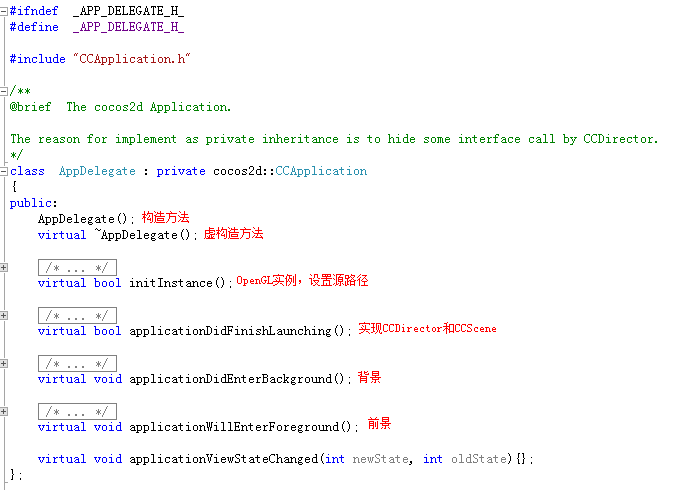
AppDelegate.cpp
AppDelegate.cpp源文件中包含AppDelegate.h头文件,在其中实现头文件中声明的方法。
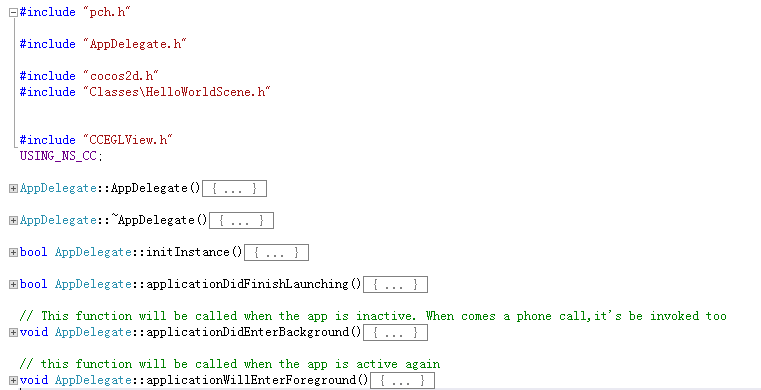
其中在方法applicationDidFinishLaunching中,我们找到了熟悉的CCDirector(导演),当中pScene为起始页面。很显然HelloWorld类,需要在AppDelegate.cpp中引用Classes文件夹中的HelloWorldScene.h头文件(fei话,呵呵)。

HelloWorldScene
scene()方法
主要负责将Layer层通过addChild到Scene层

init()方法
主要将Layer层以下层内容添加到Layer层。
 bool HelloWorld::init()

 {

     bool bRet = false;

     do

     {

         if ( !CCLayer::init() )

         {

             break;

         }

         this->setIsTouchEnabled(true);

         CCSize screenSize = CCDirector::sharedDirector()->getWinSize();

         // 1. Add a menu item with "X" image, which is clicked to quit the program.

         // Create a "close" menu item with close icon, it's an auto release object.

         CCMenuItemImage *pCloseItem = CCMenuItemImage::itemFromNormalImage(

             "CloseNormal.png",

             "CloseSelected.png",

             this,

             menu_selector(HelloWorld::menuCloseCallback));

         CC_BREAK_IF(! pCloseItem);

         // Place the menu item bottom-right conner.

         pCloseItem->setPosition(ccp(CCDirector::sharedDirector()->getWinSize().width - , ));

         // Create a menu with the "close" menu item, it's an auto release object.

         CCMenu* pMenu = CCMenu::menuWithItems(pCloseItem, NULL);

         pMenu->setPosition(CCPointZero);

         CC_BREAK_IF(! pMenu);

         // Add the menu to HelloWorld layer as a child layer.

         this->addChild(pMenu, );

         // 2. Add a label shows "Hello World".

         // Create a label and initialize with string "Hello World".

         CCLabelTTF* pLabel = CCLabelTTF::labelWithString("Hello World", "Arial", );

         CC_BREAK_IF(! pLabel);

         // Get window size and place the label upper.

         CCSize size = CCDirector::sharedDirector()->getWinSize();

         pLabel->setPosition(ccp(size.width / , size.height - ));

         // Add the label to HelloWorld layer as a child layer.

         this->addChild(pLabel, );

         // 3. Add add a splash screen, show the cocos2d splash image.

         CCSprite* pSprite = CCSprite::spriteWithFile("HelloWorld.png");

         CC_BREAK_IF(! pSprite);

         // Place the sprite on the center of the screen

         pSprite->setPosition(ccp(size.width/, size.height/));

         // Add the sprite to HelloWorld layer as a child layer.

         this->addChild(pSprite, );

         bRet = true;

     } while ();

     return bRet;

 }
HelloWorldScene.h完整代码
 #ifndef __HELLOWORLD_SCENE_H__

 #define __HELLOWORLD_SCENE_H__

 #include "cocos2d.h"

 #include "SimpleAudioEngine.h"

 class HelloWorld : public cocos2d::CCLayer

 {

 public:

     HelloWorld();

     ~HelloWorld();

     // Here's a difference. Method 'init' in cocos2d-x returns bool, instead of returning 'id' in cocos2d-iphone

     virtual bool init();

     // there's no 'id' in cpp, so we recommand to return the exactly class pointer

     static cocos2d::CCScene* scene();

     // a selector callback

     void menuCloseCallback(CCObject* pSender);

     // implement the "static node()" method manually

     LAYER_NODE_FUNC(HelloWorld);

 };

 #endif  // __HELLOWORLD_SCENE_H__
HelloWorldScene.cpp完整代码
 #include "pch.h"

 #include "HelloWorldScene.h"

 using namespace cocos2d;

 HelloWorld::~HelloWorld()

 {

     // cpp don't need to call super dealloc

     // virtual destructor will do this

 }

 HelloWorld::HelloWorld()

 {

 }

 CCScene* HelloWorld::scene()

 {

     CCScene * scene = NULL;

     do

     {

         // 'scene' is an autorelease object

         scene = CCScene::node();

         CC_BREAK_IF(! scene);

         // 'layer' is an autorelease object

         HelloWorld *layer = HelloWorld::node();

         CC_BREAK_IF(! layer);

         // add layer as a child to scene

         scene->addChild(layer);

     } while ();

     // return the scene

     return scene;

 }

 // on "init" you need to initialize your instance

 bool HelloWorld::init()

 {

     bool bRet = false;

     do

     {

         if ( !CCLayer::init() )

         {

             break;

         }

         this->setIsTouchEnabled(true);

         CCSize screenSize = CCDirector::sharedDirector()->getWinSize();

         // 1. Add a menu item with "X" image, which is clicked to quit the program.

         // Create a "close" menu item with close icon, it's an auto release object.

         CCMenuItemImage *pCloseItem = CCMenuItemImage::itemFromNormalImage(

             "CloseNormal.png",

             "CloseSelected.png",

             this,

             menu_selector(HelloWorld::menuCloseCallback));

         CC_BREAK_IF(! pCloseItem);

         // Place the menu item bottom-right conner.

         pCloseItem->setPosition(ccp(CCDirector::sharedDirector()->getWinSize().width - , ));

         // Create a menu with the "close" menu item, it's an auto release object.

         CCMenu* pMenu = CCMenu::menuWithItems(pCloseItem, NULL);

         pMenu->setPosition(CCPointZero);

         CC_BREAK_IF(! pMenu);

         // Add the menu to HelloWorld layer as a child layer.

         this->addChild(pMenu, );

         // 2. Add a label shows "Hello World".

         // Create a label and initialize with string "Hello World".

         CCLabelTTF* pLabel = CCLabelTTF::labelWithString("Hello World", "Arial", );

         CC_BREAK_IF(! pLabel);

         // Get window size and place the label upper.

         CCSize size = CCDirector::sharedDirector()->getWinSize();

         pLabel->setPosition(ccp(size.width / , size.height - ));

         // Add the label to HelloWorld layer as a child layer.

         this->addChild(pLabel, );

         // 3. Add add a splash screen, show the cocos2d splash image.

         CCSprite* pSprite = CCSprite::spriteWithFile("HelloWorld.png");

         CC_BREAK_IF(! pSprite);

         // Place the sprite on the center of the screen

         pSprite->setPosition(ccp(size.width/, size.height/));

         // Add the sprite to HelloWorld layer as a child layer.

         this->addChild(pSprite, );

         bRet = true;

     } while ();

     return bRet;

 }

 void HelloWorld::menuCloseCallback(CCObject* pSender)

 {

     // "close" menu item clicked

     CCDirector::sharedDirector()->end();

 }

版本cocos2dx-0.13.0-wp8-0.8似乎不怎么给力,Lumia820真机上测试不通过,模拟器没任何问题。不过快有新版本出来了吧,现在凑合学习学习。
著作权声明:本文由http://www.cnblogs.com/suguoqiang 原创,欢迎转载分享。请尊重作者劳动,转载时保留该声明和作者博客链接,谢谢!
Learning Cocos2d-x for WP8(2)——深入刨析Hello World的更多相关文章
- Orchard 刨析:Logging
最近事情比较多,有预研的,有目前正在研发的,都是很需要时间的工作,所以导致这周只写了两篇Orchard系列的文章,这边不能保证后期会很频繁的更新该系列,但我会写完这整个系列,包括后面会把正在研发的东西 ...
- Orchard 刨析:Caching
关于Orchard中的Caching组件已经有一些文章做了介绍,为了系列的完整性会再次对Caching组件进行一次介绍. 缓存的使用 在Orchard看到如下一段代码: 可以看到使用缓存的方法Get而 ...
- Orchard 刨析:导航篇
之前承诺过针对Orchard Framework写一个系列.本应该在昨天写下这篇导航篇,不过昨天比较累偷懒的去玩了两盘单机游戏哈哈.下面进入正题. 写在前面 面向读者 之前和本文一再以Orchard ...
- MapReduce源码刨析
MapReduce编程刨析: Map map函数是对一些独立元素组成的概念列表(如单词计数中每行数据形成的列表)的每一个元素进行指定的操作(如把每行数据拆分成不同单词,并把每个单词计数为1),用户可以 ...
- Apollo 刨析:Localization
九月 30 2014 11:27 上午 admin 0 Comments 今天我们来看一看Apollo中的Localization Component. 本地化在Apollo中的使用 像这样的 ...
- 30s源码刨析系列之函数篇
前言 由浅入深.逐个击破 30SecondsOfCode 中函数系列所有源码片段,带你领略源码之美. 本系列是对名库 30SecondsOfCode 的深入刨析. 本篇是其中的函数篇,可以在极短的时间 ...
- Golang 性能测试 (3) 跟踪刨析 golang trace
简介 对于绝大部分服务,跟踪刨析是用不到的.但是如果遇到了下面问题,可以不妨一试: 怀疑哪个协程慢了 系统调用有问题 协程调度问题 (chan 交互.互斥锁.信号量等) 怀疑是 gc (Garbage ...
- 温故知新-多线程-深入刨析volatile关键词
文章目录 摘要 volatile的作用 volatile如何解决线程可见? CPU Cache CPU Cache & 主内存 缓存一致性协议 volatile如何解决指令重排序? volat ...
- 深入刨析tomcat 之---第8篇 how tomcat works 第11章 11.9应用程序,自定义Filter,及注册
writed by 张艳涛, 标签:全网独一份, 自定义一个Filter 起因:在学习深入刨析tomcat的学习中,第11章,说了调用过滤链的原理,但没有给出实例来,自己经过分析,给出来了一个Filt ...
随机推荐
- 王立平--PopupWindow
MainActivity.java <span style="font-size:14px;">package com.main; import android.app ...
- Android 最火高速开发框架AndroidAnnotations使用具体解释
Android 最火的高速开发框架androidannotations配置具体解释文章中有eclipse配置步骤,Android 最火高速开发框架AndroidAnnotations简介文章中的简介, ...
- 从注册流程 分析如何安全退出多个Activity 多种方式(附DEMO)
前言 由于一个同学问到我如何按照一个流程走好之后回到首页,我以前看到过4个解决方案,后来发现有做个记录和总结的必要,就写了这篇博文.(之前看小强也写过一篇,这里通过自身的分析完整的总结一下以下6种 ...
- EXT2/EXT3文件系统(一)
整理自<鸟哥的Linux私房菜>,整理者:华科小涛http://www.cnblogs.com/hust-ghtao/ 1.文件系统概念引入 文件系统是一种存储和组织计算机数据的方法,它使 ...
- C#用正则表达式去掉Html中的script脚本和html标签
原文 C#用正则表达式去掉Html中的script脚本和html标签 /// <summary> /// 用正则表达式去掉Html中的script脚本和html标签 ...
- Java基础:泛型及其擦除性、不可协变性
转载请注明出处:jiq•钦's technical Blog 1泛型语法: 泛型类: class ClassName<T>{} 泛型方法:public <T> void f(T ...
- android ListView中CheckBox错位的解决
貌似已经非常晚了,可是还是想记下笔记,想让今天完满. 在ListView中加了checkBox,但是发现点击改变其选中状态的时候,发现其位置错乱.状态改变的并非你选中的,百思不得其解.后面通过上网查资 ...
- jquery easyui Accordion的使用
<html> <head> <script src="jquery-easyui/jquery.min.js"></script> ...
- Swift - 移除页面视图上的所有元素
下面代码可以遍历移除页面视图上的所有元件 1 2 3 4 5 6 //清空所有子视图 func clearViews() { for v in self.view.subviews as [U ...
- 14.5.1 Resizing the InnoDB System Tablespace
14.5.1 Resizing the InnoDB System Tablespace 本节描述如何增加或者减少InnoDB 系统表空间的大小 增加InnoDB 系统表空间的大小 最简单的方式增加I ...