
《Java知识应用》Java压缩文件和解压缩
今天通过Java实现一下:文件的压缩和解压缩。
1. 压缩
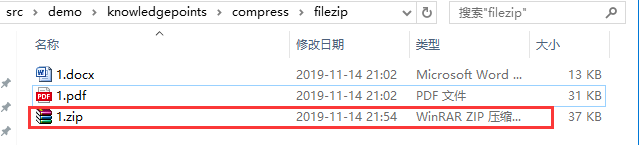
准备文件:

准备代码:(压缩)
import java.io.BufferedInputStream;

import java.io.BufferedOutputStream;

import java.io.ByteArrayInputStream;

import java.io.ByteArrayOutputStream;

import java.io.File;

import java.io.FileInputStream;

import java.io.FileOutputStream;

import java.io.IOException;

import java.io.OutputStream;

import java.util.ArrayList;

import java.util.List;

import java.util.zip.ZipEntry;

import java.util.zip.ZipOutputStream;

public class CompressUtils {

    public static void main(String[] args) {

        //需要压缩的文件路径

        List<String> filePathList = new ArrayList<>();

        filePathList.add("src\\demo\\knowledgepoints\\compress\\filezip\\1.docx");

        filePathList.add("src\\demo\\knowledgepoints\\compress\\filezip\\1.pdf");

        //压缩后的文件路径

        String zipPath = "src/demo/knowledgepoints/compress/filezip/1.zip";

        toZip(filePathList,zipPath);

    }

    /**

     * 压缩文件

     * @param filePathList

     * @param zipPath

     * @throws RuntimeException

     */

    public static void toZip(List<String> filePathList,String zipPath) throws RuntimeException {

        List<File> adjustFiles = new ArrayList<>();

        for (String filePath :filePathList){

            adjustFiles.add(new File(filePath));

        }

        ByteArrayOutputStream fos2 = new ByteArrayOutputStream();

        CompressUtils.toZip(adjustFiles, fos2);

        BufferedOutputStream output = null;

        BufferedInputStream bis = null;

        FileOutputStream fos = null;

        byte[] fileBytes = fos2.toByteArray();

        try {

            ByteArrayInputStream byteInputStream = new ByteArrayInputStream(fileBytes);

            bis = new BufferedInputStream(byteInputStream);

            File file = new File(zipPath);

            file.createNewFile();

            fos = new FileOutputStream(file);

            // 实例化OutputString 对象

            output = new BufferedOutputStream(fos);

            byte[] buffer = new byte[1024];

            int length = bis.read(buffer);

            while (length != -1) {

                output.write(buffer, 0, length);

                length = bis.read(buffer);

            }

            output.flush();

        } catch (Exception e) {

            e.printStackTrace();

        } finally {

            try {

                if (bis != null) {

                    bis.close();

                }

                if (fos != null) {

                    fos.close();

                }

                if (output != null) {

                    output.close();

                }

            } catch (IOException e0) {

                e0.printStackTrace();

            }

        }

    }

    /**

     * 压缩成ZIP

     * @param srcFiles 需要压缩的文件列表

     * @param out      压缩文件输出流

     * @throws RuntimeException 压缩失败会抛出运行时异常

     */

    public static void toZip(List<File> srcFiles, OutputStream out) throws RuntimeException {

        long start = System.currentTimeMillis();

        ZipOutputStream zos = null;

        try {

            zos = new ZipOutputStream(out);

            for (File srcFile : srcFiles) {

                byte[] buf = new byte[1024];

                zos.putNextEntry(new ZipEntry(srcFile.getName()));

                int len;

                FileInputStream in = new FileInputStream(srcFile);

                while ((len = in.read(buf)) != -1) {

                    zos.write(buf, 0, len);

                }

                zos.closeEntry();

                in.close();

            }

            long end = System.currentTimeMillis();

            System.out.println("压缩完成,耗时:" + (end - start) + " ms");

        } catch (Exception e) {

            throw new RuntimeException("zip error from ZipUtils", e);

        } finally {

            if (zos != null) {

                try {

                    zos.close();

                } catch (IOException e) {

                    e.printStackTrace();

                }

            }

        }

    }

}
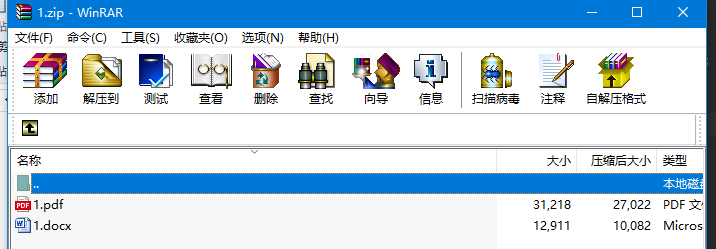
运行效果:

1. 解压缩
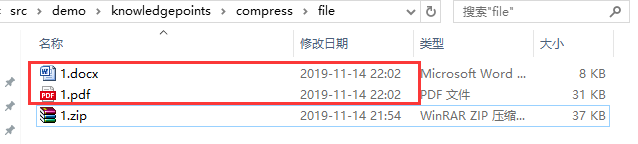
将刚刚压缩的文件放到新的路径下:

准备代码:(解压缩)
import java.io.BufferedInputStream;

import java.io.BufferedOutputStream;

import java.io.File;

import java.io.FileInputStream;

import java.io.FileOutputStream;

import java.io.IOException;

import java.util.zip.ZipEntry;

import java.util.zip.ZipInputStream;

public class CompressUtils {

    public static void main(String[] args) {

        String zipPath = "src\\demo\\knowledgepoints\\compress\\file\\1.zip";

        String filePath = "src\\demo\\knowledgepoints\\compress\\file";

        zipToFile(zipPath,filePath);

    }

    /**

     * zip解压过程

     * @param zipPath  压缩文件路径

     * @param filePath 解压后文件夹路径

     * @throws RuntimeException

     */

    public static void zipToFile(String zipPath, String filePath) throws RuntimeException {

        long startTime = System.currentTimeMillis();

        BufferedInputStream Bin = null;  //数据源缓存流

        ZipInputStream Zin = null;  //数据源

        FileOutputStream out = null;  //输出流

        BufferedOutputStream Bout = null;  //输出缓存流

        try {

            Zin = new ZipInputStream(new FileInputStream(zipPath));//输入源zip路径

            Bin = new BufferedInputStream(Zin);

            File Fout;

            ZipEntry entry;

            while ((entry = Zin.getNextEntry()) != null && !entry.isDirectory()) {

                Fout = new File(filePath, entry.getName());

                if (!Fout.exists()) {

                    new File(Fout.getParent()).mkdirs();

                }

                out = new FileOutputStream(Fout);

                Bout = new BufferedOutputStream(out);

                int bytes;

                while ((bytes = Bin.read()) != -1) {

                    Bout.write(bytes);

                }

                System.out.println(Fout + "解压成功");

            }

            long endTime = System.currentTimeMillis();

            System.out.println("耗费时间: " + (endTime - startTime) + " ms");

        } catch (Exception e) {

            // TODO Auto-generated catch block

            e.printStackTrace();

        } finally {

            try {

                if (Bin != null) {

                    Bin.close();

                }

                if (Zin != null) {

                    Zin.close();

                }

                if (Bout != null) {

                    Bout.close();

                }

                if (out != null) {

                    out.close();

                }

            } catch (IOException e) {

                e.printStackTrace();

            }

        }

    }

}
运行结果:

参考:https://www.cnblogs.com/wangxuemei/p/8360800.html
《Java知识应用》Java压缩文件和解压缩的更多相关文章
- Java学习笔记之I/O流(读取压缩文件以及压缩文件)
1.读取压缩文件:ZipInputStream 借助ZipFile类的getInputStream方法得到压缩文件的指定项的内容,然后传递给InputStreamReader类的构造方法,返回给Buf ...
- C#压缩文件,C#压缩文件夹,C#获取文件
using System; using System.Data; using System.Configuration; using System.Collections.Generic; using ...
- cocos2d-x教程3:用php或DOS批处理命令来转换文件和解压缩zip
在cocos2d-x使用中,须要不停的转换文件和压缩或解压文件.假设全人工来做,太麻烦了,且easy出错. 我如今把一些用的到批处理贴出来,供大家使用 自己主动把dat文件按数字排序重命名gz.DOS ...
- linux 压缩文件 及压缩选项详解
本文介绍linux下的压缩程序tar.gzip.gunzip.bzip2.bunzip2.compress.uncompress. zip. unzip.rar.unrar等程式,以及如何使用它们对. ...
- linux下tar gz bz2 tgz z等众多压缩文件的压缩与解压方法
Linux下最常用的打包程序就是tar了,使用tar程序打出来的包我们常称为tar包,tar包文件的命令通常都是以.tar结尾的.生成tar包后,就可以用其它的程序来进 行压缩了,所以首先就来讲讲ta ...
- C#压缩文件 不压缩路径
我想把 E:\\AA\BB\11.txt 压缩后存入 E:\\AA1\BB1\11.rar 但是当我解压( E:\\AA1\BB1\11.rar)的时候,发现:11.txt 不是在 E:\\AA1\B ...
- python 压缩文件(解决压缩路径问题)
#压缩文件 def Zip_files(): datapath = filepath # 证据路径 file_newname = datapath + '.zip' # 压缩文件的名字 log.deb ...
- 使用zip.js压缩文件和解压文件
zip.js官方网站为:https://stuk.github.io/jszip/ 在此说明,下面的例子基本上来自官方示例,大家可以做参考,官方示例地址为:https://stuk.github.io ...
- Linux 压缩文件 和解压文件
.zip 解压:unzip FileName.zip 压缩:zip FileName.zip DirName .rar 解压:rar -x FileName.zip 压缩:rar -a FileNam ...
随机推荐
- Alibaba Nacos 学习(五):K8S Nacos搭建,使用nfs
Alibaba Nacos 学习(一):Nacos介绍与安装 Alibaba Nacos 学习(二):Spring Cloud Nacos Config Alibaba Nacos 学习(三):Spr ...
- css居中布局的几种方式
一.水平居中 若是行内元素,则直接给其父元素设置text-align: center即可 若是块级元素,则直接给该元素设置margin: 0 auto即可 若子元素包含浮动元素,则给父元素设置widt ...
- pdf 在线预览之 vue-pdf插件
vue-pdf 支持到ie11npm安装:npm install --save vue-pdf 组件template: <div class="show-pdf"> ...
- 联想Y7000,I5-9300H+Nvidia GTX 1050, kali linux的nvidia显卡驱动安装
转载自,Linux安装NVIDIA显卡驱动的正确姿势 https://blog.csdn.net/wf19930209/article/details/81877822#NVIDIA_173 ,主要用 ...
- 【2018寒假集训 Day1】【位运算】桐桐的运输方案
桐桐的运输方案(transp) [问题描述] 桐桐有 N 件货物需要运送到目的地,它们的重量和价值分别记为: 重量:W1,W2,…,Wn: 价值:V1,V2,…,Vn: 已知某辆货车的最大载货量为 X ...
- Spring Cloud - Zuul添加过滤器
Zuul作为网关的其中一个重要功能,就是实现请求的鉴权.而这个动作我们往往是通过Zuul提供的过滤器来实现的. 一.过滤器方法的作用 想要使用Zuul实现过滤功能,我们需要自定义一个类继承ZuulFi ...
- 浏览器中的 Event Loop
当我们执行 JS 代码的时候其实就是往执行栈中放入函数,那么遇到异步代码的时候该怎么办?其实当遇到异步的代码时,会被挂起并在需要执行的时候加入到 Task(有多种 Task) 队列中.一旦执行栈为空, ...
- react中简单倒计时跳转
其实在react中实现倒计时的跳转方法有很多中,其中我认为较为好用的就是通过定时器更改state中的时间值. 首先在constructor中设置10秒的时间值: constructor () { su ...
- (Nginx+PHP+MySQL)单机+Redis部署
链接:Nginx+PHP+MySQL+Redis多机部署 1.lnmp+redis工作机制 2.lnmp+redis操作步骤(lnmp为单机部署) (1)lnmp+redis实战环境 lnmp服务器: ...
- 浅谈C#中的序列化与反序列化
今天我利用这篇文章给大家讲解一下C#中的序列化与反序列化.这两个概念我们再开发中经常用到,但是我们绝大部分只用到了其中的一部分,剩下的部分很多开发人员并不清楚,甚至可以说是不知道.因此我希望通过这篇文 ...