
【Android UI】自定义带按钮的标题栏
自定义标题栏在很多的android app中很常见,可以说是一种很有用的UI设计方法。自
己也本着学习的态度,经过一番各种坑,终于实现了,现总结如下:
一:大致流程
1. 对指定的android activity设置自定义主题风格,其中自定义主题风格是关键
在android 4.0以上版本中如果使用Theme.Holo或者Theme.Light等,程序会
一直报错误-you cannot combine custom title with other feature titles
2. 在对应的Activity中加入代码
        super.onCreate(savedInstanceState);

        requestWindowFeature(Window.FEATURE_CUSTOM_TITLE);

        setContentView(R.layout.main);

        getWindow().setFeatureInt(Window.FEATURE_CUSTOM_TITLE,R.layout.mycustomtitle);
3. 在styles.xml使用如下的自定义主题。
<resources>

    <style name="WindowTitleBackground" >

    </style>

    <style name="MyTheme" parent="android:Theme">

        <item name="android:windowTitleSize">60dp</item>

        <item name="android:windowTitleBackgroundStyle">@style/WindowTitleBackground</item>

    </style>

</resources>
二:测试MainActivity源代码
MainActivity.java
package com.example.title_bar;

import android.app.Activity;

import android.content.Intent;

import android.os.Bundle;

import android.view.View;

import android.view.View.OnClickListener;

import android.view.Window;

import android.widget.Button;

public class MainActivity extends Activity {

    Button button;

    @Override

    protected void onCreate(Bundle savedInstanceState) {

        super.onCreate(savedInstanceState);

        requestWindowFeature(Window.FEATURE_CUSTOM_TITLE);

        setContentView(R.layout.activity_main);

        getWindow().setFeatureInt(Window.FEATURE_CUSTOM_TITLE,R.layout.titlebarstyle);

        button=(Button) findViewById(R.id.button1);

        button.setOnClickListener(new OnClickListener(){

            @Override

            public void onClick(View v) {

                // TODO Auto-generated method stub

                Intent intent=new Intent(MainActivity.this,test_title_bar.class);

                startActivity(intent);

            }

        });

    }

}
test_title_bar.java
package com.example.title_bar;

import android.app.Activity;

import android.os.Bundle;

import android.view.Window;

import android.widget.Button;

import android.widget.TextView;

public class test_title_bar extends Activity{

      @Override

        protected void onCreate(Bundle savedInstanceState) {

            super.onCreate(savedInstanceState);

         // 去标题

          //requestWindowFeature(Window.FEATURE_NO_TITLE);

            requestWindowFeature(Window.FEATURE_CUSTOM_TITLE);

            setContentView(R.layout.titlebartest);

            //设置标题为某个layout,标题样式

            getWindow().setFeatureInt(Window.FEATURE_CUSTOM_TITLE, R.layout.titlebarstyle);

            //设置标题栏的标题

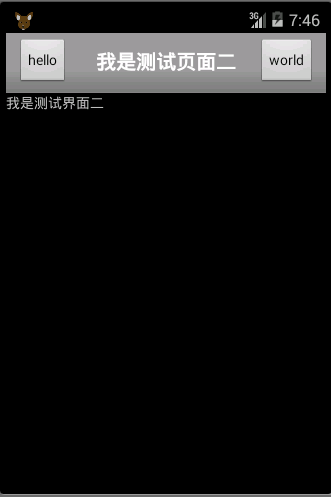
            settitle("hello","我是测试页面二","world");

        }

    private void settitle(String btn1str,String string,String btn2str) {

        // TODO Auto-generated method stub

        Button btnback=(Button) findViewById(R.id.back);

        Button btnnext=(Button) findViewById(R.id.next);

        TextView tvtitle=(TextView) findViewById(R.id.title);

        btnback.setText(btn1str);

        tvtitle.setText(string);

        btnnext.setText(btn2str);

    }

}
三:XML资源文件
titlebarstyle.xml的内容
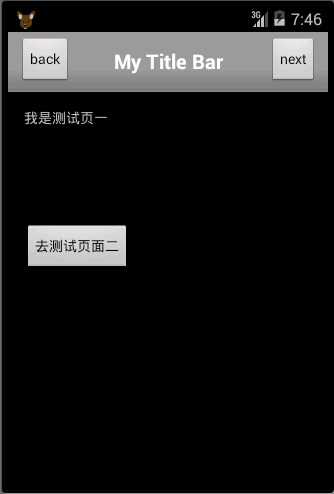
<RelativeLayout xmlns:android="http://schemas.android.com/apk/res/android"

    android:layout_width="fill_parent"

    android:layout_gravity="fill_horizontal"

    android:orientation="horizontal"

    android:layout_height="fill_parent" >

    <Button  android:id="@+id/header_left_btn"

        android:layout_width="wrap_content"

        android:layout_height="wrap_content"

        android:layout_alignParentLeft="true"

        android:layout_marginLeft="5dp"

        android:layout_centerVertical="true"

        android:text="back"

        android:textColor="#000000"/>

        <TextView android:id="@+id/header_text"

            android:layout_width="fill_parent"

            android:layout_height="fill_parent"

            android:layout_toRightOf="@+id/header_left_btn"

            android:layout_toLeftOf="@+id/header_right_btn"

            android:text="My Title Bar"

            android:textSize="20sp"

            android:textStyle="bold"

            android:textColor="#FFFFFF"

            android:gravity="center"

            android:layout_centerHorizontal="true"

            android:layout_centerVertical="true"

            android:singleLine="true" />

        <Button  android:id="@+id/header_right_btn"

            android:layout_width="wrap_content"

             android:layout_height="wrap_content"

            android:layout_alignParentRight="true"

            android:layout_marginRight="5dp"

             android:layout_centerVertical="true"

             android:text="next"

             android:textColor="#000000"/>

</RelativeLayout>
activity_main.xml
<RelativeLayout xmlns:android="http://schemas.android.com/apk/res/android"

    xmlns:tools="http://schemas.android.com/tools"

    android:layout_width="match_parent"

    android:layout_height="match_parent"

    android:paddingBottom="@dimen/activity_vertical_margin"

    android:paddingLeft="@dimen/activity_horizontal_margin"

    android:paddingRight="@dimen/activity_horizontal_margin"

    android:paddingTop="@dimen/activity_vertical_margin"

    tools:context="com.example.title_bar.MainActivity" >

    <TextView

        android:id="@+id/textView1"

        android:layout_width="wrap_content"

        android:layout_height="wrap_content"

        android:text="我是测试页一" />

    <Button

        android:id="@+id/button1"

        android:layout_width="wrap_content"

        android:layout_height="wrap_content"

        android:layout_below="@+id/textView1"

        android:layout_marginTop="97dp"

        android:text="去测试页面二" />

</RelativeLayout>
titlebartest.xml
<?xml version="1.0" encoding="utf-8"?>

<LinearLayout xmlns:android="http://schemas.android.com/apk/res/android"

    android:layout_width="match_parent"

    android:layout_height="match_parent"

    android:orientation="vertical" >

    <TextView

        android:id="@+id/textView1"

        android:layout_width="wrap_content"

        android:layout_height="wrap_content"

        android:text="我是测试界面二" />

</LinearLayout>
最后别忘记在android的manifest配置文件中加上自定义的主题
android:theme="@style/MyTheme"
界面一:
界面二:
【Android UI】自定义带按钮的标题栏的更多相关文章
- Android实现自定义带文字和图片的Button
Android实现自定义带文字和图片的Button 在Android开发中经常会需要用到带文字和图片的button,下面来讲解一下常用的实现办法. 一.用系统自带的Button实现 最简单的一种办法就 ...
- 【Android】Android实现自定义带文字和图片的Button
在Android开发中经常会需要用到带文字和图片的button,下面来讲解一下常用的实现办法. 一.用系统自带的Button实现 最简单的一种办法就是利用系统自带的Button来实现,这种方式代码量最 ...
- android 弹出带按钮的对话框
package com.example.helloworld; import android.os.Bundle;import android.app.Activity;import android. ...
- Android UI自定义Spinner下拉框(用popuwindow实现)-转
定义出第一个图片的布局和弹出框(一个listView)的布局,,这里就不在多说了~ListView需要自己定义一个MyspinnerAdapter~做好这些准备之后,就是弹出框的实现了~ prote ...
- [转]Android UI:看看Google官方自定义带旋转动画的ImageView-----RotateImageView怎么写(附 图片淡入淡出效果)
http://blog.csdn.net/yanzi1225627/article/details/22439119 众所周知,想要让ImageView旋转的话,可以用setRotation()让其围 ...
- Android UI:看看Google官方自定义带旋转动画的ImageView-----RotateImageView怎么写(附 图片淡入淡...)
众所周知,想要让ImageView旋转的话,可以用setRotation()让其围绕中心点旋转,但这个旋转是不带动画的,也就是旋转屏幕时图片噌的一下就转过去了,看不到旋转的过程,此UI体验不大好,为此 ...
- Android UI(五)云通讯录项目之联系人列表,带侧滑选择,带搜索框
作者:泥沙砖瓦浆木匠网站:http://blog.csdn.net/jeffli1993个人签名:打算起手不凡写出鸿篇巨作的人,往往坚持不了完成第一章节.交流QQ群:[编程之美 365234583]h ...
- Android UI 绘制过程浅析(五)自定义View
前言 这已经是Android UI 绘制过程浅析系列文章的第五篇了,不出意外的话也是最后一篇.再次声明一下,这一系列文章,是我在拜读了csdn大牛郭霖的博客文章<带你一步步深入了解View> ...
- Android 自定义Button按钮显示样式(正常、按下、获取焦点)
现在的用户对APP的外观看得很重要,如果APP内所有元件都用Android默认样式写,估计下面评论里就有一堆在骂UI丑的.今天学习自定义Button按钮样式.Button样式修改的是Button的背景 ...
随机推荐
- 配置QtCreator+CDB远程调试环境(用到了符号表) good
相关环境信息:开发机Win7 x64.远程机器WinXP.调试器是CDB.Qt版本5.2.1 一.部署远程机器环境 我这里用的是虚拟机(Windows XP),根据你要调试的程序选择安装不同架构的Wi ...
- GetParent、SetParent、MoveWindow - 获取、指定父窗口和移动窗口,IsChild - 判断两个窗口是不是父子关系
提示: SetParent 应该 Windows.SetParent, 因为 TForm 的父类有同名方法. //声明: {获取父窗口句柄} GetParent(hWnd: HWND): HWND; ...
- DelphiRemotePushSender
Sending iOS (and Android) remote push notifications from your Delphi service with the HTTP/2 protoco ...
- 认识Docker
以下是个人学习过程中所记,仅作为学习经历和备忘,有问题不负责,但可以交流和探讨. 1 什么是Docker? 在Docker的官网,Docker的设计师们对Docker的定义是: Docke ...
- 利用批处理自动创建schtasks系统任务
通过批处理自动创建schtasks系统任务,把下列代码保存成bat文件,放到要执行的文件的同级目录即可. @echo on set curpath=%cd%c:cd %systemroot%schta ...
- UbuntuServer添加软件源列表
要使用Ubuntu前,我们一般都要先做好工具!特别是对于安装这一块~~~~ 1.配置前,先做个配置文件的备份: $sudo cp /etc/apt/sources.list /etc/apt/sour ...
- 记一次 qW3xT.4,解决挖矿病毒。
最近感觉我的服务器特别卡,打开数据库都半天,刚开始以为网咯不好也没太在意. 利用top命令: 这时候问题出来了,最高cpu占用100%,那我用啥??? 根据进程id 一看究竟,ps -ef|grep ...
- Python基础(七) 闭包与装饰器
闭包的定义 闭包是嵌套在函数中的函数. 闭包必须是内层函数对外层函数的变量(非全局变量)的引用. 闭包格式: def func(): lst=[] def inner(a): lst.append(a ...
- Hexo+NexT(三):Next主题配置详解
阅读本篇之前,假定读者已经有了Node.js的基础,如需要补充Node.js知识的,请自行百度. Hexo是在Node.js框架下的一个项目,利用Node.js提供的强大功能,完成从Markdown到 ...
- 本地线程-ThreadLocal
线程本地存储是一个自动化机制,可以为使用相同变量的每个不同的线程都创建不同的存储.简单来说,就是对于某个变量,针对不同的线程存储不同的值. 实例: import java.util.Random; i ...