
【Android UI】自定义带按钮的标题栏
自定义标题栏在很多的android app中很常见,可以说是一种很有用的UI设计方法。自
己也本着学习的态度,经过一番各种坑,终于实现了,现总结如下:
一:大致流程
1. 对指定的android activity设置自定义主题风格,其中自定义主题风格是关键
在android 4.0以上版本中如果使用Theme.Holo或者Theme.Light等,程序会
一直报错误-you cannot combine custom title with other feature titles
2. 在对应的Activity中加入代码
        super.onCreate(savedInstanceState);

        requestWindowFeature(Window.FEATURE_CUSTOM_TITLE);

        setContentView(R.layout.main);

        getWindow().setFeatureInt(Window.FEATURE_CUSTOM_TITLE,R.layout.mycustomtitle);
3. 在styles.xml使用如下的自定义主题。
<resources>

    <style name="WindowTitleBackground" >

    </style>

    <style name="MyTheme" parent="android:Theme">

        <item name="android:windowTitleSize">60dp</item>

        <item name="android:windowTitleBackgroundStyle">@style/WindowTitleBackground</item>

    </style>

</resources>
二:测试MainActivity源代码
MainActivity.java
package com.example.title_bar;

import android.app.Activity;

import android.content.Intent;

import android.os.Bundle;

import android.view.View;

import android.view.View.OnClickListener;

import android.view.Window;

import android.widget.Button;

public class MainActivity extends Activity {

    Button button;

    @Override

    protected void onCreate(Bundle savedInstanceState) {

        super.onCreate(savedInstanceState);

        requestWindowFeature(Window.FEATURE_CUSTOM_TITLE);

        setContentView(R.layout.activity_main);

        getWindow().setFeatureInt(Window.FEATURE_CUSTOM_TITLE,R.layout.titlebarstyle);

        button=(Button) findViewById(R.id.button1);

        button.setOnClickListener(new OnClickListener(){

            @Override

            public void onClick(View v) {

                // TODO Auto-generated method stub

                Intent intent=new Intent(MainActivity.this,test_title_bar.class);

                startActivity(intent);

            }

        });

    }

}
test_title_bar.java
package com.example.title_bar;

import android.app.Activity;

import android.os.Bundle;

import android.view.Window;

import android.widget.Button;

import android.widget.TextView;

public class test_title_bar extends Activity{

      @Override

        protected void onCreate(Bundle savedInstanceState) {

            super.onCreate(savedInstanceState);

         // 去标题

          //requestWindowFeature(Window.FEATURE_NO_TITLE);

            requestWindowFeature(Window.FEATURE_CUSTOM_TITLE);

            setContentView(R.layout.titlebartest);

            //设置标题为某个layout,标题样式

            getWindow().setFeatureInt(Window.FEATURE_CUSTOM_TITLE, R.layout.titlebarstyle);

            //设置标题栏的标题

            settitle("hello","我是测试页面二","world");

        }

    private void settitle(String btn1str,String string,String btn2str) {

        // TODO Auto-generated method stub

        Button btnback=(Button) findViewById(R.id.back);

        Button btnnext=(Button) findViewById(R.id.next);

        TextView tvtitle=(TextView) findViewById(R.id.title);

        btnback.setText(btn1str);

        tvtitle.setText(string);

        btnnext.setText(btn2str);

    }

}
三:XML资源文件
titlebarstyle.xml的内容
<RelativeLayout xmlns:android="http://schemas.android.com/apk/res/android"

    android:layout_width="fill_parent"

    android:layout_gravity="fill_horizontal"

    android:orientation="horizontal"

    android:layout_height="fill_parent" >

    <Button  android:id="@+id/header_left_btn"

        android:layout_width="wrap_content"

        android:layout_height="wrap_content"

        android:layout_alignParentLeft="true"

        android:layout_marginLeft="5dp"

        android:layout_centerVertical="true"

        android:text="back"

        android:textColor="#000000"/>

        <TextView android:id="@+id/header_text"

            android:layout_width="fill_parent"

            android:layout_height="fill_parent"

            android:layout_toRightOf="@+id/header_left_btn"

            android:layout_toLeftOf="@+id/header_right_btn"

            android:text="My Title Bar"

            android:textSize="20sp"

            android:textStyle="bold"

            android:textColor="#FFFFFF"

            android:gravity="center"

            android:layout_centerHorizontal="true"

            android:layout_centerVertical="true"

            android:singleLine="true" />

        <Button  android:id="@+id/header_right_btn"

            android:layout_width="wrap_content"

             android:layout_height="wrap_content"

            android:layout_alignParentRight="true"

            android:layout_marginRight="5dp"

             android:layout_centerVertical="true"

             android:text="next"

             android:textColor="#000000"/>

</RelativeLayout>
activity_main.xml
<RelativeLayout xmlns:android="http://schemas.android.com/apk/res/android"

    xmlns:tools="http://schemas.android.com/tools"

    android:layout_width="match_parent"

    android:layout_height="match_parent"

    android:paddingBottom="@dimen/activity_vertical_margin"

    android:paddingLeft="@dimen/activity_horizontal_margin"

    android:paddingRight="@dimen/activity_horizontal_margin"

    android:paddingTop="@dimen/activity_vertical_margin"

    tools:context="com.example.title_bar.MainActivity" >

    <TextView

        android:id="@+id/textView1"

        android:layout_width="wrap_content"

        android:layout_height="wrap_content"

        android:text="我是测试页一" />

    <Button

        android:id="@+id/button1"

        android:layout_width="wrap_content"

        android:layout_height="wrap_content"

        android:layout_below="@+id/textView1"

        android:layout_marginTop="97dp"

        android:text="去测试页面二" />

</RelativeLayout>
titlebartest.xml
<?xml version="1.0" encoding="utf-8"?>

<LinearLayout xmlns:android="http://schemas.android.com/apk/res/android"

    android:layout_width="match_parent"

    android:layout_height="match_parent"

    android:orientation="vertical" >

    <TextView

        android:id="@+id/textView1"

        android:layout_width="wrap_content"

        android:layout_height="wrap_content"

        android:text="我是测试界面二" />

</LinearLayout>
最后别忘记在android的manifest配置文件中加上自定义的主题
android:theme="@style/MyTheme"
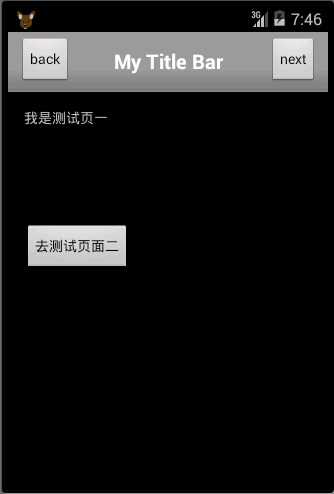
界面一:
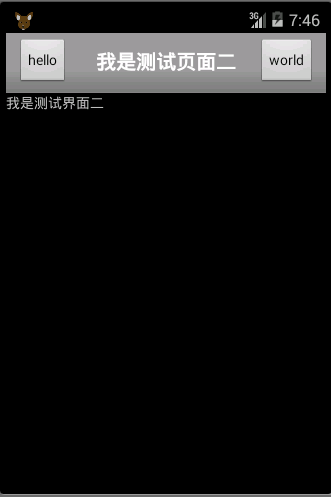
界面二:
【Android UI】自定义带按钮的标题栏的更多相关文章
- Android实现自定义带文字和图片的Button
Android实现自定义带文字和图片的Button 在Android开发中经常会需要用到带文字和图片的button,下面来讲解一下常用的实现办法. 一.用系统自带的Button实现 最简单的一种办法就 ...
- 【Android】Android实现自定义带文字和图片的Button
在Android开发中经常会需要用到带文字和图片的button,下面来讲解一下常用的实现办法. 一.用系统自带的Button实现 最简单的一种办法就是利用系统自带的Button来实现,这种方式代码量最 ...
- android 弹出带按钮的对话框
package com.example.helloworld; import android.os.Bundle;import android.app.Activity;import android. ...
- Android UI自定义Spinner下拉框(用popuwindow实现)-转
定义出第一个图片的布局和弹出框(一个listView)的布局,,这里就不在多说了~ListView需要自己定义一个MyspinnerAdapter~做好这些准备之后,就是弹出框的实现了~ prote ...
- [转]Android UI:看看Google官方自定义带旋转动画的ImageView-----RotateImageView怎么写(附 图片淡入淡出效果)
http://blog.csdn.net/yanzi1225627/article/details/22439119 众所周知,想要让ImageView旋转的话,可以用setRotation()让其围 ...
- Android UI:看看Google官方自定义带旋转动画的ImageView-----RotateImageView怎么写(附 图片淡入淡...)
众所周知,想要让ImageView旋转的话,可以用setRotation()让其围绕中心点旋转,但这个旋转是不带动画的,也就是旋转屏幕时图片噌的一下就转过去了,看不到旋转的过程,此UI体验不大好,为此 ...
- Android UI(五)云通讯录项目之联系人列表,带侧滑选择,带搜索框
作者:泥沙砖瓦浆木匠网站:http://blog.csdn.net/jeffli1993个人签名:打算起手不凡写出鸿篇巨作的人,往往坚持不了完成第一章节.交流QQ群:[编程之美 365234583]h ...
- Android UI 绘制过程浅析(五)自定义View
前言 这已经是Android UI 绘制过程浅析系列文章的第五篇了,不出意外的话也是最后一篇.再次声明一下,这一系列文章,是我在拜读了csdn大牛郭霖的博客文章<带你一步步深入了解View> ...
- Android 自定义Button按钮显示样式(正常、按下、获取焦点)
现在的用户对APP的外观看得很重要,如果APP内所有元件都用Android默认样式写,估计下面评论里就有一堆在骂UI丑的.今天学习自定义Button按钮样式.Button样式修改的是Button的背景 ...
随机推荐
- 深度网络中的Tricks
数据增强(Data augmentation) 预处理(Pre-processing) 初始化(Initializations) 训练中的Tricks 激活函数(Activation function ...
- How to trim and edit videos in Photos for OS X
Don't let the name fool you, Photos for OS X also stores all your videos. Whether you synced them fr ...
- C#调用记事本并填写内容
using System.Runtime.InteropServices; using System.Diagnostics; [DllImport("User32.DLL") ...
- java多线程之生产者-消费者
public class Product { private String lock; public Product(String lock) { this.lock = lock; } public ...
- git日常使用整理
注册使用gitlab新用户 在gitlab注册完账号后,创建项目,会有如下提示 点击add an SSHkey 现实如下: 点击generate it,按照提示计算ssh key 把结果粘贴到gitl ...
- ajax中error函数参数与返回值详解 200 300 400 500
201-206:都表示服务器成功处理了请求的状态代码,说明网页可以正常访问. 200:(成功) 服务器已成功处理了请求.通常,这表示服务器提供了请求的网页. 201:(已创建) 请求成功且服务器已创建 ...
- Spring Boot:使用Rabbit MQ消息队列
综合概述 消息队列 消息队列就是一个消息的链表,可以把消息看作一个记录,具有特定的格式以及特定的优先级.对消息队列有写权限的进程可以向消息队列中按照一定的规则添加新消息,对消息队列有读权限的进程则可以 ...
- Product Backlog:终极任务清单
健康的Product Backlog就像一个健康的人那样:整洁有序.组织合理.公开透明.一个按照优先级顺序排好的敏捷Backlog不仅能够简化发版和迭代计划,还能够对团队计划去做的所有工作进行细致规划 ...
- 为什么建议大家使用 Linux 开发
Linux 能用吗? 我身边还有些朋友对 linux 的印象似乎还停留在黑乎乎的命令行界面上.当我告诉他或者建议他使用 linux 时,会一脸惊讶的问我,那个怎么用(来开发或者日常使用)? Linux ...
- 前端摸爬滚打之路(一)之 JavaScript 基础
前言:这是我第一次在博客上记录自己的前端学习过程,以往都是在桌面右侧开个 onenote 小窗,记录自己在学习过程中获得的知识.通常都是记录的满满当当,然后心满意足的关闭窗口,但是记录不代表学会.这些 ...