
(二十五)c#Winform自定义控件-有确定取消的窗体(一)
官网
前提
入行已经7,8年了,一直想做一套漂亮点的自定义控件,于是就有了本系列文章。
GitHub:https://github.com/kwwwvagaa/NetWinformControl
码云:https://gitee.com/kwwwvagaa/net_winform_custom_control.git
如果觉得写的还行,请点个 star 支持一下吧
欢迎前来交流探讨: 企鹅群568015492 idkey=6e08741ef16fe53bf0314c1c9e336c4f626047943a8b76bac062361bab6b4f8d">
目录
https://www.cnblogs.com/bfyx/p/11364884.html
准备工作
这个窗体继承子基类窗体FrmWithTitle,如果你对FrmWithTitle还不了解,请移步 (二十四)c#Winform自定义控件-单标题窗体 查看
开始
添加一个Form,命名FrmWithOKCancel1,继承FrmWithTitle
代码不多,直接上全部代码
 // 版权所有  黄正辉  交流群:568015492   QQ:623128629

 // 文件名称:FrmWithOKCancel1.cs

 // 创建日期:2019-08-15 16:05:16

 // 功能描述:FrmWithOKCancel1

 // 项目地址:https://gitee.com/kwwwvagaa/net_winform_custom_control

 using System;

 using System.Collections.Generic;

 using System.ComponentModel;

 using System.Data;

 using System.Drawing;

 using System.Linq;

 using System.Text;

 using System.Windows.Forms;

 namespace HZH_Controls.Forms

 {

     [Designer("System.Windows.Forms.Design.ParentControlDesigner, System.Design", typeof(System.ComponentModel.Design.IDesigner))]

     public partial class FrmWithOKCancel1 : FrmWithTitle

     {

         public FrmWithOKCancel1()

         {

             InitializeComponent();

         }

         private void btnOK_BtnClick(object sender, EventArgs e)

         {

             DoEnter();

         }

         private void btnCancel_BtnClick(object sender, EventArgs e)

         {

             DoEsc();

         }

         protected override void DoEnter()

         {

             this.DialogResult = System.Windows.Forms.DialogResult.OK;

             this.Close();

         }

         private void FrmWithOKCancel1_VisibleChanged(object sender, EventArgs e)

         {

         }

     }

 }
 namespace HZH_Controls.Forms

 {

     partial class FrmWithOKCancel1

     {

         /// <summary>

         /// Required designer variable.

         /// </summary>

         private System.ComponentModel.IContainer components = null;

         /// <summary>

         /// Clean up any resources being used.

         /// </summary>

         /// <param name="disposing">true if managed resources should be disposed; otherwise, false.</param>

         protected override void Dispose(bool disposing)

         {

             if (disposing && (components != null))

             {

                 components.Dispose();

             }

             base.Dispose(disposing);

         }

         #region Windows Form Designer generated code

         /// <summary>

         /// Required method for Designer support - do not modify

         /// the contents of this method with the code editor.

         /// </summary>

         private void InitializeComponent()

         {

             System.ComponentModel.ComponentResourceManager resources = new System.ComponentModel.ComponentResourceManager(typeof(FrmWithOKCancel1));

             this.btnOK = new HZH_Controls.Controls.UCBtnExt();

             this.btnCancel = new HZH_Controls.Controls.UCBtnExt();

             this.panel3 = new System.Windows.Forms.Panel();

             this.tableLayoutPanel1 = new System.Windows.Forms.TableLayoutPanel();

             this.ucSplitLine_V1 = new HZH_Controls.Controls.UCSplitLine_V();

             this.ucSplitLine_H2 = new HZH_Controls.Controls.UCSplitLine_H();

             this.tableLayoutPanel1.SuspendLayout();

             this.SuspendLayout();

             //

             // btnOK

             //

             this.btnOK.BackColor = System.Drawing.Color.Transparent;

             this.btnOK.BtnBackColor = System.Drawing.Color.Transparent;

             this.btnOK.BtnFont = new System.Drawing.Font("微软雅黑", 12F, System.Drawing.FontStyle.Regular, System.Drawing.GraphicsUnit.Point, ((byte)()));

             this.btnOK.BtnForeColor = System.Drawing.Color.FromArgb(((int)(((byte)()))), ((int)(((byte)()))), ((int)(((byte)()))));

             this.btnOK.BtnText = "确定";

             this.btnOK.ConerRadius = ;

             this.btnOK.Cursor = System.Windows.Forms.Cursors.Hand;

             this.btnOK.Dock = System.Windows.Forms.DockStyle.Fill;

             this.btnOK.FillColor = System.Drawing.Color.White;

             this.btnOK.Font = new System.Drawing.Font("微软雅黑", 15F, System.Drawing.FontStyle.Regular, System.Drawing.GraphicsUnit.Pixel);

             this.btnOK.IsRadius = false;

             this.btnOK.IsShowRect = false;

             this.btnOK.IsShowTips = false;

             this.btnOK.Location = new System.Drawing.Point(, );

             this.btnOK.Margin = new System.Windows.Forms.Padding();

             this.btnOK.Name = "btnOK";

             this.btnOK.RectColor = System.Drawing.Color.FromArgb(((int)(((byte)()))), ((int)(((byte)()))), ((int)(((byte)()))));

             this.btnOK.RectWidth = ;

             this.btnOK.Size = new System.Drawing.Size(, );

             this.btnOK.TabIndex = ;

             this.btnOK.TabStop = false;

             this.btnOK.TipsText = "";

             this.btnOK.BtnClick += new System.EventHandler(this.btnOK_BtnClick);

             //

             // btnCancel

             //

             this.btnCancel.BackColor = System.Drawing.Color.Transparent;

             this.btnCancel.BtnBackColor = System.Drawing.Color.Transparent;

             this.btnCancel.BtnFont = new System.Drawing.Font("微软雅黑", 12F, System.Drawing.FontStyle.Regular, System.Drawing.GraphicsUnit.Point, ((byte)()));

             this.btnCancel.BtnForeColor = System.Drawing.Color.FromArgb(((int)(((byte)()))), ((int)(((byte)()))), ((int)(((byte)()))));

             this.btnCancel.BtnText = "取消";

             this.btnCancel.ConerRadius = ;

             this.btnCancel.Cursor = System.Windows.Forms.Cursors.Hand;

             this.btnCancel.Dock = System.Windows.Forms.DockStyle.Fill;

             this.btnCancel.FillColor = System.Drawing.Color.White;

             this.btnCancel.Font = new System.Drawing.Font("微软雅黑", 15F, System.Drawing.FontStyle.Regular, System.Drawing.GraphicsUnit.Pixel);

             this.btnCancel.IsRadius = false;

             this.btnCancel.IsShowRect = false;

             this.btnCancel.IsShowTips = false;

             this.btnCancel.Location = new System.Drawing.Point(, );

             this.btnCancel.Margin = new System.Windows.Forms.Padding();

             this.btnCancel.Name = "btnCancel";

             this.btnCancel.RectColor = System.Drawing.Color.FromArgb(((int)(((byte)()))), ((int)(((byte)()))), ((int)(((byte)()))));

             this.btnCancel.RectWidth = ;

             this.btnCancel.Size = new System.Drawing.Size(, );

             this.btnCancel.TabIndex = ;

             this.btnCancel.TabStop = false;

             this.btnCancel.TipsText = "";

             this.btnCancel.BtnClick += new System.EventHandler(this.btnCancel_BtnClick);

             //

             // panel3

             //

             this.panel3.BackColor = System.Drawing.Color.White;

             this.panel3.Dock = System.Windows.Forms.DockStyle.Fill;

             this.panel3.Location = new System.Drawing.Point(, );

             this.panel3.Name = "panel3";

             this.panel3.Size = new System.Drawing.Size(, );

             this.panel3.TabIndex = ;

             //

             // tableLayoutPanel1

             //

             this.tableLayoutPanel1.ColumnCount = ;

             this.tableLayoutPanel1.ColumnStyles.Add(new System.Windows.Forms.ColumnStyle(System.Windows.Forms.SizeType.Percent, 50F));

             this.tableLayoutPanel1.ColumnStyles.Add(new System.Windows.Forms.ColumnStyle(System.Windows.Forms.SizeType.Absolute, 1F));

             this.tableLayoutPanel1.ColumnStyles.Add(new System.Windows.Forms.ColumnStyle(System.Windows.Forms.SizeType.Percent, 50F));

             this.tableLayoutPanel1.Controls.Add(this.ucSplitLine_V1, , );

             this.tableLayoutPanel1.Controls.Add(this.btnOK, , );

             this.tableLayoutPanel1.Controls.Add(this.btnCancel, , );

             this.tableLayoutPanel1.Dock = System.Windows.Forms.DockStyle.Bottom;

             this.tableLayoutPanel1.Location = new System.Drawing.Point(, );

             this.tableLayoutPanel1.Name = "tableLayoutPanel1";

             this.tableLayoutPanel1.RowCount = ;

             this.tableLayoutPanel1.RowStyles.Add(new System.Windows.Forms.RowStyle(System.Windows.Forms.SizeType.Percent, 100F));

             this.tableLayoutPanel1.Size = new System.Drawing.Size(, );

             this.tableLayoutPanel1.TabIndex = ;

             //

             // ucSplitLine_V1

             //

             this.ucSplitLine_V1.BackColor = System.Drawing.Color.FromArgb(((int)(((byte)()))), ((int)(((byte)()))), ((int)(((byte)()))));

             this.ucSplitLine_V1.Dock = System.Windows.Forms.DockStyle.Fill;

             this.ucSplitLine_V1.Location = new System.Drawing.Point(, );

             this.ucSplitLine_V1.Margin = new System.Windows.Forms.Padding(, , , );

             this.ucSplitLine_V1.Name = "ucSplitLine_V1";

             this.ucSplitLine_V1.Size = new System.Drawing.Size(, );

             this.ucSplitLine_V1.TabIndex = ;

             this.ucSplitLine_V1.TabStop = false;

             //

             // ucSplitLine_H2

             //

             this.ucSplitLine_H2.BackColor = System.Drawing.Color.FromArgb(((int)(((byte)()))), ((int)(((byte)()))), ((int)(((byte)()))));

             this.ucSplitLine_H2.Dock = System.Windows.Forms.DockStyle.Bottom;

             this.ucSplitLine_H2.Location = new System.Drawing.Point(, );

             this.ucSplitLine_H2.Name = "ucSplitLine_H2";

             this.ucSplitLine_H2.Size = new System.Drawing.Size(, );

             this.ucSplitLine_H2.TabIndex = ;

             this.ucSplitLine_H2.TabStop = false;

             //

             // FrmWithOKCancel1

             //

             this.AutoScaleMode = System.Windows.Forms.AutoScaleMode.None;

             this.ClientSize = new System.Drawing.Size(, );

             this.Controls.Add(this.panel3);

             this.Controls.Add(this.ucSplitLine_H2);

             this.Controls.Add(this.tableLayoutPanel1);

             this.Icon = ((System.Drawing.Icon)(resources.GetObject("$this.Icon")));

             this.Name = "FrmWithOKCancel1";

             this.Text = "FrmWithOKCancel";

             this.VisibleChanged += new System.EventHandler(this.FrmWithOKCancel1_VisibleChanged);

             this.Controls.SetChildIndex(this.tableLayoutPanel1, );

             this.Controls.SetChildIndex(this.ucSplitLine_H2, );

             this.Controls.SetChildIndex(this.panel3, );

             this.tableLayoutPanel1.ResumeLayout(false);

             this.ResumeLayout(false);

         }

         #endregion

         private Controls.UCBtnExt btnOK;

         private Controls.UCBtnExt btnCancel;

         public System.Windows.Forms.Panel panel3;

         private System.Windows.Forms.TableLayoutPanel tableLayoutPanel1;

         private Controls.UCSplitLine_H ucSplitLine_H2;

         private Controls.UCSplitLine_V ucSplitLine_V1;

     }

 }
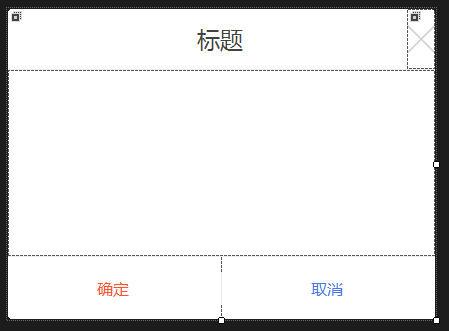
用处及效果
最后的话
如果你喜欢的话,请到 https://gitee.com/kwwwvagaa/net_winform_custom_control 点个星 星吧
(二十五)c#Winform自定义控件-有确定取消的窗体(一)的更多相关文章
- (二十六)c#Winform自定义控件-有确定取消的窗体(二)
前提 入行已经7,8年了,一直想做一套漂亮点的自定义控件,于是就有了本系列文章. 开源地址:https://gitee.com/kwwwvagaa/net_winform_custom_control ...
- (二十)c#Winform自定义控件-有后退的窗体
前提 入行已经7,8年了,一直想做一套漂亮点的自定义控件,于是就有了本系列文章. 开源地址:https://gitee.com/kwwwvagaa/net_winform_custom_control ...
- (二十七)c#Winform自定义控件-多输入窗体
前提 入行已经7,8年了,一直想做一套漂亮点的自定义控件,于是就有了本系列文章. 开源地址:https://gitee.com/kwwwvagaa/net_winform_custom_control ...
- Bootstrap <基础二十五>警告(Alerts)
警告(Alerts)以及 Bootstrap 所提供的用于警告的 class.警告(Alerts)向用户提供了一种定义消息样式的方式.它们为典型的用户操作提供了上下文信息反馈. 您可以为警告框添加一个 ...
- VMware vSphere 服务器虚拟化之二十五 桌面虚拟化之终端服务池
VMware vSphere 服务器虚拟化之二十五 桌面虚拟化之终端服务池 终端服务池是指由一台或多台微软终端服务器提供服务的桌面源组成的池.终端服务器桌面源可交付多个桌面.它具有以下特征: 1.终端 ...
- WCF技术剖析之二十五: 元数据(Metadata)架构体系全景展现[元数据描述篇]
原文:WCF技术剖析之二十五: 元数据(Metadata)架构体系全景展现[元数据描述篇] 在[WS标准篇]中我花了很大的篇幅介绍了WS-MEX以及与它相关的WS规范:WS-Policy.WS-Tra ...
- Bootstrap入门(二十五)JS插件2:过渡效果
Bootstrap入门(二十五)JS插件2:过渡效果 对于简单的过渡效果,只需将 transition.js 和其它 JS 文件一起引入即可.如果你使用的是编译(或压缩)版的bootstrap.js ...
- JAVA基础再回首(二十五)——Lock锁的使用、死锁问题、多线程生产者和消费者、线程池、匿名内部类使用多线程、定时器、面试题
JAVA基础再回首(二十五)--Lock锁的使用.死锁问题.多线程生产者和消费者.线程池.匿名内部类使用多线程.定时器.面试题 版权声明:转载必须注明本文转自程序猿杜鹏程的博客:http://blog ...
- JAVA之旅(二十五)——文件复制,字符流的缓冲区,BufferedWriter,BufferedReader,通过缓冲区复制文件,readLine工作原理,自定义readLine
JAVA之旅(二十五)--文件复制,字符流的缓冲区,BufferedWriter,BufferedReader,通过缓冲区复制文件,readLine工作原理,自定义readLine 我们继续IO上个篇 ...
随机推荐
- java接口自动化(一) - 接口自动化测试整体认知 - 开山篇(超详解)
简介 了解什么是接口和为什么要做接口测试.并且知道接口自动化测试应该学习哪些技术以及接口自动化测试的落地过程.其实这些基本上在python接口自动化的文章中已经详细的介绍过了,不清楚的可以过去看看.了 ...
- Python选修第00次作业:缘分
先说一说我与Python的缘分吧.初识Python,是在高三上学期.从那位同学那里经过时,看到了他桌子上的一本书——<和小卡特一起学Python>,封面就很吸引人,便买来一本,累了不想做题 ...
- SSH框架,xml配置实现动态定时器
<?xml version="1.0" encoding="UTF-8"?> <!DOCTYPE beans PUBLIC "-// ...
- 自定义new和delete
#include "stdafx.h" #include <stdlib.h> #include <malloc.h> #include <iostr ...
- Ubuntu搭建hugo博客
自己搭建了一个博客用hugo,后因自己搭建的博客上传文章,搞一些东西不方便,就创建了现在这个博客,不过还是把如何搭建hugo的过程记录以下. Ubuntu下的操作 1. 下载Git 打开终端 Ctrl ...
- 【LightOJ - 1370】Bi-shoe and Phi-shoe
Bi-shoe and Phi-shoe Descriptions: 给出一些数字,对于每个数字找到一个欧拉函数值大于等于这个数的数,求找到的所有数的最小和. Input 输入以整数T(≤100)开始 ...
- Git学习笔记 (二)
Git学习笔记(二) 突然发现,学习新知识新技能,都得经常温故使用,这样才能日益精进.最近学习的Git是因为加入了课题组,在学习做一些后台,由于后台开发会牵扯到多人开发,所以学会Git这一代码管理工具 ...
- sql format 格式化数字(前面补0)
将一个数字例如33,或1使用t-sql语句转换成033或001 以下是详细分析: 1.select power(10,3)得到1000 2.select cast(1000+33 as varchar ...
- Java--重载与重写的区别
1.重写必须继承,重载不用.2.重写的方法名,参数数目相同,参数类型兼容,重载的方法名相同,参数列表不同.3.重写的方法修饰符大于等于父类的方法,重载和修饰符无关.4.重写不可以抛出父类没有抛出的一般 ...
- SQLyog连接数据库报错plugin caching_sha2_password could not be loaded
摘录自: https://blog.csdn.net/lihua5419/article/details/80394716