
(二十五)c#Winform自定义控件-有确定取消的窗体(一)
官网
前提
入行已经7,8年了,一直想做一套漂亮点的自定义控件,于是就有了本系列文章。
GitHub:https://github.com/kwwwvagaa/NetWinformControl
码云:https://gitee.com/kwwwvagaa/net_winform_custom_control.git
如果觉得写的还行,请点个 star 支持一下吧
欢迎前来交流探讨: 企鹅群568015492 idkey=6e08741ef16fe53bf0314c1c9e336c4f626047943a8b76bac062361bab6b4f8d">
目录
https://www.cnblogs.com/bfyx/p/11364884.html
准备工作
这个窗体继承子基类窗体FrmWithTitle,如果你对FrmWithTitle还不了解,请移步 (二十四)c#Winform自定义控件-单标题窗体 查看
开始
添加一个Form,命名FrmWithOKCancel1,继承FrmWithTitle
代码不多,直接上全部代码
 // 版权所有  黄正辉  交流群:568015492   QQ:623128629

 // 文件名称:FrmWithOKCancel1.cs

 // 创建日期:2019-08-15 16:05:16

 // 功能描述:FrmWithOKCancel1

 // 项目地址:https://gitee.com/kwwwvagaa/net_winform_custom_control

 using System;

 using System.Collections.Generic;

 using System.ComponentModel;

 using System.Data;

 using System.Drawing;

 using System.Linq;

 using System.Text;

 using System.Windows.Forms;

 namespace HZH_Controls.Forms

 {

     [Designer("System.Windows.Forms.Design.ParentControlDesigner, System.Design", typeof(System.ComponentModel.Design.IDesigner))]

     public partial class FrmWithOKCancel1 : FrmWithTitle

     {

         public FrmWithOKCancel1()

         {

             InitializeComponent();

         }

         private void btnOK_BtnClick(object sender, EventArgs e)

         {

             DoEnter();

         }

         private void btnCancel_BtnClick(object sender, EventArgs e)

         {

             DoEsc();

         }

         protected override void DoEnter()

         {

             this.DialogResult = System.Windows.Forms.DialogResult.OK;

             this.Close();

         }

         private void FrmWithOKCancel1_VisibleChanged(object sender, EventArgs e)

         {

         }

     }

 }
 namespace HZH_Controls.Forms

 {

     partial class FrmWithOKCancel1

     {

         /// <summary>

         /// Required designer variable.

         /// </summary>

         private System.ComponentModel.IContainer components = null;

         /// <summary>

         /// Clean up any resources being used.

         /// </summary>

         /// <param name="disposing">true if managed resources should be disposed; otherwise, false.</param>

         protected override void Dispose(bool disposing)

         {

             if (disposing && (components != null))

             {

                 components.Dispose();

             }

             base.Dispose(disposing);

         }

         #region Windows Form Designer generated code

         /// <summary>

         /// Required method for Designer support - do not modify

         /// the contents of this method with the code editor.

         /// </summary>

         private void InitializeComponent()

         {

             System.ComponentModel.ComponentResourceManager resources = new System.ComponentModel.ComponentResourceManager(typeof(FrmWithOKCancel1));

             this.btnOK = new HZH_Controls.Controls.UCBtnExt();

             this.btnCancel = new HZH_Controls.Controls.UCBtnExt();

             this.panel3 = new System.Windows.Forms.Panel();

             this.tableLayoutPanel1 = new System.Windows.Forms.TableLayoutPanel();

             this.ucSplitLine_V1 = new HZH_Controls.Controls.UCSplitLine_V();

             this.ucSplitLine_H2 = new HZH_Controls.Controls.UCSplitLine_H();

             this.tableLayoutPanel1.SuspendLayout();

             this.SuspendLayout();

             //

             // btnOK

             //

             this.btnOK.BackColor = System.Drawing.Color.Transparent;

             this.btnOK.BtnBackColor = System.Drawing.Color.Transparent;

             this.btnOK.BtnFont = new System.Drawing.Font("微软雅黑", 12F, System.Drawing.FontStyle.Regular, System.Drawing.GraphicsUnit.Point, ((byte)()));

             this.btnOK.BtnForeColor = System.Drawing.Color.FromArgb(((int)(((byte)()))), ((int)(((byte)()))), ((int)(((byte)()))));

             this.btnOK.BtnText = "确定";

             this.btnOK.ConerRadius = ;

             this.btnOK.Cursor = System.Windows.Forms.Cursors.Hand;

             this.btnOK.Dock = System.Windows.Forms.DockStyle.Fill;

             this.btnOK.FillColor = System.Drawing.Color.White;

             this.btnOK.Font = new System.Drawing.Font("微软雅黑", 15F, System.Drawing.FontStyle.Regular, System.Drawing.GraphicsUnit.Pixel);

             this.btnOK.IsRadius = false;

             this.btnOK.IsShowRect = false;

             this.btnOK.IsShowTips = false;

             this.btnOK.Location = new System.Drawing.Point(, );

             this.btnOK.Margin = new System.Windows.Forms.Padding();

             this.btnOK.Name = "btnOK";

             this.btnOK.RectColor = System.Drawing.Color.FromArgb(((int)(((byte)()))), ((int)(((byte)()))), ((int)(((byte)()))));

             this.btnOK.RectWidth = ;

             this.btnOK.Size = new System.Drawing.Size(, );

             this.btnOK.TabIndex = ;

             this.btnOK.TabStop = false;

             this.btnOK.TipsText = "";

             this.btnOK.BtnClick += new System.EventHandler(this.btnOK_BtnClick);

             //

             // btnCancel

             //

             this.btnCancel.BackColor = System.Drawing.Color.Transparent;

             this.btnCancel.BtnBackColor = System.Drawing.Color.Transparent;

             this.btnCancel.BtnFont = new System.Drawing.Font("微软雅黑", 12F, System.Drawing.FontStyle.Regular, System.Drawing.GraphicsUnit.Point, ((byte)()));

             this.btnCancel.BtnForeColor = System.Drawing.Color.FromArgb(((int)(((byte)()))), ((int)(((byte)()))), ((int)(((byte)()))));

             this.btnCancel.BtnText = "取消";

             this.btnCancel.ConerRadius = ;

             this.btnCancel.Cursor = System.Windows.Forms.Cursors.Hand;

             this.btnCancel.Dock = System.Windows.Forms.DockStyle.Fill;

             this.btnCancel.FillColor = System.Drawing.Color.White;

             this.btnCancel.Font = new System.Drawing.Font("微软雅黑", 15F, System.Drawing.FontStyle.Regular, System.Drawing.GraphicsUnit.Pixel);

             this.btnCancel.IsRadius = false;

             this.btnCancel.IsShowRect = false;

             this.btnCancel.IsShowTips = false;

             this.btnCancel.Location = new System.Drawing.Point(, );

             this.btnCancel.Margin = new System.Windows.Forms.Padding();

             this.btnCancel.Name = "btnCancel";

             this.btnCancel.RectColor = System.Drawing.Color.FromArgb(((int)(((byte)()))), ((int)(((byte)()))), ((int)(((byte)()))));

             this.btnCancel.RectWidth = ;

             this.btnCancel.Size = new System.Drawing.Size(, );

             this.btnCancel.TabIndex = ;

             this.btnCancel.TabStop = false;

             this.btnCancel.TipsText = "";

             this.btnCancel.BtnClick += new System.EventHandler(this.btnCancel_BtnClick);

             //

             // panel3

             //

             this.panel3.BackColor = System.Drawing.Color.White;

             this.panel3.Dock = System.Windows.Forms.DockStyle.Fill;

             this.panel3.Location = new System.Drawing.Point(, );

             this.panel3.Name = "panel3";

             this.panel3.Size = new System.Drawing.Size(, );

             this.panel3.TabIndex = ;

             //

             // tableLayoutPanel1

             //

             this.tableLayoutPanel1.ColumnCount = ;

             this.tableLayoutPanel1.ColumnStyles.Add(new System.Windows.Forms.ColumnStyle(System.Windows.Forms.SizeType.Percent, 50F));

             this.tableLayoutPanel1.ColumnStyles.Add(new System.Windows.Forms.ColumnStyle(System.Windows.Forms.SizeType.Absolute, 1F));

             this.tableLayoutPanel1.ColumnStyles.Add(new System.Windows.Forms.ColumnStyle(System.Windows.Forms.SizeType.Percent, 50F));

             this.tableLayoutPanel1.Controls.Add(this.ucSplitLine_V1, , );

             this.tableLayoutPanel1.Controls.Add(this.btnOK, , );

             this.tableLayoutPanel1.Controls.Add(this.btnCancel, , );

             this.tableLayoutPanel1.Dock = System.Windows.Forms.DockStyle.Bottom;

             this.tableLayoutPanel1.Location = new System.Drawing.Point(, );

             this.tableLayoutPanel1.Name = "tableLayoutPanel1";

             this.tableLayoutPanel1.RowCount = ;

             this.tableLayoutPanel1.RowStyles.Add(new System.Windows.Forms.RowStyle(System.Windows.Forms.SizeType.Percent, 100F));

             this.tableLayoutPanel1.Size = new System.Drawing.Size(, );

             this.tableLayoutPanel1.TabIndex = ;

             //

             // ucSplitLine_V1

             //

             this.ucSplitLine_V1.BackColor = System.Drawing.Color.FromArgb(((int)(((byte)()))), ((int)(((byte)()))), ((int)(((byte)()))));

             this.ucSplitLine_V1.Dock = System.Windows.Forms.DockStyle.Fill;

             this.ucSplitLine_V1.Location = new System.Drawing.Point(, );

             this.ucSplitLine_V1.Margin = new System.Windows.Forms.Padding(, , , );

             this.ucSplitLine_V1.Name = "ucSplitLine_V1";

             this.ucSplitLine_V1.Size = new System.Drawing.Size(, );

             this.ucSplitLine_V1.TabIndex = ;

             this.ucSplitLine_V1.TabStop = false;

             //

             // ucSplitLine_H2

             //

             this.ucSplitLine_H2.BackColor = System.Drawing.Color.FromArgb(((int)(((byte)()))), ((int)(((byte)()))), ((int)(((byte)()))));

             this.ucSplitLine_H2.Dock = System.Windows.Forms.DockStyle.Bottom;

             this.ucSplitLine_H2.Location = new System.Drawing.Point(, );

             this.ucSplitLine_H2.Name = "ucSplitLine_H2";

             this.ucSplitLine_H2.Size = new System.Drawing.Size(, );

             this.ucSplitLine_H2.TabIndex = ;

             this.ucSplitLine_H2.TabStop = false;

             //

             // FrmWithOKCancel1

             //

             this.AutoScaleMode = System.Windows.Forms.AutoScaleMode.None;

             this.ClientSize = new System.Drawing.Size(, );

             this.Controls.Add(this.panel3);

             this.Controls.Add(this.ucSplitLine_H2);

             this.Controls.Add(this.tableLayoutPanel1);

             this.Icon = ((System.Drawing.Icon)(resources.GetObject("$this.Icon")));

             this.Name = "FrmWithOKCancel1";

             this.Text = "FrmWithOKCancel";

             this.VisibleChanged += new System.EventHandler(this.FrmWithOKCancel1_VisibleChanged);

             this.Controls.SetChildIndex(this.tableLayoutPanel1, );

             this.Controls.SetChildIndex(this.ucSplitLine_H2, );

             this.Controls.SetChildIndex(this.panel3, );

             this.tableLayoutPanel1.ResumeLayout(false);

             this.ResumeLayout(false);

         }

         #endregion

         private Controls.UCBtnExt btnOK;

         private Controls.UCBtnExt btnCancel;

         public System.Windows.Forms.Panel panel3;

         private System.Windows.Forms.TableLayoutPanel tableLayoutPanel1;

         private Controls.UCSplitLine_H ucSplitLine_H2;

         private Controls.UCSplitLine_V ucSplitLine_V1;

     }

 }
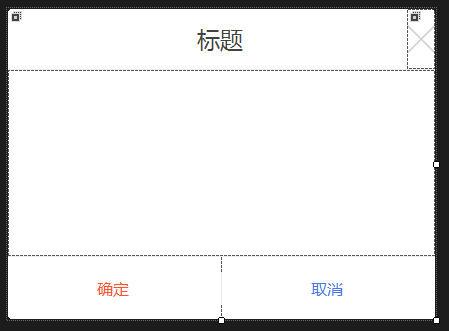
用处及效果
最后的话
如果你喜欢的话,请到 https://gitee.com/kwwwvagaa/net_winform_custom_control 点个星 星吧
(二十五)c#Winform自定义控件-有确定取消的窗体(一)的更多相关文章
- (二十六)c#Winform自定义控件-有确定取消的窗体(二)
前提 入行已经7,8年了,一直想做一套漂亮点的自定义控件,于是就有了本系列文章. 开源地址:https://gitee.com/kwwwvagaa/net_winform_custom_control ...
- (二十)c#Winform自定义控件-有后退的窗体
前提 入行已经7,8年了,一直想做一套漂亮点的自定义控件,于是就有了本系列文章. 开源地址:https://gitee.com/kwwwvagaa/net_winform_custom_control ...
- (二十七)c#Winform自定义控件-多输入窗体
前提 入行已经7,8年了,一直想做一套漂亮点的自定义控件,于是就有了本系列文章. 开源地址:https://gitee.com/kwwwvagaa/net_winform_custom_control ...
- Bootstrap <基础二十五>警告(Alerts)
警告(Alerts)以及 Bootstrap 所提供的用于警告的 class.警告(Alerts)向用户提供了一种定义消息样式的方式.它们为典型的用户操作提供了上下文信息反馈. 您可以为警告框添加一个 ...
- VMware vSphere 服务器虚拟化之二十五 桌面虚拟化之终端服务池
VMware vSphere 服务器虚拟化之二十五 桌面虚拟化之终端服务池 终端服务池是指由一台或多台微软终端服务器提供服务的桌面源组成的池.终端服务器桌面源可交付多个桌面.它具有以下特征: 1.终端 ...
- WCF技术剖析之二十五: 元数据(Metadata)架构体系全景展现[元数据描述篇]
原文:WCF技术剖析之二十五: 元数据(Metadata)架构体系全景展现[元数据描述篇] 在[WS标准篇]中我花了很大的篇幅介绍了WS-MEX以及与它相关的WS规范:WS-Policy.WS-Tra ...
- Bootstrap入门(二十五)JS插件2:过渡效果
Bootstrap入门(二十五)JS插件2:过渡效果 对于简单的过渡效果,只需将 transition.js 和其它 JS 文件一起引入即可.如果你使用的是编译(或压缩)版的bootstrap.js ...
- JAVA基础再回首(二十五)——Lock锁的使用、死锁问题、多线程生产者和消费者、线程池、匿名内部类使用多线程、定时器、面试题
JAVA基础再回首(二十五)--Lock锁的使用.死锁问题.多线程生产者和消费者.线程池.匿名内部类使用多线程.定时器.面试题 版权声明:转载必须注明本文转自程序猿杜鹏程的博客:http://blog ...
- JAVA之旅(二十五)——文件复制,字符流的缓冲区,BufferedWriter,BufferedReader,通过缓冲区复制文件,readLine工作原理,自定义readLine
JAVA之旅(二十五)--文件复制,字符流的缓冲区,BufferedWriter,BufferedReader,通过缓冲区复制文件,readLine工作原理,自定义readLine 我们继续IO上个篇 ...
随机推荐
- 哈工大计算机网络Week0-概述
目录 L01什么是计算机网络 计算机网络 Internet L02什么是网络协议? 定义 内容 三要素 L03计算机网络结构 网络边缘 接入网络 数字用户线路DSL 电缆网络 无线接入网络 网络核心( ...
- TensorFlow高效读取数据的方法——TFRecord的学习
关于TensorFlow读取数据,官网给出了三种方法: 供给数据(Feeding):在TensorFlow程序运行的每一步,让python代码来供给数据. 从文件读取数据:在TensorFlow图的起 ...
- blog更新
特别感谢: yu__xuan (啊这位着重感谢,多次帮助,于是帮他宣传一下https://www.cnblogs.com/poi-bolg-poi/) widerg 为两位大佬撒花~
- Git的使用和配置小白必看都是干货,为您解惑
Git安装 首先下载git这个软件,然后打开码云新建仓库 在本地选择一个路径作为本地仓库 点新建仓库然后输入邮箱和密码,然后进行配置 在要作为本地仓库的地方新建一个文件夹,保存后关闭,在文件夹空白处鼠 ...
- [leetcode] 929. Unique Email Addresses (easy)
统计有几种邮箱地址. 邮箱名类型:local@domain 规则:1. local中出现"."的,忽略. a.bc=abc 2. local中出现"+"的,+以 ...
- 关于C#多线程、易失域、锁的分享
一.多线程 windows系统是一个多线程的操作系统.一个程序至少有一个进程,一个进程至少有一个线程.进程是线程的容器,一个C#客户端程序开始于一个单独的线程,CLR(公共语言运行库)为该进程创建了一 ...
- ssh,公钥和私钥,远程复制
ssh,公钥和私钥,远程复制 1.openssh 是一个提供远程访问控制的软件 2.ssh 远程主机用户@远程主机ip地址 ssh root@172.25.254.1 The authenticity ...
- IIS短文件名漏洞复现
IIS短文件名漏洞复现 一.漏洞描述 此漏洞实际是由HTTP请求中旧DOS 8.3名称约定(SFN)的代字符(~)波浪号引起的.它允许远程攻击者在Web根目录下公开文件和文件夹名称(不应该可被访问). ...
- java性能优化--字符串优化处理
String对象 String对象是java中重要的数据类型,在大部分情况下我们都会用到String对象.其实在Java语言中,其设计者也对String做了大量的优化工作,这些也是String对象的特 ...
- 【Android】Mac Android adb 配置
打开终端,输入下面命令: touch .bash_profile open -e .bash_profile 即新建 “.bash_profile” 文件,并会弹出 “.bash_profile” 文 ...