
SSM整合环境搭建demo
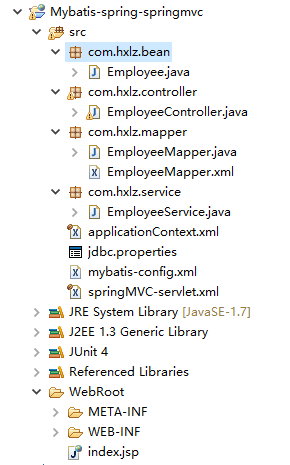
1.项目目录结构
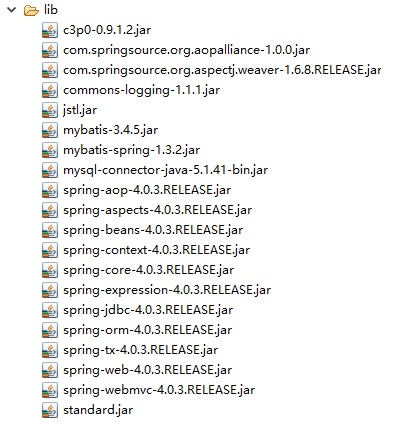
2.项目中用的jar包
3.web.xml(其中主要配置spring与springmvc)
 <?xml version="1.0" encoding="UTF-8"?>

 <!DOCTYPE web-app PUBLIC "-//Sun Microsystems, Inc.//DTD Web Application 2.3//EN" "http://java.sun.com/dtd/web-app_2_3.dtd">

 <web-app id="WebApp_ID">

     <!-- spring配置 -->

     <context-param>

         <param-name>contextConfigLocation</param-name>

         <param-value>classpath:applicationContext.xml</param-value>

     </context-param>

     <listener>

         <listener-class>org.springframework.web.context.ContextLoaderListener</listener-class>

     </listener>

     <!-- springmvc配置 -->

     <servlet>

         <servlet-name>springmvc</servlet-name>

         <servlet-class>org.springframework.web.servlet.DispatcherServlet</servlet-class>

         <init-param>

             <param-name>contextConfigLocation</param-name>

             <param-value>classpath:springMVC-servlet.xml</param-value>

         </init-param>

         <load-on-startup>1</load-on-startup>

     </servlet>

     <servlet-mapping>

         <servlet-name>springmvc</servlet-name>

         <url-pattern>/</url-pattern>

     </servlet-mapping>

 </web-app>
4.spring配置文件applicationContext.xml
 <?xml version="1.0" encoding="UTF-8"?>

 <beans xmlns="http://www.springframework.org/schema/beans"

     xmlns:xsi="http://www.w3.org/2001/XMLSchema-instance"

     xmlns:context="http://www.springframework.org/schema/context"

     xmlns:tx="http://www.springframework.org/schema/tx"

     xmlns:aop="http://www.springframework.org/schema/aop"

     xmlns:mybatis-spring="http://mybatis.org/schema/mybatis-spring"

     xsi:schemaLocation="http://www.springframework.org/schema/aop http://www.springframework.org/schema/aop/spring-aop-4.0.xsd

         http://www.springframework.org/schema/beans http://www.springframework.org/schema/beans/spring-beans.xsd

         http://mybatis.org/schema/mybatis-spring http://mybatis.org/schema/mybatis-spring-1.2.xsd

         http://www.springframework.org/schema/tx http://www.springframework.org/schema/tx/spring-tx-4.0.xsd

         http://www.springframework.org/schema/context http://www.springframework.org/schema/context/spring-context-4.0.xsd">

     <context:component-scan base-package="com.hxlz">

         <context:exclude-filter type="annotation" expression="org.springframework.stereotype.Controller"/>

     </context:component-scan>

     <context:property-placeholder location="classpath:jdbc.properties" />

     <bean id="dataSource" class="com.mchange.v2.c3p0.ComboPooledDataSource">

         <property name="user" value="${jdbc.user}"></property>

         <property name="password" value="${jdbc.password}"></property>

         <property name="jdbcUrl" value="${jdbc.jdbcUrl}"></property>

         <property name="driverClass" value="${jdbc.driverClass}"></property>

         <property name="initialPoolSize" value="${jdbc.initPoolSize}"></property>

         <property name="maxPoolSize" value="${jdbc.maxPoolSize}"></property>

     </bean>

     <bean id="transactionManager"

         class="org.springframework.jdbc.datasource.DataSourceTransactionManager">

         <property name="dataSource" ref="dataSource"></property>

     </bean>

     <tx:annotation-driven transaction-manager="transactionManager" />

     <bean id="sqlSessionFactory" class="org.mybatis.spring.SqlSessionFactoryBean">

         <property name="dataSource" ref="dataSource" />

         <!-- 指定mybatis配置文件 -->

         <property name="configLocation" value="classpath:mybatis-config.xml"></property>

     </bean>

     <mybatis-spring:scan base-package="com.hxlz.mapper"/>

 </beans>
5.springmvc配置文件springMVC-servlet.xml
 <?xml version="1.0" encoding="UTF-8"?>

 <beans xmlns="http://www.springframework.org/schema/beans"

     xmlns:xsi="http://www.w3.org/2001/XMLSchema-instance"

     xmlns:context="http://www.springframework.org/schema/context"

     xmlns:mvc="http://www.springframework.org/schema/mvc"

     xsi:schemaLocation="http://www.springframework.org/schema/beans http://www.springframework.org/schema/beans/spring-beans.xsd

         http://www.springframework.org/schema/context http://www.springframework.org/schema/context/spring-context-4.0.xsd

         http://www.springframework.org/schema/mvc http://www.springframework.org/schema/mvc/spring-mvc-4.0.xsd">

     <!-- 只扫描标了controller注解的控制器 -->

      <context:component-scan base-package="com.hxlz" use-default-filters="false">

         <context:include-filter type="annotation" expression="org.springframework.stereotype.Controller"/>

     </context:component-scan>

     <bean class="org.springframework.web.servlet.view.InternalResourceViewResolver">

         <property name="prefix" value="/WEB-INF/view/"></property>

         <property name="suffix" value=".jsp"></property>

     </bean>

     <mvc:view-controller path="/" view-name="index"/>

     <mvc:annotation-driven></mvc:annotation-driven>

     <mvc:default-servlet-handler/>

 </beans>
6.mybatis配置文件mybatis-config.xml
 <?xml version="1.0" encoding="UTF-8"?>

 <!DOCTYPE configuration

 PUBLIC "-//mybatis.org//DTD Config 3.0//EN"

 "http://mybatis.org/dtd/mybatis-3-config.dtd">

 <configuration>

     <settings>

         <setting name="mapUnderscoreToCamelCase" value="true" />

         <setting name="lazyLoadingEnabled" value="true"/>

         <setting name="aggressiveLazyLoading" value="false"/>

     </settings>

     <typeAliases>

         <typeAlias alias="Employee" type="com.hxlz.bean.Employee" />

     </typeAliases>

 </configuration>
7.具体的业务逻辑的代码(https://github.com/MenghuiLiu/SSM/tree/master/mybatis-spring-springmvc)
内附上mybaits整合spring的官方给的demo(https://github.com/mybatis/jpetstore-6)
希望一起成长,交流,学习。
SSM整合环境搭建demo的更多相关文章
- SSM框架环境搭建
SSM基础环境搭建 创建maven工程 next,finish,等待创建完成,创建完成后,src/main下只有webapp文件夹,我们需要手动创建java和resources,鼠标右击main,ne ...
- 手把手制作一个简单的IDEA插件(环境搭建Demo篇)
新建IDEA插件File --> new --> Project--> Intellij PlatForm Plugin-->Next-->填好项目名OK 编写插件新建工 ...
- 项目SpringMVC+Spring+Mybatis 整合环境搭建(2)-> 测试Spring+Mybatis 环境
测试前期准备 第一步:创建easybuy数据库,设置utf-8格式 第二步:创建表test_tb CREATE TABLE `test_tb` ( `id` int(11) NOT NULL AUTO ...
- ssm整合:搭建环境
解决配置中文过滤器后,存入数据库时依旧乱码问题:在web.xml中修改数据库url如下: <property name="jdbcUrl" value="jdbc: ...
- 整合SSM框架环境搭建
知识要求 MySQL相关操作 Maven操作 Mybatis.Spring.SpringMVC三个框架基本操作 JavaWeb等知识 搭建环境 MySQL 8.0 Mybatis 3.5.2 使用c3 ...
- springboot整合mybatis(SSM开发环境搭建)
0.项目结构: ---------------------方法一:使用mybatis官方提供的Spring Boot整合包实现--------------------- 1.application.p ...
- 18.SSM整合_搭建开发环境
1.导入jar包 mybatis的Jar包 ehcache的Jar包 spring的 Jar包 mybatis 与 spring 整合Jar包 JSON的jar包 Jaskson的Jar包 Hiber ...
- 阶段3 3.SpringMVC·_07.SSM整合案例_02.ssm整合之搭建环境
创建数据库ssm并创建表account create database ssm; use ssm; create table account( id int primary key auto_incr ...
- JavaEE权限管理系统的搭建(三)--------springmvc和mabatis整合环境搭建
本节介绍如何环境的搭建和配置: 首先要在父工程引入jar包依赖: <!-- 通过属性定义指定jar的版本 --> <properties> <spring.version ...
随机推荐
- 15个非常棒的jQuery无限滚动插件【瀑布流效果】
现在,最热门的网站分页趋势之一是jQuery的无限滚动(也即瀑布流).如果你碰巧观察Pinterest的网站,如Facebook,Twitter和deviantART的,你会发现无限滚动的动作,当旧的 ...
- return view 详解 MVC
1.return View(); 返回值 类型:System.Web.Mvc.ViewResult将视图呈现给响应的 View() 结果. 注释 View() 类的此方法重载将返回一个具有空 View ...
- Zookeeper详解-概述(一)
ZooKeeper是一种分布式协调服务,用于管理大型主机.在分布式环境中协调和管理服务是一个复杂的过程.ZooKeeper通过其简单的架构和API解决了这个问题.ZooKeeper允许开发人员专注于核 ...
- Spring 5.x 、Spring Boot 2.x 、Spring Cloud 与常用技术栈整合
项目 GitHub 地址:https://github.com/heibaiying/spring-samples-for-all 版本说明: Spring: 5.1.3.RELEASE Spring ...
- idea创建类报错
创建类报错: 在idea.exe.vmoptions 或 idea64.exe.vmoptions中加入配置 -Djdk.util.zip.ensureTrailingSlash=false jar包 ...
- selenium3+python3自动化测试学习之模拟事件处理
自动化测试实战之ActionChains模拟用户行为 需要模拟鼠标操作才能进行的情况,比如单击.双击.点击鼠标右键.拖拽 解决:selenium提供了一个类来处理这类事件 selenium.webdr ...
- C语言版数据结构笔记
现在把以前学的数据结构知识再理一遍,上机测试.首先最重要的是链表.在我看来,链表其实就是由一个个结构体连接而成的,创建一个链表有多种方式,头插法,尾插法等,这里采用的是尾插法.表述有不对的地方,欢迎更 ...
- GRPC Oauth IdentityServer4
Server端 StartUp类: using System; using System.Collections.Generic; using System.Linq; using System.Th ...
- Web自动化测试 二 ----- HTML
HTML 一.结构 html> 与 </html> 之间的文本描述网页 <body> 与 </body> 之间的文本是可见的页面内容 <h1> 与 ...
- POJ 3318:Matrix Multiplication(随机算法)
http://poj.org/problem?id=3318 题意:问A和B两个矩阵相乘能否等于C. 思路:题目明确说出(n^3)的算法不能过,但是通过各种常数优化还是能过的. 这里的随机算法指的是随 ...