
0.9.0.RELEASE版本的spring cloud alibaba nacos实例
简而言之,nacos与eureka的不同之处有三:后台老板、部署方式、功能。nacos是阿里的,eureka是奈飞的;nacos有自己的安装包,需要独立部署,eureka仅作为一个服务组件,引入jar包即可;nacos=eureka+config,它既是注册中心,也是配置中心。
如何使用nacos?先下载安装包(下载地址https://github.com/alibaba/nacos/releases),打开下载页 -> 点击目前最新版本1.1.3跳到下载页 -> 点击压缩包 -> 下载到本地(E盘download目录)后解压 -> 通过命令行启动nacos:
C:\Users\wulf>e:

E:\>cd download\nacos\bin

E:\download\nacos\bin>startup.cmd -m standalone

         ,--.

       ,--.'|

   ,--,:  : |                                           Nacos 1.1.

,`--.'`|  ' :                       ,---.               Running in stand alone mode, All function modules

|   :  :  | |                      '   ,'\   .--.--.    Port:

:   |   \ | :  ,--.--.     ,---.  /   /   | /  /    '   Pid: 32916

|   : '  '; | /       \   /     \.   ; ,. :|  :  /`./   Console: http://10.10.100.110:8848/nacos/index.html

'   ' ;.    ;.--.  .-. | /    / ''   | |: :|  :  ;_

|   | | \   | \__\/: . ..    ' / '   | .; : \  \    `.      https://nacos.io

'   : |  ; .' ," .--.; |'   ; :__|   :    |  `----.   \

|   | '`--'  /  /  ,.  |'   | '.'|\   \  /  /  /`--'  /

'   : |     ;  :   .'   \   :    : `----'  '--'.     /

;   |.'     |  ,     .-./\   \  /            `--'---'

'---'        `--`---'     `----'

-- ::, INFO Bean 'org.springframework.security.config.annotation.configuration.ObjectPostProcessorConfiguration' of type [org.springframework.security.config.annotation.configuration.ObjectPostProcessorConfiguration$$EnhancerBySpringCGLIB$$209b3f7a] is not eligible for getting processed by all BeanPostProcessors (for example: not eligible for auto-proxying)

-- ::, INFO Bean 'objectPostProcessor' of type [org.springframework.security.config.annotation.configuration.AutowireBeanFactoryObjectPostProcessor] is not eligible for getting processed by all BeanPostProcessors (for example: not eligible for auto-proxying)

-- ::, INFO Bean 'org.springframework.security.access.expression.method.DefaultMethodSecurityExpressionHandler@6e9175d8' of type [org.springframework.security.access.expression.method.DefaultMethodSecurityExpressionHandler] is not eligible for getting processed by all BeanPostProcessors (for example: not eligible for auto-proxying)

-- ::, INFO Bean 'org.springframework.security.config.annotation.method.configuration.GlobalMethodSecurityConfiguration' of type [org.springframework.security.config.annotation.method.configuration.GlobalMethodSecurityConfiguration$$EnhancerBySpringCGLIB$$456fe22c] is not eligible for getting processed by all BeanPostProcessors (for example: not eligible for auto-proxying)

-- ::, INFO Bean 'methodSecurityMetadataSource' of type [org.springframework.security.access.method.DelegatingMethodSecurityMetadataSource] is not eligible for getting processed by all BeanPostProcessors (for example: not eligible for auto-proxying)

-- ::, INFO Tomcat initialized with port(s):  (http)

-- ::, INFO Root WebApplicationContext: initialization completed in  ms

-- ::, INFO Initializing ExecutorService 'applicationTaskExecutor'

-- ::, INFO Adding welcome page: class path resource [static/index.html]

-- ::, INFO Creating filter chain: Ant [pattern='/'], []

-- ::, INFO Creating filter chain: Ant [pattern='/**/*.css'], []

-- ::, INFO Creating filter chain: Ant [pattern='/**/*.js'], []

-- ::, INFO Creating filter chain: Ant [pattern='/**/*.html'], []

-- ::, INFO Creating filter chain: Ant [pattern='/**/*.map'], []

-- ::, INFO Creating filter chain: Ant [pattern='/**/*.svg'], []

-- ::, INFO Creating filter chain: Ant [pattern='/**/*.png'], []

-- ::, INFO Creating filter chain: Ant [pattern='/**/*.ico'], []

-- ::, INFO Creating filter chain: Ant [pattern='/console-fe/public/**'], []

-- ::, INFO Creating filter chain: Ant [pattern='/v1/auth/login'], []

-- ::, INFO Creating filter chain: Ant [pattern='/v1/console/health/**'], []

-- ::, INFO Creating filter chain: Ant [pattern='/v1/cs/**'], []

-- ::, INFO Creating filter chain: Ant [pattern='/v1/ns/**'], []

-- ::, INFO Creating filter chain: Ant [pattern='/v1/cmdb/**'], []

-- ::, INFO Creating filter chain: Ant [pattern='/actuator/**'], []

-- ::, INFO Creating filter chain: Ant [pattern='/v1/console/server/**'], []

-- ::, INFO Creating filter chain: any request, [org.springframework.security.web.context.request.async.WebAsyncManagerIntegrationFilter@6c8bca63, org.springframework.security.web.context.SecurityContextPersistenceFilter@6d24ffa1, org.springframework.security.web.header.HeaderWriterFilter@74cadd41, org.springframework.security.web.authentication.logout.LogoutFilter@42a9e5d1, com.alibaba.nacos.console.filter.JwtAuthenticationTokenFilter@2364305a, org.springframework.security.web.savedrequest.RequestCacheAwareFilter@773f7880, org.springframework.security.web.servletapi.SecurityContextHolderAwareRequestFilter@4c51bb7, org.springframework.security.web.authentication.AnonymousAuthenticationFilter@470a696f, org.springframework.security.web.session.SessionManagementFilter@55e8ec2f, org.springframework.security.web.access.ExceptionTranslationFilter@62fad19, org.springframework.security.web.access.intercept.FilterSecurityInterceptor@5536379e]

-- ::, INFO Exposing  endpoint(s) beneath base path '/actuator'

-- ::, INFO Initializing ExecutorService 'taskScheduler'

-- ::, INFO Tomcat started on port(s):  (http) with context path '/nacos'

-- ::, INFO Nacos Log files: E:\download\nacos/logs/

-- ::, INFO Nacos Conf files: E:\download\nacos/conf/

-- ::, INFO Nacos Data files: E:\download\nacos/data/

-- ::, INFO Nacos started successfully in stand alone mode.

-- ::, INFO Initializing Servlet 'dispatcherServlet'

-- ::, INFO Completed initialization in  ms
我们通过localhost:8848/nacos可以访问到它,默认用户名密码都是nacos:
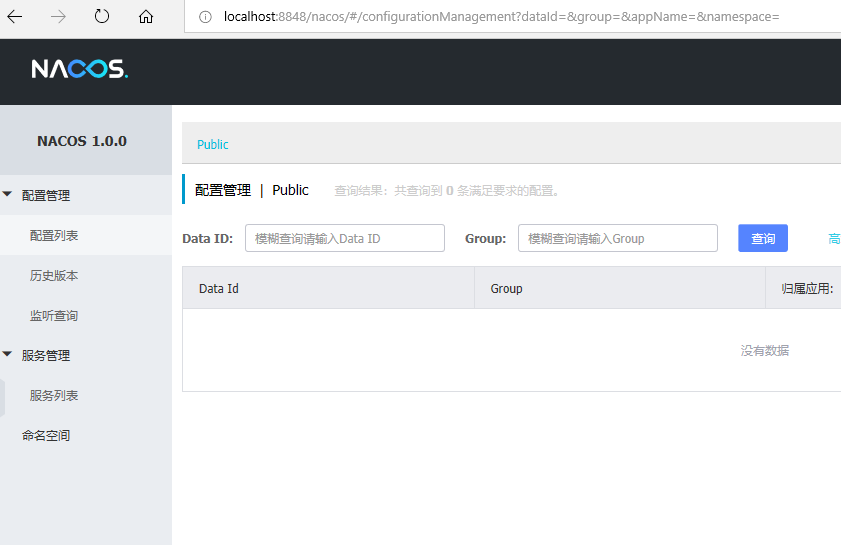
我们创建个项目来注册到这个nacos,三板斧再来:
1、pom引入spring boot、spring cloud、spring cloud alibaba和nacos依赖:
<?xml version="1.0" encoding="UTF-8"?>

<project xmlns="http://maven.apache.org/POM/4.0.0" xmlns:xsi="http://www.w3.org/2001/XMLSchema-instance"

         xsi:schemaLocation="http://maven.apache.org/POM/4.0.0 http://maven.apache.org/xsd/maven-4.0.0.xsd">

    <modelVersion>4.0.0</modelVersion>

    <groupId>com.wlf</groupId>

    <artifactId>spring-cloud-alibaba-provider</artifactId>

    <version>0.0.1-SNAPSHOT</version>

    <packaging>jar</packaging>

    <parent>

        <groupId>org.springframework.boot</groupId>

        <artifactId>spring-boot-starter-parent</artifactId>

        <version>2.1.7.RELEASE</version>

    </parent>

    <dependencyManagement>

        <dependencies>

            <dependency>

                <groupId>org.springframework.cloud</groupId>

                <artifactId>spring-cloud-dependencies</artifactId>

                <version>Greenwich.SR2</version>

                <type>pom</type>

                <scope>import</scope>

            </dependency>

            <dependency>

                <groupId>org.springframework.cloud</groupId>

                <artifactId>spring-cloud-alibaba-dependencies</artifactId>

                <version>0.9.0.RELEASE</version>

                <type>pom</type>

                <scope>import</scope>

            </dependency>

        </dependencies>

    </dependencyManagement>

    <dependencies>

        <dependency>

            <groupId>org.springframework.boot</groupId>

            <artifactId>spring-boot-starter-web</artifactId>

        </dependency>

        <dependency>

            <groupId>org.springframework.boot</groupId>

            <artifactId>spring-boot-starter-test</artifactId>

            <scope>test</scope>

        </dependency>

        <dependency>

            <groupId>org.springframework.cloud</groupId>

            <artifactId>spring-cloud-starter-alibaba-nacos-discovery</artifactId>

        </dependency>

        <dependency>

            <groupId>org.projectlombok</groupId>

            <artifactId>lombok</artifactId>

            <optional>true</optional>

        </dependency>

    </dependencies>

    <build>

        <plugins>

            <plugin>

                <groupId>org.springframework.boot</groupId>

                <artifactId>spring-boot-maven-plugin</artifactId>

            </plugin>

        </plugins>

    </build>

</project>
2、application配置nacos地址:
#端口

server.port=

#应用名

spring.application.name=lxytrans-provider

#注册中心

spring.cloud.nacos.discovery.server-addr=localhost:
3、启动类加注解@EnableDiscoveryClient:
import lombok.extern.slf4j.Slf4j;

import org.springframework.boot.SpringApplication;

import org.springframework.boot.autoconfigure.SpringBootApplication;

import org.springframework.cloud.client.discovery.EnableDiscoveryClient;

import org.springframework.context.annotation.Bean;

import org.springframework.web.bind.annotation.GetMapping;

import org.springframework.web.bind.annotation.RestController;

@EnableDiscoveryClient

@SpringBootApplication

public class TransProviderApplication {

    public static void main(String[] args) {

        SpringApplication.run(TransProviderApplication.class, args);

    }

    @Slf4j

    @RestController

    static class TestController {

        @GetMapping("/hello")

        public String hello() {

            return "hello";

        }

        @GetMapping("/hey")

        public String hey() throws InterruptedException {

            Thread.sleep(2000);

            return "hey";

        }

    }

}
跑起来后我们看下nacos控制台实例:

以上是服务提供方注册到nacos, 消费方的注册跟服务方没啥不同,这里就不再列出。nacos更多介绍参见https://nacos.io/zh-cn/docs/what-is-nacos.html。至于消费方如何通过nacos调用提供方服务,参见0.9.0.RELEASE版本的spring cloud alibaba nacos+feign实例。
0.9.0.RELEASE版本的spring cloud alibaba nacos实例的更多相关文章
- 0.9.0.RELEASE版本的spring cloud alibaba sentinel实例
sentinel即哨兵,相比hystrix断路器而言,它的功能更丰富.hystrix仅支持熔断,当服务消费方调用提供方发现异常后,进入熔断:sentinel不仅支持异常熔断,也支持响应超时熔断,另外还 ...
- 0.9.0.RELEASE版本的spring cloud alibaba nacos+feign实例
这里的feign依然是原来的feign,只不过将注册中心由eureka换成了nacos.服务提供方参见0.9.0.RELEASE版本的spring cloud alibaba nacos实例,消费方跟 ...
- 0.9.0.RELEASE版本的spring cloud alibaba nacos+gateway网关实例
gateway就是用来替换zuul的,功能都差不多,我们看下它怎么来跟nacos一起玩.老套路,三板斧: 1.pom: <?xml version="1.0" encodin ...
- 0.9.0.RELEASE版本的spring cloud alibaba sentinel+gateway网关实例
sentinel除了让服务提供方.消费方用之外,网关也能用它来限流.我们基于上次整的网关(参见0.9.0.RELEASE版本的spring cloud alibaba nacos+gateway网关实 ...
- 0.9.0.RELEASE版本的spring cloud alibaba sentinel+feign降级处理实例
既然用到了feign,那么主要是针对服务消费方的降级处理.我们基于0.9.0.RELEASE版本的spring cloud alibaba nacos+feign实例添油加醋,把sentinel功能加 ...
- 0.9.0.RELEASE版本的spring cloud alibaba sentinel限流、降级处理实例
先看服务提供方的,我们在原来的sentinel实例(参见0.9.0.RELEASE版本的spring cloud alibaba sentinel实例)上加上限流.降级处理,三板斧只需在最后那一斧co ...
- Spring Cloud Alibaba | Nacos服务中心初探
目录 Spring Cloud Alibaba | Nacos服务中心初探 1. 什么是Nacos? 1.1 Nacos 1.0 1.2 Nacos 2.0 2. Nacos 架构及概念 2.1 服务 ...
- Spring Cloud Alibaba | Nacos服务注册与发现
目录 Spring Cloud Alibaba | Nacos服务注册与发现 1. 服务提供者 1.1 pom.xml项目依赖 1.2 配置文件application.yml 1.3 启动类Produ ...
- Spring Cloud Alibaba | Nacos配置管理
目录 Spring Cloud Alibaba | Nacos配置管理 1. pom.xml 项目依赖 2. 在 bootstrap.properties 中配置 Nacos server 的地址和应 ...
随机推荐
- 【原创】改进的大马webshell,过市面上任何防护
因为之前使用的webshell大马很多都没用了,都被安全防护拦截了,所以通过几个大牛的指点和网上的教程整理而成自己做的增强版的webshell大马,我这个是源码,部分无加密! <?php $pa ...
- Java锁--Semaphore
转载请注明出处:http://www.cnblogs.com/skywang12345/p/3534050.html Semaphore简介 Semaphore是一个计数信号量,它的本质是一个&quo ...
- java中的AIO
AIO(异步非阻塞)AIO采用了Proactor模式,AIO与NIO的不同之处在于当AIO在进行读写操作时,不用先等通知,可直接调用相应的read/write方法,这两种方法均为异步的,对于读操作而言 ...
- 发布一个在Web下输入密码时提示大写锁定键的Jquery插件
功能介绍:在Web下输入密码时提示大写锁定键,封装成jq插件方便有需要的同学!使用:$("#txtPWD").capsLockTip();截图预览:代码(2012-05-03 10 ...
- man与info
Linux系统中在线求助命令:man page 与info page 还有--help . --help没有man的详细,首先我们来看mna 命令.在linux中输入 man + 相关的文件 ,就可以 ...
- MySQL-数据库三范式
数据库三范式 (1)第一范式(1NF): 定义:每一列都是不可分割的原子数据项(强调的是列的原子性): 例:一个表:[联系人](姓名,性别,电话) 如果在实际场景中,一个联系人有家庭电话和公司电话,那 ...
- myeclipse2018修改主题
- How to Fix Broken Packages in Ubuntu
How to Fix Broken Packages in Ubuntu By Nick Congleton – Posted on Jan 11, 2019 in Linux Apt, Ubun ...
- Linux gdb分析core dump文件
文章目录1. coredump1.1 coredump简介1.2 coredump的文件存储路径1.3 coredump产生的条件1.4 coredump产生原因2. 测试生成coredump1. c ...
- 【.Net设计模式系列】仓储(Repository)模式 ( 一 )
开篇 2016新年伊始,望眼过去,不知不觉在博客园已经注册8个月啦,由于最近忙于工作,博客迟迟没有更新.直到最近一直研究.Net设计模式,对一些模式有所感悟,故拿出自己的心得与大家分享,在接下来的所有 ...