
JavaWeb-RESTful(二)_使用SpringMVC开发RESTful_上
JavaWeb-RESTful(一)_RESTful初认识 传送门
JavaWeb-RESTful(二)_使用SpringMVC开发RESTful_上 传送门
JavaWeb-RESTful(三)_使用SpringMVC开发RESTful_下 传送门
项目已上传至github 传送门
Learn
一、实现一个成功的SpringMVC单元测试类
二、RequestParam注解:
三、JsonView注解
创建SpringBoot项目 传送门
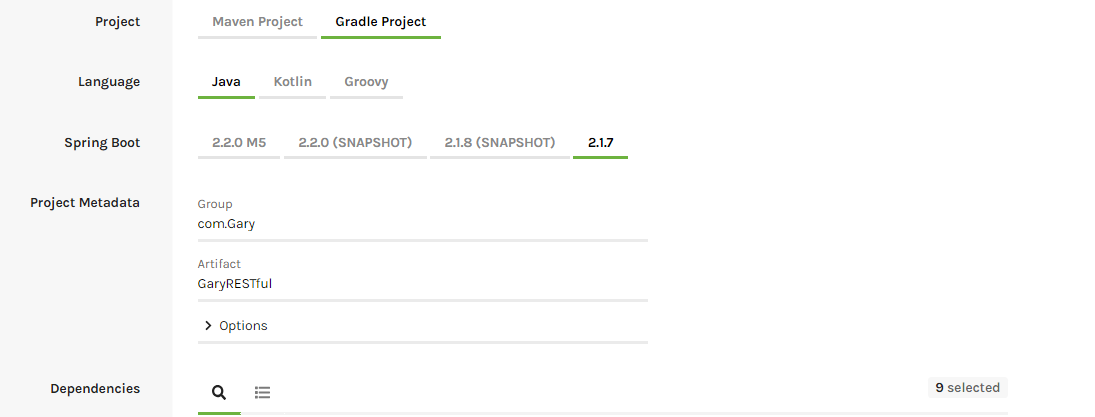
【 添加Spring Web Starter,Spring Data JPA,Spring Security,Thymeleaf,Spring Data Elasticsearch,Cloud OAuth2,Spring Session,MySQL Driver,H2 Database依赖】
一、实现一个成功的SpringMVC单元测试类
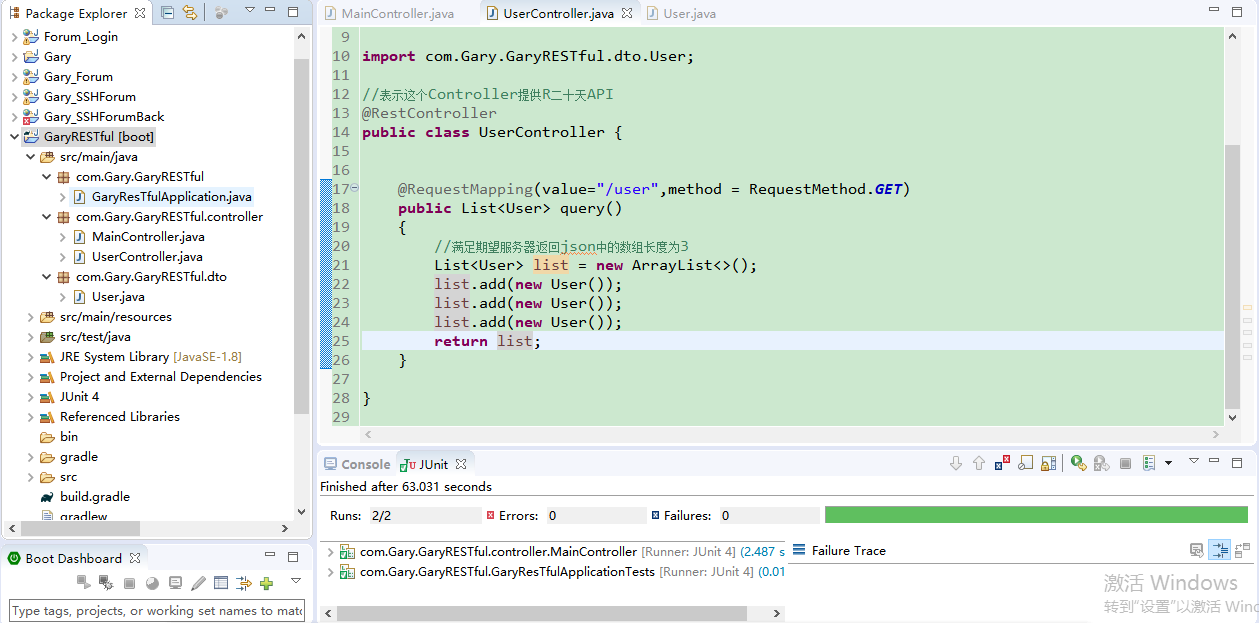
在MainController.java中向服务器以Json格式发起一个请求,并反回两个期望
期望一:期望服务器返回状态码为200
期望二:期望服务器返回json中的数组长度为3
        @Test

        //查询user

        public void test() throws Exception

        {

            //发起一个Get请求

            mockMvc.perform(MockMvcRequestBuilders.get("/user")

                    //json的形式发送一个请求

                    .contentType(MediaType.APPLICATION_JSON_UTF8))

                    //期望服务器返回什么(期望返回的状态码为200)

                    .andExpect(MockMvcResultMatchers.status().isOk())

                    //期望服务器返回json中的数组长度为3

                    .andExpect(MockMvcResultMatchers.jsonPath("$.length()").value(3));

        }
package com.Gary.GaryRESTful;

import org.springframework.boot.SpringApplication;

import org.springframework.boot.autoconfigure.SpringBootApplication;

@SpringBootApplication

public class GaryResTfulApplication {

    public static void main(String[] args) {

        SpringApplication.run(GaryResTfulApplication.class, args);

    }

}
GaryResTfulApplication.java
package com.Gary.GaryRESTful.controller;

import org.junit.Before;

import org.junit.Test;

import org.junit.runner.RunWith;

import org.springframework.beans.factory.annotation.Autowired;

import org.springframework.boot.test.context.SpringBootTest;

import org.springframework.http.MediaType;

import org.springframework.test.context.junit4.SpringRunner;

import org.springframework.test.web.servlet.MockMvc;

import org.springframework.test.web.servlet.request.MockMvcRequestBuilders;

import org.springframework.test.web.servlet.result.MockMvcResultMatchers;

import org.springframework.test.web.servlet.setup.MockMvcBuilders;

import org.springframework.web.context.WebApplicationContext;

//这是SpringBoot测试类

@RunWith(SpringRunner.class)

@SpringBootTest

public class MainController {

        @Autowired

        private WebApplicationContext webApplicationContext;

        //SpringMV单元测试独立测试类

        private MockMvc mockMvc;

        @Before

        public void before()

        {

            //创建独立测试类

            mockMvc = MockMvcBuilders.webAppContextSetup(webApplicationContext).build();

        }

        @Test

        //查询user

        public void test() throws Exception

        {

            //发起一个Get请求

            mockMvc.perform(MockMvcRequestBuilders.get("/user")

                    //json的形式发送一个请求

                    .contentType(MediaType.APPLICATION_JSON_UTF8))

                    //期望服务器返回什么(期望返回的状态码为200)

                    .andExpect(MockMvcResultMatchers.status().isOk())

                    //期望服务器返回json中的数组长度为3

                    .andExpect(MockMvcResultMatchers.jsonPath("$.length()").value(3));

        }

}
MainController.java
package com.Gary.GaryRESTful.controller;

import java.util.ArrayList;

import java.util.List;

import org.springframework.web.bind.annotation.RequestMapping;

import org.springframework.web.bind.annotation.RequestMethod;

import org.springframework.web.bind.annotation.RestController;

import com.Gary.GaryRESTful.dto.User;

//表示这个Controller提供R二十天API

@RestController

public class UserController {

    @RequestMapping(value="/user",method = RequestMethod.GET)

    public List<User> query()

    {

        //满足期望服务器返回json中的数组长度为3

        List<User> list = new ArrayList<>();

        list.add(new User());

        list.add(new User());

        list.add(new User());

        return list;

    }

}
UserController.java
package com.Gary.GaryRESTful.dto;

public class User {

    private String username;

    private String password;

    public String getUsername() {

        return username;

    }

    public void setUsername(String username) {

        this.username = username;

    }

    public String getPassword() {

        return password;

    }

    public void setPassword(String password) {

        this.password = password;

    }

}
User.java
二、RequestParam注解:
@RequestParam 获取请求参数的值
在MainController.java中通过param方法给Get请求添加参数
        @Test

        //查询user

        public void test() throws Exception

        {

            //发起一个Get请求

            mockMvc.perform(MockMvcRequestBuilders.get("/user")

                    .param("username", "Gary")

                        //json的形式发送一个请求

                        .contentType(MediaType.APPLICATION_JSON_UTF8))

                        //期望服务器返回什么(期望返回的状态码为200)

                        .andExpect(MockMvcResultMatchers.status().isOk())

                        //期望服务器返回json中的数组长度为3

                        .andExpect(MockMvcResultMatchers.jsonPath("$.length()").value(3));

        }
在UserController.java中通过@RequestParam注入username参数,并通过System.out.println(username)输出username中的值
    @RequestMapping(value="/user",method = RequestMethod.GET)

    /*

     * default value     默认

     * name             请求的名字

     * required            是否是必须的,true

     * value            别名

     *

     * */

    public List<User> query(@RequestParam(name="username",required=false) String username)

    {

        System.out.println(username);

        //满足期望服务器返回json中的数组长度为3

        List<User> list = new ArrayList<>();

        list.add(new User());

        list.add(new User());

        list.add(new User());

        return list;

    }

package com.Gary.GaryRESTful.controller;

import org.junit.Before;

import org.junit.Test;

import org.junit.runner.RunWith;

import org.springframework.beans.factory.annotation.Autowired;

import org.springframework.boot.test.context.SpringBootTest;

import org.springframework.http.MediaType;

import org.springframework.test.context.junit4.SpringRunner;

import org.springframework.test.web.servlet.MockMvc;

import org.springframework.test.web.servlet.request.MockMvcRequestBuilders;

import org.springframework.test.web.servlet.result.MockMvcResultMatchers;

import org.springframework.test.web.servlet.setup.MockMvcBuilders;

import org.springframework.web.context.WebApplicationContext;

//这是SpringBoot测试类

@RunWith(SpringRunner.class)

@SpringBootTest

public class MainController {

        @Autowired

        private WebApplicationContext webApplicationContext;

        //SpringMV单元测试独立测试类

        private MockMvc mockMvc;

        @Before

        public void before()

        {

            //创建独立测试类

            mockMvc = MockMvcBuilders.webAppContextSetup(webApplicationContext).build();

        }

        @Test

        //查询user

        public void test() throws Exception

        {

            //发起一个Get请求

            mockMvc.perform(MockMvcRequestBuilders.get("/user")

                    .param("username", "Gary")

                        //json的形式发送一个请求

                        .contentType(MediaType.APPLICATION_JSON_UTF8))

                        //期望服务器返回什么(期望返回的状态码为200)

                        .andExpect(MockMvcResultMatchers.status().isOk())

                        //期望服务器返回json中的数组长度为3

                        .andExpect(MockMvcResultMatchers.jsonPath("$.length()").value(3));

        }

}
MainController.java
package com.Gary.GaryRESTful.controller;

import java.util.ArrayList;

import java.util.List;

import org.springframework.web.bind.annotation.RequestMapping;

import org.springframework.web.bind.annotation.RequestMethod;

import org.springframework.web.bind.annotation.RequestParam;

import org.springframework.web.bind.annotation.RestController;

import com.Gary.GaryRESTful.dto.User;

//表示这个Controller提供R二十天API

@RestController

public class UserController {

    @RequestMapping(value="/user",method = RequestMethod.GET)

    public List<User> query(@RequestParam String username)

    {

        System.out.println(username);

        //满足期望服务器返回json中的数组长度为3

        List<User> list = new ArrayList<>();

        list.add(new User());

        list.add(new User());

        list.add(new User());

        return list;

    }

    //@RequestParam

}
UserController.java
如果需要访问用户详细信息,在MainController.java中添加getInfo()方法,发起一个get请求去查看用户详情
        @Test

        public void getInfo() throws Exception

        {

            //发起一个get请求,查看用户详情

            mockMvc.perform(MockMvcRequestBuilders.get("/user/1")

                    .contentType(MediaType.APPLICATION_JSON_UTF8))

                    .andExpect(MockMvcResultMatchers.status().isOk())

                    .andExpect(MockMvcResultMatchers.jsonPath("$.username").value("Gary"));

        }
在UserController.java中添加一个getInfo()方法,去接收该请求
    @RequestMapping(value="/user/{id}",method= RequestMethod.GET)

    //将@PathVariable路径中的片段映射到java代码中

    public User getInfo(@PathVariable String id)

    {

        User user = new User();

        user.setUsername("Gary");

        return user;

    }

package com.Gary.GaryRESTful;

import org.springframework.boot.SpringApplication;

import org.springframework.boot.autoconfigure.SpringBootApplication;

@SpringBootApplication

public class GaryResTfulApplication {

    public static void main(String[] args) {

        SpringApplication.run(GaryResTfulApplication.class, args);

    }

}
GaryResTfulApplication.java
package com.Gary.GaryRESTful.controller;

import org.junit.Before;

import org.junit.Test;

import org.junit.runner.RunWith;

import org.springframework.beans.factory.annotation.Autowired;

import org.springframework.boot.test.context.SpringBootTest;

import org.springframework.http.MediaType;

import org.springframework.test.context.junit4.SpringRunner;

import org.springframework.test.web.servlet.MockMvc;

import org.springframework.test.web.servlet.request.MockMvcRequestBuilders;

import org.springframework.test.web.servlet.result.MockMvcResultMatchers;

import org.springframework.test.web.servlet.setup.MockMvcBuilders;

import org.springframework.web.context.WebApplicationContext;

//这是SpringBoot测试类

@RunWith(SpringRunner.class)

@SpringBootTest

public class MainController {

        @Autowired

        private WebApplicationContext webApplicationContext;

        //SpringMV单元测试独立测试类

        private MockMvc mockMvc;

        @Before

        public void before()

        {

            //创建独立测试类

            mockMvc = MockMvcBuilders.webAppContextSetup(webApplicationContext).build();

        }

        @Test

        //查询user

        public void test() throws Exception

        {

            //发起一个Get请求

            mockMvc.perform(MockMvcRequestBuilders.get("/user")

                    .param("username", "Gary")

                        //json的形式发送一个请求

                        .contentType(MediaType.APPLICATION_JSON_UTF8))

                        //期望服务器返回什么(期望返回的状态码为200)

                        .andExpect(MockMvcResultMatchers.status().isOk())

                        //期望服务器返回json中的数组长度为3

                        .andExpect(MockMvcResultMatchers.jsonPath("$.length()").value(3));

        }

        @Test

        public void getInfo() throws Exception

        {

            //发起一个get请求,查看用户详情

            mockMvc.perform(MockMvcRequestBuilders.get("/user/1")

                    .contentType(MediaType.APPLICATION_JSON_UTF8))

                    .andExpect(MockMvcResultMatchers.status().isOk())

                    .andExpect(MockMvcResultMatchers.jsonPath("$.username").value("Gary"));

        }

}
MainController.java
package com.Gary.GaryRESTful.controller;

import java.util.ArrayList;

import java.util.List;

import org.junit.Test;

import org.springframework.web.bind.annotation.PathVariable;

import org.springframework.web.bind.annotation.RequestMapping;

import org.springframework.web.bind.annotation.RequestMethod;

import org.springframework.web.bind.annotation.RequestParam;

import org.springframework.web.bind.annotation.RestController;

import com.Gary.GaryRESTful.dto.User;

//表示这个Controller提供R二十天API

@RestController

public class UserController {

    @RequestMapping(value="/user",method = RequestMethod.GET)

    /*

     * default value     默认

     * name             请求的名字

     * required            是否是必须的,true

     * value            别名

     *

     * */

    public List<User> query(@RequestParam(name="username",required=false) String username)

    {

        System.out.println(username);

        //满足期望服务器返回json中的数组长度为3

        List<User> list = new ArrayList<>();

        list.add(new User());

        list.add(new User());

        list.add(new User());

        return list;

    }

    @RequestMapping(value="/user/{id}",method= RequestMethod.GET)

    //将@PathVariable路径中的片段映射到java代码中

    public User getInfo(@PathVariable String id)

    {

        User user = new User();

        user.setUsername("Gary");

        return user;

    }

}
UserController.java
package com.Gary.GaryRESTful.dto;

public class User {

    private String username;

    private String password;

    public String getUsername() {

        return username;

    }

    public void setUsername(String username) {

        this.username = username;

    }

    public String getPassword() {

        return password;

    }

    public void setPassword(String password) {

        this.password = password;

    }

}
User.java
三、JsonView注解
@JsonView是Jackson的一个注解,可以用来过滤序列化对象的字段属性,是你可以选择序列化对象哪些属性,哪些过滤掉。
@JsonView使用步骤:
1、使用接口来声明多个视图
2、在值对象的get方法上指定视图
3、在Controller方法上指定视图
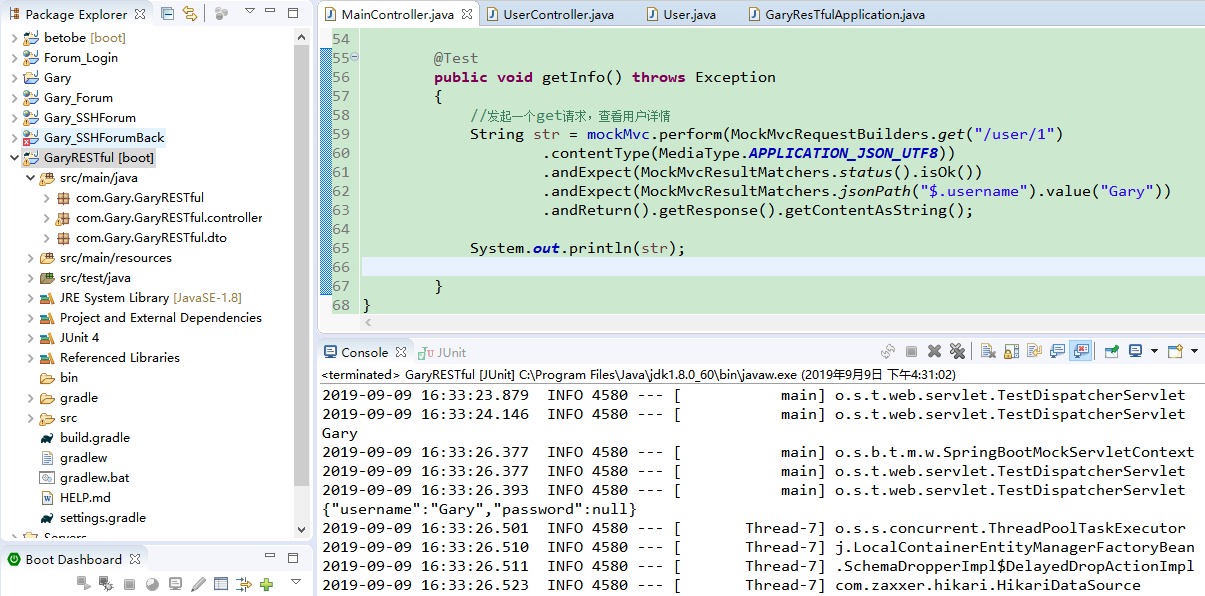
通过.andReturn().getResponse().getContentAsString()将mockMvc.perform(MockMvcRequestBuilders.get("/user/1")发送的get请求以字符串的格式打印出来
        @Test

        public void getInfo() throws Exception

        {

            //发起一个get请求,查看用户详情

            String str = mockMvc.perform(MockMvcRequestBuilders.get("/user/1")

                    .contentType(MediaType.APPLICATION_JSON_UTF8))

                    .andExpect(MockMvcResultMatchers.status().isOk())

                    .andExpect(MockMvcResultMatchers.jsonPath("$.username").value("Gary"))

                    .andReturn().getResponse().getContentAsString();

            System.out.println(str);

        }
package com.Gary.GaryRESTful.controller;

import org.junit.Before;

import org.junit.Test;

import org.junit.runner.RunWith;

import org.springframework.beans.factory.annotation.Autowired;

import org.springframework.boot.test.context.SpringBootTest;

import org.springframework.http.MediaType;

import org.springframework.test.context.junit4.SpringRunner;

import org.springframework.test.web.servlet.MockMvc;

import org.springframework.test.web.servlet.request.MockMvcRequestBuilders;

import org.springframework.test.web.servlet.result.MockMvcResultMatchers;

import org.springframework.test.web.servlet.setup.MockMvcBuilders;

import org.springframework.web.context.WebApplicationContext;

//这是SpringBoot测试类

@RunWith(SpringRunner.class)

@SpringBootTest

public class MainController {

        @Autowired

        private WebApplicationContext webApplicationContext;

        //SpringMV单元测试独立测试类

        private MockMvc mockMvc;

        @Before

        public void before()

        {

            //创建独立测试类

            mockMvc = MockMvcBuilders.webAppContextSetup(webApplicationContext).build();

        }

        @Test

        //查询user

        public void test() throws Exception

        {

            //发起一个Get请求

            mockMvc.perform(MockMvcRequestBuilders.get("/user")

                    .param("username", "Gary")

                        //json的形式发送一个请求

                        .contentType(MediaType.APPLICATION_JSON_UTF8))

                        //期望服务器返回什么(期望返回的状态码为200)

                        .andExpect(MockMvcResultMatchers.status().isOk())

                        //期望服务器返回json中的数组长度为3

                        .andExpect(MockMvcResultMatchers.jsonPath("$.length()").value(3));

        }

        @Test

        public void getInfo() throws Exception

        {

            //发起一个get请求,查看用户详情

            String str = mockMvc.perform(MockMvcRequestBuilders.get("/user/1")

                    .contentType(MediaType.APPLICATION_JSON_UTF8))

                    .andExpect(MockMvcResultMatchers.status().isOk())

                    .andExpect(MockMvcResultMatchers.jsonPath("$.username").value("Gary"))

                    .andReturn().getResponse().getContentAsString();

            System.out.println(str);

        }

}
MainController.java
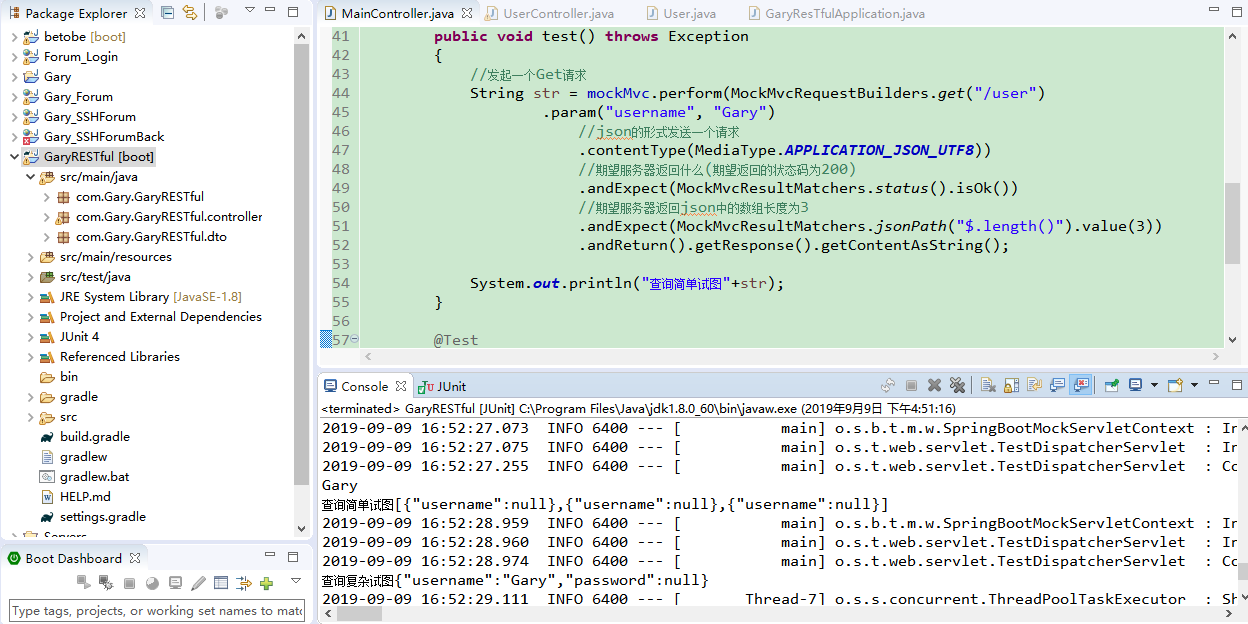
发现此时输出来的json字符串格式是{"username":"Gary","password":null},但我们此时不希望用户看到password时,就可以用到@JsonView这个注解了
使用接口声明多个视图
1)username,password
2)username
在值对象的get方法中指定视图
//简单试图 只有一个username

    public interface UserSimpleView{};

    //复杂试图 有username 和   password

    public interface UserDetailView extends UserSimpleView{};

    private String username;

    private String password;

    @JsonView(UserSimpleView.class)

    public String getUsername() {

        return username;

    }

    @JsonView(UserDetailView.class)

    public String getPassword() {

        return password;

    }
在controller方法中指定视图
@RequestMapping(value="/user",method = RequestMethod.GET)

    /*

     * default value     默认

     * name             请求的名字

     * required            是否是必须的,true

     * value            别名

     *

     * */

    @JsonView(User.UserSimpleView.class)

    public List<User> query(@RequestParam(name="username",required=false) String username)

    {

        System.out.println(username);

        //满足期望服务器返回json中的数组长度为3

        List<User> list = new ArrayList<>();

        list.add(new User());

        list.add(new User());

        list.add(new User());

        return list;

    }

    @RequestMapping(value="/user/{id}",method= RequestMethod.GET)

    //将@PathVariable路径中的片段映射到java代码中

    @JsonView(User.UserDetailView.class)

    public User getInfo(@PathVariable String id)

    {

        User user = new User();

        user.setUsername("Gary");

        return user;

    }
package com.Gary.GaryRESTful;

import org.springframework.boot.SpringApplication;

import org.springframework.boot.autoconfigure.SpringBootApplication;

@SpringBootApplication

public class GaryResTfulApplication {

    public static void main(String[] args) {

        SpringApplication.run(GaryResTfulApplication.class, args);

    }

}
GaryResTfulApplication.java
package com.Gary.GaryRESTful.controller;

import org.junit.Before;

import org.junit.Test;

import org.junit.runner.RunWith;

import org.springframework.beans.factory.annotation.Autowired;

import org.springframework.boot.test.context.SpringBootTest;

import org.springframework.http.MediaType;

import org.springframework.test.context.junit4.SpringRunner;

import org.springframework.test.web.servlet.MockMvc;

import org.springframework.test.web.servlet.request.MockMvcRequestBuilders;

import org.springframework.test.web.servlet.result.MockMvcResultMatchers;

import org.springframework.test.web.servlet.setup.MockMvcBuilders;

import org.springframework.web.context.WebApplicationContext;

//这是SpringBoot测试类

@RunWith(SpringRunner.class)

@SpringBootTest

public class MainController {

        @Autowired

        private WebApplicationContext webApplicationContext;

        //SpringMV单元测试独立测试类

        private MockMvc mockMvc;

        @Before

        public void before()

        {

            //创建独立测试类

            mockMvc = MockMvcBuilders.webAppContextSetup(webApplicationContext).build();

        }

        @Test

        //查询user

        public void test() throws Exception

        {

            //发起一个Get请求

            String str = mockMvc.perform(MockMvcRequestBuilders.get("/user")

                    .param("username", "Gary")

                        //json的形式发送一个请求

                        .contentType(MediaType.APPLICATION_JSON_UTF8))

                        //期望服务器返回什么(期望返回的状态码为200)

                        .andExpect(MockMvcResultMatchers.status().isOk())

                        //期望服务器返回json中的数组长度为3

                        .andExpect(MockMvcResultMatchers.jsonPath("$.length()").value(3))

                        .andReturn().getResponse().getContentAsString();

            System.out.println("查询简单试图"+str);

        }

        @Test

        public void getInfo() throws Exception

        {

            //发起一个get请求,查看用户详情

            String str = mockMvc.perform(MockMvcRequestBuilders.get("/user/1")

                    .contentType(MediaType.APPLICATION_JSON_UTF8))

                    .andExpect(MockMvcResultMatchers.status().isOk())

                    .andExpect(MockMvcResultMatchers.jsonPath("$.username").value("Gary"))

                    .andReturn().getResponse().getContentAsString();

            System.out.println("查询复杂试图"+str);

        }

}
MainController.java
package com.Gary.GaryRESTful.controller;

import java.util.ArrayList;

import java.util.List;

import org.junit.Test;

import org.springframework.web.bind.annotation.PathVariable;

import org.springframework.web.bind.annotation.RequestMapping;

import org.springframework.web.bind.annotation.RequestMethod;

import org.springframework.web.bind.annotation.RequestParam;

import org.springframework.web.bind.annotation.RestController;

import com.Gary.GaryRESTful.dto.User;

import com.fasterxml.jackson.annotation.JsonView;

//表示这个Controller提供R二十天API

@RestController

public class UserController {

    @RequestMapping(value="/user",method = RequestMethod.GET)

    /*

     * default value     默认

     * name             请求的名字

     * required            是否是必须的,true

     * value            别名

     *

     * */

    @JsonView(User.UserSimpleView.class)

    public List<User> query(@RequestParam(name="username",required=false) String username)

    {

        System.out.println(username);

        //满足期望服务器返回json中的数组长度为3

        List<User> list = new ArrayList<>();

        list.add(new User());

        list.add(new User());

        list.add(new User());

        return list;

    }

    @RequestMapping(value="/user/{id}",method= RequestMethod.GET)

    //将@PathVariable路径中的片段映射到java代码中

    @JsonView(User.UserDetailView.class)

    public User getInfo(@PathVariable String id)

    {

        User user = new User();

        user.setUsername("Gary");

        return user;

    }

}
UserController.java
package com.Gary.GaryRESTful.dto;

import com.fasterxml.jackson.annotation.JsonView;

public class User {

    //简单试图 只有一个username

    public interface UserSimpleView{};

    //复杂试图 有username 和   password

    public interface UserDetailView extends UserSimpleView{};

    private String username;

    private String password;

    @JsonView(UserSimpleView.class)

    public String getUsername() {

        return username;

    }

    public void setUsername(String username) {

        this.username = username;

    }

    @JsonView(UserDetailView.class)

    public String getPassword() {

        return password;

    }

    public void setPassword(String password) {

        this.password = password;

    }

}
User.java
JavaWeb-RESTful(二)_使用SpringMVC开发RESTful_上的更多相关文章
- JavaWeb-RESTful(三)_使用SpringMVC开发RESTful_下
JavaWeb-RESTful(一)_RESTful初认识 传送门 JavaWeb-RESTful(二)_使用SpringMVC开发RESTful_上 传送门 JavaWeb-RESTful(三)_使 ...
- javaweb基础(21)_两种开发模式
SUN公司推出JSP技术后,同时也推荐了两种web应用程序的开发模式,一种是JSP+JavaBean模式,一种是Servlet+JSP+JavaBean模式. 一.JSP+JavaBean开发模式 1 ...
- Appium移动自动化测试(二)--安装Android开发环境(转)
Appium移动自动化测试(二)--安装Android开发环境 2015-06-04 17:30 by 虫师, 35299 阅读, 23 评论, 收藏, 编辑 继续Appium环境的搭建. 第二节 ...
- java学习笔记-JavaWeb篇二
JavaWEB篇二 45 HttpSession概述46 HttpSession的生命周期 47 HttpSession常用方法示例48 HttpSessionURL重写 49 HttpSession ...
- SpringMVC开发手册
title: SpringMvc -- 开发手册 date: 2018-11-15 22:14:22 tags: SpringMvc categories: SpringMvc #分类名 type: ...
- spring参数类型异常输出(二), SpringMvc参数类型转换错误输出(二)
spring参数类型异常输出(二), SpringMvc参数类型转换错误输出(二) >>>>>>>>>>>>>>&g ...
- (二)Hololens Unity 开发入门 之 Hello HoloLens~
学习源于官方文档 微软官文~ 笔记一部分是直接翻译官方文档,部分各人理解不一致的和一些比较浅显的保留英文原文 (二)Hololens Unity 开发入门 之 Hello HoloLens~ 本文主要 ...
- Spring-MVC开发步骤(入门配置)
Spring-MVC开发步骤(入门配置) Step1.导包 spring-webmvc Step2.添加spring配置文件 Step3.配置DispatcherServlet 在web.xml中: ...
- Android高效率编码-第三方SDK详解系列(二)——Bmob后端云开发,实现登录注册,更改资料,修改密码,邮箱验证,上传,下载,推送消息,缩略图加载等功能
Android高效率编码-第三方SDK详解系列(二)--Bmob后端云开发,实现登录注册,更改资料,修改密码,邮箱验证,上传,下载,推送消息,缩略图加载等功能 我的本意是第二篇写Mob的shareSD ...
随机推荐
- 6.Bash的功能
6.Bash的功能本章介绍 Bash 的特色功能.6.1 Bash的启动 bash [长选项] [-ir] [-abefhkmnptuvxdBCDHP] [-o 选项] [-O shopt 选项] [ ...
- 用winform实现一个B/S代码更新打包工具
一个.net程序员必须拥有的能力就是可以随时随地写出一个自己需要的小工具,于是记录一下我的个人工具吧. 新建一个窗体应用项目,代码如下: namespace 打包工具 { partial class ...
- python之jupyter notebook
jupyter是一种交互式计算和开发环境的笔记,ipython命令行比原生的python命令行更加友好和高效,还可以运行web版的界面,支持多语言,输出图形.音频.视频等功能. 安装 pip inst ...
- npm install 常用的几个参数
npm install moduleName # 安装模块到项目目录下 npm install -g moduleName # -g 的意思是将模块安装到全局,具体安装到磁盘哪个位置,要看 npm c ...
- 采购订单保存生成PO号后增强点。
EXIT_SAPMM06E_013 这个增强可用于生成的PO后,调用外部接口把变更或生成的PO信息下发出去. 这里面的参数 I_EKKO 是新的抬头 I_EKKO_OLD 是更改前的抬头 XEKPO ...
- SSIS 初次接触 + 开发记录
第一次接触SSIS,昨天终于把一套流程走通,记一下流水. 1:安装 使用SSIS需要安装插件(VS 和Sql Server都需要另外安装). 自己使用的vs2017开发,官网有专门的 VS2017 安 ...
- Java注解【五、注解实战】
需求: 1.表:用户ID,用户名,年龄,邮箱. 2.实现方法,传入实体,打印sql. 实现: 1.表: package Annotation; @Table("user") pub ...
- 蓝牙App漏洞系列分析之三CVE-2017-0645
蓝牙App漏洞系列分析之三CVE-2017-0645 0x01 漏洞简介 Android 6月的安全公告,同时还修复了我们发现的一个蓝牙 App 提权中危漏洞,该漏洞允许手机本地无权限的恶意程序构造一 ...
- linux之网络命令
本文整理了在实践过程中使用的Linux网络工具,这些工具提供的功能非常强大,我们平时使用的只是冰山一角,比如lsof.ip.tcpdump.iptables等. 本文不会深入研究这些命令的强大用法,因 ...
- 1.1.EJB概述
1.EJB概述: Enterprice JavaBeans是一个用于分布式业务应用的标准服务端组件模型.采用Enterprice JavaBeans架构编写的应用是可伸的.事务性的. 多用户安全的.采 ...