
JavaWeb-RESTful(三)_使用SpringMVC开发RESTful_下
JavaWeb-RESTful(一)_RESTful初认识 传送门
JavaWeb-RESTful(二)_使用SpringMVC开发RESTful_上 传送门
JavaWeb-RESTful(三)_使用SpringMVC开发RESTful_下 传送门
项目已上传至github 传送门
Learn
一、单元测试:添加用户
二、单元测试:修改用户
三、单元测试:删除用户
四、SpringBoot默认处理异常路径
一、单元测试:添加用户
在MainController.java中添加addUser()添加用户的单元测试方法
        @Test

        public void addUser() throws Exception

        {

            mockMvc.perform(MockMvcRequestBuilders.post("/user")

                    .contentType(MediaType.APPLICATION_JSON_UTF8)

                    .content("{\"username\":\"Gary\"}"))

                    .andExpect(MockMvcResultMatchers.status().isOk())

                    .andExpect(MockMvcResultMatchers.jsonPath("$.id").value("1"));

        }
给User实体对象设置三个熟悉,id、username、password
    private String username;

    private String password;

    private String id;
通过id和username获得的试图都是简单试图,通过password获得的试图是复杂试图
    @JsonView(UserSimpleView.class)

    public String getId() {

        return id;

    }

    @JsonView(UserSimpleView.class)

    public String getUsername() {

        return username;

    }

    @JsonView(UserDetailView.class)

    public String getPassword() {

        return password;

    }
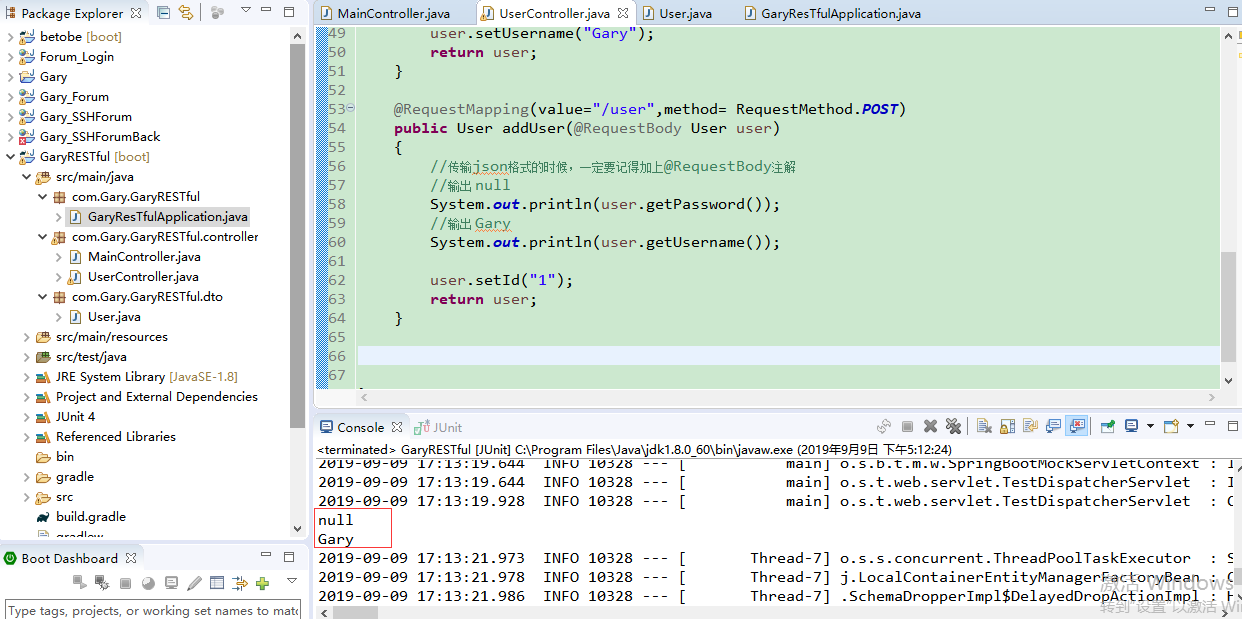
在UserController.java中通过addUser()方法获得MainController.java中的addUser()的POST请求
    @RequestMapping(value="/user",method= RequestMethod.POST)

    public User addUser(@RequestBody User user)

    {

        //传输json格式的时候,一定要记得加上@RequestBody注解

        //输出 null

        System.out.println(user.getPassword());

        //输出 Gary

        System.out.println(user.getUsername());

        user.setId("1");

        return user;

    }
package com.Gary.GaryRESTful;

import org.springframework.boot.SpringApplication;

import org.springframework.boot.autoconfigure.SpringBootApplication;

@SpringBootApplication

public class GaryResTfulApplication {

    public static void main(String[] args) {

        SpringApplication.run(GaryResTfulApplication.class, args);

    }

}
GaryResTfulApplication.java
package com.Gary.GaryRESTful.controller;

import org.junit.Before;

import org.junit.Test;

import org.junit.runner.RunWith;

import org.springframework.beans.factory.annotation.Autowired;

import org.springframework.boot.test.context.SpringBootTest;

import org.springframework.http.MediaType;

import org.springframework.test.context.junit4.SpringRunner;

import org.springframework.test.web.servlet.MockMvc;

import org.springframework.test.web.servlet.request.MockMvcRequestBuilders;

import org.springframework.test.web.servlet.result.MockMvcResultMatchers;

import org.springframework.test.web.servlet.setup.MockMvcBuilders;

import org.springframework.web.context.WebApplicationContext;

//这是SpringBoot测试类

@RunWith(SpringRunner.class)

@SpringBootTest

public class MainController {

        @Autowired

        private WebApplicationContext webApplicationContext;

        //SpringMV单元测试独立测试类

        private MockMvc mockMvc;

        @Before

        public void before()

        {

            //创建独立测试类

            mockMvc = MockMvcBuilders.webAppContextSetup(webApplicationContext).build();

        }

        //@Test

        //查询user

        public void test() throws Exception

        {

            //发起一个Get请求

            String str = mockMvc.perform(MockMvcRequestBuilders.get("/user")

                    .param("username", "Gary")

                        //json的形式发送一个请求

                        .contentType(MediaType.APPLICATION_JSON_UTF8))

                        //期望服务器返回什么(期望返回的状态码为200)

                        .andExpect(MockMvcResultMatchers.status().isOk())

                        //期望服务器返回json中的数组长度为3

                        .andExpect(MockMvcResultMatchers.jsonPath("$.length()").value(3))

                        .andReturn().getResponse().getContentAsString();

            System.out.println("查询简单试图"+str);

        }

        //@Test

        public void getInfo() throws Exception

        {

            //发起一个get请求,查看用户详情

            String str = mockMvc.perform(MockMvcRequestBuilders.get("/user/1")

                    .contentType(MediaType.APPLICATION_JSON_UTF8))

                    .andExpect(MockMvcResultMatchers.status().isOk())

                    .andExpect(MockMvcResultMatchers.jsonPath("$.username").value("Gary"))

                    .andReturn().getResponse().getContentAsString();

            System.out.println("查询复杂试图"+str);

        }

        @Test

        public void addUser() throws Exception

        {

            mockMvc.perform(MockMvcRequestBuilders.post("/user")

                    .contentType(MediaType.APPLICATION_JSON_UTF8)

                    .content("{\"username\":\"Gary\"}"))

                    .andExpect(MockMvcResultMatchers.status().isOk())

                    .andExpect(MockMvcResultMatchers.jsonPath("$.id").value("1"));

        }

}
MainController.java
package com.Gary.GaryRESTful.controller;

import java.util.ArrayList;

import java.util.List;

import org.junit.Test;

import org.springframework.web.bind.annotation.PathVariable;

import org.springframework.web.bind.annotation.RequestBody;

import org.springframework.web.bind.annotation.RequestMapping;

import org.springframework.web.bind.annotation.RequestMethod;

import org.springframework.web.bind.annotation.RequestParam;

import org.springframework.web.bind.annotation.RestController;

import com.Gary.GaryRESTful.dto.User;

import com.fasterxml.jackson.annotation.JsonView;

//表示这个Controller提供R二十天API

@RestController

public class UserController {

    @RequestMapping(value="/user",method = RequestMethod.GET)

    /*

     * default value     默认

     * name             请求的名字

     * required            是否是必须的,true

     * value            别名

     *

     * */

    @JsonView(User.UserSimpleView.class)

    public List<User> query(@RequestParam(name="username",required=false) String username)

    {

        System.out.println(username);

        //满足期望服务器返回json中的数组长度为3

        List<User> list = new ArrayList<>();

        list.add(new User());

        list.add(new User());

        list.add(new User());

        return list;

    }

    @RequestMapping(value="/user/{id}",method= RequestMethod.GET)

    //将@PathVariable路径中的片段映射到java代码中

    @JsonView(User.UserDetailView.class)

    public User getInfo(@PathVariable String id)

    {

        User user = new User();

        user.setUsername("Gary");

        return user;

    }

    @RequestMapping(value="/user",method= RequestMethod.POST)

    public User addUser(@RequestBody User user)

    {

        //传输json格式的时候,一定要记得加上@RequestBody注解

        //输出 null

        System.out.println(user.getPassword());

        //输出 Gary

        System.out.println(user.getUsername());

        user.setId("1");

        return user;

    }

}
UserController.java
package com.Gary.GaryRESTful.dto;

import com.fasterxml.jackson.annotation.JsonView;

public class User {

    //简单试图 只有一个username

    public interface UserSimpleView{};

    //复杂试图 有username 和   password

    public interface UserDetailView extends UserSimpleView{};

    private String username;

    private String password;

    private String id;

    @JsonView(UserSimpleView.class)

    public String getId() {

        return id;

    }

    public void setId(String id) {

        this.id = id;

    }

    @JsonView(UserSimpleView.class)

    public String getUsername() {

        return username;

    }

    public void setUsername(String username) {

        this.username = username;

    }

    @JsonView(UserDetailView.class)

    public String getPassword() {

        return password;

    }

    public void setPassword(String password) {

        this.password = password;

    }

}
User.java
二、单元测试:修改用户
在MainController.java中添加updataUser()修改用户的单元测试方法
        //修改用户

        @Test

        public void updataUser() throws Exception

        {

            mockMvc.perform(MockMvcRequestBuilders.put("/user/1")

                    .contentType(MediaType.APPLICATION_JSON_UTF8)

                    .content("{\"username\":\"Garyary\",\"id\":\"1\"}"))

            .andExpect(MockMvcResultMatchers.status().isOk())

            .andExpect(MockMvcResultMatchers.jsonPath("$.id").value("1"));

        }
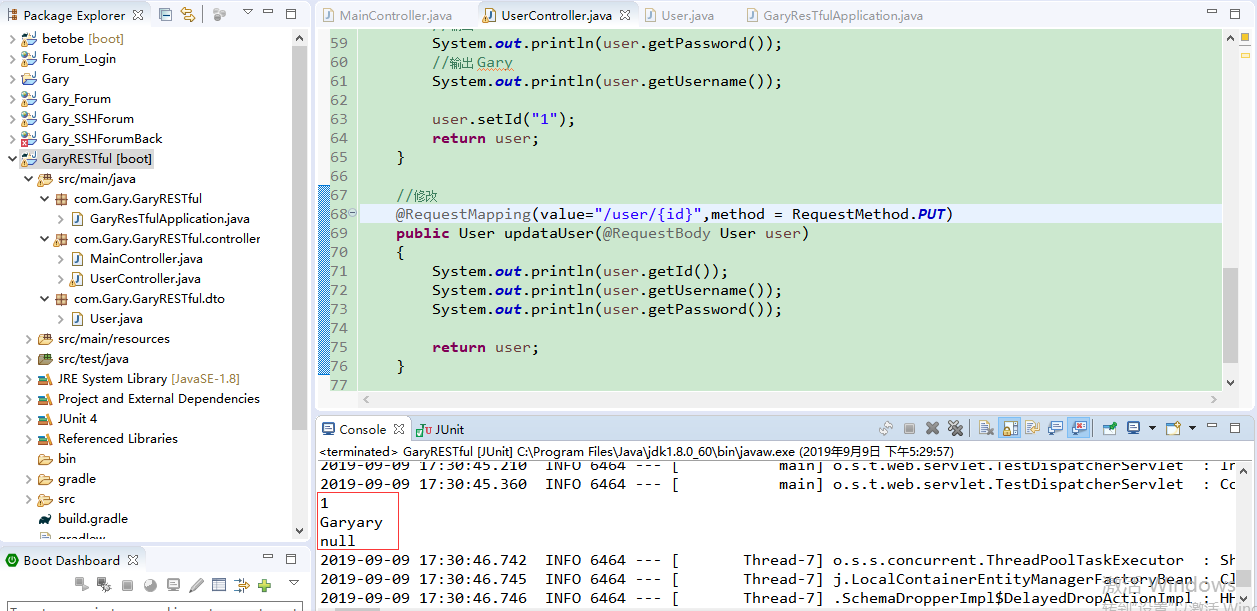
在UserController.java中接收来自updataUser的请求
    //修改用户资料

    @RequestMapping(value="/user/{id}",method = RequestMethod.PUT)

    public User updataUser(@RequestBody User user)

    {

        System.out.println(user.getId());

        System.out.println(user.getUsername());

        System.out.println(user.getPassword());

        return user;

    }
package com.Gary.GaryRESTful;

import org.springframework.boot.SpringApplication;

import org.springframework.boot.autoconfigure.SpringBootApplication;

@SpringBootApplication

public class GaryResTfulApplication {

    public static void main(String[] args) {

        SpringApplication.run(GaryResTfulApplication.class, args);

    }

}
GaryResTfulApplication.java
package com.Gary.GaryRESTful.controller;

import org.junit.Before;

import org.junit.Test;

import org.junit.runner.RunWith;

import org.springframework.beans.factory.annotation.Autowired;

import org.springframework.boot.test.context.SpringBootTest;

import org.springframework.http.MediaType;

import org.springframework.test.context.junit4.SpringRunner;

import org.springframework.test.web.servlet.MockMvc;

import org.springframework.test.web.servlet.request.MockMvcRequestBuilders;

import org.springframework.test.web.servlet.result.MockMvcResultMatchers;

import org.springframework.test.web.servlet.setup.MockMvcBuilders;

import org.springframework.web.context.WebApplicationContext;

//这是SpringBoot测试类

@RunWith(SpringRunner.class)

@SpringBootTest

public class MainController {

        @Autowired

        private WebApplicationContext webApplicationContext;

        //SpringMV单元测试独立测试类

        private MockMvc mockMvc;

        @Before

        public void before()

        {

            //创建独立测试类

            mockMvc = MockMvcBuilders.webAppContextSetup(webApplicationContext).build();

        }

        //@Test

        //查询user

        public void test() throws Exception

        {

            //发起一个Get请求

            String str = mockMvc.perform(MockMvcRequestBuilders.get("/user")

                    .param("username", "Gary")

                        //json的形式发送一个请求

                        .contentType(MediaType.APPLICATION_JSON_UTF8))

                        //期望服务器返回什么(期望返回的状态码为200)

                        .andExpect(MockMvcResultMatchers.status().isOk())

                        //期望服务器返回json中的数组长度为3

                        .andExpect(MockMvcResultMatchers.jsonPath("$.length()").value(3))

                        .andReturn().getResponse().getContentAsString();

            System.out.println("查询简单试图"+str);

        }

        //@Test

        public void getInfo() throws Exception

        {

            //发起一个get请求,查看用户详情

            String str = mockMvc.perform(MockMvcRequestBuilders.get("/user/1")

                    .contentType(MediaType.APPLICATION_JSON_UTF8))

                    .andExpect(MockMvcResultMatchers.status().isOk())

                    .andExpect(MockMvcResultMatchers.jsonPath("$.username").value("Gary"))

                    .andReturn().getResponse().getContentAsString();

            System.out.println("查询复杂试图"+str);

        }

        //添加用户

        //@Test

        public void addUser() throws Exception

        {

            mockMvc.perform(MockMvcRequestBuilders.post("/user")

                    .contentType(MediaType.APPLICATION_JSON_UTF8)

                    .content("{\"username\":\"Gary\"}"))

                    .andExpect(MockMvcResultMatchers.status().isOk())

                    .andExpect(MockMvcResultMatchers.jsonPath("$.id").value("1"));

        }

        //修改用户

        @Test

        public void updataUser() throws Exception

        {

            mockMvc.perform(MockMvcRequestBuilders.put("/user/1")

                    .contentType(MediaType.APPLICATION_JSON_UTF8)

                    .content("{\"username\":\"Garyary\",\"id\":\"1\"}"))

            .andExpect(MockMvcResultMatchers.status().isOk())

            .andExpect(MockMvcResultMatchers.jsonPath("$.id").value("1"));

        }

}
MainController.java
package com.Gary.GaryRESTful.controller;

import java.util.ArrayList;

import java.util.List;

import org.junit.Test;

import org.springframework.web.bind.annotation.PathVariable;

import org.springframework.web.bind.annotation.PutMapping;

import org.springframework.web.bind.annotation.RequestBody;

import org.springframework.web.bind.annotation.RequestMapping;

import org.springframework.web.bind.annotation.RequestMethod;

import org.springframework.web.bind.annotation.RequestParam;

import org.springframework.web.bind.annotation.RestController;

import com.Gary.GaryRESTful.dto.User;

import com.fasterxml.jackson.annotation.JsonView;

//表示这个Controller提供R二十天API

@RestController

public class UserController {

    @RequestMapping(value="/user",method = RequestMethod.GET)

    /*

     * default value     默认

     * name             请求的名字

     * required            是否是必须的,true

     * value            别名

     *

     * */

    @JsonView(User.UserSimpleView.class)

    public List<User> query(@RequestParam(name="username",required=false) String username)

    {

        System.out.println(username);

        //满足期望服务器返回json中的数组长度为3

        List<User> list = new ArrayList<>();

        list.add(new User());

        list.add(new User());

        list.add(new User());

        return list;

    }

    @RequestMapping(value="/user/{id}",method= RequestMethod.GET)

    //将@PathVariable路径中的片段映射到java代码中

    @JsonView(User.UserDetailView.class)

    public User getInfo(@PathVariable String id)

    {

        User user = new User();

        user.setUsername("Gary");

        return user;

    }

    @RequestMapping(value="/user",method= RequestMethod.POST)

    public User addUser(@RequestBody User user)

    {

        //传输json格式的时候,一定要记得加上@RequestBody注解

        //输出 null

        System.out.println(user.getPassword());

        //输出 Gary

        System.out.println(user.getUsername());

        user.setId("1");

        return user;

    }

    //修改用户资料

    @RequestMapping(value="/user/{id}",method = RequestMethod.PUT)

    public User updataUser(@RequestBody User user)

    {

        System.out.println(user.getId());

        System.out.println(user.getUsername());

        System.out.println(user.getPassword());

        return user;

    }

}
UserController.java
package com.Gary.GaryRESTful.dto;

import com.fasterxml.jackson.annotation.JsonView;

public class User {

    //简单试图 只有一个username

    public interface UserSimpleView{};

    //复杂试图 有username 和   password

    public interface UserDetailView extends UserSimpleView{};

    private String username;

    private String password;

    private String id;

    @JsonView(UserSimpleView.class)

    public String getId() {

        return id;

    }

    public void setId(String id) {

        this.id = id;

    }

    @JsonView(UserSimpleView.class)

    public String getUsername() {

        return username;

    }

    public void setUsername(String username) {

        this.username = username;

    }

    @JsonView(UserDetailView.class)

    public String getPassword() {

        return password;

    }

    public void setPassword(String password) {

        this.password = password;

    }

}
User.java
三、单元测试:删除用户
在MainController.java中添加deleteUser()修改用户的单元测试方法
        //删除用户

        @Test

        public void deleteUser() throws Exception

        {

            mockMvc.perform(MockMvcRequestBuilders.delete("/user/1")

                    .contentType(MediaType.APPLICATION_JSON_UTF8))

                    .andExpect(MockMvcResultMatchers.status().isOk());

        }
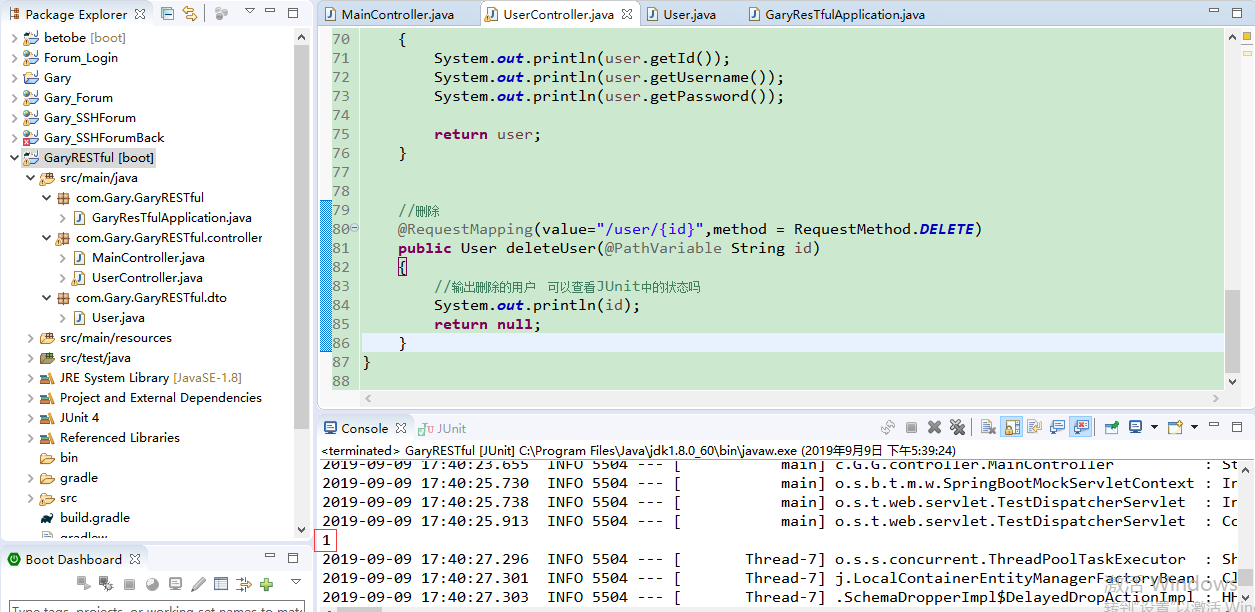
在UserController.java中接收来自deleteUser的请求
    @RequestMapping(value="/user/{id}",method = RequestMethod.DELETE)

    public User deleteUser(@PathVariable String id)

    {

        System.out.println(id);

        return null;

    }
package com.Gary.GaryRESTful;

import org.springframework.boot.SpringApplication;

import org.springframework.boot.autoconfigure.SpringBootApplication;

@SpringBootApplication

public class GaryResTfulApplication {

    public static void main(String[] args) {

        SpringApplication.run(GaryResTfulApplication.class, args);

    }

}
GaryResTfulApplication.java
package com.Gary.GaryRESTful.controller;

import org.junit.Before;

import org.junit.Test;

import org.junit.runner.RunWith;

import org.springframework.beans.factory.annotation.Autowired;

import org.springframework.boot.test.context.SpringBootTest;

import org.springframework.http.MediaType;

import org.springframework.test.context.junit4.SpringRunner;

import org.springframework.test.web.servlet.MockMvc;

import org.springframework.test.web.servlet.request.MockMvcRequestBuilders;

import org.springframework.test.web.servlet.result.MockMvcResultMatchers;

import org.springframework.test.web.servlet.setup.MockMvcBuilders;

import org.springframework.web.context.WebApplicationContext;

//这是SpringBoot测试类

@RunWith(SpringRunner.class)

@SpringBootTest

public class MainController {

        @Autowired

        private WebApplicationContext webApplicationContext;

        //SpringMV单元测试独立测试类

        private MockMvc mockMvc;

        @Before

        public void before()

        {

            //创建独立测试类

            mockMvc = MockMvcBuilders.webAppContextSetup(webApplicationContext).build();

        }

        //@Test

        //查询user

        public void test() throws Exception

        {

            //发起一个Get请求

            String str = mockMvc.perform(MockMvcRequestBuilders.get("/user")

                    .param("username", "Gary")

                        //json的形式发送一个请求

                        .contentType(MediaType.APPLICATION_JSON_UTF8))

                        //期望服务器返回什么(期望返回的状态码为200)

                        .andExpect(MockMvcResultMatchers.status().isOk())

                        //期望服务器返回json中的数组长度为3

                        .andExpect(MockMvcResultMatchers.jsonPath("$.length()").value(3))

                        .andReturn().getResponse().getContentAsString();

            System.out.println("查询简单试图"+str);

        }

        //@Test

        public void getInfo() throws Exception

        {

            //发起一个get请求,查看用户详情

            String str = mockMvc.perform(MockMvcRequestBuilders.get("/user/1")

                    .contentType(MediaType.APPLICATION_JSON_UTF8))

                    .andExpect(MockMvcResultMatchers.status().isOk())

                    .andExpect(MockMvcResultMatchers.jsonPath("$.username").value("Gary"))

                    .andReturn().getResponse().getContentAsString();

            System.out.println("查询复杂试图"+str);

        }

        //添加用户

        //@Test

        public void addUser() throws Exception

        {

            mockMvc.perform(MockMvcRequestBuilders.post("/user")

                    .contentType(MediaType.APPLICATION_JSON_UTF8)

                    .content("{\"username\":\"Gary\"}"))

                    .andExpect(MockMvcResultMatchers.status().isOk())

                    .andExpect(MockMvcResultMatchers.jsonPath("$.id").value("1"));

        }

        //修改用户

        //@Test

        public void updataUser() throws Exception

        {

            mockMvc.perform(MockMvcRequestBuilders.put("/user/1")

                    .contentType(MediaType.APPLICATION_JSON_UTF8)

                    .content("{\"username\":\"Garyary\",\"id\":\"1\"}"))

            .andExpect(MockMvcResultMatchers.status().isOk())

            .andExpect(MockMvcResultMatchers.jsonPath("$.id").value("1"));

        }

        //删除用户

        @Test

        public void deleteUser() throws Exception

        {

            mockMvc.perform(MockMvcRequestBuilders.delete("/user/1")

                    .contentType(MediaType.APPLICATION_JSON_UTF8))

                    .andExpect(MockMvcResultMatchers.status().isOk());

        }

}
MainController.java
package com.Gary.GaryRESTful.controller;

import java.util.ArrayList;

import java.util.List;

import org.junit.Test;

import org.springframework.web.bind.annotation.PathVariable;

import org.springframework.web.bind.annotation.PutMapping;

import org.springframework.web.bind.annotation.RequestBody;

import org.springframework.web.bind.annotation.RequestMapping;

import org.springframework.web.bind.annotation.RequestMethod;

import org.springframework.web.bind.annotation.RequestParam;

import org.springframework.web.bind.annotation.RestController;

import com.Gary.GaryRESTful.dto.User;

import com.fasterxml.jackson.annotation.JsonView;

//表示这个Controller提供R二十天API

@RestController

public class UserController {

    @RequestMapping(value="/user",method = RequestMethod.GET)

    /*

     * default value     默认

     * name             请求的名字

     * required            是否是必须的,true

     * value            别名

     *

     * */

    @JsonView(User.UserSimpleView.class)

    public List<User> query(@RequestParam(name="username",required=false) String username)

    {

        System.out.println(username);

        //满足期望服务器返回json中的数组长度为3

        List<User> list = new ArrayList<>();

        list.add(new User());

        list.add(new User());

        list.add(new User());

        return list;

    }

    @RequestMapping(value="/user/{id}",method= RequestMethod.GET)

    //将@PathVariable路径中的片段映射到java代码中

    @JsonView(User.UserDetailView.class)

    public User getInfo(@PathVariable String id)

    {

        User user = new User();

        user.setUsername("Gary");

        return user;

    }

    @RequestMapping(value="/user",method= RequestMethod.POST)

    public User addUser(@RequestBody User user)

    {

        //传输json格式的时候,一定要记得加上@RequestBody注解

        //输出 null

        System.out.println(user.getPassword());

        //输出 Gary

        System.out.println(user.getUsername());

        user.setId("1");

        return user;

    }

    //修改用户资料

    @RequestMapping(value="/user/{id}",method = RequestMethod.PUT)

    public User updataUser(@RequestBody User user)

    {

        System.out.println(user.getId());

        System.out.println(user.getUsername());

        System.out.println(user.getPassword());

        return user;

    }

    //删除

    @RequestMapping(value="/user/{id}",method = RequestMethod.DELETE)

    public User deleteUser(@PathVariable String id)

    {

        //输出删除的用户    可以查看JUnit中的状态吗

        System.out.println(id);

        return null;

    }

}
UserController.java
package com.Gary.GaryRESTful.dto;

import com.fasterxml.jackson.annotation.JsonView;

public class User {

    //简单试图 只有一个username

    public interface UserSimpleView{};

    //复杂试图 有username 和   password

    public interface UserDetailView extends UserSimpleView{};

    private String username;

    private String password;

    private String id;

    @JsonView(UserSimpleView.class)

    public String getId() {

        return id;

    }

    public void setId(String id) {

        this.id = id;

    }

    @JsonView(UserSimpleView.class)

    public String getUsername() {

        return username;

    }

    public void setUsername(String username) {

        this.username = username;

    }

    @JsonView(UserDetailView.class)

    public String getPassword() {

        return password;

    }

    public void setPassword(String password) {

        this.password = password;

    }

}
User.java
在UserController.java中通过@RequestMapping("/user")映射来处理所有user请求,使代码变得简介一些
package com.Gary.GaryRESTful.controller;

import java.util.ArrayList;

import java.util.List;

import org.junit.Test;

import org.springframework.web.bind.annotation.DeleteMapping;

import org.springframework.web.bind.annotation.GetMapping;

import org.springframework.web.bind.annotation.PathVariable;

import org.springframework.web.bind.annotation.PostMapping;

import org.springframework.web.bind.annotation.PutMapping;

import org.springframework.web.bind.annotation.RequestBody;

import org.springframework.web.bind.annotation.RequestMapping;

import org.springframework.web.bind.annotation.RequestMethod;

import org.springframework.web.bind.annotation.RequestParam;

import org.springframework.web.bind.annotation.RestController;

import com.Gary.GaryRESTful.dto.User;

import com.fasterxml.jackson.annotation.JsonView;

//表示这个Controller提供R二十天API

@RestController

@RequestMapping("/user")

public class UserController {

    //@RequestMapping(value="/user",method = RequestMethod.GET)

    /*

     * default value     默认

     * name             请求的名字

     * required            是否是必须的,true

     * value            别名

     *

     * */

    @GetMapping

    @JsonView(User.UserSimpleView.class)

    public List<User> query(@RequestParam(name="username",required=false) String username)

    {

        System.out.println(username);

        //满足期望服务器返回json中的数组长度为3

        List<User> list = new ArrayList<>();

        list.add(new User());

        list.add(new User());

        list.add(new User());

        return list;

    }

    //@RequestMapping(value="/user/{id}",method= RequestMethod.GET)

    //将@PathVariable路径中的片段映射到java代码中

    @GetMapping("/{id}")

    @JsonView(User.UserDetailView.class)

    public User getInfo(@PathVariable String id)

    {

        User user = new User();

        user.setUsername("Gary");

        return user;

    }

    //添加用户

    //@RequestMapping(value="/user",method= RequestMethod.POST)

    @PostMapping

    public User addUser(@RequestBody User user)

    {

        //传输json格式的时候,一定要记得加上@RequestBody注解

        //输出 null

        System.out.println(user.getPassword());

        //输出 Gary

        System.out.println(user.getUsername());

        user.setId("1");

        return user;

    }

    //修改用户资料

    //@RequestMapping(value="/user/{id}",method = RequestMethod.PUT)

    @PutMapping("/{id}")

    public User updataUser(@RequestBody User user)

    {

        System.out.println(user.getId());

        System.out.println(user.getUsername());

        System.out.println(user.getPassword());

        return user;

    }

    //删除

    //@RequestMapping(value="/user/{id}",method = RequestMethod.DELETE)

    @DeleteMapping("/{id}")

    public User deleteUser(@PathVariable String id)

    {

        //输出删除的用户    可以查看JUnit中的状态吗

        System.out.println(id);

        return null;

    }

}
UserController.java
四、SpringBoot默认处理异常路径
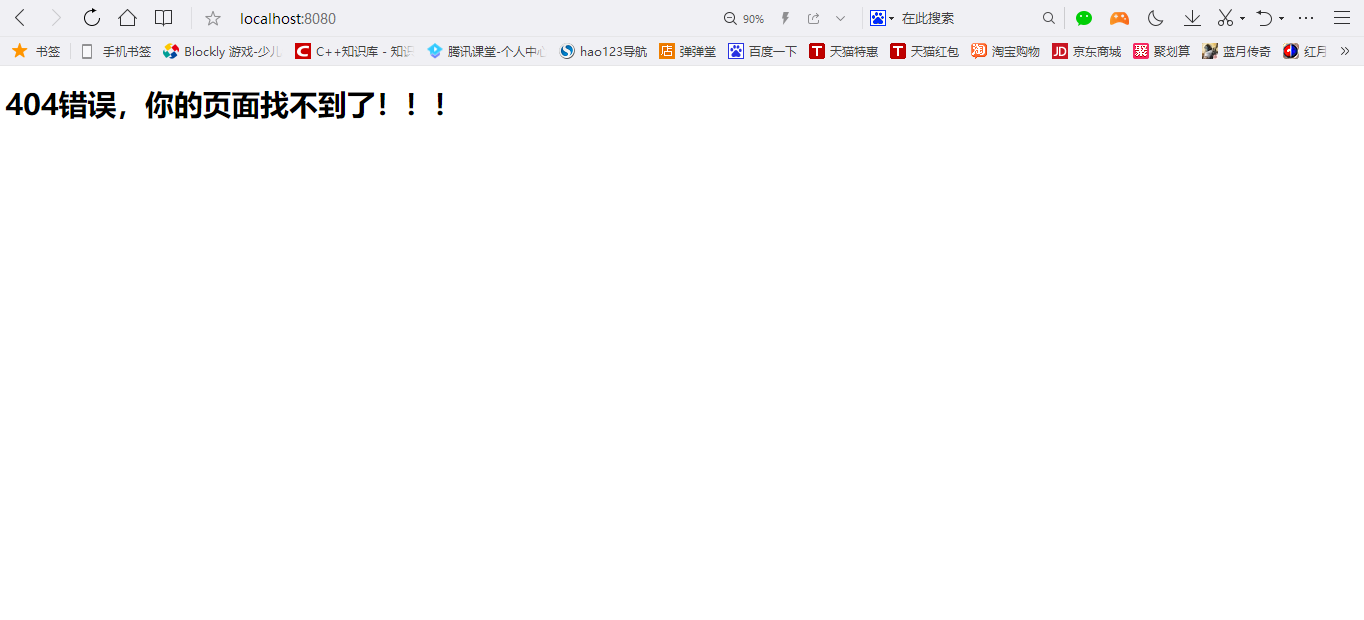
在项目static->error目录下创建一个404.html,运行项目

<!DOCTYPE html>

<html>

<head>

<meta charset="UTF-8">

<title>404页面</title>

</head>

<body>

<h1>404错误,你的页面找不到了!!!</h1>

</body>

</html>
404.html
JavaWeb-RESTful(三)_使用SpringMVC开发RESTful_下的更多相关文章
- JavaWeb-RESTful(二)_使用SpringMVC开发RESTful_上
JavaWeb-RESTful(一)_RESTful初认识 传送门 JavaWeb-RESTful(二)_使用SpringMVC开发RESTful_上 传送门 JavaWeb-RESTful(三)_使 ...
- javaweb基础(21)_两种开发模式
SUN公司推出JSP技术后,同时也推荐了两种web应用程序的开发模式,一种是JSP+JavaBean模式,一种是Servlet+JSP+JavaBean模式. 一.JSP+JavaBean开发模式 1 ...
- SpringMVC开发手册
title: SpringMvc -- 开发手册 date: 2018-11-15 22:14:22 tags: SpringMvc categories: SpringMvc #分类名 type: ...
- webService学习之路(三):springMVC集成CXF后调用已知的wsdl接口
webService学习之路一:讲解了通过传统方式怎么发布及调用webservice webService学习之路二:讲解了SpringMVC和CXF的集成及快速发布webservice 本篇文章将讲 ...
- 20145337实验三实验报告——敏捷开发与XP实践
20145337实验三实验报告--敏捷开发与XP实践 实验名称 敏捷开发与XP实践 实验内容 XP基础 XP核心实践 相关工具 ** 实验步骤**### 敏捷开发与XP 软件工程包括下列领域:软件需求 ...
- Spring-MVC开发步骤(入门配置)
Spring-MVC开发步骤(入门配置) Step1.导包 spring-webmvc Step2.添加spring配置文件 Step3.配置DispatcherServlet 在web.xml中: ...
- 前端工程化(三)---Vue的开发模式
从0开始,构建前后端分离应用 导航 前端工程化(一)---工程基础目录搭建 前端工程化(二)---webpack配置 前端工程化(三)---Vue的开发模式 前端工程化(四)---helloWord ...
- 20172310 2017-2018-2 《程序设计与数据结构》实验三报告(敏捷开发与XP实践)
20172310 2017-2018-2 <程序设计与数据结构>实验三报告(敏捷开发与XP实践) 课程:<程序设计与数据结构> 班级: 1723 姓名: 仇夏 学号:20172 ...
- C#_02.13_基础三_.NET类基础
C#_02.13_基础三_.NET类基础 一.类概述: 类是一个能存储数据和功能并执行代码的数据结构,包含数据成员和函数成员.(有什么和能够干什么) 运行中的程序是一组相互作用的对象的集合. 二.为类 ...
随机推荐
- NYOJ 石子合并(一) 区间dp入门级别
描述 有N堆石子排成一排,每堆石子有一定的数量.现要将N堆石子并成为一堆.合并的过程只能每次将相邻的两堆石子堆成一堆,每次合并花费的代价为这两堆石子的和,经过N-1次合并后成为一堆.求出总的代价 ...
- 搭建自己的框架WedeNet(二)
WedeNet2018.Infrastructure-基础设施层:结构如下: Tools结构如下: 考虑到系统可能会有多个数据上下文(暂时以两个为例),所以根据需要定义两个T4模板用来生成对应的ent ...
- 【题解】codevs 3044 矩形面积合并
传送门 3044 矩形面积求并 时间限制: 1 s 空间限制: 256000 KB 题目等级 : 钻石 Diamond 题目描述 Description 输入n个矩形,求他们总共占地面积(也就是求一下 ...
- centos7安装nginx服务
Nginx发音引擎x是一个免费的开源高性能HTTP和反向代理服务器,负责处理互联网上一些最大的网站的负载. 本教程将教你如何在你的CentOS Linux 7.5机器上安装和管理Nginx. 安装Ng ...
- vue2.0关于for循环 index的使用方法
<!DOCTYPE html> <html> <head> <title>for循环</title> </head> <b ...
- git commit报错解决,绕过代码检查
上一个项目用的svn,新项目用了git,很开心,终于学习了git了,本以为把git都学会了,但是还是遇到了一个不在自己学习的知识点范围内的问题,最后是同事帮忙解决的. 问题:第一次代码commit的时 ...
- vue+ element 动态换肤
转至 https://www.cnblogs.com/dengqichang/p/10364455.html 一.搭建好项目的环境. 二.根据ElementUI官网的自定义主题(http://elem ...
- 【Java】 BIO与NIO以及AIO分析
一.BIO与NIO以及AIO的概念 BIO是同步阻塞式的IO NIO是同步非阻塞的IO (NIO1.0,JDK1.4) AIO是非同步非阻塞的IO(NIO2.0,JDK1.7) 二.BIO简单分析 1 ...
- go语言入门(1)
1,Go语言的核心开发团队-三个大牛 Ken Thompson(肯·汤普森):1983年图灵奖(Turing Award)和1998年美国国家技术奖(National Medal of Technol ...
- shell脚本中使用nohup执行命令不生效
1 例如 !#/bin/bash nohup echo "hello world" 2 解决办法 加上 source /etc/profile 就好了 !#/bin/bash so ...