
Flutter移动电商实战 --(34)列表页_小BUG的修复
当高粱酒的子类没有数据返回的时候就会报错。

解决接口空数据报错的问题

没有数据的时候,给用户一个友好的提示,
我们没有数据的时候还要告诉用户,提示一下他没有数据,在我们的右侧列表的build方法内去判断
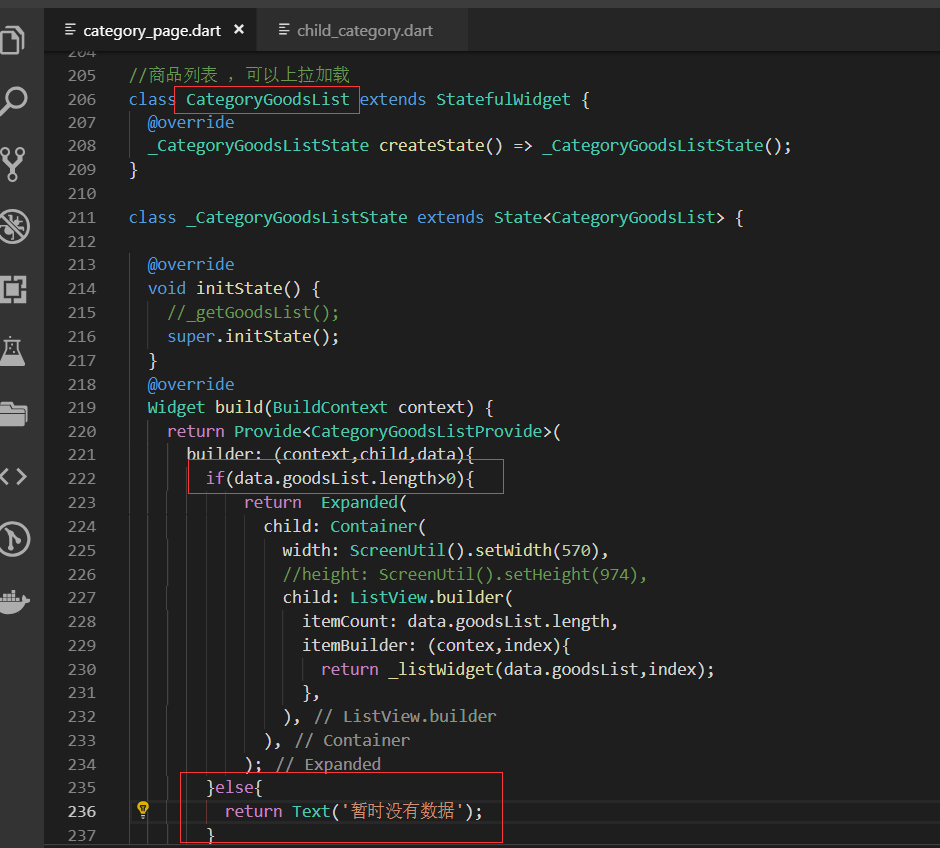
友好提示展示效果:

子类的id状态化
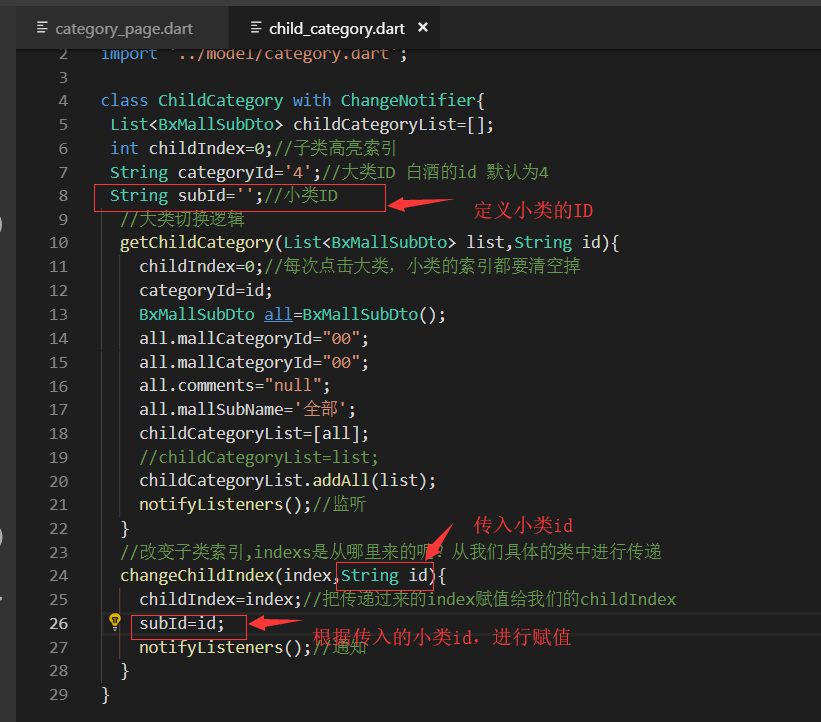
状态管理里面,定义小类的变量,并根据传入的id根性赋值。这样我们在点击小类的时候,需要也传入小类的id
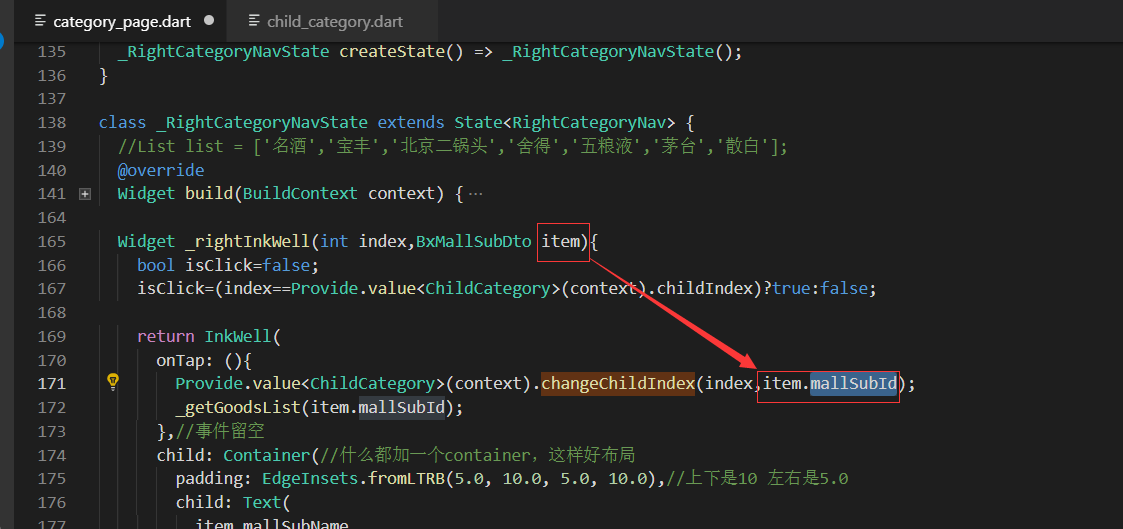
这样我们在小类点击事件里面,传入小类的id就可以了
测试程序
点击小类进行测试

最终代码:
provide/child_category.dart
import 'package:flutter/material.dart';

import '../model/category.dart';

class ChildCategory with ChangeNotifier{

 List<BxMallSubDto> childCategoryList=[];

 int childIndex=0;//子类高亮索引

 String categoryId='4';//大类ID 白酒的id 默认为4

 String subId='';//小类ID

  //大类切换逻辑

  getChildCategory(List<BxMallSubDto> list,String id){

    childIndex=0;//每次点击大类,小类的索引都要清空掉

    categoryId=id;

    BxMallSubDto all=BxMallSubDto();

    all.mallCategoryId="00";

    all.mallCategoryId="00";

    all.comments="null";

    all.mallSubName='全部';

    childCategoryList=[all];

    //childCategoryList=list;

    childCategoryList.addAll(list);

    notifyListeners();//监听

  }

  //改变子类索引,indexs是从哪里来的呢?从我们具体的类中进行传递

  changeChildIndex(index,String id){

    childIndex=index;//把传递过来的index赋值给我们的childIndex

    subId=id;

    notifyListeners();//通知

  }

}
pages/category_page.dart
import 'package:flutter/material.dart';

import '../service/service_method.dart';

import 'dart:convert';

import '../model/category.dart';

import '../model/categoryGoodsList.dart';

import 'package:flutter_screenutil/flutter_screenutil.dart';

import 'package:provide/provide.dart';

import '../provide/child_category.dart';

import '../provide/category_goods_list.dart';

class CategoryPage extends StatefulWidget {

  @override

  _CategoryPageState createState() => _CategoryPageState();

}

class _CategoryPageState extends State<CategoryPage> {

  @override

  Widget build(BuildContext context) {

    //_getCategory();

    return Scaffold(

      appBar: AppBar(title: Text('商品分类'),),

      body: Container(

        child: Row(

          children: <Widget>[

            LeftCategoryNav(),

            Column(

              children: <Widget>[

                RightCategoryNav(),

                CategoryGoodsList()

              ],

            )

          ],

        ),

      ),

    );

  }

}

//左侧大类导航

class LeftCategoryNav extends StatefulWidget {

  @override

  _LeftCategoryNavState createState() => _LeftCategoryNavState();

}

class _LeftCategoryNavState extends State<LeftCategoryNav> {

  List list=[];

  var listIndex=0;

  @override

  void initState() {

    super.initState();

    _getCategory();//请求接口的数据

    _getGoodsList();//参数是可选的默认是4 所以这里可以不用传值

  }

  @override

  Widget build(BuildContext context) {

    return Container(

      width: ScreenUtil().setWidth(180),

      decoration: BoxDecoration(

        border: Border(

          right: BorderSide(width:1.0,color: Colors.black12),//有边框

        )

      ),

      child: ListView.builder(

        itemCount: list.length,

        itemBuilder: (contex,index){

          return _leftInkWell(index);

        },

      ),

    );

  }

  Widget _leftInkWell(int index){

    bool isClick=false;

    isClick=(index==listIndex)?true:false;

    return InkWell(

      onTap: (){

        setState(() {

         listIndex=index;

        });

        var childList=list[index].bxMallSubDto;//当前大类的子类的列表

        var categoryId=list[index].mallCategoryId;//大类的id

        Provide.value<ChildCategory>(context).getChildCategory(childList,categoryId);

        _getGoodsList(categoryId:categoryId);

      },

      child: Container(

        height: ScreenUtil().setHeight(100),

        padding: EdgeInsets.only(left:10.0,top:10.0),

        decoration: BoxDecoration(

          color: isClick?Color.fromRGBO(236, 236, 236, 1.0): Colors.white,

          border: Border(

            bottom: BorderSide(width: 1.0,color: Colors.black12)

          )

        ),

        child: Text(

          list[index].mallCategoryName,

          style: TextStyle(fontSize: ScreenUtil().setSp(28)),//设置字体大小,为了兼容使用setSp

        ),

      ),

    );

  }

   void _getCategory() async{

    await request('getCategory').then((val){

      var data=json.decode(val.toString());

      //print(data);

      CategoryModel category= CategoryModel.fromJson(data);

      setState(() {

       list=category.data;

      });

      Provide.value<ChildCategory>(context).getChildCategory(list[0].bxMallSubDto,list[0].mallCategoryId);

    });

  }

  void _getGoodsList({String categoryId}) {

    var data={

      'categoryId':categoryId==null?'4':categoryId,//白酒的默认类别

      'categorySubId':"",

      'page':1

    };

    request('getMallGoods',formData: data).then((val){

      var data=json.decode(val.toString());

      CategoryGoodsListModel goodsList=CategoryGoodsListModel.fromJson(data);//这样就从json'转换成了model类

      //print('>>>>>>>>>>>>>>>>>>>>>>>>>>>>>:${goodsList.data[0].goodsName}');

      // setState(() {

      //  list=goodsList.data;

      // });

      Provide.value<CategoryGoodsListProvide>(context).getGoodsList(goodsList.data);

    });

  }

}

class RightCategoryNav extends StatefulWidget {

  @override

  _RightCategoryNavState createState() => _RightCategoryNavState();

}

class _RightCategoryNavState extends State<RightCategoryNav> {

  //List list = ['名酒','宝丰','北京二锅头','舍得','五粮液','茅台','散白'];

  @override

  Widget build(BuildContext context) {

    return Provide<ChildCategory>(

      builder: (context,child,childCategory){

        return  Container(

          height: ScreenUtil().setHeight(80),

          width: ScreenUtil().setWidth(570),//总的宽度是750 -180

          decoration: BoxDecoration(

            color: Colors.white,//白色背景

            border: Border(

              bottom: BorderSide(width: 1.0,color: Colors.black12)//边界线

            )

          ),

          child: ListView.builder(

            scrollDirection: Axis.horizontal,

            itemCount: childCategory.childCategoryList.length,

            itemBuilder: (context,index){

              return _rightInkWell(index,childCategory.childCategoryList[index]);

            },

          ),

        );

      }

    );

  }

  Widget _rightInkWell(int index,BxMallSubDto item){

    bool isClick=false;

    isClick=(index==Provide.value<ChildCategory>(context).childIndex)?true:false;

    return InkWell(

      onTap: (){

        Provide.value<ChildCategory>(context).changeChildIndex(index,item.mallSubId);

        _getGoodsList(item.mallSubId);

      },//事件留空

      child: Container(//什么都加一个container,这样好布局

        padding: EdgeInsets.fromLTRB(5.0, 10.0, 5.0, 10.0),//上下是10 左右是5.0

        child: Text(

          item.mallSubName,

          style:TextStyle(

            fontSize: ScreenUtil().setSp(28),

            color: isClick?Colors.pink:Colors.black

          ),

        ),

      ),

    );

  }

  void _getGoodsList(String categorySubId) {

    var data={

      'categoryId':Provide.value<ChildCategory>(context).categoryId,//大类ID

      'categorySubId':categorySubId,

      'page':1

    };

    request('getMallGoods',formData: data).then((val){

      var data=json.decode(val.toString());

      CategoryGoodsListModel goodsList=CategoryGoodsListModel.fromJson(data);//这样就从json'转换成了model类

      if(goodsList.data==null){

        Provide.value<CategoryGoodsListProvide>(context).getGoodsList([]);

      }else{

        Provide.value<CategoryGoodsListProvide>(context).getGoodsList(goodsList.data);

      }

    });

  }

}

//商品列表 ,可以上拉加载

class CategoryGoodsList extends StatefulWidget {

  @override

  _CategoryGoodsListState createState() => _CategoryGoodsListState();

}

class _CategoryGoodsListState extends State<CategoryGoodsList> {

  @override

  void initState() {

    //_getGoodsList();

    super.initState();

  }

  @override

  Widget build(BuildContext context) {

    return Provide<CategoryGoodsListProvide>(

      builder: (context,child,data){

        if(data.goodsList.length>0){

            return  Expanded(

              child: Container(

                width: ScreenUtil().setWidth(570),

                //height: ScreenUtil().setHeight(974),

                child: ListView.builder(

                  itemCount: data.goodsList.length,

                  itemBuilder: (contex,index){

                    return _listWidget(data.goodsList,index);

                  },

                ),

              ),

            );

        }else{

          return Text('暂时没有数据');

        }

      },

    );

  }

  Widget _goodsImage(List newList,index){

    return Container(

      width: ScreenUtil().setWidth(200),//设置200的宽度 限制

      child: Image.network(newList[index].image),

    );

  }

  Widget _goodsName(List newList,index){

    return Container(

      padding: EdgeInsets.all(5.0),//上下左右都是5.0的内边距

      width: ScreenUtil().setWidth(370),//370是一个大约的值

      child: Text(

        newList[index].goodsName,

        maxLines: 2,//最多显示2行内容

        overflow: TextOverflow.ellipsis,

        style: TextStyle(fontSize: ScreenUtil().setSp(28)),//字体大小

      ),

    );

  }

  Widget _goodsPrice(List newList,index){

    return Container(

      margin: EdgeInsets.only(top:20.0),//和上面的外间距

      width: ScreenUtil().setWidth(370),//370是一个大约的值

      child: Row(

        children: <Widget>[

          Text(

            '价格¥${newList[index].presentPrice}',

            style: TextStyle(color: Colors.pink,fontSize: ScreenUtil().setSp(30)),

          ),

          Text(

            '价格¥${newList[index].oriPrice}',

            style: TextStyle(

              color: Colors.black26,

              decoration: TextDecoration.lineThrough

            ),//删除线的样式

          )

        ],

      ),

    );

  }

  Widget _listWidget(List newList,int index){

    return InkWell(

      onTap: (){},

      child: Container(

        padding: EdgeInsets.only(top:5.0,bottom:5.0),

        decoration: BoxDecoration(

          color: Colors.white,

          border: Border(

            bottom: BorderSide(width: 1.0,color: Colors.black12)

          )

        ),

        child: Row(

          children: <Widget>[

            _goodsImage(newList,index),

            Column(

              children: <Widget>[

                _goodsName(newList,index),

                _goodsPrice(newList,index)

              ],

            )

          ],

        ),

      ),

    );

  }

}
.
Flutter移动电商实战 --(34)列表页_小BUG的修复的更多相关文章
- Flutter实战视频-移动电商-34.列表页_小BUG的修复
34.列表页_小BUG的修复 当高粱酒的子类没有数据返回的时候就会报错. 解决接口空数据报错的问题 没有数据的时候,给用户一个友好的提示, 我们没有数据的时候还要告诉用户,提示一下他没有数据,在我们的 ...
- Flutter实战视频-移动电商-27.列表页_现有Bug修复和完善
27.列表页_现有Bug修复和完善 小解决小bug 默认右侧的小类没有被加载 数据加载完成后,就list的第一个子对象传递给provide进行赋值,这样右侧的小类就刷新了数据 默认加载了第一个类别 调 ...
- Flutter实战视频-移动电商-32.列表页_小类高亮交互效果制作
32.列表页_小类高亮交互效果制作 点击大类右侧的横向的小类红色显示当前的小类别 解决之前溢出的问题: 先解决一个bug,之前右侧的这里设置的高度是1000,但是有不同的虚拟机和手机设别的问题造成了溢 ...
- Flutter移动电商实战 --(28)列表页_商品列表后台接口调试
主要调试商品列表页的接口 这个接口是最难的因为有大类.小类还有上拉加载 先配置接口 config/service_url.dart //const serviceUrl='http://test.ba ...
- Flutter移动电商实战 --(27)列表页_现有Bug修复和完善
小解决小bug 默认右侧的小类没有被加载 数据加载完成后,就list的第一个子对象传递给provide进行赋值,这样右侧的小类就刷新了数据 默认加载了第一个类别 调整颜色 对比图片调整下颜色 这里的参 ...
- Flutter移动电商实战 --(40)路由_Fluro的全局注入和使用方法
路由注册到顶层,使每个页面都可以使用,注册到顶层就需要在main.dart中 main.dart注册路由 注入 onGenerateRoute是MaterialApp自带的路由配置项, 首页跳转到详细 ...
- Flutter移动电商实战 --(35)列表页_上拉加载更多制作
右侧列表上拉加载配合类别的切换 上拉加载需要一个page参数,当点击大类或者小类的时候,这个page就要变成1 provide内定义参数 首先我们需要定义一个page的变量 下图是我们之前在首页的时候 ...
- Flutter移动电商实战 --(33)列表页_子类和商品列表交互效果
主要实现点击小类下面的列表跟着切换 获取右侧下面的列表信息,即要传递大类的id也要传递小类的,所以需要把左侧的大类的id也要Provide化 可以看下网站上的接口说明: https://jspang. ...
- Flutter移动电商实战 --(32)列表页_小类高亮交互效果制作
点击大类右侧的横向的小类红色显示当前的小类别 解决之前溢出的问题: 先解决一个bug,之前右侧的这里设置的高度是1000,但是有不同的虚拟机和手机设别的问题造成了溢出的问题 Expaned是有伸缩能力 ...
随机推荐
- 5.Redis的持久化
Redis中数据的持久化有两种方式:RDB(Redis DataBsse) 和 AOF(Append Only File),默认采取的是RDB方式 RDB 1.是什么:在指定的时间间隔内将内存中的数据 ...
- 03 WIndows编程——手绘函数调用过程
源码 #include<Windows.h> #include<stdio.h> int MessageBoxPrint(char *szFormat, ...); int W ...
- win10+CPU+Python3.6下安装pytorch
- 写在前面 最近,学习之余,想继续搞以前的深度学习.虽然电脑上已经安装配置好tensorflow,但是鉴于其学习难度较高,且我是一个忠实的Pythoner(爱所有Python化的东西),因此果断入坑 ...
- Octave(控制语句)
for循环遍历 >> v = zeros(,) v = >> v() ans = >> :, v(i) = ^i; end; >> v v = 或者: ...
- net.exe和net1.exe的区别&联系.
system32文件夹下有一个net.exe和net1.exe,一般做渗透的时候,很多情况下管理员只知道删除net.exe而遗漏net1.exe,导致我们能继续do evil..... 一直没弄明白它 ...
- nomn文件分析
#encoding=gbk import os import re import math from os import path ''' 手动输入文件nmon文件路径,要截取的开始时间,结束时间 ' ...
- NLP学习(1)---Glove模型---词向量模型
一.简介: 1.概念:glove是一种无监督的Word representation方法. Count-based模型,如GloVe,本质上是对共现矩阵进行降维.首先,构建一个词汇的共现矩阵,每一行是 ...
- centos6.5下cacti部署说明
一.Cacti简介 1. cacti是用php语言实现的一个软件,它的主要功能是用snmp服务获取数据,然后用rrdtool储存和更新数据,当用户需要查看数据的时候用rrdtool生成图表呈现给用户. ...
- i p _ i n s e r t o p t i o n s函数
i p _ o u t p u t函数接收一个分组和选项.当 i p _ f o r w a r d调用该函数时,选项已经是分组的一部分,所以 i p _ f o r w a r d总是把一个空选项指 ...
- 关于EZDML数据库表结构制作设计工具使用踩的坑
我使用的是一款EZDML的数据库表结构制作设计工具 最开始在数据库创建数据库名为personalmall,基字符集为默认,数据库排序规则也是默认,创建完成之后 去EZDML生成SQL 点击执行sql ...