
Flutter移动电商实战 --(27)列表页_现有Bug修复和完善
小解决小bug
默认右侧的小类没有被加载
数据加载完成后,就list的第一个子对象传递给provide进行赋值,这样右侧的小类就刷新了数据

默认加载了第一个类别

调整颜色
对比图片调整下颜色

这里的参数r:就是red红色
g:green绿色
b:blue蓝色
opacity:就是透明度

最终修改成颜色:
Color.fromRGBO(236, 236, 236, 1.0)

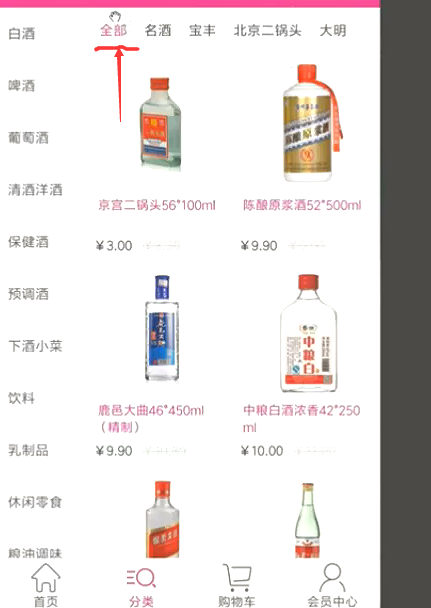
全部
点击类别的时候默认有一个全部,我们的数据里面默认是没有这个全部的。这就需要我们自己把这个子类加上
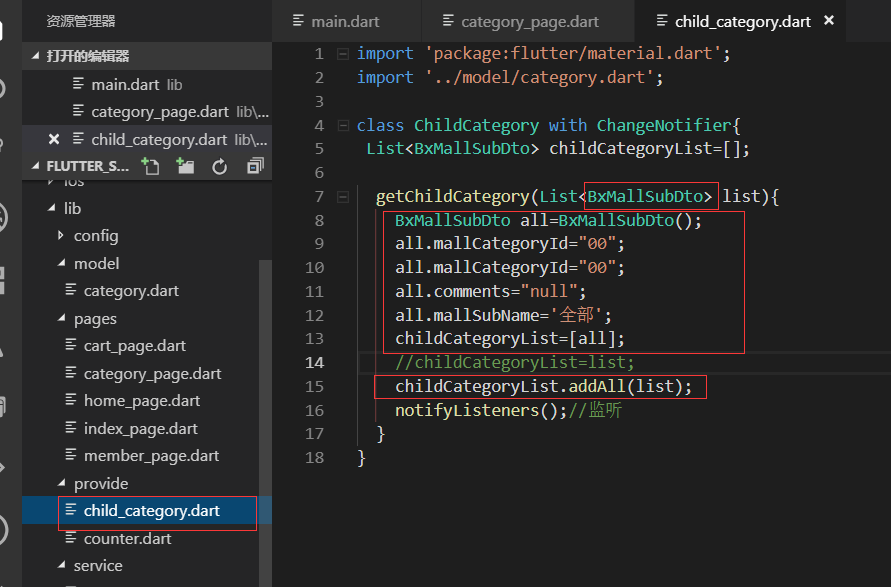
我们在Provide的类里面去实现。先声明一个BxMallSubDto的实体,然后字段都赋值,加入到childCategoryList里面。
最后childCategoryList再把传递过来的list也加上值
这样我们的全部的效果就出来了

最终代码:
category_page.dart
import 'package:flutter/material.dart';

import '../service/service_method.dart';

import 'dart:convert';

import '../model/category.dart';

import 'package:flutter_screenutil/flutter_screenutil.dart';

import 'package:provide/provide.dart';

import '../provide/child_category.dart';

class CategoryPage extends StatefulWidget {

  @override

  _CategoryPageState createState() => _CategoryPageState();

}

class _CategoryPageState extends State<CategoryPage> {

  @override

  Widget build(BuildContext context) {

    //_getCategory();

    return Scaffold(

      appBar: AppBar(title: Text('商品分类'),),

      body: Container(

        child: Row(

          children: <Widget>[

            LeftCategoryNav(),

            Column(

              children: <Widget>[

                RightCategoryNav()

              ],

            )

          ],

        ),

      ),

    );

  }

}

//左侧大类导航

class LeftCategoryNav extends StatefulWidget {

  @override

  _LeftCategoryNavState createState() => _LeftCategoryNavState();

}

class _LeftCategoryNavState extends State<LeftCategoryNav> {

  List list=[];

  var listIndex=0;

  @override

  void initState() {

    super.initState();

    _getCategory();//请求接口的数据

  }

  @override

  Widget build(BuildContext context) {

    return Container(

      width: ScreenUtil().setWidth(180),

      decoration: BoxDecoration(

        border: Border(

          right: BorderSide(width:1.0,color: Colors.black12),//有边框

        )

      ),

      child: ListView.builder(

        itemCount: list.length,

        itemBuilder: (contex,index){

          return _leftInkWell(index);

        },

      ),

    );

  }

  Widget _leftInkWell(int index){

    bool isClick=false;

    isClick=(index==listIndex)?true:false;

    return InkWell(

      onTap: (){

        setState(() {

         listIndex=index;

        });

        var childList=list[index].bxMallSubDto;//当前大类的子类的列表

        Provide.value<ChildCategory>(context).getChildCategory(childList);

      },

      child: Container(

        height: ScreenUtil().setHeight(100),

        padding: EdgeInsets.only(left:10.0,top:10.0),

        decoration: BoxDecoration(

          color: isClick?Color.fromRGBO(236, 236, 236, 1.0): Colors.white,

          border: Border(

            bottom: BorderSide(width: 1.0,color: Colors.black12)

          )

        ),

        child: Text(

          list[index].mallCategoryName,

          style: TextStyle(fontSize: ScreenUtil().setSp(28)),//设置字体大小,为了兼容使用setSp

        ),

      ),

    );

  }

   void _getCategory() async{

    await request('getCategory').then((val){

      var data=json.decode(val.toString());

      //print(data);

      CategoryModel category= CategoryModel.fromJson(data);

      setState(() {

       list=category.data;

      });

      Provide.value<ChildCategory>(context).getChildCategory(list[0].bxMallSubDto);

    });

  }

}

class RightCategoryNav extends StatefulWidget {

  @override

  _RightCategoryNavState createState() => _RightCategoryNavState();

}

class _RightCategoryNavState extends State<RightCategoryNav> {

  //List list = ['名酒','宝丰','北京二锅头','舍得','五粮液','茅台','散白'];

  @override

  Widget build(BuildContext context) {

    return Provide<ChildCategory>(

      builder: (context,child,childCategory){

        return  Container(

          height: ScreenUtil().setHeight(80),

          width: ScreenUtil().setWidth(570),//总的宽度是750 -180

          decoration: BoxDecoration(

            color: Colors.white,//白色背景

            border: Border(

              bottom: BorderSide(width: 1.0,color: Colors.black12)//边界线

            )

          ),

          child: ListView.builder(

            scrollDirection: Axis.horizontal,

            itemCount: childCategory.childCategoryList.length,

            itemBuilder: (context,index){

              return _rightInkWell(childCategory.childCategoryList[index]);

            },

          ),

        );

      }

    );

  }

  Widget _rightInkWell(BxMallSubDto item){

    return InkWell(

      onTap: (){},//事件留空

      child: Container(//什么都加一个container,这样好布局

        padding: EdgeInsets.fromLTRB(5.0, 10.0, 5.0, 10.0),//上下是10 左右是5.0

        child: Text(

          item.mallSubName,

          style:TextStyle(fontSize: ScreenUtil().setSp(28)),

        ),

      ),

    );

  }

}
provide/child_category.dart
import 'package:flutter/material.dart';

import '../model/category.dart';

class ChildCategory with ChangeNotifier{

 List<BxMallSubDto> childCategoryList=[];

  getChildCategory(List<BxMallSubDto> list){

    BxMallSubDto all=BxMallSubDto();

    all.mallCategoryId="00";

    all.mallCategoryId="00";

    all.comments="null";

    all.mallSubName='全部';

    childCategoryList=[all];

    //childCategoryList=list;

    childCategoryList.addAll(list);

    notifyListeners();//监听

  }

}
.
Flutter移动电商实战 --(27)列表页_现有Bug修复和完善的更多相关文章
- Flutter实战视频-移动电商-27.列表页_现有Bug修复和完善
27.列表页_现有Bug修复和完善 小解决小bug 默认右侧的小类没有被加载 数据加载完成后,就list的第一个子对象传递给provide进行赋值,这样右侧的小类就刷新了数据 默认加载了第一个类别 调 ...
- Flutter实战视频-移动电商-34.列表页_小BUG的修复
34.列表页_小BUG的修复 当高粱酒的子类没有数据返回的时候就会报错. 解决接口空数据报错的问题 没有数据的时候,给用户一个友好的提示, 我们没有数据的时候还要告诉用户,提示一下他没有数据,在我们的 ...
- Flutter移动电商实战 --(28)列表页_商品列表后台接口调试
主要调试商品列表页的接口 这个接口是最难的因为有大类.小类还有上拉加载 先配置接口 config/service_url.dart //const serviceUrl='http://test.ba ...
- Flutter移动电商实战 --(40)路由_Fluro的全局注入和使用方法
路由注册到顶层,使每个页面都可以使用,注册到顶层就需要在main.dart中 main.dart注册路由 注入 onGenerateRoute是MaterialApp自带的路由配置项, 首页跳转到详细 ...
- Flutter移动电商实战 --(35)列表页_上拉加载更多制作
右侧列表上拉加载配合类别的切换 上拉加载需要一个page参数,当点击大类或者小类的时候,这个page就要变成1 provide内定义参数 首先我们需要定义一个page的变量 下图是我们之前在首页的时候 ...
- Flutter移动电商实战 --(34)列表页_小BUG的修复
当高粱酒的子类没有数据返回的时候就会报错. 解决接口空数据报错的问题 没有数据的时候,给用户一个友好的提示, 我们没有数据的时候还要告诉用户,提示一下他没有数据,在我们的右侧列表的build方法内去判 ...
- Flutter移动电商实战 --(33)列表页_子类和商品列表交互效果
主要实现点击小类下面的列表跟着切换 获取右侧下面的列表信息,即要传递大类的id也要传递小类的,所以需要把左侧的大类的id也要Provide化 可以看下网站上的接口说明: https://jspang. ...
- Flutter移动电商实战 --(32)列表页_小类高亮交互效果制作
点击大类右侧的横向的小类红色显示当前的小类别 解决之前溢出的问题: 先解决一个bug,之前右侧的这里设置的高度是1000,但是有不同的虚拟机和手机设别的问题造成了溢出的问题 Expaned是有伸缩能力 ...
- Flutter移动电商实战 --(31)列表页_列表切换交互制作
点击左侧的大类右边的小类也跟着变化 新建provide 要改变哪里就建哪里的provide,我们现在要改变的是右边的商品列表的数组. category_goods_list.dart 这样我们的pro ...
随机推荐
- Missing Push Notification Entitlement解决方法
原委 最近提交APP到Apple Store审核,结果很快就收到Apple很"贴心"的邮件.原文如下: Dear developer, We have discovered one ...
- Python实现MATLAB中的 bwlabel函数
最近做验证码识别,原本用MATLAB已经实现的整个识别模型,不过代码要部署在Linux服务器上还是需要用另外的语言实现,于是决定用Python + OpenCV来实现. bwlabel函数的作用是检测 ...
- clipboard兼容各个浏览器,不需要设置权限
解决方案:用clipboard.js插件 注意要引用clipboard.js文件 案例: 将文本赋值给剪切板 <button class="btn">Copy</ ...
- vscode 使用ESLint 自动检查,保存时自动格式化
1:全局安装eslint `npm install -g eslint`2: 打开vscode 点击 “文件”----->“首选项”---->“设置”,在右侧“用户设置/settings. ...
- 第五章、Celery分布式系统
Celery 官方 Celery 官网:http://www.celeryproject.org/ Celery 官方文档英文版:http://docs.celeryproject.org/en/la ...
- 使用了frame的页面如何整体进行跳转,而不是仅frame跳转
使用了frame的页面如何整体进行跳转,而不是仅frame跳转 js window.parent.location.href="你的地址"; php echo "&quo ...
- c#系统预定义类型
- rsync 应用总结
rysnc server端 1.vim /etcrsyncd.conf (用户rsync,目录,模块,非系统虚拟用户及密码文件) 2.创建共享目录 /data/www/{www,bbs,blog} 3 ...
- FreeRTOS调度器
FreeRTOS----调度器 调度器的启动流程分析 当创建完任务之后,会调用vTaskStartScheduler()函数,启动任务调度器: void vTaskStartScheduler( vo ...
- C#单元测试小例子
步骤简略,特别处进行说明. 以VS2015为例. 1.创建一个解决方案方案,如添加一个ConsoleApplication1的解决方案. 2.在解决方案的默认项目中,添加一个Calc类 3.将Calc ...