
VUE-练习
作业一:有红黄蓝三个按钮,以及一个200*200矩形box,点击不同按钮,box的颜色会被切换为指定的颜色
<!DOCTYPE html>
<html lang="en">
<head>
    <meta charset="UTF-8">
    <title></title>
    <script src="https://cdn.bootcss.com/jquery/3.4.1/jquery.min.js"></script>
</head>
<body>
<div id="app">

    <div :style="div_style"></div>
    <div>
        <button v-on:click="changeColor('red')">{{ red }}</button>
        <button v-on:click="changeColor('yellow')">{{ yellow }}</button>
        <button v-on:click="changeColor('blue')">{{ blue }}</button>
    </div>
</div>

</body>
<script src="Vue/vue.js"></script>
<script>
    var app = new Vue({
        el: '#app',
        data: {
            div_style: {
                width: "200px",
                height: "200px",
                backgroundColor: "black"
            },
            red: '点击变红',
            yellow: '点击变黄',
            blue: '点击变蓝',
        },
        methods: {
            changeColor(c) {
                this.div_style.backgroundColor = c;
            }
        }
    })
</script>
</html>
作业二:有一个200*200的矩形wrap框,点击wrap本身,记录点击次数,如果是1次wrap为pink色,2次wrap为green,3次warp为cyan色,4次重新回到pink色,一次类推。
<!DOCTYPE html><html lang="en"><head>    <meta charset="UTF-8">    <title>Title</title>    <style>        .wrap{            width: 200px;            height: 200px;            color: white;            font: bold 50px/200px 'STSong';            text-align: center;            user-select: none;        }    </style></head><body><div id="app">    <div class="wrap" @click="actionFn" :style="{backgroundColor:bgColor}">{{content}}</div></div></body><script src="js/vue.js"></script><script>    new Vue({        el:'#app',        data:{            content:0,            bgColor:'black',            colorArr:['cyan','pink','green'],        },        methods:{            actionFn(){                this.content ++;                this.bgColor=this.colorArr[this.content % 3]            }        }    })

</script>

</html>
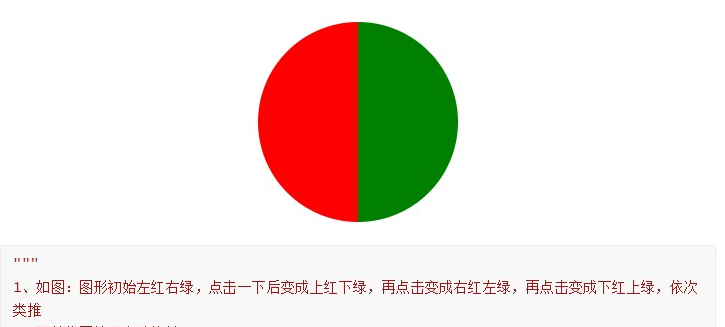
作业三:
<!DOCTYPE html>
<html lang="en">
<head>
    <meta charset="UTF-8">
    <title>Title</title>
    <style>
        .wrap {
            border: 3px solid black;
            width: 200px;
            height: 200px;
            border-radius: 50%;
            overflow: hidden;
            margin: 50px auto 0;
            position: relative;
        }

        .red, .green {
            width: 100px;
            height: 200px;
            position: absolute;
        }

        .red {
            background-color: red;
        }

        .green {
            background-color: green;
        }

        .l {
            width: 100px;
            height: 200px;
            left: 0;
        }

        .t {
            width: 200px;
            height: 100px;
            top: 0;
        }

        .r {
            width: 100px;
            height: 200px;
            right: 0;
        }

        .b {
            width: 200px;
            height: 100px;
            bottom: 0;
        }
    </style>
</head>
<body>
<div id="app">
    <div class="wrap" @click="actionFn">
        <div class="red" :class="red_class"></div>
        <div class="green" :class="green_class"></div>
        <div></div>
    </div>
</div>
</body>
<script src="js/vue.js"></script>
<script>
    new Vue({
        el: '#app',
        data: {
            count: 0,
            red_class: 'l',
            green_class: 'r',
            red_attr: ['l', 't', 'r', 'b'],
            green_attr: ['r', 'b', 'l', 't'],
        },
        methods: {
            actionFn() {
                this.count ++;
                this.red_class = this.red_attr[this.count % 4];
                this.green_class = this.green_attr[this.count % 4];
            }
        }
    })

</script>
</html>
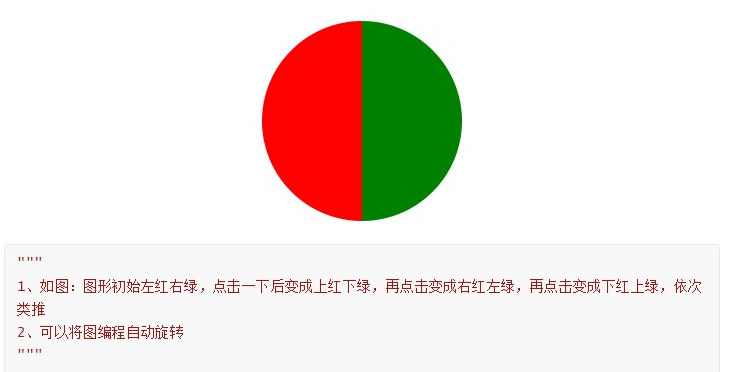
第三题的第二问:
<!DOCTYPE html>
<html lang="en">
<head>
    <meta charset="UTF-8">
    <title>Title</title>
</head>
<body>

<div id="app">
    <form action="" style="margin: 20px;">
        <p @click="tag" :style="{width: w,height: h, background: bgc, borderRadius:rad}"></p>
    </form>
</div>

</body>
<script src="Vue/vue.js"></script>
<script>
    let num = 0;
    let app = new Vue({
        el:'#app',
        data:{
            h: '200px',
            w: '200px',
            bgc: 'linear-gradient(to top, red 50%, green 50%)',  //实现页面的过度(颜色)
            rad: '50%'
            },
        methods:{
            tag () {
                num += 1;
                if (num==1){
                    this.bgc = 'linear-gradient(to top, red 50%, green 50%)' // 控制方向
                }else {if (num==2){
                    this.bgc = 'linear-gradient(to left, red 50%, green 50%)'
                }else {if (num==3) {
                    this.bgc = 'linear-gradient(to bottom,red  50%, green 50%)'
                }else {
                    this.bgc = 'linear-gradient(to right, red 50%, green 50%)';
                    num = 0
                }
                }}
            }
        }
    });
    function funcTest(){
    window.setInterval(app.tag,500);  // 按照指定的周期(以毫秒计)来调用函数
}
    window.onload = funcTest;  // 页面加载完直接调用 该方法
</script>
</html>
VUE-练习的更多相关文章
- Vue.js 和 MVVM 小细节
MVVM 是Model-View-ViewModel 的缩写,它是一种基于前端开发的架构模式,其核心是提供对View 和 ViewModel 的双向数据绑定,这使得ViewModel 的状态改变可以自 ...
- wepack+sass+vue 入门教程(三)
十一.安装sass文件转换为css需要的相关依赖包 npm install --save-dev sass-loader style-loader css-loader loader的作用是辅助web ...
- wepack+sass+vue 入门教程(二)
六.新建webpack配置文件 webpack.config.js 文件整体框架内容如下,后续会详细说明每个配置项的配置 webpack.config.js直接放在项目demo目录下 module.e ...
- wepack+sass+vue 入门教程(一)
一.安装node.js node.js是基础,必须先安装.而且最新版的node.js,已经集成了npm. 下载地址 node安装,一路按默认即可. 二.全局安装webpack npm install ...
- Vue + Webpack + Vue-loader 系列教程(2)相关配置篇
原文地址:https://lvyongbo.gitbooks.io/vue-loader/content/ 使用预处理器 在 Webpack 中,所有的预处理器需要和一个相应的加载器一同使用.vue- ...
- Vue + Webpack + Vue-loader 系列教程(1)功能介绍篇
原文地址:https://lvyongbo.gitbooks.io/vue-loader/content/ Vue-loader 是什么? vue-loader 是一个加载器,能把如下格式的 Vue ...
- 关于Vue.js 2.0 的 Vuex 2.0,你需要更新的知识库
应用结构 实际上,Vuex 在怎么组织你的代码结构上面没有任何限制,相反,它强制规定了一系列高级的原则: 应用级的状态集中放在 store 中. 改变状态的唯一方式是提交mutations,这是个同步 ...
- Vue.js 2.0 和 React、Augular等其他框架的全方位对比
引言 这个页面无疑是最难编写的,但也是非常重要的.或许你遇到了一些问题并且先前用其他的框架解决了.来这里的目的是看看Vue是否有更好的解决方案.那么你就来对了. 客观来说,作为核心团队成员,显然我们会 ...
- 窥探Vue.js 2.0 - Virtual DOM到底是个什么鬼?
引言 你可能听说在Vue.js 2.0已经发布,并且在其中新添加如了一些新功能.其中一个功能就是"Virtual DOM". Virtual DOM是什么 在之前,React和Em ...
- 初探Vue
Vue.js(读音/vju:/,类似于view),是近来比较火的前端框架,但一直没有怎么具体了解.实现过,就知道个啥的MVVM啦,数据驱动啦,等这些关于Vue的虚概念. 由于最近,小生在公司中,负责开 ...
随机推荐
- struts框架之环境搭建(一)
一.首先,我们需要做一些准备工作: 1.1. 下载struts:https://struts.apache.org/download.cgi#struts2520 1.2. 下载tomcat:ht ...
- linux各种IPC机制
docker中的资源隔离,一种就是IPC的隔离.IPC是进程间通信. 下面的文章转载自https://blog.csdn.net/yyq_9623/article/details/78794775 原 ...
- Redis(1.1)linux下安装redis
一.常见安装方式 [0]环境 OS:CentOS7.5 Redis:4.0.14 yum源:本地源 [1]检查安装 gcc 依赖环境 gcc -v#如果没安装会报错类似于 command not fi ...
- zookeeper安装 配置集群
zookeeper下载 http://zookeeper.apache.org/releases.html. 解压 重命名 新建data log两个文件夹配置单个启动 tar -xvf zookeep ...
- pg_ctl — 启动、停止、重启 PostgreSQL
pg_ctl 名称 pg_ctl -- 启动.停止.重启 PostgreSQL 语法 pg_ctl start [-w] [-s] [-D datadir] [-l filename] [-o opt ...
- ZOOKEEPER进阶
集群个数: 2n+1,因为集群当宕机大于等于二分之一的机子时,集群选举会失败.故 2n+1台机器和3n台机器可靠性相同 Leader的作用: 为了实现各个节点数据的一致性,需要一个负责协调数据同步的操 ...
- 弹窗插件 layer
官方网站 http://layer.layui.com/ Github 地址 https://github.com/sentsin/layer //在这里面输入任何合法的js语句 layer.open ...
- gperftools cpp wrapper
gperftools cpp wrapper // Compile command : ${CXX} -o test_profiler.elf -DUSE_GPERFTOOLS -DDEBUG -D_ ...
- 如何为 esp32 编译和配置及烧写 MicroPython 固件。
MicroPython 在 esp-idf (esp32) 上编译固件 esp32 编译 micropython 的固件相关的资料应该很多吧,我也会出一篇,但会额外讲一些 linux 的东西的. 资料 ...
- Hive SQL查询效率提升之Analyze方案的实施
0.简介 Analyze,分析表(也称为计算统计信息)是一种内置的Hive操作,可以执行该操作来收集表上的元数据信息.这可以极大的改善表上的查询时间,因为它收集构成表中数据的行计数,文件计数和文件大小 ...