
vue中引入Tinymce富文本编辑器
中文文档地址:http://tinymce.ax-z.cn/configure/integration-and-setup.php
最近想在项目上引入一个富文本编辑器,之前引入过summernote,感觉并不太适合vue使用,
然后在网上查了查,vue中使用Tinymce比较适合,
首先,我们在vue项目的components文件夹中加入如下几个文件
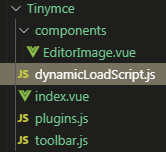
首先看一下Tinymce/dynamicLoadScript.js的内容:
let callbacks = []

function loadedTinymce() {

  // to fixed https://github.com/PanJiaChen/vue-element-admin/issues/2144

  // check is successfully downloaded script

  return window.tinymce

}

const dynamicLoadScript = (src, callback) => {

  const existingScript = document.getElementById(src)

  const cb = callback || function() {}

  if (!existingScript) {

    const script = document.createElement('script')

    script.src = src // src url for the third-party library being loaded.

    script.id = src

    document.body.appendChild(script)

    callbacks.push(cb)

    const onEnd = 'onload' in script ? stdOnEnd : ieOnEnd

    onEnd(script)

  }

  if (existingScript && cb) {

    if (loadedTinymce()) {

      cb(null, existingScript)

    } else {

      callbacks.push(cb)

    }

  }

  function stdOnEnd(script) {

    script.onload = function() {

      // this.onload = null here is necessary

      // because even IE9 works not like others

      this.onerror = this.onload = null

      for (const cb of callbacks) {

        cb(null, script)

      }

      callbacks = null

    }

    script.onerror = function() {

      this.onerror = this.onload = null

      cb(new Error('Failed to load ' + src), script)

    }

  }

  function ieOnEnd(script) {

    script.onreadystatechange = function() {

      if (this.readyState !== 'complete' && this.readyState !== 'loaded') return

      this.onreadystatechange = null

      for (const cb of callbacks) {

        cb(null, script) // there is no way to catch loading errors in IE8

      }

      callbacks = null

    }

  }

}

export default dynamicLoadScript
再来看一下Tinymce/components/EditorImage.vue中的内容
<template>

  <div class="upload-container">

    <el-button :style="{background:color,borderColor:color}" icon="el-icon-upload" size="mini" type="primary" @click=" dialogVisible=true">

      upload

    </el-button>

    <el-dialog :visible.sync="dialogVisible">

      <el-upload

        :multiple="true"

        :file-list="fileList"

        :show-file-list="true"

        :on-remove="handleRemove"

        :on-success="handleSuccess"

        :before-upload="beforeUpload"

        class="editor-slide-upload"

        action="https://httpbin.org/post"

        list-type="picture-card"

      >

        <el-button size="small" type="primary">

          Click upload

        </el-button>

      </el-upload>

      <el-button @click="dialogVisible = false">

        Cancel

      </el-button>

      <el-button type="primary" @click="handleSubmit">

        Confirm

      </el-button>

    </el-dialog>

  </div>

</template>

<script>

// import { getToken } from 'api/qiniu'

export default {

  name: 'EditorSlideUpload',

  props: {

    color: {

      type: String,

      default: '#1890ff'

    }

  },

  data() {

    return {

      dialogVisible: false,

      listObj: {},

      fileList: []

    }

  },

  methods: {

    checkAllSuccess() {

      return Object.keys(this.listObj).every(item => this.listObj[item].hasSuccess)

    },

    handleSubmit() {

      const arr = Object.keys(this.listObj).map(v => this.listObj[v])

      if (!this.checkAllSuccess()) {

        this.$message('Please wait for all images to be uploaded successfully. If there is a network problem, please refresh the page and upload again!')

        return

      }

      this.$emit('successCBK', arr)

      this.listObj = {}

      this.fileList = []

      this.dialogVisible = false

    },

    handleSuccess(response, file) {

      const uid = file.uid

      const objKeyArr = Object.keys(this.listObj)

      for (let i = 0, len = objKeyArr.length; i < len; i++) {

        if (this.listObj[objKeyArr[i]].uid === uid) {

          this.listObj[objKeyArr[i]].url = response.files.file

          this.listObj[objKeyArr[i]].hasSuccess = true

          return

        }

      }

    },

    handleRemove(file) {

      const uid = file.uid

      const objKeyArr = Object.keys(this.listObj)

      for (let i = 0, len = objKeyArr.length; i < len; i++) {

        if (this.listObj[objKeyArr[i]].uid === uid) {

          delete this.listObj[objKeyArr[i]]

          return

        }

      }

    },

    beforeUpload(file) {

      const _self = this

      const _URL = window.URL || window.webkitURL

      const fileName = file.uid

      this.listObj[fileName] = {}

      return new Promise((resolve, reject) => {

        const img = new Image()

        img.src = _URL.createObjectURL(file)

        img.onload = function() {

          _self.listObj[fileName] = { hasSuccess: false, uid: file.uid, width: this.width, height: this.height }

        }

        resolve(true)

      })

    }

  }

}

</script>

<style lang="scss" scoped>

.editor-slide-upload {

  margin-bottom: 20px;

  /deep/ .el-upload--picture-card {

    width: 100%;

  }

}

</style>
Tinymce/plugins.js中的内容:
// Any plugins you want to use has to be imported

// Detail plugins list see https://www.tinymce.com/docs/plugins/

// Custom builds see https://www.tinymce.com/download/custom-builds/

const plugins = ['advlist anchor autolink autosave code codesample colorpicker colorpicker contextmenu directionality emoticons fullscreen hr image imagetools insertdatetime link lists media nonbreaking noneditable pagebreak paste preview print save searchreplace spellchecker tabfocus table template textcolor textpattern visualblocks visualchars wordcount']

export default plugins
Tinymce/toolbar.js的内容:
// Here is a list of the toolbar

// Detail list see https://www.tinymce.com/docs/advanced/editor-control-identifiers/#toolbarcontrols

const toolbar = ['searchreplace bold fontsizeselect italic underline strikethrough alignleft aligncenter alignright outdent indent  blockquote undo redo removeformat subscript superscript code codesample', 'hr bullist numlist link image charmap preview anchor pagebreak insertdatetime media table emoticons forecolor backcolor fullscreen']

export default toolbar
在看看Tinymce/index.vue中的内容:
<template>
<div :class="{fullscreen:fullscreen}" class="tinymce-container" :style="{width:containerWidth}">
<textarea :id="tinymceId" class="tinymce-textarea" />
<!-- <div class="editor-custom-btn-container">
<editorImage color="#1890ff" class="editor-upload-btn" @successCBK="imageSuccessCBK" />
</div> -->
</div>
</template> <script>
/**
* docs:
* https://panjiachen.github.io/vue-element-admin-site/feature/component/rich-editor.html#tinymce
*/
import editorImage from './components/EditorImage'
import plugins from './plugins'
import toolbar from './toolbar'
import load from './dynamicLoadScript' // why use this cdn, detail see https://github.com/PanJiaChen/tinymce-all-in-one
const tinymceCDN = 'https://cdn.jsdelivr.net/npm/tinymce-all-in-one@4.9.3/tinymce.min.js' export default {
name: 'Tinymce',
components: { editorImage },
props: {
id: {
type: String,
default: function() {
return 'vue-tinymce-' + +new Date() + ((Math.random() * 1000).toFixed(0) + '')
}
},
value: {
type: String,
default: ''
},
toolbar: {
type: Array,
required: false,
default() {
return []
}
},
menubar: {
type: String,
default: 'file edit insert view format table'
},
height: {
type: [Number, String],
required: false,
default: 360
},
width: {
type: [Number, String],
required: false,
default: 'auto'
}
},
data() {
return {
hasChange: false,
hasInit: false,
tinymceId: this.id,
fullscreen: false,
languageTypeList: {
'en': 'en',
'zh': 'zh_CN',
'es': 'es_MX',
'ja': 'ja'
}
}
},
computed: {
containerWidth() {
const width = this.width
if (/^[\d]+(\.[\d]+)?$/.test(width)) { // matches `100`, `'100'`
return `${width}px`
}
return width
}
},
watch: {
value(val) {
if (!this.hasChange && this.hasInit) {
this.$nextTick(() =>
window.tinymce.get(this.tinymceId).setContent(val || ''))
}
}
},
mounted() {
this.init()
},
activated() {
if (window.tinymce) {
this.initTinymce()
}
},
deactivated() {
this.destroyTinymce()
},
destroyed() {
this.destroyTinymce()
},
methods: {
init() {
// dynamic load tinymce from cdn
load(tinymceCDN, (err) => {
if (err) {
this.$message.error(err.message)
return
}
this.initTinymce()
})
},
initTinymce() {
const _this = this
window.tinymce.init({
selector: `#${this.tinymceId}`,
language: this.languageTypeList['zh'],
height: this.height,
body_class: 'panel-body ',
object_resizing: false,
toolbar: this.toolbar.length > 0 ? this.toolbar : toolbar,
menubar: this.menubar,
plugins: plugins,
end_container_on_empty_block: true,
powerpaste_word_import: 'clean',
code_dialog_height: 450,
code_dialog_width: 1000,
advlist_bullet_styles: 'square',
advlist_number_styles: 'default',
imagetools_cors_hosts: ['www.tinymce.com', 'codepen.io'],
default_link_target: '_blank',
link_title: false,
nonbreaking_force_tab: true, // inserting nonbreaking space need Nonbreaking Space Plugin
init_instance_callback: editor => {
if (_this.value) {
editor.setContent(_this.value)
}
_this.hasInit = true
editor.on('NodeChange Change KeyUp SetContent', () => {
this.hasChange = true
this.$emit('input', editor.getContent())
})
},
setup(editor) {
editor.on('FullscreenStateChanged', (e) => {
_this.fullscreen = e.state
})
}
// 整合七牛上传
// images_dataimg_filter(img) {
// setTimeout(() => {
// const $image = $(img);
// $image.removeAttr('width');
// $image.removeAttr('height');
// if ($image[0].height && $image[0].width) {
// $image.attr('data-wscntype', 'image');
// $image.attr('data-wscnh', $image[0].height);
// $image.attr('data-wscnw', $image[0].width);
// $image.addClass('wscnph');
// }
// }, 0);
// return img
// },
// images_upload_handler(blobInfo, success, failure, progress) {
// progress(0);
// const token = _this.$store.getters.token;
// getToken(token).then(response => {
// const url = response.data.qiniu_url;
// const formData = new FormData();
// formData.append('token', response.data.qiniu_token);
// formData.append('key', response.data.qiniu_key);
// formData.append('file', blobInfo.blob(), url);
// upload(formData).then(() => {
// success(url);
// progress(100);
// })
// }).catch(err => {
// failure('出现未知问题,刷新页面,或者联系程序员')
// console.log(err);
// });
// },
})
},
destroyTinymce() {
const tinymce = window.tinymce.get(this.tinymceId)
if (this.fullscreen) {
tinymce.execCommand('mceFullScreen')
} if (tinymce) {
tinymce.destroy()
}
},
setContent(value) {
window.tinymce.get(this.tinymceId).setContent(value)
},
getContent() {
window.tinymce.get(this.tinymceId).getContent()
},
imageSuccessCBK(arr) {
const _this = this
arr.forEach(v => {
window.tinymce.get(_this.tinymceId).insertContent(`<img class="wscnph" src="${v.url}" >`)
})
}
}
}
</script> <style scoped>
.tinymce-container {
position: relative;
line-height: normal;
}
.tinymce-container>>>.mce-fullscreen {
z-index: 10000;
}
.tinymce-textarea {
visibility: hidden;
z-index: -1;
}
.editor-custom-btn-container {
position: absolute;
right: 4px;
top: 4px;
/*z-index: 2005;*/
}
.fullscreen .editor-custom-btn-container {
z-index: 10000;
position: fixed;
}
.editor-upload-btn {
display: inline-block;
}
</style>
最后,在需要引入的页面内引入;
<template>

  <div >

    <tinymce v-model="content" :height="300" />

  </div>

</template>

<script>

import Tinymce from '@/components/Tinymce'

export default {

  components:{

    Tinymce

  }

</script>
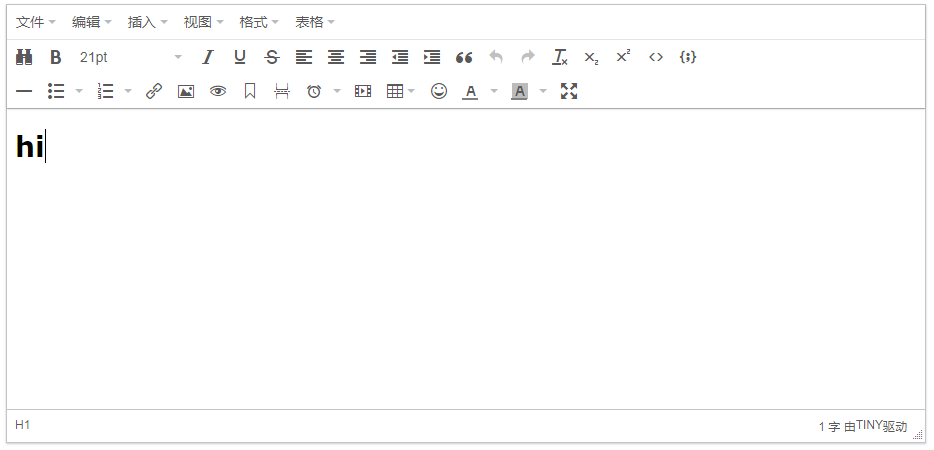
效果:
vue中引入Tinymce富文本编辑器的更多相关文章
- 在 Vue 项目中引入 tinymce 富文本编辑器
项目中原本使用的富文本编辑器是 wangEditor,这是一个很轻量.简洁编辑器 但是公司的业务升级,想要一个功能更全面的编辑器,我找了好久,目前常见的编辑器有这些: UEditor:百度前端的开源项 ...
- Vue 中使用UEditor富文本编辑器-亲测可用-vue-ueditor-wrap
其中UEditor中也存在不少错误,再引用过程中. 但是UEditor相对还是比较好用的一个富文本编辑器. vue-ueditor-wrap说明 Vue + UEditor + v-model 双向绑 ...
- vue中使用kindeditor富文本编辑器
1.去官网下载kindeditor 2.将其放在一个名为kindeditor的文件夹里,并且将它放在vue里的static文件夹下 3.创建kindeditor.vue <template> ...
- vue中使用kindeditor富文本编辑器2
第一步,下载依赖 yarn add kindeditor 第二步,建立kindeditor.vue组件 <template> <div class="kindeditor& ...
- django的admin或者应用中使用KindEditor富文本编辑器
由于django后台管理没有富文本编辑器,看着好丑,展示出来的页面不美观,无法做到所见即所得的编辑方式,所以我们需要引入第三方富文本编辑器. 之前找了好多文档已经博客才把这个功能做出来,有些博客虽然写 ...
- Vue集成tinymce富文本编辑器并实现本地化指南(2019.11.21最新)
tinymce是一款综合口碑特别好.功能异常强大的富文本编辑器,在某些网站,甚至享有"宇宙最强富文本编辑器"的称号.那么,在Vue项目中如何集成呢?这并不困难,只需要参照官方教程 ...
- Vue.js中使用wangEditor富文本编辑器
1.前端代码 前端HTML <script src="https://cdn.bootcss.com/wangEditor/10.0.13/wangEditor.js"> ...
- vue集成百度UEditor富文本编辑器
在前端开发的项目中.难免会遇到需要在页面上集成一个富文本编辑器.那么.如果你有这个需求.希望可以帮助到你 vue是前端开发者所追捧的框架,简单易上手,但是基于vue的富文本编辑器大多数太过于精简.于是 ...
- springboot中使用kindeditor富文本编辑器实现博客功能
kindeditor在之前已经用过,现在在springboot项目中使用.并且也在里面使用了图片上传以及回显等功能. 其实主要的功能是图片的处理:kindeditor对输入的内容会作为html标签处理 ...
随机推荐
- NRF52832 Mesh调试,使其同时支持串口打印和RTT打印
查看开发环境里面,是否有这个文件,如果没有你的话,则添加文件. 然后要在sdk_config.h中添加使能 然后打开刚才添加的文件retarget.c,主意里面这些地方 这里它进行判断,要么使用RTT ...
- Thinkphp中的assign() 和 display()
说到 $this->assign() 与 $this->display()想必用过TP框架的都不陌生,那么今天我们就来说说他们的作用及其他用法. 先说 $this->assign( ...
- 读取普通java web项目下的WEB-INF目录下的配置文件(application.xml,xx.properties等配置文件)
一.在Java web工程WEB-INF下创建weixin.properties属性文件 weixin.properties属性文件里内容如下: 二.创建PropertiesUtils.java测试类 ...
- Traceback (most recent call last): File "../zubax_chibios/tools/make_boot_descriptor.py", line 251
出现如下错误: Traceback (most recent call last): File "../zubax_chibios/tools/make_boot_descriptor.py ...
- django_rest framework 接口开发(一)
1 restful 规范(建议) 基于FbV def order(request): if request.method=="GET": return HttpResponse(' ...
- pandas 25 式
英文版 Jupyter Notebook 链接:https://nbviewer.jupyter.org/github/justmarkham/pandas-videos/blob/master/to ...
- Git Git 已被其他开发删除的远程分支,本地依旧显示,如何删除?
- python之迭代器、生成器及列表推导式
一.迭代器 迭代器就是迭代的工具,迭代是一个重复的过程,每次重复都是一次迭代并且每次迭代的结果都是下次迭代的初始值. lst=[1,2,3,4,5] count=0 while count<le ...
- Python-共享引用
A会改变么? 下面三小段代码,A的值都会改变么? >>> A = "spam" >>> B = A >>> B = " ...
- windows 数据备份
xcopy 数据目录 备份目录 /e /c /q /h /r /y at 00:00 /every:M,T,W,Th,F,S,Su d:\批处理文件名