
vue中使用kindeditor富文本编辑器2
第一步,下载依赖
yarn add kindeditor
第二步,建立kindeditor.vue组件
<template>

  <div class="kindeditor">

    <textarea :id="id" name="content" v-model="outContent"></textarea>

  </div>

</template>

<script>

import '../../node_modules/kindeditor/kindeditor-all.js'

import '../../node_modules/kindeditor/lang/zh-CN.js'

import '../../node_modules/kindeditor/themes/default/default.css'

export default {

  name: 'kindeditor',

  data () {

    return {

      editor: null,

      outContent: this.content

    }

  },

  props: {

    content: {

      type: String,

      default: ''

    },

    id: {

      type: String,

      required: true

    },

    width: {

      type: String

    },

    height: {

      type: String

    },

    minWidth: {

      type: Number,

      default: 650

    },

    minHeight: {

      type: Number,

      default: 100

    },

    items: {

      type: Array,

      default: function () {

        return [

          'source', '|', 'undo', 'redo', '|', 'preview', 'print', 'template', 'code', 'cut', 'copy', 'paste',

          'plainpaste', 'wordpaste', '|', 'justifyleft', 'justifycenter', 'justifyright',

          'justifyfull', 'insertorderedlist', 'insertunorderedlist', 'indent', 'outdent', 'subscript',

          'superscript', 'clearhtml', 'quickformat', 'selectall', '|', 'fullscreen', '/',

          'formatblock', 'fontname', 'fontsize', '|', 'forecolor', 'hilitecolor', 'bold',

          'italic', 'underline', 'strikethrough', 'lineheight', 'removeformat', '|', 'image', 'multiimage',

          'flash', 'media', 'insertfile', 'table', 'hr', 'emoticons', 'baidumap', 'pagebreak',

          'anchor', 'link', 'unlink', '|', 'about'

        ]

      }

    },

    noDisableItems: {

      type: Array,

      default: function () {

        return ['source', 'fullscreen']

      }

    },

    filterMode: {

      type: Boolean,

      default: true

    },

    htmlTags: {

      type: Object,

      default: function () {

        return {

          font: ['color', 'size', 'face', '.background-color'],

          span: ['style'],

          div: ['class', 'align', 'style'],

          table: ['class', 'border', 'cellspacing', 'cellpadding', 'width', 'height', 'align', 'style'],

          'td,th': ['class', 'align', 'valign', 'width', 'height', 'colspan', 'rowspan', 'bgcolor', 'style'],

          a: ['class', 'href', 'target', 'name', 'style'],

          embed: ['src', 'width', 'height', 'type', 'loop', 'autostart', 'quality',

            'style', 'align', 'allowscriptaccess', '/'],

          img: ['src', 'width', 'height', 'border', 'alt', 'title', 'align', 'style', '/'],

          hr: ['class', '/'],

          br: ['/'],

          'p,ol,ul,li,blockquote,h1,h2,h3,h4,h5,h6': ['align', 'style'],

          'tbody,tr,strong,b,sub,sup,em,i,u,strike': []

        }

      }

    },

    wellFormatMode: {

      type: Boolean,

      default: true

    },

    resizeType: {

      type: Number,

      default: 2

    },

    themeType: {

      type: String,

      default: 'default'

    },

    langType: {

      type: String,

      default: 'zh-CN'

    },

    designMode: {

      type: Boolean,

      default: true

    },

    fullscreenMode: {

      type: Boolean,

      default: false

    },

    basePath: {

      type: String

    },

    themesPath: {

      type: String

    },

    pluginsPath: {

      type: String,

      default: ''

    },

    langPath: {

      type: String

    },

    minChangeSize: {

      type: Number,

      default: 5

    },

    loadStyleMode: {

      type: Boolean,

      default: true

    },

    urlType: {

      type: String,

      default: ''

    },

    newlineTag: {

      type: String,

      default: 'p'

    },

    pasteType: {

      type: Number,

      default: 2

    },

    dialogAlignType: {

      type: String,

      default: 'page'

    },

    shadowMode: {

      type: Boolean,

      default: true

    },

    zIndex: {

      type: Number,

      default: 811213

    },

    useContextmenu: {

      type: Boolean,

      default: true

    },

    syncType: {

      type: String,

      default: 'form'

    },

    indentChar: {

      type: String,

      default: '\t'

    },

    cssPath: {

      type: [ String, Array ]

    },

    cssData: {

      type: String

    },

    bodyClass: {

      type: String,

      default: 'ke-content'

    },

    colorTable: {

      type: Array

    },

    afterCreate: {

      type: Function

    },

    afterChange: {

      type: Function

    },

    afterTab: {

      type: Function

    },

    afterFocus: {

      type: Function

    },

    afterBlur: {

      type: Function

    },

    afterUpload: {

      type: Function

    },

    uploadJson: {

      type: String

    },

    fileManagerJson: {

      type: Function

    },

    allowPreviewEmoticons: {

      type: Boolean,

      default: true

    },

    allowImageUpload: {

      type: Boolean,

      default: true

    },

    allowFlashUpload: {

      type: Boolean,

      default: true

    },

    allowMediaUpload: {

      type: Boolean,

      default: true

    },

    allowFileUpload: {

      type: Boolean,

      default: true

    },

    allowFileManager: {

      type: Boolean,

      default: false

    },

    fontSizeTable: {

      type: Array,

      default: function () {

        return ['9px', '10px', '12px', '14px', '16px', '18px', '24px', '32px']

      }

    },

    imageTabIndex: {

      type: Number,

      default: 0

    },

    formatUploadUrl: {

      type: Boolean,

      default: true

    },

    fullscreenShortcut: {

      type: Boolean,

      default: false

    },

    extraFileUploadParams: {

      type: Array,

      default: function () {

        return []

      }

    },

    filePostName: {

      type: String,

      default: 'imgFile'

    },

    fillDescAfterUploadImage: {

      type: Boolean,

      default: false

    },

    afterSelectFile: {

      type: Function

    },

    pagebreakHtml: {

      type: String,

      default: '<hr style=”page-break-after: always;” class=”ke-pagebreak” />'

    },

    allowImageRemote: {

      type: Boolean,

      default: true

    },

    autoHeightMode: {

      type: Boolean,

      default: false

    },

    fixToolBar: {

      type: Boolean,

      default: false

    },

    tabIndex: {

      type: Number

    }

  },

  watch: {

    content (val) {

      this.editor && val !== this.outContent && this.editor.html(val)

    },

    outContent (val) {

      this.$emit('update:content', val)

      this.$emit('on-content-change', val)

    }

  },

  mounted () {

    var _this = this

    _this.editor = window.KindEditor.create('#' + this.id, {

      width: _this.width,

      height: _this.height,

      minWidth: _this.minWidth,

      minHeight: _this.minHeight,

      items: _this.items,

      noDisableItems: _this.noDisableItems,

      filterMode: _this.filterMode,

      htmlTags: _this.htmlTags,

      wellFormatMode: _this.wellFormatMode,

      resizeType: _this.resizeType,

      themeType: _this.themeType,

      langType: _this.langType,

      designMode: _this.designMode,

      fullscreenMode: _this.fullscreenMode,

      basePath: _this.basePath,

      themesPath: _this.cssPath,

      pluginsPath: _this.pluginsPath,

      langPath: _this.langPath,

      minChangeSize: _this.minChangeSize,

      loadStyleMode: _this.loadStyleMode,

      urlType: _this.urlType,

      newlineTag: _this.newlineTag,

      pasteType: _this.pasteType,

      dialogAlignType: _this.dialogAlignType,

      shadowMode: _this.shadowMode,

      zIndex: _this.zIndex,

      useContextmenu: _this.useContextmenu,

      syncType: _this.syncType,

      indentChar: _this.indentChar,

      cssPath: _this.cssPath,

      cssData: _this.cssData,

      bodyClass: _this.bodyClass,

      colorTable: _this.colorTable,

      afterCreate: _this.afterCreate,

      afterChange: function () {

        _this.afterChange

        _this.outContent = this.html()

      },

      afterTab: _this.afterTab,

      afterFocus: _this.afterFocus,

      afterBlur: _this.afterBlur,

      afterUpload: _this.afterUpload,

      uploadJson: _this.uploadJson,

      fileManagerJson: _this.fileManagerJson,

      allowPreviewEmoticons: _this.allowPreviewEmoticons,

      allowImageUpload: _this.allowImageUpload,

      allowFlashUpload: _this.allowFlashUpload,

      allowMediaUpload: _this.allowMediaUpload,

      allowFileUpload: _this.allowFileUpload,

      allowFileManager: _this.allowFileManager,

      fontSizeTable: _this.fontSizeTable,

      imageTabIndex: _this.imageTabIndex,

      formatUploadUrl: _this.formatUploadUrl,

      fullscreenShortcut: _this.fullscreenShortcut,

      extraFileUploadParams: _this.extraFileUploadParams,

      filePostName: _this.filePostName,

      fillDescAfterUploadImage: _this.fillDescAfterUploadImage,

      afterSelectFile: _this.afterSelectFile,

      pagebreakHtml: _this.pagebreakHtml,

      allowImageRemote: _this.allowImageRemote,

      autoHeightMode: _this.autoHeightMode,

      fixToolBar: _this.fixToolBar,

      tabIndex: _this.tabIndex

    })

  }

}

</script>

<style>

</style>
第三步,引入使用
<template>

  <div id="app">

     <editor id="editor_id" height="500px" width="700px" :content.sync="editorText"

            :afterChange="afterChange()"

            :loadStyleMode="false"

            @on-content-change="onContentChange"></editor>

    <div> editorTextCopy: {{ editorTextCopy }} </div>

  </div>

</template>

<script>

import editor from './components/kindeditor.vue'

export default {

  name: 'app',

  components: {

    editor

  },

  data () {

    return {

      editorText: '直接初始化值', // 双向同步的变量

      editorTextCopy: ''  // content-change 事件回掉改变的对象

    }

  },

    methods: {

    onContentChange (val) {

      this.editorTextCopy = val;

      window.console.log(this.editorTextCopy)

    },

    afterChange () {

    }

  }

}

</script>
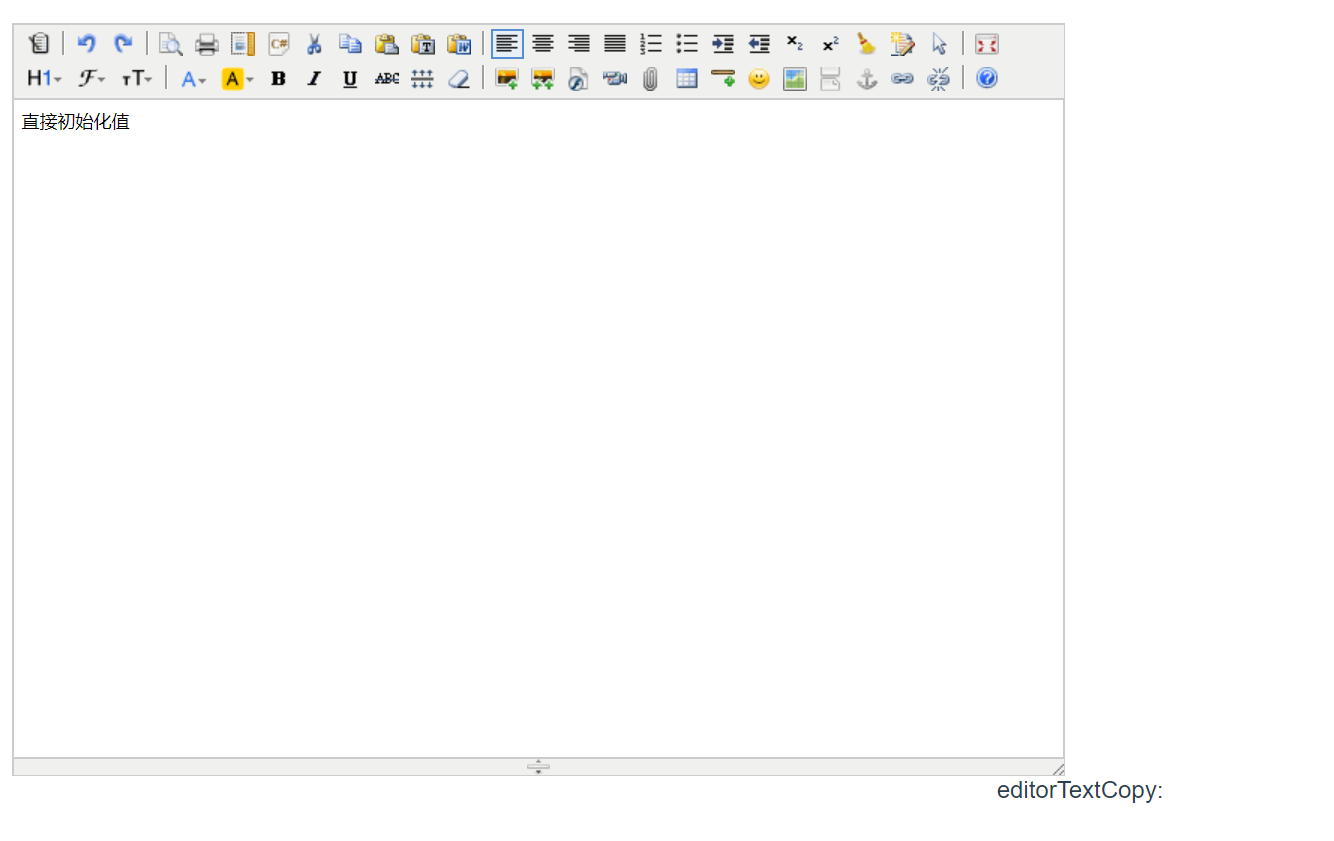
效果如下:
vue中使用kindeditor富文本编辑器2的更多相关文章
- vue中使用kindeditor富文本编辑器
1.去官网下载kindeditor 2.将其放在一个名为kindeditor的文件夹里,并且将它放在vue里的static文件夹下 3.创建kindeditor.vue <template> ...
- django的admin或者应用中使用KindEditor富文本编辑器
由于django后台管理没有富文本编辑器,看着好丑,展示出来的页面不美观,无法做到所见即所得的编辑方式,所以我们需要引入第三方富文本编辑器. 之前找了好多文档已经博客才把这个功能做出来,有些博客虽然写 ...
- springboot中使用kindeditor富文本编辑器实现博客功能
kindeditor在之前已经用过,现在在springboot项目中使用.并且也在里面使用了图片上传以及回显等功能. 其实主要的功能是图片的处理:kindeditor对输入的内容会作为html标签处理 ...
- Vue 中使用UEditor富文本编辑器-亲测可用-vue-ueditor-wrap
其中UEditor中也存在不少错误,再引用过程中. 但是UEditor相对还是比较好用的一个富文本编辑器. vue-ueditor-wrap说明 Vue + UEditor + v-model 双向绑 ...
- django项目中使用KindEditor富文本编辑器。
先从官网下载插件,放在static文件下 前端引入 <script type="text/javascript" src="/static/back/kindedi ...
- vue中引入Tinymce富文本编辑器
最近想在项目上引入一个富文本编辑器,之前引入过summernote,感觉并不太适合vue使用, 然后在网上查了查,vue中使用Tinymce比较适合, 首先,我们在vue项目的components文件 ...
- django项目中使用KindEditor富文本编辑器
先从官网下载插件,放在static文件下 前端引入 <script type="text/javascript" src="/static/back/kindedi ...
- 在ASP.NET中使用KindEditor富文本编辑器
以前一直用百度的UEditor.这次客户提了一个需求要在编辑器中插入Flash动画,但是不知道怎么用UEditor实现,于是选用了KindEditor. 更重要的一点是,客户的网站使用Framewor ...
- kindeditor富文本编辑器初步使用教程
下载kindeditor 可以选择去官网下载(http://kindeditor.net/down.php),不过要FQ:或者直接CSDNhttp://download.csdn.net/downlo ...
随机推荐
- torch_12_BigGAN全文解读
1.摘要: 尽管近来生成图片模型取得了进步,成功生成了高分辨率的图片,但是在复杂的数据集中,样本的多样性仍然是难以捉摸的目标.本文尝试在大规模上训练生成对抗网络,并研究这种规模下的不稳定性.我们发现将 ...
- Uboot启动流程分析(一)
1.前言 Linux系统的启动需要一个bootloader程序,该bootloader程序会先初始化DDR等外设,然后将Linux内核从flash中拷贝到DDR中,最后启动Linux内核,uboot的 ...
- Vue.js 源码分析(三十) 高级应用 函数式组件 详解
函数式组件比较特殊,也非常的灵活,它可以根据传入该组件的内容动态的渲染成任意想要的节点,在一些比较复杂的高级组件里用到,比如Vue-router里的<router-view>组件就是一个函 ...
- class net.sf.cglib.core.DebuggingClassWriter overrides final method visit
在使用CGLIB进行动态代理的时候,报了[java.lang.VerifyError: class net.sf.cglib.core.DebuggingClassWriter overrides f ...
- 一个利用 Parallel.For 并行处理任务,带有进度条(ProgressBar)的 WinForm 实例(下)
接着上一篇:一个利用 Parallel.For 并行处理任务,带有进度条(ProgressBar)的 WinForm 实例(上) 直接贴代码了: using System; using System. ...
- 一个人的公众号,我写了1w+
大家好,我是Bypass,一个人一直保持着写博客的习惯,为此维护了一个技术公众号,致力于分享原创高质量干货,写的内容主要围绕:渗透测试.WAF绕过.代码审计.应急响应.企业安全. 一直以来,我把它当成 ...
- Spring源码系列 — 注解原理
前言 前文中主要介绍了Spring中处理BeanDefinition的扩展点,其中着重介绍BeanDefinitionParser方式的扩展.本篇文章承接该内容,详解Spring中如何利用BeanDe ...
- Winform 通过 WebBrowser 与 JS 交互
Winform 通过 WebBrowser 与 JS 交互 魏刘宏 2019.08.17 之前在使用 Cef (可在 Winform 或 WPF 程序中嵌入 Chrome 内核的网页浏览器的组件)时, ...
- csp 201809-1卖菜
问题描述 在一条街上有n个卖菜的商店,按1至n的顺序排成一排,这些商店都卖一种蔬菜. 第一天,每个商店都自己定了一个价格.店主们希望自己的菜价和其他商店的一致,第二天,每一家商店都会根据他自己和相邻商 ...
- ubuntu下编译android jni到so库的mk文件配置
项目根目录下的Android.mk文件 LOCAL_PATH:= $(call my-dir)include $(CLEAR_VARS) LOCAL_MODULE_TAGS := optional L ...