
C#编写windows服务程序
Windows Service这一块并不复杂,但是注意事项太多了,网上资料也很凌乱,偶尔自己写也会丢三落四的。所以本文也就产生了,本文不会写复杂的东西,完全以基础应用的需求来写,所以不会对Windows Service写很深入。
本文介绍了如何用C#创建、安装、启动、监控、卸载简单的Windows Service 的内容步骤和注意事项。
一、创建一个Windows Service
1)创建Windows Service项目
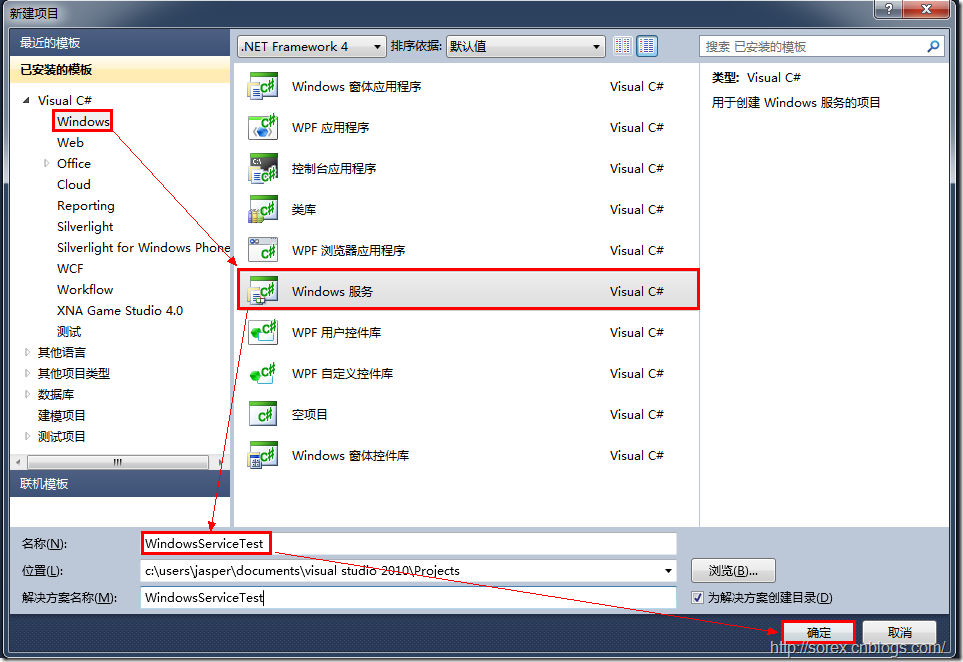
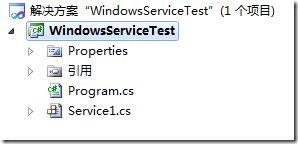
2)对Service重命名
将Service1重命名为你服务名称,这里我们命名为ServiceTest。
二、创建服务安装程序
1)添加安装程序
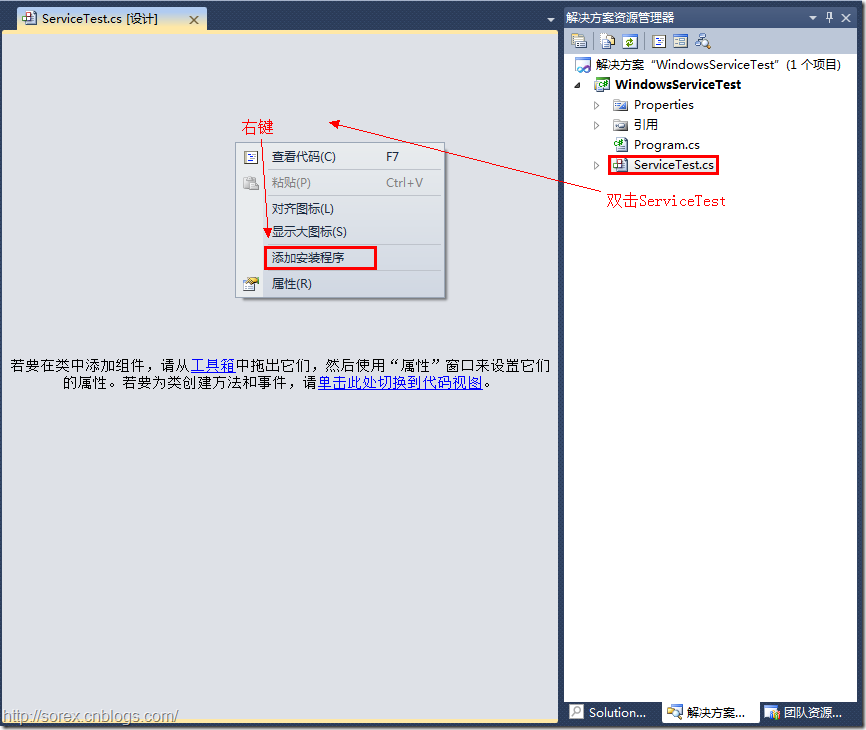
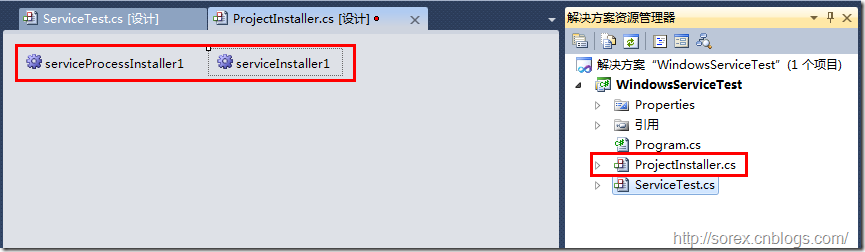
之后我们可以看到上图,自动为我们创建了ProjectInstaller.cs以及2个安装的组件。
2)修改安装服务名
右键serviceInsraller1,选择属性,将ServiceName的值改为ServiceTest。
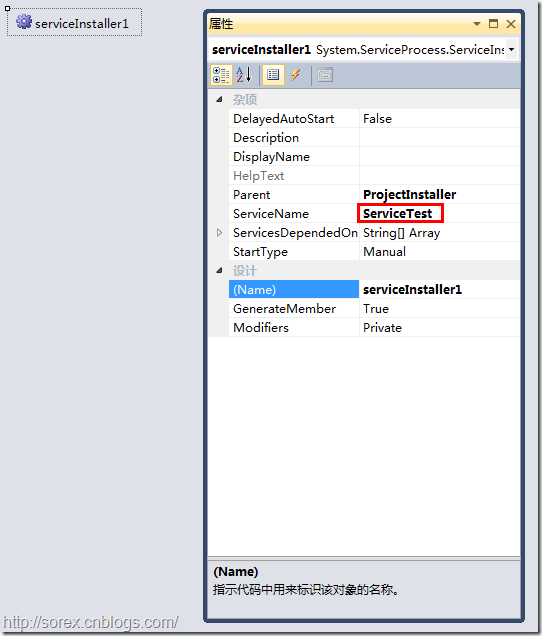
3)修改安装权限
右键serviceProcessInsraller1,选择属性,将Account的值改为LocalSystem。
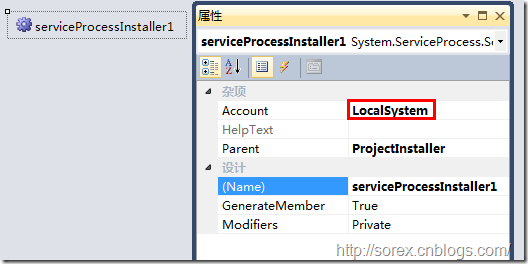
三、写入服务代码
1)打开ServiceTest代码
右键ServiceTest,选择查看代码。
2)写入Service逻辑
添加如下代码:
using System;

using System.Collections.Generic;

using System.ComponentModel;

using System.Data;

using System.Diagnostics;

using System.Linq;

using System.ServiceProcess;

using System.Text;

namespace WindowsServiceTest

{

	public partial class ServiceTest : ServiceBase

	{

		public ServiceTest()

		{

			InitializeComponent();

		}

		protected override void OnStart(string[] args)

		{

			using (System.IO.StreamWriter sw = new System.IO.StreamWriter("C:\\log.txt", true))

			{

				sw.WriteLine(DateTime.Now.ToString("yyyy-MM-dd HH:mm:ss ") + "Start.");

			}

		}

		protected override void OnStop()

		{

			using (System.IO.StreamWriter sw = new System.IO.StreamWriter("C:\\log.txt", true))

			{

				sw.WriteLine(DateTime.Now.ToString("yyyy-MM-dd HH:mm:ss ") + "Stop.");

			}

		}

	}

}
这里我们的逻辑很简单,启动服务的时候写个日志,关闭的时候再写个日志。
四、创建安装脚本
在项目中添加2个文件如下(必须是ANSI或者UTF-8无BOM格式):
1)安装脚本Install.bat
%SystemRoot%\Microsoft.NET\Framework\v4.0.30319\installutil.exe WindowsServiceTest.exe

Net Start ServiceTest

sc config ServiceTest start= auto
2)卸载脚本Uninstall.bat
%SystemRoot%\Microsoft.NET\Framework\v4.0.30319\installutil.exe /u WindowsServiceTest.exe
3)安装脚本说明
第二行为启动服务。
第三行为设置服务为自动运行。
这2行视服务形式自行选择。
4)脚本调试
如果需要查看脚本运行状况,在脚本最后一行加入pause
五、在C#中对服务进行控制
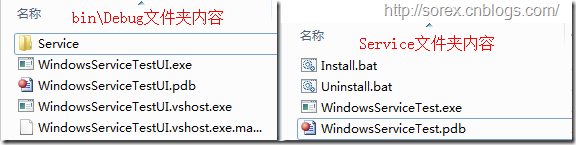
0)配置目录结构
简历一个新WPF项目,叫WindowsServiceTestUI,添加对System.ServiceProcess的引用。
在WindowsServiceTestUI的bin\Debug目录下建立Service目录。
将WindowsServiceTest的生成目录设置为上面创建的Service目录。
生成后目录结构如下图
1)安装
安装时会产生目录问题,所以安装代码如下:
string CurrentDirectory = System.Environment.CurrentDirectory;

System.Environment.CurrentDirectory = CurrentDirectory + "\\Service";

Process process = new Process();

process.StartInfo.UseShellExecute = false;

process.StartInfo.FileName = "Install.bat";

process.StartInfo.CreateNoWindow = true;

process.Start();

System.Environment.CurrentDirectory = CurrentDirectory;
2)卸载
卸载时也会产生目录问题,所以卸载代码如下:
string CurrentDirectory = System.Environment.CurrentDirectory;

System.Environment.CurrentDirectory = CurrentDirectory + "\\Service";

Process process = new Process();

process.StartInfo.UseShellExecute = false;

process.StartInfo.FileName = "Uninstall.bat";

process.StartInfo.CreateNoWindow = true;

process.Start();

System.Environment.CurrentDirectory = CurrentDirectory;
3)启动
代码如下:
using System.ServiceProcess;

ServiceController serviceController = new ServiceController("ServiceTest");

serviceController.Start();
4)停止
ServiceController serviceController = new ServiceController("ServiceTest");

if (serviceController.CanStop)

	serviceController.Stop();
5)暂停/继续
ServiceController serviceController = new ServiceController("ServiceTest");

if (serviceController.CanPauseAndContinue)

{

	if (serviceController.Status == ServiceControllerStatus.Running)

		serviceController.Pause();

	else if (serviceController.Status == ServiceControllerStatus.Paused)

		serviceController.Continue();

}
6)检查状态
ServiceController serviceController = new ServiceController("ServiceTest");

string Status = serviceController.Status.ToString();
六、调试Windows Service
1)安装并运行服务
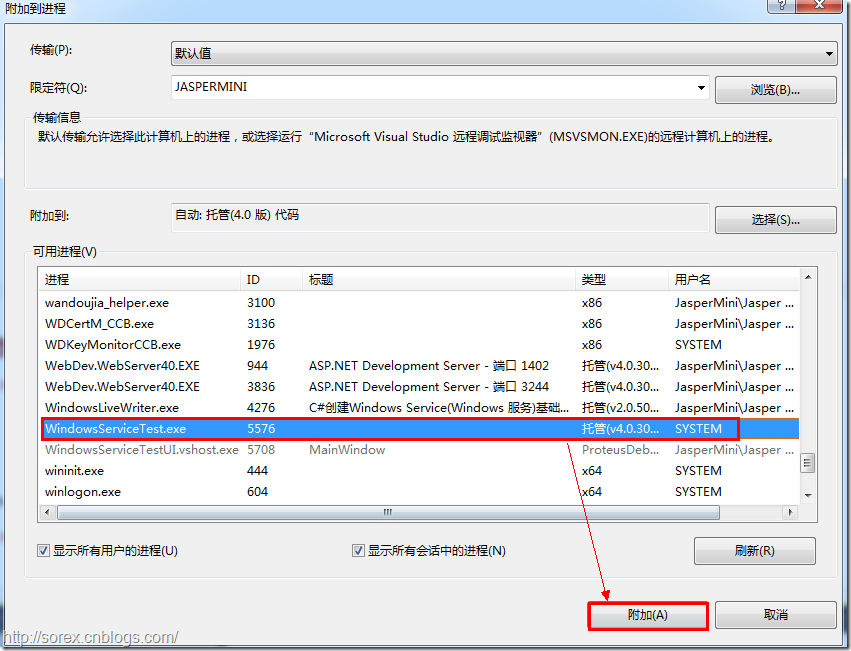
2)附加进程
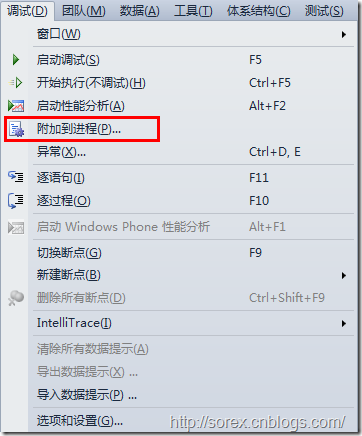
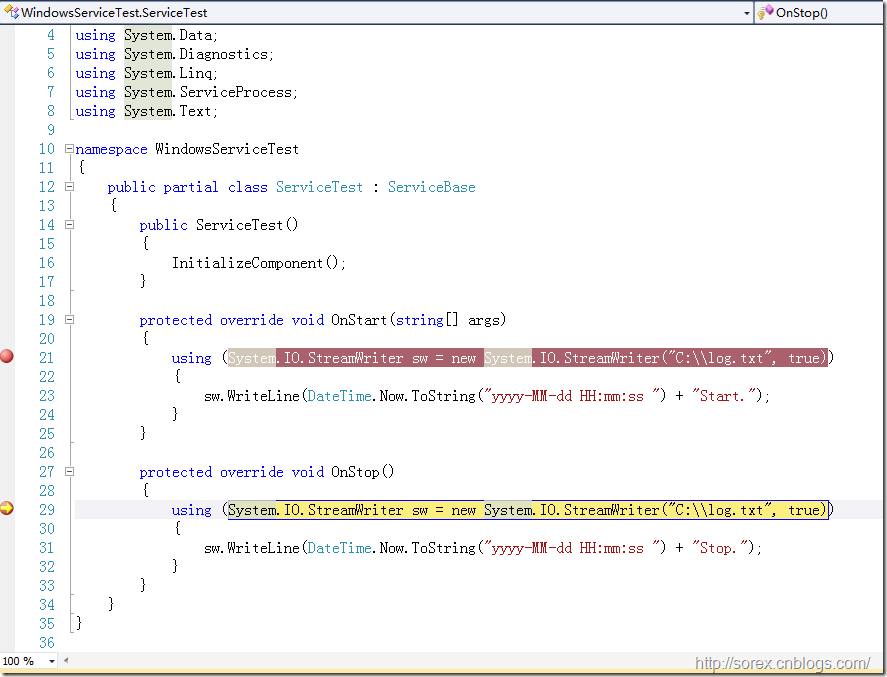
3)在代码中加入断点进行调试
七、总结
本文对Windows service的上述配置都未做详细解释,但是按上述步骤就可以制作可运行的Windows Service,从而达到了工作的需求。
C#编写windows服务程序的更多相关文章
- C语言编写Windows服务程序
原文:C语言编写Windows服务程序 #include <Windows.h> #include <stdio.h> #define SLEEP_TIME 5000 // 间 ...
- 编写windows服务程序
2012-11-02 08:54 (分类:计算机程序) windows服务是一个运行在后台并实现勿需用户交互的任务的控制台程序,对于隐藏程序有很大帮助. 用了几天时间概括了编写windows服务程序的 ...
- 用 C 语言编写 Windows 服务程序的五个步骤
Windows 服务被设计用于需要在后台运行的应用程序以及实现没有用户交互的任务.为了学习这种控制台应用程序的基础知识,C(不是C++)是最佳选择.本文将建立并实现一个简单的服务程序,其功能是查询系统 ...
- 用C语言编写Windows服务程序的五个步骤
Windows 服务被设计用于需要在后台运行的应用程序以及实现没有用户交互的任务.为了学习这种控制台应用程序的基础知识,C(不是C++)是最佳选择.本文将建立并实现一个简单的服务程序,其功能是查询系统 ...
- Python3编写Windows服务程序
最近做了公司签到的小工具,有同事要求做成Windows服务,开机自启.先说下怎么用Python写Windows服务程序. #encoding=utf-8 import win32serviceutil ...
- C#编写Windows服务程序图文教程
安装服务程序C:\WINDOWS\Microsoft.NET\Framework\v4.0.30319\InstallUtil.exe 要安装的服务程序路径(如F:\***.exe)卸载服务程序C: ...
- C#编写Windows服务程序 (服务端),client使用 消息队列 实现淘宝 订单全链路效果
需求: 针对 淘宝提出的 订单全链路 产品接入 .http://open.taobao.com/doc/detail.htm?id=102423&qq-pf-to=pcqq.group oms ...
- C#编写Windows服务程序图文教程(转载)
Windows Service这一块并不复杂,但是注意事项太多了,网上资料也很凌乱,偶尔自己写也会丢三落四的.所以本文也就产生了,本文不会写复杂的东西,完全以基础应用的需求来写,所以不会对Window ...
- 用Visual C#创建Windows服务程序
一.Windows服务介绍: Windows服务以前被称作NT服务,是一些运行在Windows NT.Windows 2000和Windows XP等操作系统下用户环境以外的程序.在以前,编写Wind ...
随机推荐
- F - Coins
F - Coins Time Limit:3000MS Memory Limit:30000KB 64bit IO Format:%I64d & %I64u Submit St ...
- ajax乱码问题 服务端 客户端 两种的解决方案--转载
今天弄了一天的Ajax中文乱码问题,Ajax的乱码问题分为两种: 1. JavaScript输出的中文乱码, 比如:alert("中文乱码测试"); 2. 这第二种就是Ajax从服 ...
- MemCacheManager
#region Fields private AreaRepository _areaRepository = new AreaRepository(); private ICacheManager ...
- map的正确删除方式
遍历删除map元素的正确方式是 for(itor = maptemplate.begin; itor != maptemplate.end(); ) { if(neederase) ...
- Check Box 用法
void CMyDlg::OnInitDialog() //Check1 初始化为选中状态 void CMyDlg::OnInitDialog() { CDialog::OnInitDialog(); ...
- hibernateTemplate HibernateDaoSupport不建议在Spring与Hibernate整合中使用
HibernateTemplate类属于spring框架中的类 :org.springframework.orm.hibernate3.HibernateTemplate HibernateTempl ...
- 汇编语言(学习笔记----寄存器CPU互作原理)
一.段寄存器 1.段寄存器就是提供段地址的,8086CPU有4个段寄存器:CS(代码段寄存器),DS(数据段寄存器),SS(堆栈段寄存器),ES(附加段寄存器) 2.当8086CPU要访问内存时,由这 ...
- 教你看懂邮件头信息<转载>
MIME对于邮件系统的扩展是巨大的,因为在MIME出现以前,信件内容如果要包括声音和动画,就必须把它变为ASCII码或把二进制的信息变成可以传送的编码标准,而接收方必须经过解码才可以获得声音和图画信息 ...
- cdoj 1253 阿里巴巴和n个大盗 博弈论
阿里巴巴和n个大盗 Time Limit: 20 Sec Memory Limit: 256 MB 题目连接 http://acm.uestc.edu.cn/#/problem/show/1253 D ...
- HDU 1077Catching Fish(简单计算几何)
Catching Fish Time Limit: 10000/5000 MS (Java/Others) Memory Limit: 65536/32768 K (Java/Others) T ...