
springboot整合Mybatis(有xml)
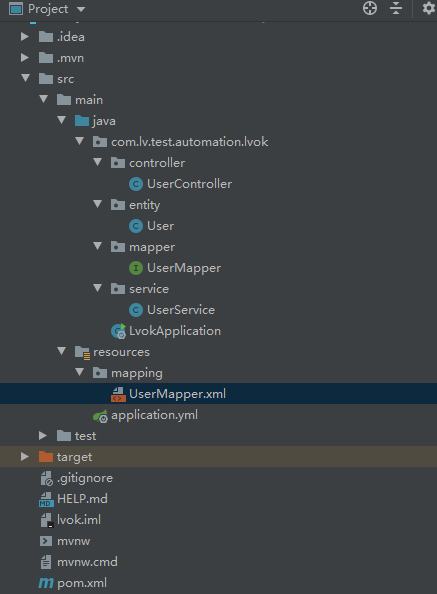
pom.xml
<!-- mybatis 支持 SpringBoot -->

<dependency>

   <groupId>org.mybatis.spring.boot</groupId>

   <artifactId>mybatis-spring-boot-starter</artifactId>

   <version>2.1.1</version>

</dependency>

<!-- mysql 驱动 -->

<dependency>

   <groupId>mysql</groupId>

   <artifactId>mysql-connector-java</artifactId>

   <version>8.0.18</version>

</dependency>

<dependency>

   <groupId>org.springframework.boot</groupId>

   <artifactId>spring-boot-starter-web</artifactId>

</dependency>
application.yml
spring:

  datasource:

    url: jdbc:mysql://localhost:3306/yys_springboot_mybatis?useUnicode=true&characterEncoding=utf-8&serverTimezone=Asia/Shanghai

    username: root

    password:

    driver-class-name: com.mysql.cj.jdbc.Driver

mybatis:

  mapper-locations: classpath:mapping/*Mapper.xml

  type-aliases-package: com.lv.test.automation.lvok.entity

logging:

  level:

    com:

      example:

        mapper : debug
UserController.class
import com.lv.test.automation.lvok.service.UserService;

import org.springframework.beans.factory.annotation.Autowired;

import org.springframework.web.bind.annotation.PathVariable;

import org.springframework.web.bind.annotation.RequestMapping;

import org.springframework.web.bind.annotation.RestController;

@RestController

@RequestMapping("/testBoot")

public class UserController {

    @Autowired

    private UserService userService;

    @RequestMapping("getUser/{id}")

    public String GetUser(@PathVariable int id){

        return userService.Sel(id).toString();

    }

}
User.class
public class User {

    private Integer id;

    private String userName;

    private String passWord;

    private String realName;

    public Integer getId() {

        return id;

    }

    public void setId(Integer id) {

        this.id = id;

    }

    public String getUserName() {

        return userName;

    }

    public void setUserName(String userName) {

        this.userName = userName;

    }

    public String getPassWord() {

        return passWord;

    }

    public void setPassWord(String passWord) {

        this.passWord = passWord;

    }

    public String getRealName() {

        return realName;

    }

    public void setRealName(String realName) {

        this.realName = realName;

    }

    @Override

    public String toString() {

        return "User{" +

                "id=" + id +

                ", userName='" + userName + '\'' +

                ", passWord='" + passWord + '\'' +

                ", realName='" + realName + '\'' +

                '}';

    }

}
UserMapper.class
import com.lv.test.automation.lvok.entity.User;
import org.springframework.stereotype.Repository;
@Repository

public interface UserMapper {

    User Sel(int id);

}
UserService.class
import com.lv.test.automation.lvok.entity.User;

import com.lv.test.automation.lvok.mapper.UserMapper;

import org.springframework.beans.factory.annotation.Autowired;

import org.springframework.stereotype.Service;

@Service

public class UserService {

    @Autowired

    UserMapper userMapper;

    public User Sel(int id){

        return userMapper.Sel(id);

    }

}
Application.class
import org.mybatis.spring.annotation.MapperScan;

import org.springframework.boot.SpringApplication;

import org.springframework.boot.autoconfigure.SpringBootApplication;

@MapperScan("com.lv.test.automation.lvok.mapper")

@SpringBootApplication

public class LvokApplication {

   public static void main(String[] args) {

      SpringApplication.run(LvokApplication.class, args);

   }

}
UserMapper.xml
<?xml version="1.0" encoding="UTF-8"?>

<!DOCTYPE mapper PUBLIC "-//mybatis.org//DTD Mapper 3.0//EN" "http://mybatis.org/dtd/mybatis-3-mapper.dtd">

<mapper namespace="com.lv.test.automation.lvok.mapper.UserMapper">

    <resultMap id="BaseResultMap" type="com.lv.test.automation.lvok.entity.User">

        <result column="id" jdbcType="INTEGER" property="id" />

        <result column="userName" jdbcType="VARCHAR" property="userName" />

        <result column="passWord" jdbcType="VARCHAR" property="passWord" />

        <result column="realName" jdbcType="VARCHAR" property="realName" />

    </resultMap>

    <select id="Sel" resultType="com.lv.test.automation.lvok.entity.User">

        select * from user where id = #{id}

    </select>

</mapper>

springboot整合Mybatis(有xml)的更多相关文章
- SpringBoot整合Mybatis之xml
SpringBoot整合Mybatis mybatis ORM框架.几个重要的概念: Mapper配置 : 可以使用基于XML的Mapper配置文件来实现,也可以使用基于Java注解的Mybatis注 ...
- SpringBoot 整合 Mybatis + Mysql——XML配置方式
一.介绍 SpringBoot有两种方法与数据库建立连接,一种是集成Mybatis,另一种用JdbcTemplate,本文主要讨论集成Mybatis方式. SpringBoot整合Mybatis也有两 ...
- SpringBoot整合MyBatis之xml配置
现在业界比较流行的数据操作层框架 MyBatis,下面就讲解下 Springboot 如何整合 MyBatis,这里使用的是xml配置SQL而不是用注解.主要是 SQL 和业务代码应该隔离,方便和 D ...
- SpringBoot系列-整合Mybatis(XML配置方式)
目录 一.什么是 MyBatis? 二.整合方式 三.实战 四.测试 本文介绍下SpringBoot整合Mybatis(XML配置方式)的过程. 一.什么是 MyBatis? MyBatis 是一款优 ...
- SpringBoot从入门到精通二(SpringBoot整合myBatis的两种方式)
前言 通过上一章的学习,我们已经对SpringBoot有简单的入门,接下来我们深入学习一下SpringBoot,我们知道任何一个网站的数据大多数都是动态的,也就是说数据是从数据库提取出来的,而非静态数 ...
- springboot整合mybatis时无法读取xml文件解决方法(必读)
转 http://baijiahao.baidu.com/s?id=1588136004120071836&wfr=spider&for=pc 在springboot整合myba ...
- SpringBoot整合Mybatis之项目结构、数据源
已经有好些日子没有总结了,不是变懒了,而是我一直在奋力学习springboot的路上,现在也算是完成了第一阶段的学习,今天给各位总结总结. 之前在网上找过不少关于springboot的教程,都是一些比 ...
- SpringBoot整合Mybatis【非注解版】
接上文:SpringBoot整合Mybatis[注解版] 一.项目创建 新建一个工程 选择Spring Initializr,配置JDK版本 输入项目名 选择构建web项目所需的state ...
- springboot学习随笔(四):Springboot整合mybatis(含generator自动生成代码)
这章我们将通过springboot整合mybatis来操作数据库 以下内容分为两部分,一部分主要介绍generator自动生成代码,生成model.dao层接口.dao接口对应的sql配置文件 第一部 ...
- springboot整合mybatis出现的一些问题
springboot整合mybatis非常非常的简单,简直简单到发指.但是也有一些坑,这里我会详细的指出会遇到什么问题,并且这些配置的作用 整合mybatis,无疑需要mapper文件,实体类,dao ...
随机推荐
- Kafka SSL安装与配置
1.概述 最近有同学咨询说,Kafka的SSL安全认证如何安装与使用?今天笔者将通过以下几个方面来介绍Kafka的SSL: Kafka 权限介绍 Kafka SSL的安装与使用 Kafka Eagle ...
- ajax 请求PHP返回json格式的处理
php返回代码格式 public function json(){ if (request()->isAjax()){ $data = [ 'code'=>'1', 'msg'=>' ...
- 什么是cookie?
cookie是什么? 其实cookies是由网络服务器存储在你电脑硬盘上的一个txt类型的小文件,它和你的网络浏览行为有关,所以存储在你电脑上的cookies就好像你的一张身份证,你电脑上的cooki ...
- [PHP学习教程 - 文件]001.高速读写大数据“二进制”文件,不必申请大内存(Byte Block)
引言:读写大“二进制”文件,不必申请很大内存(fopen.fread.fwrite.fclose)!做到开源节流,提高速度! 每天告诉自己一次,『我真的很不错』.... 加速读写大文件,在实际工作过程 ...
- [PHP自动化-进阶]002.CURL模拟登录带有验证码的网站
引言:继前文<模拟登录并采集数据>,大家似乎看不过瘾,这会再出一发,模拟实现带验证码网站的登录. 这篇文章主要介绍了PHP使用CURL实现对带有验证码的网站进行模拟登录的方法,可以帮助读者 ...
- [Objective-C] 010_Foundation框架之NSSet与NSMutableSet
在Cocoa Foundation中的NSSet和NSMutableSet ,和NSArray功能性质一样,用于存储对象属于集合.但是NSSet和NSMutableSet是无序的, 保证数据的唯一性, ...
- ForkJoinPool分支合并框架-工作窃取
Fork/Join 框架 Fork/Join 框架:就是在必要的情况下,将一个大任务,进行拆分(fork)成 若干个小任务(拆到不可再拆时), 再将一个个的小任务运算的结果进行 join 汇总 For ...
- 关于CAS单点登录配置文件误修改导致的JSP报错问题
weblogic环境下搭建CXF环境时,为了避免CAS拦截webservice服务URL所以设置CAS为不拦截,无修改了CAS配置的其它地方导致工程启动正常,一旦访问就会报JSP的错误. [Servl ...
- ajax实现注册并选择头像后上传
在初次接触ajax后,我们做了一个crm训练的项目,大多数小组都有注册用户这一项,但是都忽略掉了一个功能,那就是,很多网站的注册是可以上传头像的,在这里我做了一个在已有的头像数组里选择图片上传作头像的 ...
- F5忘记密码修改教程
!!!首先查看系统版本,13版本和14版本修改密码方式不一致 首先介绍13版本修改密码 注:12版本也适用,11版本未测试,应该也可以,有问题欢迎留言) 1. 将终端连接到BIG-IP串行控制台端口. ...