
Spring Boot 开发集成 WebSocket,实现私有即时通信系统
1/ 概述
利用Spring Boot作为基础框架,Spring Security作为安全框架,WebSocket作为通信框架,实现点对点聊天和群聊天。
2/ 所需依赖
Spring Boot 版本 1.5.3,使用MongoDB存储数据(非必须),Maven依赖如下:
<properties>

    <java.version>1.8</java.version>

    <thymeleaf.version>3.0.0.RELEASE</thymeleaf.version>

    <thymeleaf-layout-dialect.version>2.0.0</thymeleaf-layout-dialect.version>

  </properties>

  <dependencies>

    <!-- WebSocket依赖,移除Tomcat容器 -->

    <dependency>

      <groupId>org.springframework.boot</groupId>

      <artifactId>spring-boot-starter-websocket</artifactId>

      <exclusions>

        <exclusion>

          <groupId>org.springframework.boot</groupId>

          <artifactId>spring-boot-starter-tomcat</artifactId>

        </exclusion>

      </exclusions>

    </dependency>

    <!-- 使用Undertow容器 -->

    <dependency>

      <groupId>org.springframework.boot</groupId>

      <artifactId>spring-boot-starter-undertow</artifactId>

    </dependency>

    <!--  Spring Security 框架 -->

    <dependency>

      <groupId>org.springframework.boot</groupId>

      <artifactId>spring-boot-starter-security</artifactId>

    </dependency>

    <!-- MongoDB数据库 -->

    <dependency>

      <groupId>org.springframework.boot</groupId>

      <artifactId>spring-boot-starter-data-mongodb</artifactId>

    </dependency>

    <!-- Thymeleaf 模版引擎 -->

    <dependency>

      <groupId>org.springframework.boot</groupId>

      <artifactId>spring-boot-starter-thymeleaf</artifactId>

    </dependency>

    <dependency>

      <groupId>org.projectlombok</groupId>

      <artifactId>lombok</artifactId>

      <version>1.16.16</version>

    </dependency>

    <dependency>

      <groupId>com.alibaba</groupId>

      <artifactId>fastjson</artifactId>

      <version>1.2.30</version>

    </dependency>

    <!-- 静态资源 -->

    <dependency>

      <groupId>org.webjars</groupId>

      <artifactId>webjars-locator</artifactId>

    </dependency>

    <dependency>

      <groupId>org.webjars</groupId>

      <artifactId>sockjs-client</artifactId>

      <version>1.0.2</version>

    </dependency>

    <dependency>

      <groupId>org.webjars</groupId>

      <artifactId>stomp-websocket</artifactId>

      <version>2.3.3</version>

    </dependency>

    <dependency>

      <groupId>org.webjars</groupId>

      <artifactId>bootstrap</artifactId>

      <version>3.3.7</version>

    </dependency>

    <dependency>

      <groupId>org.webjars</groupId>

      <artifactId>jquery</artifactId>

      <version>3.1.0</version>

    </dependency>

  </dependencies>
配置文件内容:
server:

  port: 80

# 若使用MongoDB则配置如下参数

spring:

  data:

    mongodb:

      uri: mongodb://username:password@172.25.11.228:27017

      authentication-database: admin

      database: chat
大致程序结构,仅供参考:
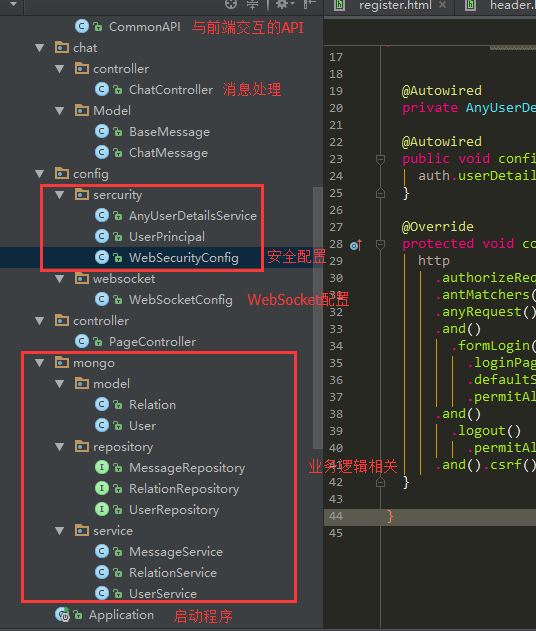
3/ 创建程序启动类,启用WebSocket
使用@EnableWebSocket注解
@SpringBootApplication

@EnableWebSocket

public class Application {

  public static void main(String[] args) {

    SpringApplication.run(Application.class, args);

  }

}
4/ 配置Spring Security
此章节省略。(配置好Spring Security,用户能正常登录即可)
可以参考:Spring Boot 全栈开发:用户安全
5/ 配置Web Socket(结合第7节的JS看)
@Configuration

@EnableWebSocketMessageBroker

@Log4j

public class WebSocketConfig extends AbstractWebSocketMessageBrokerConfigurer {

  // 此处可注入自己写的Service

  @Override

  public void registerStompEndpoints(StompEndpointRegistry stompEndpointRegistry) {

    // 客户端与服务器端建立连接的点

    stompEndpointRegistry.addEndpoint("/any-socket").withSockJS();

  }

  @Override

  public void configureMessageBroker(MessageBrokerRegistry messageBrokerRegistry) {

    // 配置客户端发送信息的路径的前缀

    messageBrokerRegistry.setApplicationDestinationPrefixes("/app");

    messageBrokerRegistry.enableSimpleBroker("/topic");

  }

  @Override

  public void configureWebSocketTransport(final WebSocketTransportRegistration registration) {

    registration.addDecoratorFactory(new WebSocketHandlerDecoratorFactory() {

      @Override

      public WebSocketHandler decorate(final WebSocketHandler handler) {

        return new WebSocketHandlerDecorator(handler) {

          @Override

          public void afterConnectionEstablished(final WebSocketSession session) throws Exception {

            // 客户端与服务器端建立连接后,此处记录谁上线了

            String username = session.getPrincipal().getName();

            log.info("online: " + username);

            super.afterConnectionEstablished(session);

          }

          @Override

          public void afterConnectionClosed(WebSocketSession session, CloseStatus closeStatus) throws Exception {

            // 客户端与服务器端断开连接后,此处记录谁下线了

            String username = session.getPrincipal().getName();

            log.info("offline: " + username);

            super.afterConnectionClosed(session, closeStatus);

          }

        };

      }

    });

    super.configureWebSocketTransport(registration);

  }

}
6/ 点对点消息,群消息
@Controller

@Log4j

public class ChatController {

  @Autowired

  private SimpMessagingTemplate template;

  // 注入其它Service

  // 群聊天

  @MessageMapping("/notice")

  public void notice(Principal principal, String message) {

    // 参数说明 principal 当前登录的用户, message 客户端发送过来的内容

    // principal.getName() 可获得当前用户的username

    // 发送消息给订阅 "/topic/notice" 且在线的用户

    template.convertAndSend("/topic/notice", message);

  }

  // 点对点聊天

  @MessageMapping("/chat")

  public void chat(Principal principal, String message){

    // 参数说明 principal 当前登录的用户, message 客户端发送过来的内容(应该至少包含发送对象toUser和消息内容content)

    // principal.getName() 可获得当前用户的username

    // 发送消息给订阅 "/user/topic/chat" 且用户名为toUser的用户

    template.convertAndSendToUser(toUser, "/topic/chat", content);

  }

}
7/ 客户端与服务器端交互
    var stompClient = null;

    function connect() {

        var socket = new SockJS('/any-socket');

        stompClient = Stomp.over(socket);

        stompClient.connect({}, function (frame) {

            // 订阅 /topic/notice 实现群聊

            stompClient.subscribe('/topic/notice', function (message) {

                showMessage(JSON.parse(message.body));

            });

            // 订阅 /user/topic/chat 实现点对点聊

            stompClient.subscribe('/user/topic/chat', function (message) {

                showMessage(JSON.parse(message.body));

            });

        });

    }

    function showMessage(message) {

        // 处理消息在页面的显示

    }

    $(function () {

        // 建立websocket连接

        connect();

        // 发送消息按钮事件

        $("#send").click(function () {

            if (target == "TO_ALL"){

                // 群发消息

                // 匹配后端ChatController中的 @MessageMapping("/notice")

                stompClient.send("/app/notice", {}, '消息内容');

            }else{

                // 点对点消息,消息中必须包含对方的username

                // 匹配后端ChatController中的 @MessageMapping("/chat")

                var content = "{'content':'消息内容','receiver':'anoy'}";

                stompClient.send("/app/chat", {}, content);

            }

        });

    });
8/ 效果测试
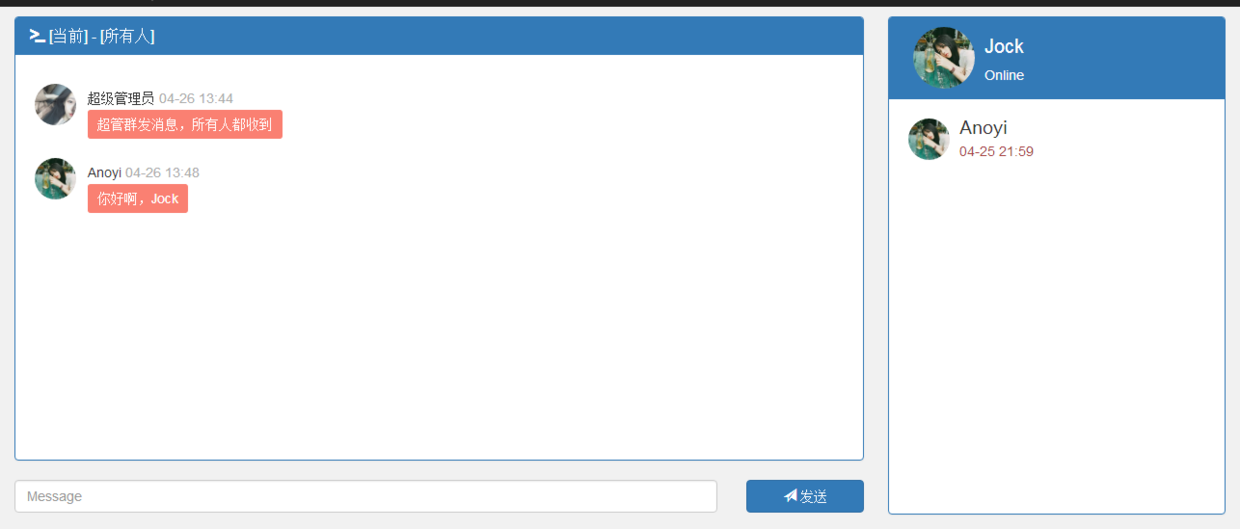
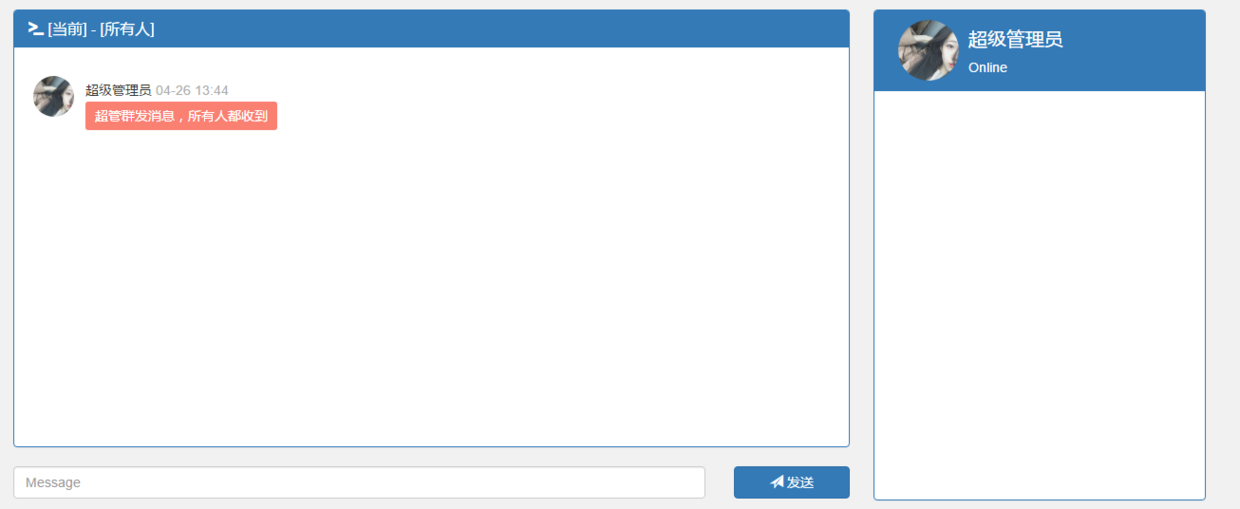
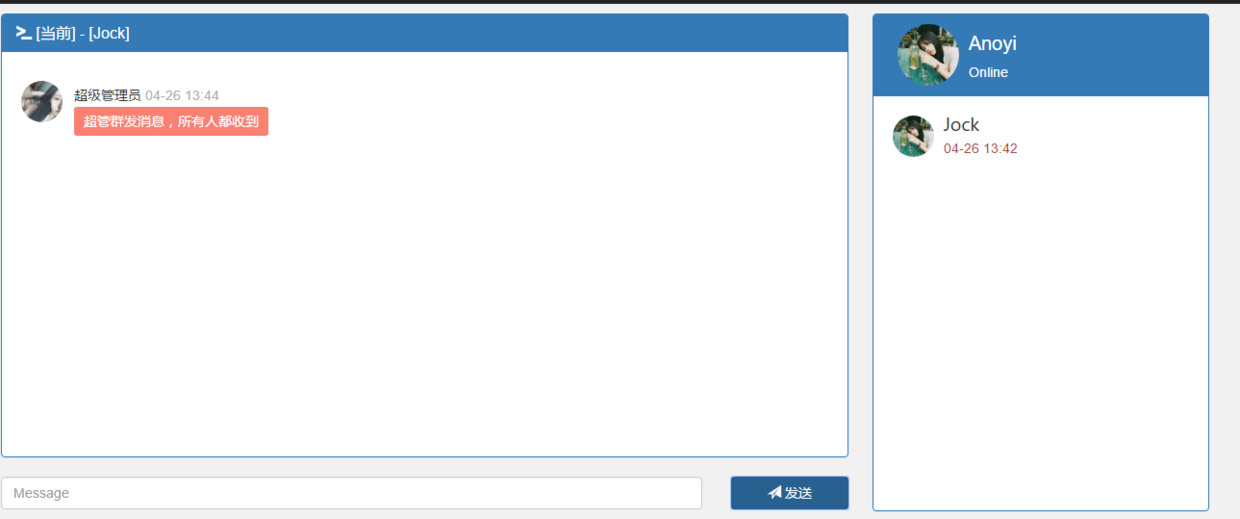
登录三个用户:Anoyi、Jock、超级管理员。
群消息测试,超级管理员群发消息:
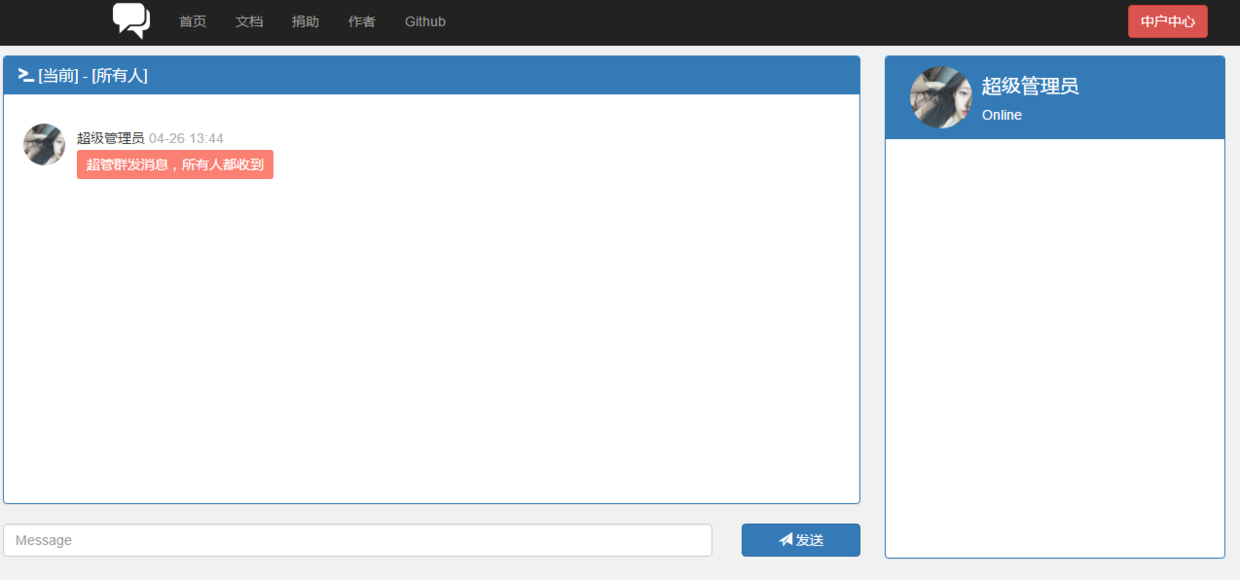
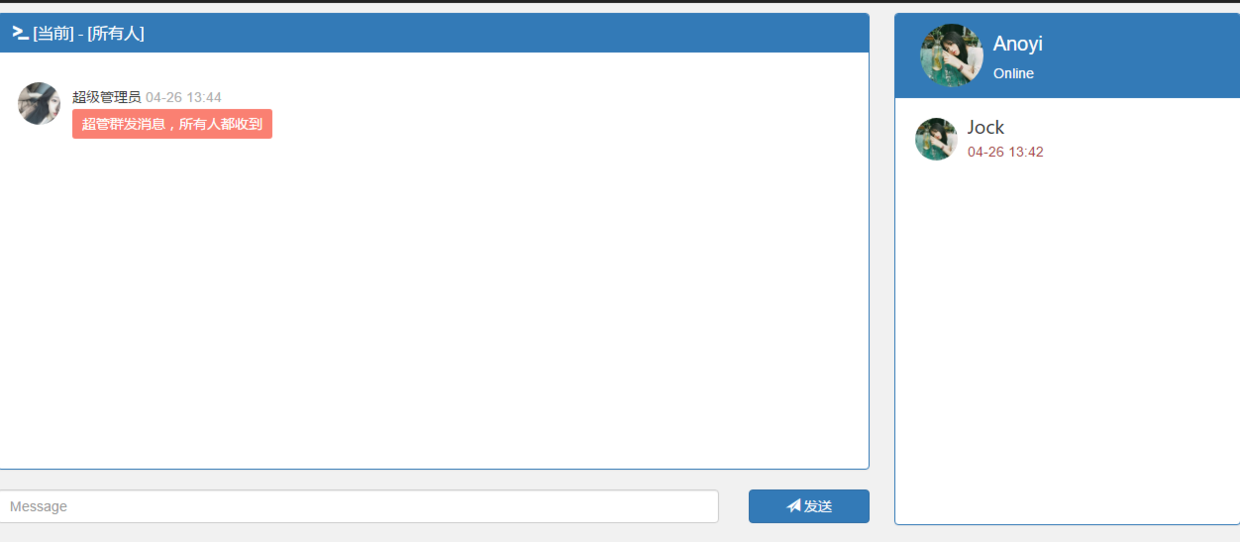
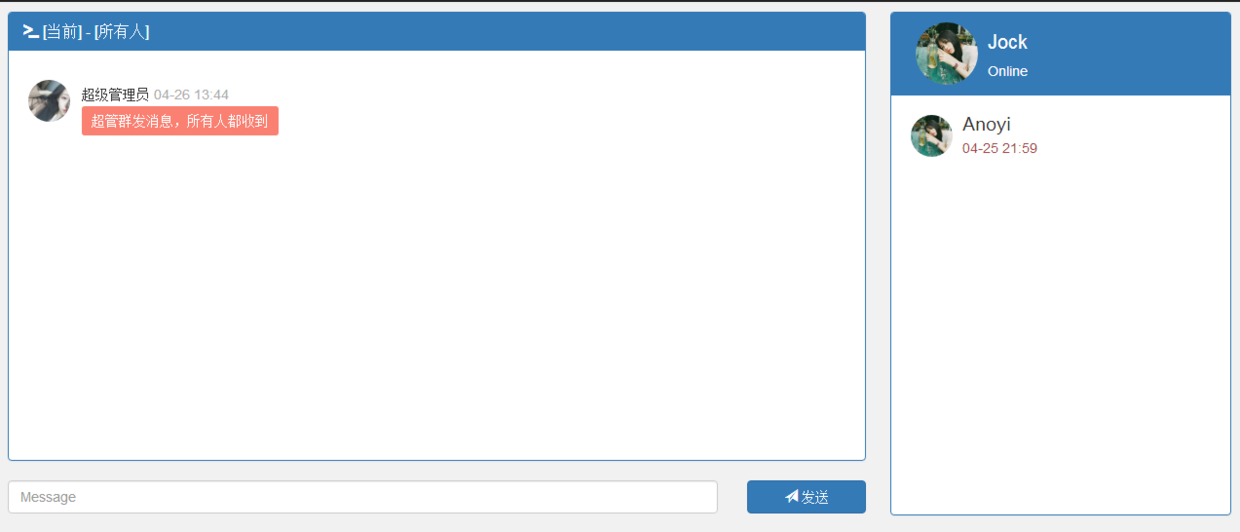
点对点消息测试,Anoyi给Jock发送消息,只有Jock收到消息,Anoyi和超级管理员收不到消息:
9/ 轻量级DEMO(完整可运行代码)
Spring Boot 开发私有即时通信系统(WebSocket)(续)
10/ 参考文献
文末福利
Java 资料大全 链接:https://pan.baidu.com/s/1pUCCPstPnlGDCljtBVUsXQ 密码:b2xc
更多资料: 2020 年 精选阿里 Java、架构、微服务精选资料等,加 v ❤ :qwerdd111
转载,请保留原文地址,谢谢 ~
Spring Boot 开发集成 WebSocket,实现私有即时通信系统的更多相关文章
- 天天玩微信,Spring Boot 开发私有即时通信系统了解一下
1/ 概述 利用Spring Boot作为基础框架,Spring Security作为安全框架,WebSocket作为通信框架,实现点对点聊天和群聊天. 2/ 所需依赖 Spring Boot 版本 ...
- Java | Spring Boot Swagger2 集成REST ful API 生成接口文档
Spring Boot Swagger2 集成REST ful API 生成接口文档 原文 简介 由于Spring Boot 的特性,用来开发 REST ful 变得非常容易,并且结合 Swagg ...
- Spring Boot开发之流水无情(二)
http://my.oschina.net/u/1027043/blog/406558 上篇散仙写了一个很简单的入门级的Spring Boot的例子,没啥技术含量,不过,其实学任何东西只要找到第一个突 ...
- Spring Boot:集成Druid数据源
综合概述 数据库连接池负责分配.管理和释放数据库连接,它允许应用程序重复使用一个现有的数据库连接,而不是再重新建立一个:释放空闲时间超过最大空闲时间的数据库连接来避免因为没有释放数据库连接而引起的数据 ...
- shiro 和 spring boot 的集成
1 添加依赖 使用 shiro-spring-boot-web-starter 在 spring boot 中集成 shiro 只需要再添加一个依赖 <dependency> <gr ...
- spring boot 2 集成JWT实现api接口认证
JSON Web Token(JWT)是目前流行的跨域身份验证解决方案.官网:https://jwt.io/本文使用spring boot 2 集成JWT实现api接口验证. 一.JWT的数据结构 J ...
- spring boot 开发环境搭建(Eclipse)
Spring Boot 集成教程 Spring Boot 介绍 Spring Boot 开发环境搭建(Eclipse) Spring Boot Hello World (restful接口)例子 sp ...
- Spring Boot入门系列(十五)Spring Boot 开发环境热部署
在实际的项目开发过中,当我们修改了某个java类文件时,需要手动重新编译.然后重新启动程序的,整个过程比较麻烦,特别是项目启动慢的时候,更是影响开发效率.其实Spring Boot的项目碰到这种情况, ...
- 使用Spring Boot开发Web项目(二)之添加HTTPS支持
上篇博客使用Spring Boot开发Web项目我们简单介绍了使用如何使用Spring Boot创建一个使用了Thymeleaf模板引擎的Web项目,当然这还远远不够.今天我们再来看看如何给我们的We ...
随机推荐
- zabbix3.x.x升级教程
1:停掉正在运行的zabbix服务,确保没有新数据写入数据库. /etc/init.d/zabbix_server stop 2:备份原zabbix的数据库数据,以及相关文件. mysqldump - ...
- LNMP环境搭建之php安装
和LAMP安装PHP方法有差别,需要开启php-fpm服务 下载php cd /usr/local/src/ wget http://cn2.php.net/distributions/php-5.6 ...
- idea配置tomcat运行参数,防止中文乱码和内存问题
点击选择 Edit Configurations... 修改 VM options ,参数在最后可直接复制 -Xms550m -Xmx1250m -Dfile.encoding=UTF-8
- AIDL原理分析
季春初始,天气返暖,新冠渐去,正值学习好时机.在Android系统中,AIDL一直在Framework和应用层上扮演着很重要的角色,今日且将其原理简单分析.(文2020.03.30) 一.开篇介绍 1 ...
- 分治思想--快速排序解决TopK问题
----前言 最近一直研究算法,上个星期刷leetcode遇到从两个数组中找TopK问题,因此写下此篇,在一个数组中如何利用快速排序解决TopK问题. 先理清一个逻辑解决TopK问题→快速排序→递 ...
- asyncio异步编程【含视频教程】
不知道你是否发现,身边聊异步的人越来越多了,比如:FastAPI.Tornado.Sanic.Django 3.aiohttp等. 听说异步如何如何牛逼?性能如何吊炸天....但他到底是咋回事呢? 本 ...
- OSG程序设计之osg::NodeVisitor
本文所有内容来自<OpenSceneGraph三维渲染引擎设计与实践>一书. 本文主要讨论的是OSG中节点的访问. 对于节点的访问是从节点接收一个访问器开始的,用户执行某个节点的accep ...
- auto_ptr和shared_ptr
<Effective C++>在资源管理一节提到了智能指针,智能指针中最著名的当属auto_ptr和shared_ptr.本文主要研究两者的实现. auto_ptr的实现: templat ...
- Hadoop入门学习笔记-第一天 (HDFS:分布式存储系统简单集群)
准备工作: 1.安装VMware Workstation Pro 2.新建三个虚拟机,安装centOS7.0 版本不限 配置工作: 1.准备三台服务器(nameNode10.dataNode20.da ...
- B. Preparing for Merge Sort
\(考虑的时候,千万不能按照题目意思一组一组去模拟\) \(要发现每组的最后一个数一定大于下一组的最后一个数\) \(那我们可以把a中的数一个一个填充到vec中\) #include <bits ...