
使用Bundle在Activity中交换数据
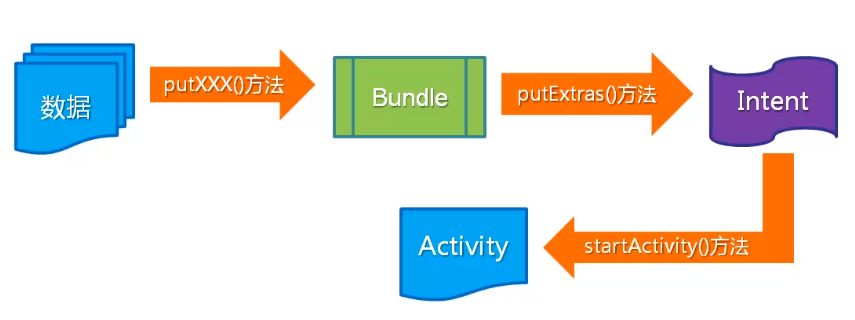
大概过程
编写demo
activity_main.xml
<?xml version="1.0" encoding="utf-8"?>

<RelativeLayout

    xmlns:app="http://schemas.android.com/apk/res-auto"

    xmlns:tools="http://schemas.android.com/tools"

    xmlns:android="http://schemas.android.com/apk/res/android"

    android:layout_width="match_parent"

    android:layout_height="match_parent"

    tools:context=".MainActivity">

    <TextView

        android:id="@+id/top"

        android:layout_width="match_parent"

        android:layout_height="wrap_content"

        android:textSize="18sp"

        android:textColor="#ff0000"

        android:text="@string/intruduce"/>

    <EditText

        android:id="@+id/name"

        android:layout_width="match_parent"

        android:layout_height="wrap_content"

        android:textSize="16sp"

        android:hint="请输入姓名"

        android:textColor="#000"

        android:layout_below="@+id/top"/>

    <EditText

        android:id="@+id/city"

        android:layout_width="match_parent"

        android:layout_height="wrap_content"

        android:textSize="16sp"

        android:hint="请输入所在城市"

        android:textColor="#000"

        android:layout_below="@+id/name"/>

    <EditText

        android:id="@+id/sex"

        android:layout_width="match_parent"

        android:layout_height="wrap_content"

        android:textSize="16sp"

        android:hint="请输入性别"

        android:textColor="#000"

        android:layout_below="@+id/city"/>

    <EditText

        android:id="@+id/phone"

        android:layout_width="match_parent"

        android:layout_height="wrap_content"

        android:textSize="16sp"

        android:hint="请输入电话号码"

        android:textColor="#000"

        android:layout_below="@+id/sex"/>

    <EditText

        android:id="@+id/age"

        android:layout_width="match_parent"

        android:layout_height="wrap_content"

        android:textSize="16sp"

        android:hint="请输入年龄"

        android:textColor="#000"

        android:layout_below="@+id/phone"/>

    <Button

        android:id="@+id/btn_submit"

        android:layout_width="wrap_content"

        android:layout_height="wrap_content"

        android:layout_alignParentBottom="true"

        android:layout_alignParentEnd="true"

        android:layout_alignParentRight="true"

        android:layout_marginBottom="10dp"

        android:layout_marginEnd="10dp"

        android:layout_marginRight="10dp"

        android:background="#ff5000"

        android:text="提交"/>

</RelativeLayout>
activity_result.xml
<?xml version="1.0" encoding="utf-8"?>

<RelativeLayout xmlns:android="http://schemas.android.com/apk/res/android"

    xmlns:app="http://schemas.android.com/apk/res-auto"

    xmlns:tools="http://schemas.android.com/tools"

    android:layout_width="match_parent"

    android:layout_height="match_parent"

    tools:context=".ResultActivity">

    <TextView

        android:id="@+id/name"

        android:layout_width="wrap_content"

        android:layout_height="wrap_content"

        android:textSize="18sp"

        android:text="朱归强"

        android:textColor="#000" />

    <TextView

        android:id="@+id/sex"

        android:layout_width="wrap_content"

        android:layout_height="wrap_content"

        android:textSize="18sp"

        android:textColor="#000"

        android:text="男"

        android:layout_below="@+id/name"/>

    <LinearLayout

        android:id="@+id/agel"

        android:layout_width="wrap_content"

        android:layout_height="wrap_content"

        android:orientation="horizontal"

        android:layout_below="@+id/sex">

        <TextView

            android:layout_width="wrap_content"

            android:layout_height="wrap_content"

            android:textSize="18sp"

            android:textColor="#000"

            android:text="年龄:"/>

        <TextView

            android:id="@+id/age"

            android:layout_width="wrap_content"

            android:layout_height="wrap_content"

            android:textSize="18sp"

            android:text="23"

            android:textColor="#000"

            />

    </LinearLayout>

    <LinearLayout

        android:id="@+id/cityl"

        android:layout_width="wrap_content"

        android:layout_height="wrap_content"

        android:orientation="horizontal"

        android:layout_below="@+id/agel">

        <TextView

            android:layout_width="wrap_content"

            android:layout_height="wrap_content"

            android:textSize="18sp"

            android:textColor="#000"

            android:text="所在城市:"/>

        <TextView

            android:id="@+id/city"

            android:layout_width="wrap_content"

            android:layout_height="wrap_content"

            android:textSize="18sp"

            android:text="长沙"

            android:textColor="#000"

            />

    </LinearLayout>

    <LinearLayout

        android:id="@+id/phonel"

        android:layout_width="wrap_content"

        android:layout_height="wrap_content"

        android:orientation="horizontal"

        android:layout_below="@+id/cityl">

        <TextView

            android:layout_width="wrap_content"

            android:layout_height="wrap_content"

            android:textSize="18sp"

            android:textColor="#000"

            android:text="电话:"/>

        <TextView

            android:id="@+id/phone"

            android:layout_width="wrap_content"

            android:layout_height="wrap_content"

            android:textSize="18sp"

            android:text="13155115510"

            android:textColor="#000"

            />

    </LinearLayout>

    <TextView

        android:id="@+id/result"

        android:layout_width="wrap_content"

        android:layout_height="wrap_content"

        android:layout_alignParentBottom="true"

        android:layout_alignParentEnd="true"

        android:layout_alignParentRight="true"

        android:layout_marginBottom="10dp"

        android:layout_marginEnd="10dp"

        android:layout_marginRight="10dp"

        android:textSize="26sp"

        android:textColor="#F31D0B"

        android:text="今日幸运值:60%"/>

</RelativeLayout>
MainActivity.java
package com.example.bundledemo;

import androidx.appcompat.app.AppCompatActivity;

import android.content.Intent;

import android.os.Bundle;

import android.view.View;

import android.widget.Button;

import android.widget.EditText;

import android.widget.Toast;

public class MainActivity extends AppCompatActivity {

    @Override

    protected void onCreate(Bundle savedInstanceState) {

        super.onCreate(savedInstanceState);

        setContentView(R.layout.activity_main);

        Button btnSubmit = (Button) findViewById(R.id.btn_submit);

        btnSubmit.setOnClickListener(new View.OnClickListener() {

            @Override

            public void onClick(View v) {

                String name = ((EditText)findViewById(R.id.name)).getText().toString();

                String sex = ((EditText) findViewById(R.id.sex)).getText().toString();

                String age = ((EditText) findViewById(R.id.age)).getText().toString();

                String city = ((EditText) findViewById(R.id.city)).getText().toString();

                String phone = ((EditText) findViewById(R.id.phone)).getText().toString();

                if(!"".equals(name)&&!"".equals(sex)&&!"".equals(age)&&!"".equals(city)&&!"".

                        equals(phone)){

                    Intent intent = new Intent(MainActivity.this, ResultActivity.class);

                    Bundle bundle = new Bundle();

                    bundle.putCharSequence("name",name);

                    bundle.putCharSequence("sex",sex);

                    bundle.putCharSequence("age",age);

                    bundle.putCharSequence("city",city);

                    bundle.putCharSequence("phone",phone);

                    intent.putExtras(bundle);

                    startActivity(intent);

                }else {

                    Toast.makeText(MainActivity.this, "请将信息填写完整", Toast.LENGTH_SHORT).show();

                }

            }

        });

    }

}
ResultActivity.java
package com.example.bundledemo;

import androidx.appcompat.app.AppCompatActivity;

import android.content.Intent;

import android.os.Bundle;

import android.widget.EditText;

import android.widget.TextView;

public class ResultActivity extends AppCompatActivity {

    @Override

    protected void onCreate(Bundle savedInstanceState) {

        super.onCreate(savedInstanceState);

        setContentView(R.layout.activity_result);

        Intent intent = getIntent();

        Bundle bundle = intent.getExtras();

        String name = bundle.getString("name");

        String sex = bundle.getString("sex");

        String age = bundle.getString("age");

        String city = bundle.getString("city");

        String phone = bundle.getString("phone");

        TextView tv_name = (TextView) findViewById(R.id.name);

        TextView tv_sex = (TextView) findViewById(R.id.sex);

        TextView tv_age = (TextView) findViewById(R.id.city);

        TextView tv_city = (TextView) findViewById(R.id.age);

        TextView tv_phone = (TextView) findViewById(R.id.phone);

        tv_name.setText(name);

        tv_sex.setText(sex);

        tv_age.setText(age);

        tv_city.setText(city);

        tv_phone.setText(phone);

    }

}
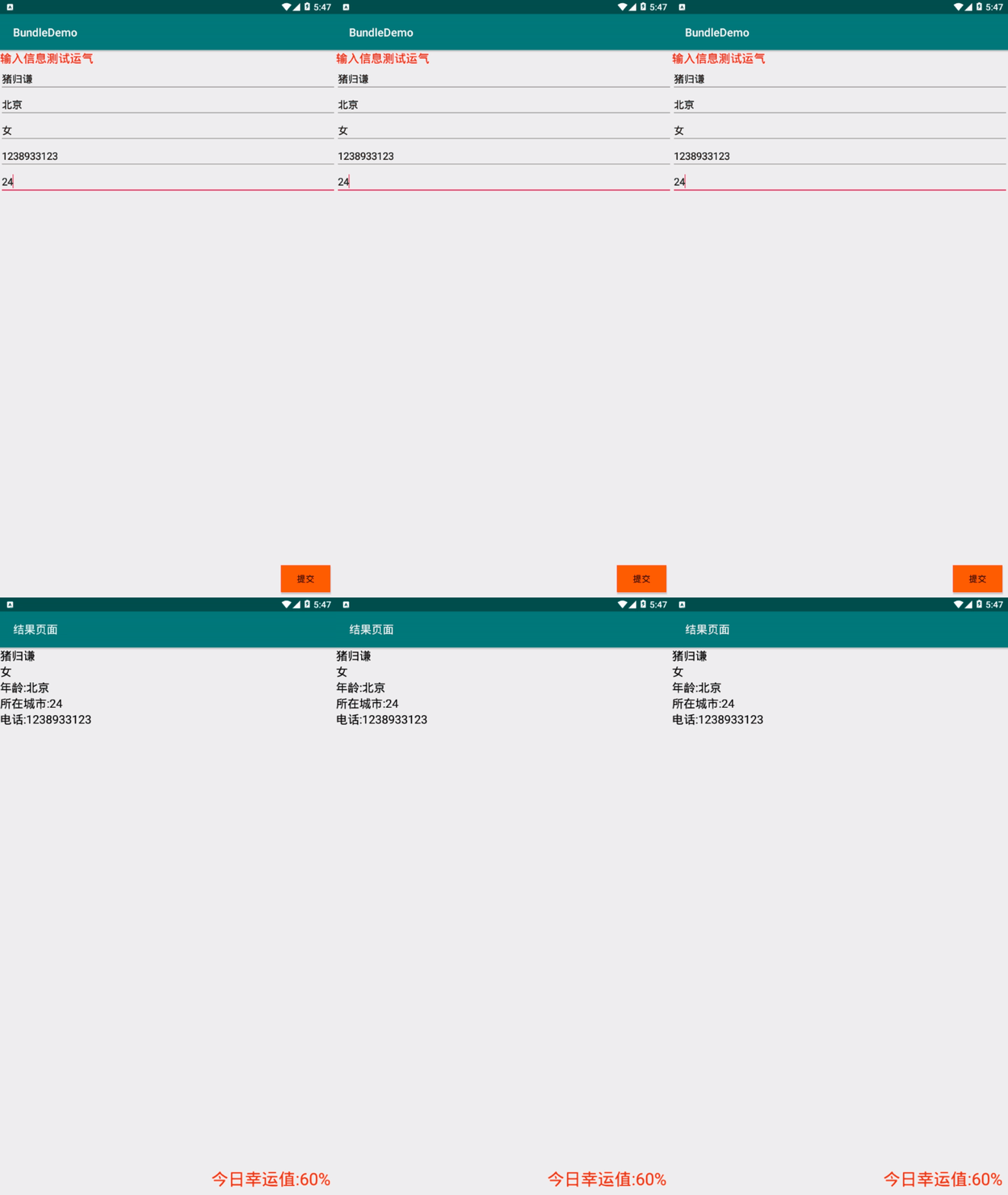
效果:
使用Bundle在Activity中交换数据的更多相关文章
- 使用 Bundle 在 Activity 之间交换数据
[toc] 使用 Bundle 在 Activity 之间交换数据 场景 当一个 Activity 启动另一个 Activity 时,常常会有一些数据需要传过去.因为两个 Activity 之间本来就 ...
- 建立、配置和使用Activity——使用Bundle在Activity之间交换数据
当一个Activity启动另一个Activity时,常常会有一些数据需要传过去——这就像Web应用从一个Servlet跳到另一个Serlvet时,Web应用习惯把需要交换的数据放入requestSco ...
- 使用Bundle在Activity之间交换数据
一:在main.xml文件中设置布局 <LinearLayout xmlns:android="http://schemas.android.com/apk/res/android&q ...
- 【Android 复习】:从Activity中返回数据
在实际的应用中,我们不仅仅要向Activity传递数据,而且要从Activity中返回数据,虽然返回数据和传递类似,也可以采用上一讲中的四种方式来传递数据,但是一般建议采用Intent对象的方式的来返 ...
- 从Activity中返回数据
从Activity中返回数据 一.简介 这里也就是使用intent方式返回数据. 二.具体步骤 在MainActivity通过一个button访问Activity01页面,然后将Activity01页 ...
- 使用Bundle在Activity间传递数据
使用Bundle在Activity间传递数据 源Activity public class SourceActivty extends Activity { private Intent intent ...
- Android笔记——Activity中的数据传递案例(用户注冊)
1.创建程序activity_main: <RelativeLayout xmlns:android="http://schemas.android.com/apk/res/andro ...
- android中使用Intent在activity之间传递数据
android中intent传递数据的简单使用: 1.使用intent传递数据: 首先将需要传递的数据放入到intent中 Intent intent = new Intent(MainActivit ...
- Activity之间传递数据的方式及常见问题总结
Activity之间传递数据一般通过以下几种方式实现: 1. 通过intent传递数据 2. 通过Application 3. 使用单例 4. 静态成员变量.(可以考虑 WeakReferences) ...
随机推荐
- JS中的基本包装类型
想一下:为什么String类型的值可以调用某些方法和访问某些属性呢? 在基本数据类型中有3个特殊的存在:String Number Boolean 这三个基本类型都有自己对应的包装对象.包装对象,其实 ...
- tp入门
其中可以配置隐藏看入口文件 和默认读取路径 <?php namespace app\admin\controller; //生命控制器 class Index { public function ...
- 第4章 最基础的分类算法-k近邻算法
思想极度简单 应用数学知识少 效果好(缺点?) 可以解释机器学习算法使用过程中的很多细节问题 更完整的刻画机器学习应用的流程 distances = [] for x_train in X_train ...
- vue中 transition组件使用总结
博客园比较啃爹啊,随笔只能手写,之前写在有道云笔记里面的内容也复制不了,忧伤..... 长话短说,看官方的transition 的讲解,可能是内容太多了,或者就是本人太辣鸡了,看的有点懵逼,但是项目中 ...
- Java之预定义
作为Java初学者的我,提供一个类似C#的预处理机制.若有不足之处,敬请各位大佬指正(感觉没有,哈哈哈哈哈哈)! Java 没有类似 C++的宏,也没有类似C#的预定义 #if...#endif C# ...
- [Objective-C] 021 KVC、KVO
写过C#的都知道C#通过反射读写一个对象的属性特别方便,可以利用字符串的方式去动态控制一个对象.其实在ObjC中,我们可以更高级点,根本不必进行任何操作就可以进行属性的动态读写,这种方式就是Key V ...
- Spring_管理bean的生命周期
Spring IOC 容器对 Bean 的生命周期进行管理的过程:通过构造器或工厂方法创建 Bean 实例为 Bean 的属性设置值和对其他 Bean 的引用将 Bean 实例传递给 Bean 后置处 ...
- SpringBoot的 HelloWorld
SpringBoot HelloWorld 功能需求 浏览器发送hello请求,服务器接收请求并处理,相应HelloWorld字符串 1.创建一个maven工程:(jar) 2.导入SpringB ...
- Unity 游戏框架搭建 2019 (五十六/五十七) 需求分析-架构中最重要的一环&从 EmptyGO 到 Manager Of Managers
我们的项目开始立项的时候,最常见的一个情况就是:几个人的小团队,一开始什么也不做,就开始写代码,验证逻辑,游戏就开始写起来了.而公司的一些所谓的领导层面一开始就把游戏定义为我们要做一个大作.这个事情本 ...
- Codeforces Round #635 (Div. 2)部分(A~E)题解
虽然打的是div1,但最后半小时完全处于挂机状态,不会做1C,只有个 \(O(n^3)\) 的想法,水了水论坛,甚至看了一下div2的AB,所以干脆顺便写个div2的题解吧,内容看上去还丰富一些(X) ...