[TensorFlow API](https://www.tensorflow.org/versions/r0.12/how_tos/variable_scope/index.html)

TensorFlow是目前最火的深度学习框架。

TensorFlow的环境搭建官网和其他博客都有较多例子,这里不再重复。

本机实验环境
macOS Sierra 10.12.3
tensorflow 1.0.0 CPU版本
Python 3.6.0

TensorFlow测试样例

首先TensorFlow支持C、C++、Python等语言。这里只介绍Python语言的TensorFlow的样例。

1
2
3
4
5
6
7
8
9
10
11
12
13
14
15
16
import tensorflow as tf
a = tf.constant([1.0,2.0],name="a")
b = tf.constant([2.0,3.0],name="b")
result = a + b
sess = tf.Session()
W tensorflow/core/platform/cpu_feature_guard.cc:45] The TensorFlow library wasn't compiled to use SSE4.1 instructions, but these are available on your machine and could speed up CPU computations.
W tensorflow/core/platform/cpu_feature_guard.cc:45] The TensorFlow library wasn't compiled to use SSE4.2 instructions, but these are available on your machine and could speed up CPU computations.
W tensorflow/core/platform/cpu_feature_guard.cc:45] The TensorFlow library wasn't compiled to use AVX instructions, but these are available on your machine and could speed up CPU computations.
W tensorflow/core/platform/cpu_feature_guard.cc:45] The TensorFlow library wasn't compiled to use AVX2 instructions, but these are available on your machine and could speed up CPU computations.
W tensorflow/core/platform/cpu_feature_guard.cc:45] The TensorFlow library wasn't compiled to use FMA instructions, but these are available on your machine and could speed up CPU computations.
>>> sess.run(result)
array([ 3., 5.], dtype=float32) >>> type(result)
<class 'tensorflow.python.framework.ops.Tensor'>
  • 要输出相加的结果,不能简单的输出result,而是要先生成一个会话(session),并且通过这个会话来计算结果。这就是一个非常简单的TensorFlow模型。

TensorFlow入门

TensorFlow计算图

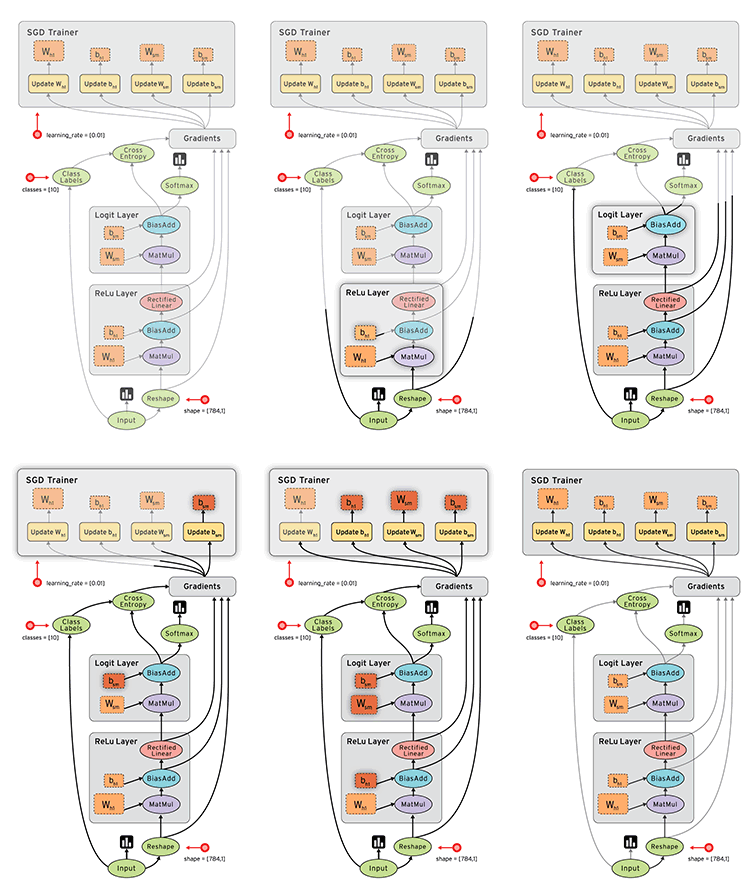
TensorFlow包括俩个重要概念——Tensor和Flow。Tensor就是张量。Flow是流。TensorFlow是一个通过计算图形式来表述计算的编程系统。TensorFlow中的每一个计算都是计算图上的一个节点,而节点之间的边描述了计算之间的依赖关系。
官网给出了一个演示数据流的图。

TensorFlow计算图的使用

TensorFlow程序一般可以分为2个阶段。第一个阶段要定义计算图中所有的计算。第二个阶段为执行计算。

1
2
3
4
5
6
7
8
import tensorflow as tf
a = tf.constant([1.0, 2.0], name="a")
b = tf.constant([2.0, 3.0], name="b")
result = a + b print(a.graph is tf.get_default_graph()) # 输出为True
# 通过a.graph可以查看张量所属的计算图,如果没有指定,则为当前默认的计算图。所以输出为True。
# tf.get_default_graph()表示获取当前默认的计算图

除了使用默认的计算图,TensorFlow还支持通过使用tf.Graph来生成新的计算图,不同计算图上的张量和运算都不会共享。

1
2
3
4
5
6
7
8
9
10
11
12
13
14
15
16
17
18
19
20
21
22
23
24
25
26
27
28
29
30
31
32
33
34
35
import tensorflow as tf

g1 = tf.Graph()
with g1.as_default():
# 设置v=0
v = tf.get_variable("v", initializer=tf.zeros(shape=[1]))
# 这个在1.0版本之前写成tf.zeros_initializer(shape=[1])下同
g2 = tf.Graph()
with g2.as_default():
# 设置v=1
v = tf.get_variable("v", initializer=tf.ones(shape=[1])) # 在计算图g1中读取变量"v"的取值
with tf.Session(graph=g1) as sess:
tf.global_variables_initializer().run()
# 这里在1.0版本之前是tf.initalizer_all_variables().run()下同
with tf.variable_scope("", reuse=True):
# 在计算图g1中,变量"v"的取值应该为0
print(sess.run(tf.get_variable("v"))) # 在计算图g2中读取变量"v"的取值
with tf.Session(graph=g2) as sess:
tf.global_variables_initializer().run()
with tf.variable_scope("", reuse=True):
# 在计算图g2中,变量"v"的取值应该为1
print(sess.run(tf.get_variable("v"))) # 运行结果
W tensorflow/core/platform/cpu_feature_guard.cc:45] The TensorFlow library wasn't compiled to use SSE4.1 instructions, but these are available on your machine and could speed up CPU computations.
W tensorflow/core/platform/cpu_feature_guard.cc:45] The TensorFlow library wasn't compiled to use SSE4.2 instructions, but these are available on your machine and could speed up CPU computations.
W tensorflow/core/platform/cpu_feature_guard.cc:45] The TensorFlow library wasn't compiled to use AVX instructions, but these are available on your machine and could speed up CPU computations.
W tensorflow/core/platform/cpu_feature_guard.cc:45] The TensorFlow library wasn't compiled to use AVX2 instructions, but these are available on your machine and could speed up CPU computations.
W tensorflow/core/platform/cpu_feature_guard.cc:45] The TensorFlow library wasn't compiled to use FMA instructions, but these are available on your machine and could speed up CPU computations.
[ 0.]
[ 1.]

上面代码产生了两个计算图,每个计算图中定义了一个名字为”v”的变量。在计算g1中,将v初始化0;在计算图g2中,将v初始化为1。当运行不同的计算图时,变量v的值也不一样。TensorFlow中的计算图不仅仅可以用来隔离张量和计算,它还提供了管理张量和计算的机制。计算图可以通过tf.Graph.device函数来指定运行计算的设备。

1
2
3
4
5
# 例如
g = tf.Graph()
with g.device('/gpu:0'):
result = a + b
# 后续有更详细的介绍

TensorFlow数据模型——张量

在TensorFlow中所有的数据都通过张量的形式来表示。从功能角度的看,张量可以被简单理解为多维数组。零阶张量表示标量,也就是一个数。一阶张量是向量,也就可以看成一维数组;第n阶张量也可以看成n维数组。但张量并不是直接采用数组的形式,它只是对TensorFlow中运算结果的引用。张量中并没有真正保存数字,保存的是如何得到这些过程的计算过程。张量的类型当然也可以是字符串,这里先不讨论。

1
2
大专栏  TensorFlow学习笔记(一)>3
4
5
6
7
8
9
10
11
12
13
14
15
16
17
18
19
20
21
22
23
24
25
26
27
28
29
30
31
32
33
34
35
36
37
38
39
40
41
42
43
import tensorflow as tf
a = tf.constant([1.0, 2.0], name="a")
b = tf.constant([2.0, 3.0], name="b")
result = tf.add(a, b, name="add")
print(result)
# 输出为
Tensor("add:0", shape=(2,), dtype=float32) '''
从这里可以看出TensorFlow中的张量和Numpy的数组不同。
TensorFlow计算的结果不是一个具体的数字,而是一个张量的结构。
一个张量中主要保存了三个属性 name、shape、type
name具体形式为 node:src_output
其中 node 为节点的名称
src_output 表示当前张量来自节点的第几个输出
例如 add:0 表示result这个张量是计算节点add输出的第一个结果(以0为开始)
type 是张量的类型,每一个张量都会有一个唯一的类型。
TensorFlow会对所有参与运算的张量进行类型的检查,当发现类型不匹配时会报错。比如:
''' a = tf.constant([1, 2], name="a")
b = tf.constant([2.0, 3.0], name="b")
result = tf.add(a, b, name="add")
print(result)
# 报错
ValueError: Tensor conversion requested dtype int32 for Tensor with dtype float32: 'Tensor("b:0", shape=(2,), dtype=float32)' # 但是如果在constant里面加入一个参数dtype=tf.float32则程序就正常运行
a = tf.constant([1, 2], name="a", dtype=tf.float32)
b = tf.constant([2.0, 3.0], name="b")
result = tf.add(a, b, name="add")
# 输出
Tensor("add:0", shape=(2,), dtype=float32) '''
如果不指定默认类型,则TensorFlow会给出默认的类型,
比如无小数点的会被默认为int32,有小数点的会被默认为float32。
TensorFlow支持14种类型
浮点数tf.float32 tf.float64
整数tf.int8 tf.int16 tf.int32 tf.int64 tf.uint8
布尔型tf.bool
复数tf.complex64 tf.complex128
'''

TensorFlow运行模型——会话(Session)

  • 明确调用会话生成函数和关闭会话函数,使用这种模式要明确调用Session.close函数关闭会话而释放资源。然而如果程序异常退出时则不会调用close导致资源泄露。
1
2
3
4
5
6
7
8
9
import tensorflow as tf
a = tf.constant([1, 2], name="a", dtype=tf.float32)
b = tf.constant([2.0, 3.0], name="b")
result = tf.add(a, b, name="add")
# 创建一个会话
sess = tf.Session()
sess.run(result)
# 关闭会话使得本次运行中使用的资源可以被释放
sess.close()
  • 使用python的上下文管理器的机制,将所有的计算放在with的内部就可以自动释放所有资源。
1
2
with tf.Session() as sess:
sess.run(result)
  • TensorFlow会自动生成默认的计算图,如果没有特殊指定,运算会自动加入这个计算图中,TensorFlow中的会话也有类似机制,但不会自动生成默认的会话,而是需要手动指定。当默认的会话被指定之后可以通过tf.Tensor.eval函数来计算一个张量的取值。
1
2
3
4
5
6
7
8
9
10
11
12
13
14
15
sess = tf.Session()
with sess.as_default():
print(result.eval()) # 输出
W tensorflow/core/platform/cpu_feature_guard.cc:45] The TensorFlow library wasn't compiled to use SSE4.1 instructions, but these are available on your machine and could speed up CPU computations.
W tensorflow/core/platform/cpu_feature_guard.cc:45] The TensorFlow library wasn't compiled to use SSE4.2 instructions, but these are available on your machine and could speed up CPU computations.
W tensorflow/core/platform/cpu_feature_guard.cc:45] The TensorFlow library wasn't compiled to use AVX instructions, but these are available on your machine and could speed up CPU computations.
W tensorflow/core/platform/cpu_feature_guard.cc:45] The TensorFlow library wasn't compiled to use AVX2 instructions, but these are available on your machine and could speed up CPU computations.
W tensorflow/core/platform/cpu_feature_guard.cc:45] The TensorFlow library wasn't compiled to use FMA instructions, but these are available on your machine and could speed up CPU computations.
[ 3. 5.] # 这2个命令都可以输出一样的结果
print(sess.run(result))
print(result.eval(session=sess))
  • TensorFlow提供了一个直接构建默认会话的函数。使用这个函数会自动将生成的会话注册为默认会话。
1
2
3
4
5
6
7
8
9
10
11
12
13
14
15
16
17
18
19
sess = tf.InteractiveSession()
print(result.eval())
sess.close() # 无论哪种方法都可以通过ConfigProto Protocol Buffer来配置需要生成的会话: config = tf.ConfigProto(allow_soft_placement=True, log_device_placement=True)
sess1 = tf.InteractiveSession(config=config)
sess2 = tf.Session(config=config) '''
通过ConfigProto可以配置类似并行的线程数、GPU分配策略、运算超时时间等参数
在这些参数中,最长使用的有两个
1)allow_soft_placement,默认为False,但为True时表示符合以下条件时GPU运算可以放在CPU上进行:
1.运算无法在GPU运行
2.没有GPU资源(运算被指定在第二个GPU运行,但设备只有一个GPU)
3.运算输入包含CPU计算结果的引用
2)log_device_placement,当它为True时日志会记录每个节点被安排在哪个设备上以方便调试,但是在生产环境中设置为False可以减少日志量。
'''

TensorFlow学习笔记(一)的更多相关文章

  1. Tensorflow学习笔记2:About Session, Graph, Operation and Tensor

    简介 上一篇笔记:Tensorflow学习笔记1:Get Started 我们谈到Tensorflow是基于图(Graph)的计算系统.而图的节点则是由操作(Operation)来构成的,而图的各个节 ...

  2. Tensorflow学习笔记2019.01.22

    tensorflow学习笔记2 edit by Strangewx 2019.01.04 4.1 机器学习基础 4.1.1 一般结构: 初始化模型参数:通常随机赋值,简单模型赋值0 训练数据:一般打乱 ...

  3. Tensorflow学习笔记2019.01.03

    tensorflow学习笔记: 3.2 Tensorflow中定义数据流图 张量知识矩阵的一个超集. 超集:如果一个集合S2中的每一个元素都在集合S1中,且集合S1中可能包含S2中没有的元素,则集合S ...

  4. TensorFlow学习笔记之--[compute_gradients和apply_gradients原理浅析]

    I optimizer.minimize(loss, var_list) 我们都知道,TensorFlow为我们提供了丰富的优化函数,例如GradientDescentOptimizer.这个方法会自 ...

  5. 深度学习-tensorflow学习笔记(1)-MNIST手写字体识别预备知识

    深度学习-tensorflow学习笔记(1)-MNIST手写字体识别预备知识 在tf第一个例子的时候需要很多预备知识. tf基本知识 香农熵 交叉熵代价函数cross-entropy 卷积神经网络 s ...

  6. 深度学习-tensorflow学习笔记(2)-MNIST手写字体识别

    深度学习-tensorflow学习笔记(2)-MNIST手写字体识别超级详细版 这是tf入门的第一个例子.minst应该是内置的数据集. 前置知识在学习笔记(1)里面讲过了 这里直接上代码 # -*- ...

  7. tensorflow学习笔记(4)-学习率

    tensorflow学习笔记(4)-学习率 首先学习率如下图 所以在实际运用中我们会使用指数衰减的学习率 在tf中有这样一个函数 tf.train.exponential_decay(learning ...

  8. tensorflow学习笔记(3)前置数学知识

    tensorflow学习笔记(3)前置数学知识 首先是神经元的模型 接下来是激励函数 神经网络的复杂度计算 层数:隐藏层+输出层 总参数=总的w+b 下图为2层 如下图 w为3*4+4个   b为4* ...

  9. tensorflow学习笔记(2)-反向传播

    tensorflow学习笔记(2)-反向传播 反向传播是为了训练模型参数,在所有参数上使用梯度下降,让NN模型在的损失函数最小 损失函数:学过机器学习logistic回归都知道损失函数-就是预测值和真 ...

  10. tensorflow学习笔记(1)-基本语法和前向传播

    tensorflow学习笔记(1) (1)tf中的图 图中就是一个计算图,一个计算过程.                                       图中的constant是个常量 计 ...

随机推荐

  1. Educational Codeforces Round 66 差G

    Educational Codeforces Round 66 F 题意:长度为 n 的序列,求有多少个区间 \([l,r]\) ,使得其构成了一个 1~r-l+1 的排列. \(n \le 3*10 ...

  2. Spring容器中的Bean几种初始化方法和销毁方法的先后顺序

    https://blog.csdn.net/caihaijiang/article/details/8629725

  3. auto uninstaller (autodesk 修复大师) 简体中文版 更新下载地址

    小伙伴是不是遇到 CAD/3dmax/maya/Revit/Inventor 安装失败或者安装不了的问题了呢?AUTODESK系列软件着实令人头疼,CAD/3dmax/maya/Revit/Inven ...

  4. leetcode第36题:有效的数独

    解题思路:按行,列,3*3方格读取元素,存入字典中.若字典中该元素的值大于1,则返回false,否则返回true. class Solution: def isValidSudoku(self, bo ...

  5. python-倒序循环

    有时候循环需要用到倒序,所以整理一下倒序循环的方法 方法1: 如果要倒序遍历访问序列中的元素,可以对该序列使用reversed() 函数,reversed函数会生成一份倒序列表的拷贝,但是不会改变原列 ...

  6. 从NIPS2014大会看机器学习新趋势

    微软杰出科学家 John Platt 本文译自:Machine Learning Trends fromNIPS 2014 编者按:John Platt是微软的杰出科学家,也是微软在机器学习领域的领军 ...

  7. 2015-09-14-初级vector

    标准库vector类型 #include<vector> using std::vector; vector为一个类模板. vector的初始化 vector<T> v1; v ...

  8. iOS(Swift)学习笔记之SnapKit+自定义UI组件

    本文为原创文章,转载请标明出处 1. 通过CocoaPods安装SnapKit platform :ios, '10.0' target '<Your Target Name>' do u ...

  9. 基于Springboot注解的策略模式

    释义 策略模式和多态很相似 可以理解为定义了一个统一的接口,有许多不同的实现类,可以自由选择不同的实时类去执行. 实现 上代码: 定义一个统一的接口: [JavaScript] 纯文本查看 复制代码 ...

  10. Zabbix 监控进程参考

    1)zabbix自动发现占用内存最大top10进程并监控资源 http://blog.csdn.net/ybx13218464908/article/details/47819401