
八: IO流,数据的读写传输
IO流概括图:
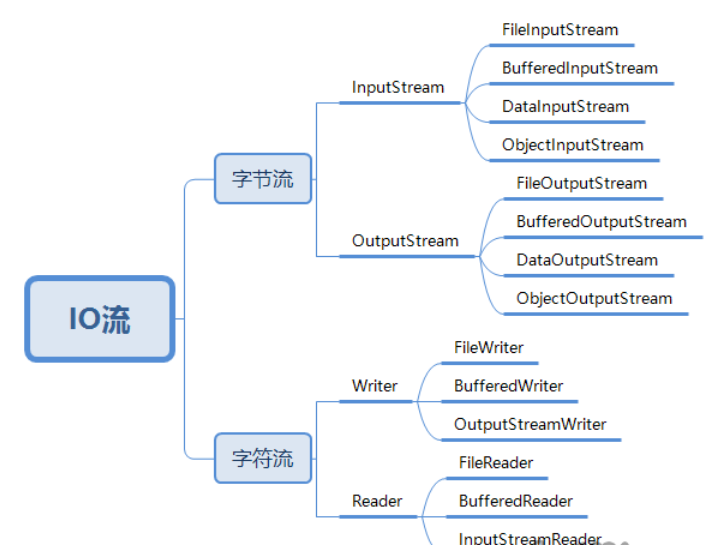
IO流的分类:
按流:
- 输入流(InputStream和Reader):从硬盘或者别的地方读入内存
- 输出流(OutputStream和Writer):从内存里向硬盘或别的地方输出
按操作类型:
- 字节流(InputStream和OutputStream): 字节流可以操作任何数据,因为在计算机中数据以字节的形式存储
- 字符流(Reader和Writer):字符流只能操作纯字符数据,比如文本,以防乱码
以上所述,InputStream、OutputStream、Reader、Writer都是抽象类
缓冲流:
- BufferedInputStream、BufferedOutputStream
- 优点:BufferedInputStream读取时会创建一个长度为8192的byte数组,读完返回-1。不用自己手动创建数组.
字符转换流:
- InputStreamReader和OutputStreamWriter可以设置编码,完成不同编码文件的转换
绝对路径和相对路径:
- 绝对路径:文件在硬盘上真正存在的路径,比如:D:\Java\HelloWorld.java
- 相对路径:只某个文件路径径和别的文件的路径关系 。
使用分隔符解决跨平台的问题:
- 使用File.separator解决不同系统路径问题
- 分隔符: windows: \
- linux : /
- 为了保证代码跨平台,使用File.separator代替分隔符
文件加密和解密:利用两次异或的原理
中文乱码问题: 一个中文占两个字节,如果一次读写入奇数个字节,就有可能乱码,这时候推荐使用字符流解决,一次读一行
字符流读写文件:一次读一行,记得换行bw.newLine()、刷新缓冲区bw.flush()
Code:
- test() :使用FileInputStream、FileOutputStream读取、写入文件中的内容
- test2():使用Buffered缓冲流进行文件拷贝
- test3():文件加密解密,利用两次异或
- test4():使用字节流读取文件乱码问题(一个中文占两个字节)
- test5():对乱码问题给出了解决,可使用字符流Writer、Reader
- test6():使用字符流拷贝文本文件
- test7():使用转换流解决不同文件编码问题
- test8():使用转换流解决不同文件编码问题,乱码解决
package io;

import java.io.BufferedInputStream;

import java.io.BufferedOutputStream;

import java.io.BufferedReader;

import java.io.BufferedWriter;

import java.io.File;

import java.io.FileInputStream;

import java.io.FileNotFoundException;

import java.io.FileOutputStream;

import java.io.FileReader;

import java.io.FileWriter;

import java.io.IOException;

import java.io.InputStream;

import java.io.InputStreamReader;

import java.io.OutputStream;

import java.io.OutputStreamWriter;

import java.io.UnsupportedEncodingException;

import java.net.URL;

import org.junit.Test;

public class IODemo {

    //定义加密code

    static int code = 88;

    //定义文件路径

    static String fileName = "C:"+File.separator+"Users"+File.separator+"李腾"+File.separator+"Desktop"+File.separator+"写入文件.txt";

    static String readName = "C:"+File.separator+"Users"+File.separator+"李腾"+File.separator+"Desktop"+File.separator+"读取文件.txt";

  //使用FileInputStream、FileOutputStream读取、写入文件中的内容

   @Test

   public void test(){

       FileInputStream fis = null;

       FileOutputStream fos = null;

       //绝对路径

       String readFile = "D:"+File.separator+"mylog.log";

       String writeFile = "D:"+File.separator+"newWrite.txt";

   try {

        fos = new FileOutputStream(writeFile,true);

        fis = new FileInputStream(readFile);

        //定义字节数组接收信息

        byte[] bytes = new byte[6000];

        int temp;

        while((temp = fis.read(bytes))!=-1){

            fos.write(temp);

            //刷新并写出所有缓冲字节

            fos.flush();

        }

    } catch (FileNotFoundException e) {

        e.printStackTrace();

    } catch (IOException e) {

        e.printStackTrace();

    }finally {

        try {

            fos.close();

            fis.close();

        }

        catch (IOException e) {

            e.printStackTrace();

        }

    }

   }

   //使用Buffered缓冲流进行文件拷贝

   @Test

   public void test2(){

       BufferedInputStream bis = null;

       BufferedOutputStream bos = null;

       try {

        bis = new BufferedInputStream(new FileInputStream("D:"+File.separator+"mylog.log"));

        bos = new BufferedOutputStream(new FileOutputStream("D:"+File.separator+"buf.txt"));

        int temp;

        while((temp=bis.read())!=-1){

            bos.write(temp);

        }

    } catch (FileNotFoundException e) {

        e.printStackTrace();

    } catch (IOException e) {

        e.printStackTrace();

    }finally{

        try {

            bis.close();

            bos.close();

        } catch (IOException e) {

            e.printStackTrace();

        }

    }

   }

   //文件加密解密,利用两次异或

   //JDK7新特性,系统自动close

   @Test

   public void test3(){

       BufferedOutputStream bos = null;

       BufferedInputStream bis = null;

       //加密

       try {

        bis = new BufferedInputStream(new FileInputStream("D:"+File.separator+"IO流.rar"));

        bos = new BufferedOutputStream(new FileOutputStream("D:"+File.separator+"加密.rar"));

        int temp;

        while((temp=bis.read())!=-1){

            bos.write(temp^code);

            bos.flush();

        }

       } catch (IOException e) {

        e.printStackTrace();

    }

       //解密

       try {

           bis = new BufferedInputStream(new FileInputStream("D:"+File.separator+"加密.rar"));

           bos = new BufferedOutputStream(new FileOutputStream("D:"+File.separator+"解密.rar"));

           int temp;

           while((temp=bis.read())!=-1){

               bos.write(temp^code);

               bos.flush();

           }

       } catch (IOException e) {

           e.printStackTrace();

       }

   }

   //使用字节流读取文件乱码问题(一个中文占两个字节)

   //test5对乱码问题给出了解决,可使用字符流Writer、Reader

   @Test

   public void test4(){

       FileOutputStream fos = null;

       FileInputStream fis = null;

       String msg = "好好";

       try {

        fos = new FileOutputStream(fileName);

        fis = new FileInputStream(readName);

        int temp;

        //每次读三个字节,也乱码

        byte[] arr = new byte[3];

        //每次写三个字节,因为中文占两,所以乱码

        fos.write(msg.getBytes(),0,3);

        //换行

        fos.write("\r\n".getBytes());

        fos.flush();

        while((temp=fis.read(arr))!=-1){

            System.out.println(new String(arr,0,temp));

        }

    } catch (FileNotFoundException e) {

        // TODO Auto-generated catch block

        e.printStackTrace();

    } catch (IOException e) {

        // TODO Auto-generated catch block

        e.printStackTrace();

    }

   }

  /* 用字符流解决中文乱码问题

   * BufferdReader可以一次读一行文字,readLine方法返回null

   * */

   @Test

   public void test5(){

       BufferedReader buf = null;

       FileWriter fw = null;

       BufferedWriter bw = null;

       try {

        buf = new BufferedReader(new FileReader(readName));

        String s;

        //写

        bw = new BufferedWriter(new FileWriter(fileName));

        bw.write("我喜欢学习java");

        bw.write(97);

        bw.flush();

        fw = new FileWriter(fileName);

        fw.write("FileWriter写入");

        fw.flush();

        //读

        while((s = buf.readLine())!=null){

//            bw.write(s);

            System.out.print(s);

        }

    } catch (IOException e) {

        e.printStackTrace();

    }

   }

   //使用字符流拷贝文本文件

    @Test

    public void test6(){

        BufferedReader br = null;

        BufferedWriter bw = null;

        try {

            br = new BufferedReader(new FileReader(readName));

            bw = new BufferedWriter(new FileWriter(fileName));

            String s ;

            while((s=br.readLine())!=null){

                //读一行

                bw.write(s);

                //读完换行

                bw.newLine();

                bw.flush();

            }

        } catch (FileNotFoundException e) {

            e.printStackTrace();

        } catch (IOException e) {

            // TODO Auto-generated catch block

            e.printStackTrace();

        }

    }

    //使用转换流解决不同文件编码问题

    //字符流乱码

    @Test

    public void test7(){

        try(

            //将utf-8的内容写出到GBK.txt中,发现乱码

            BufferedReader br=

            new BufferedReader(new FileReader("D:\\JAVA基础\\7.15\\1javaSe\\file\\utf-8.txt"));

            BufferedWriter bw=

            new BufferedWriter(new FileWriter("D:\\JAVA基础\\7.15\\1javaSe\\file\\GBK.txt"));

            ){

            String msg;

            while((msg=br.readLine())!=null){

                bw.write(msg);

            }

            bw.flush();

        } catch (UnsupportedEncodingException e) {

            e.printStackTrace();

        } catch (FileNotFoundException e) {

            e.printStackTrace();

        } catch (IOException e) {

            // TODO Auto-generated catch block

            e.printStackTrace();

        }

    }

    //使用转换流解决不同文件编码问题,乱码解决

    @Test

    public void test8(){

        try(

        BufferedReader br =

        new BufferedReader(new InputStreamReader(new FileInputStream("D:\\JAVA基础\\7.15\\1javaSe\\file\\utf-8.txt"), "utf-8"));

        BufferedWriter bw =

        new BufferedWriter(new OutputStreamWriter(new FileOutputStream("D:\\JAVA基础\\7.15\\1javaSe\\file\\GBK.txt"),"GBK"));

            ){

            String msg;

            while((msg=br.readLine())!=null){

                bw.write(msg);

            }

            bw.flush();

        } catch (UnsupportedEncodingException e) {

            e.printStackTrace();

        } catch (FileNotFoundException e) {

            e.printStackTrace();

        } catch (IOException e) {

            // TODO Auto-generated catch block

            e.printStackTrace();

        }

    }

}
八: IO流,数据的读写传输的更多相关文章
- 零基础学习java------day16-----文件,递归,IO流(字节流读写数据)
1.File 1.1 构造方法(只是创建已经存在文件的对象,并不能创建没有的文件) (1)public File(String pathname) (2)public File(String pare ...
- Java API —— IO流(数据操作流 & 内存操作流 & 打印流 & 标准输入输出流 & 随机访问流 & 合并流 & 序列化流 & Properties & NIO)
1.操作基本数据类型的流 1) 操作基本数据类型 · DataInputStream:数据输入流允许应用程序以与机器无关方式从底层输入流中读取基本 Java 数据类型.应用程序可以使用数据输出 ...
- java IO流文件的读写具体实例(转载)
引言: 关于java IO流的操作是非常常见的,基本上每个项目都会用到,每次遇到都是去网上找一找就行了,屡试不爽.上次突然一个同事问了我java文件的读取,我一下子就懵了第一反应就是去网上找,虽然也能 ...
- C# IO流与文件读写学习笔记
本笔记摘抄自:https://www.cnblogs.com/liyangLife/p/4797583.html,记录一下学习过程以备后续查用. 一.文件系统 1.1文件系统类的介绍 文件操作类大都在 ...
- java IO流文件的读写具体实例
IO流的分类:1.根据流的数据对象来分:高端流:所有的内存中的流都是高端流,比如:InputStreamReader 低端流:所有的外界设备中的流都是低端流,比如InputStream,Output ...
- IO流数据读写总结
1.用java自带的IO读写方法 官方API网站:http://docs.oracle.com/javase/7/docs/api/ 2.Apache的Commons-io-2.4.jar中的方法,参 ...
- Java IO流之随机读写流RandomAccessFile
随机读写流RandomAccessFile 简介 此类的实例支持对随机访问文件的**读取和写入**. 随机访问文件的行为类似存储在文件系统中的一个大型 byte 数组. 存在指向该隐含数组的光标或索引 ...
- io流对文件读写操作
public static void main(String[] args) throws IOException { BufferedReader reader = new BufferedRead ...
- IO流简要总结
IO流小总结 IO流的本质就是用于数据的传输,根据流的方向的不同,有输入流.输出流.根据数据类型的不同,又有字节流.字符流. 字节流 字节输入流 InputStream 字节输出流 Outpu ...
随机推荐
- 在tomcat启动时解析xml文件,获取特定标签的属性值,并将属性值设置到静态变量里
这里以解析hibernate.cfg.xml数据库配置信息为例,运用dom4j的解析方式来解析xml文件. 1.在javaWeb工程里新建一个java类,命名为GetXmlValue.java,为xm ...
- 启动named服务报错!
安装及配置bind服务程序: yum -y install bind 三个关键文件: 主配置文件(/etc/named.conf) 区域配置文件(/etc/named.rfc1912.zones) 数 ...
- Elasticsearch 6.8.4 启动报错解决方法
运行环境:centos 7,jdk 1.8 问题一: ERROR: bootstrap checks failed max ] ] 原因:无法创建本地文件问题,用户最大可创建文件数太小 解决方案:切换 ...
- swiper选项卡还可以左右滑动,最后一个直接跳转链接
整理分享: <!DOCTYPE html> <html lang="en"> <head> <meta charset="utf ...
- UIKit框架使用总结--看看你掌握了多少
一.经常使用的,基本就是每次项目迭代都需要使用的 UIView.UILabel.UIImage.UIColor.UIFont.UIImageView.UITextField.UIButton. UIS ...
- 创业复盘实战营总结----HHR计划----创业课
一句话总结课程核心点. 一共4节在线课: 第一节课:<创业学习> 投资人最看重的是CEO的快速学习能力,根据IPO思维模型,如果一共CEO每天input大量的信息,高效的process,而 ...
- Node Sass does not yet support your current environment: Linux 64-bit with Unsupported runtime
环境: ubuntu18 webstorm vue项目 报错原因: 缺少相关依赖 解决方法: npm rebuild node-sass 还未解决: npm uninstall --save node ...
- vs2013中配置SQLite数据库
转载:https://maplefan.com/index.php/2019/08/14/visual-studio-2013%e9%85%8d%e7%bd%aesqlite3%e7%9a%84%e6 ...
- ch8 基于浮动的布局(两列浮动布局、三列浮动布局)
CSS布局技术的根本是3个基本概念:定位.浮动.外边距操纵. 只需要设置希望定位的元素的宽度,然后将它们向左或向右浮动.因为浮动的元素不再占据文档流中的任何空间,它们就不再对包围他们的块框产生任何影响 ...
- Django 执行 manage 命令方式
本人使用的Pycharm作为开发工具,可以在顶部菜单栏的Tools->Run manage.py Task直接打开manager 命令控制台 打开后在底部会有命令窗口: 或者,也可以在Pytho ...