
IdentityServer4专题之五:OpenID Connect及其Client Credentials流程模式
1.基于概念
OAuth2.0与身份认证协议的角色映射
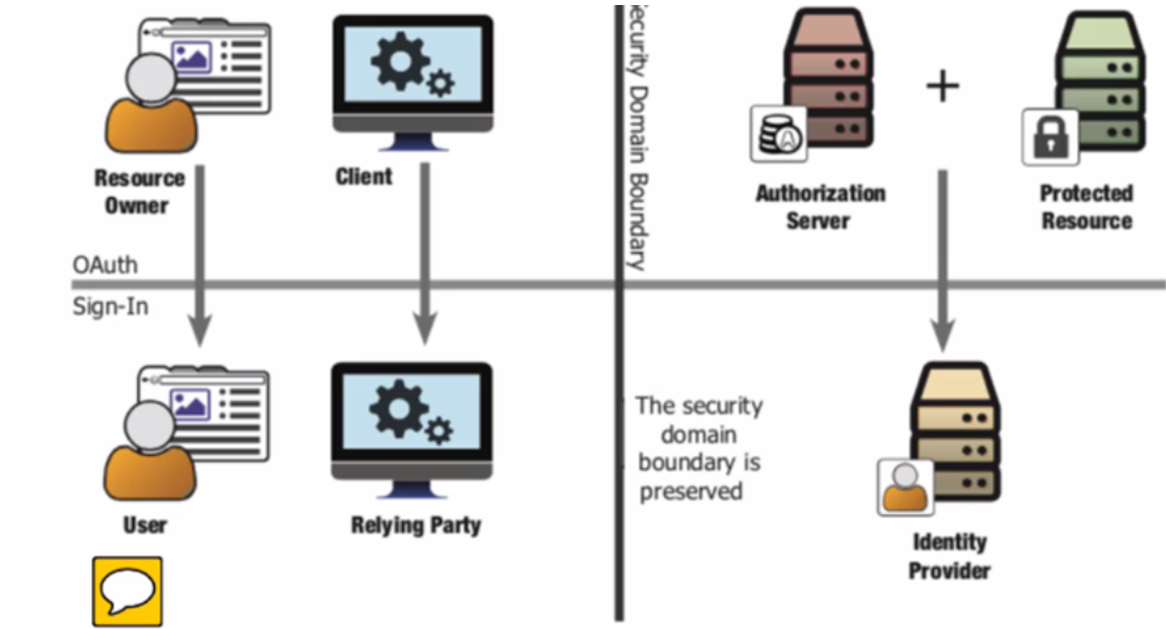
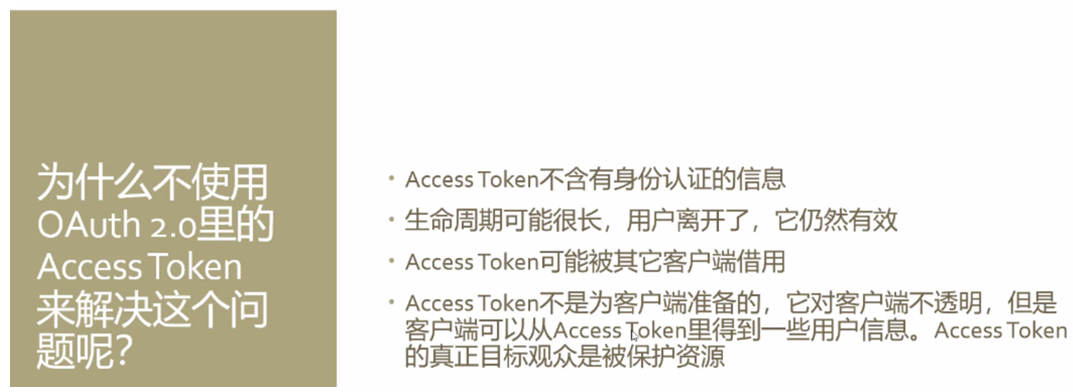
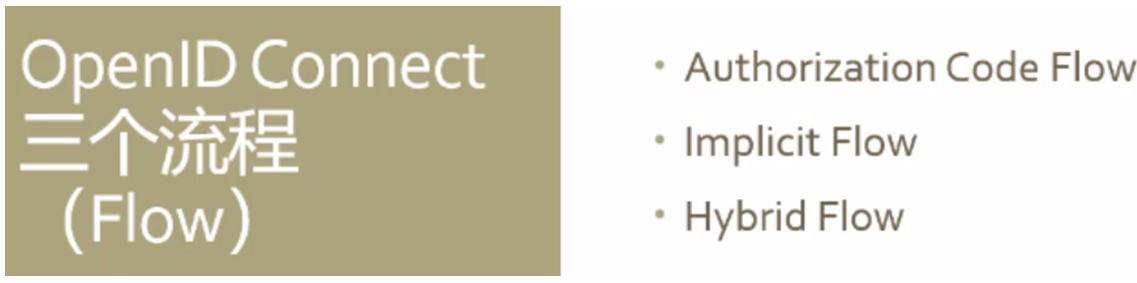
OpenID Connect 这个协议是2014颁发的,基于OAuth2.0,在这个协议中,ID Token会和Access Token一起发回客户端应用,它还提供了一个UserInfo这个端点,通过此端点可以获取用户信息,还提供了一级标识身份的scopes和claims(profile、email、address、phone)
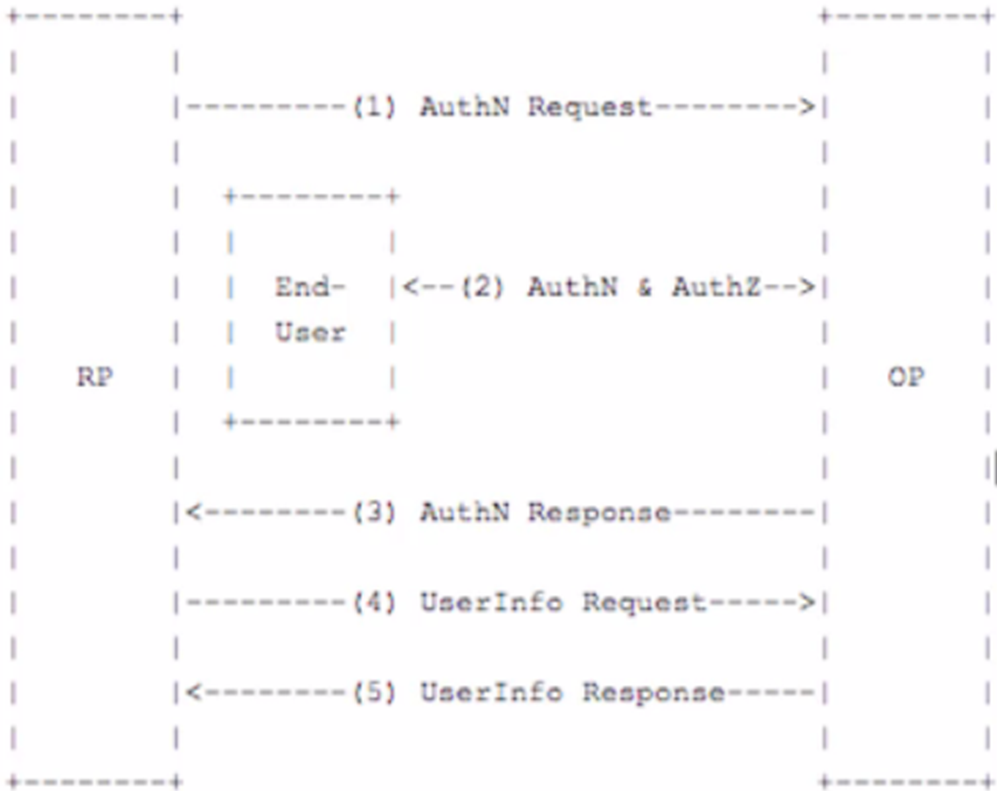
这个协议定义了三个流程:
Identity Server4.0的结构图
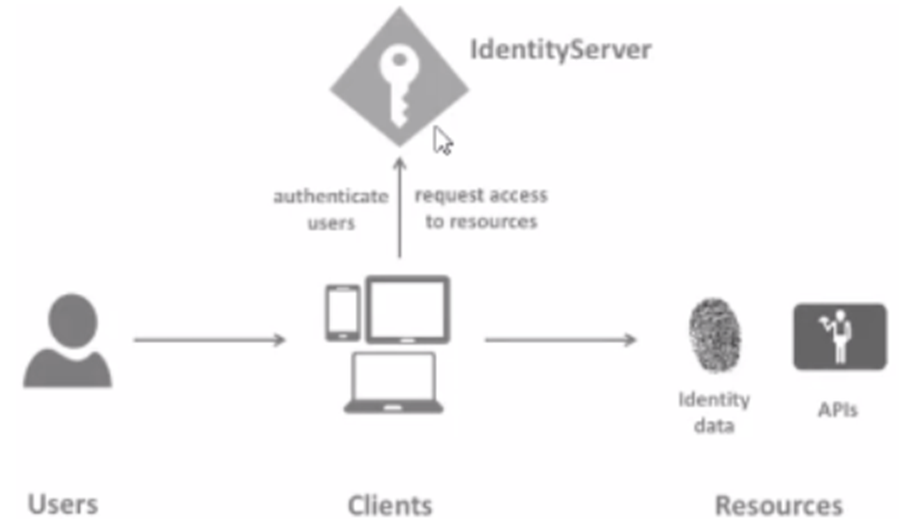
2.三种流程模式

IdentityServer上:
在startup.cs页面中ConfiureServices页面中,应将json config 方式改为code config方式。即按如下方式切换注释代码
// in-memory, code config
builder.AddInMemoryIdentityResources(Config.GetIdentityResources());
builder.AddInMemoryApiResources(Config.GetApis());
builder.AddInMemoryClients(Config.GetClients());
// in-memory, json config
//builder.AddInMemoryIdentityResources(Configuration.GetSection("IdentityResources"));
//builder.AddInMemoryApiResources(Configuration.GetSection("ApiResources"));
//builder.AddInMemoryClients(Configuration.GetSection("clients"));
public static class Config
{
public static IEnumerable<IdentityResource> GetIdentityResources()
{
return new IdentityResource[]
{
new IdentityResources.OpenId(),
new IdentityResources.Profile(),
};
}
public static IEnumerable<ApiResource> GetApis()
{
return new ApiResource[]
{
new ApiResource("api1", "My API #1")
};
}
public static IEnumerable<Client> GetClients()
{
return new[]
{
// client credentials flow client
new Client
{
ClientId = "console client",
ClientName = "Client Credentials Client",
AllowedGrantTypes = GrantTypes.ClientCredentials,
ClientSecrets = { new Secret("511536EF-F270-4058-80CA-1C89C192F69A".Sha256()) },
AllowedScopes = {"api1" }
}
};
}
}
客户端控制台程序代码:
static async Task Main(string[] args)
{
//Discovery endpoint
Console.WriteLine("Hello World!");
var client = new HttpClient();
var disco = await client.GetDiscoveryDocumentAsync("http://localhost:5000");
if(disco.IsError)
{
Console.WriteLine(disco.Error);
return;
}
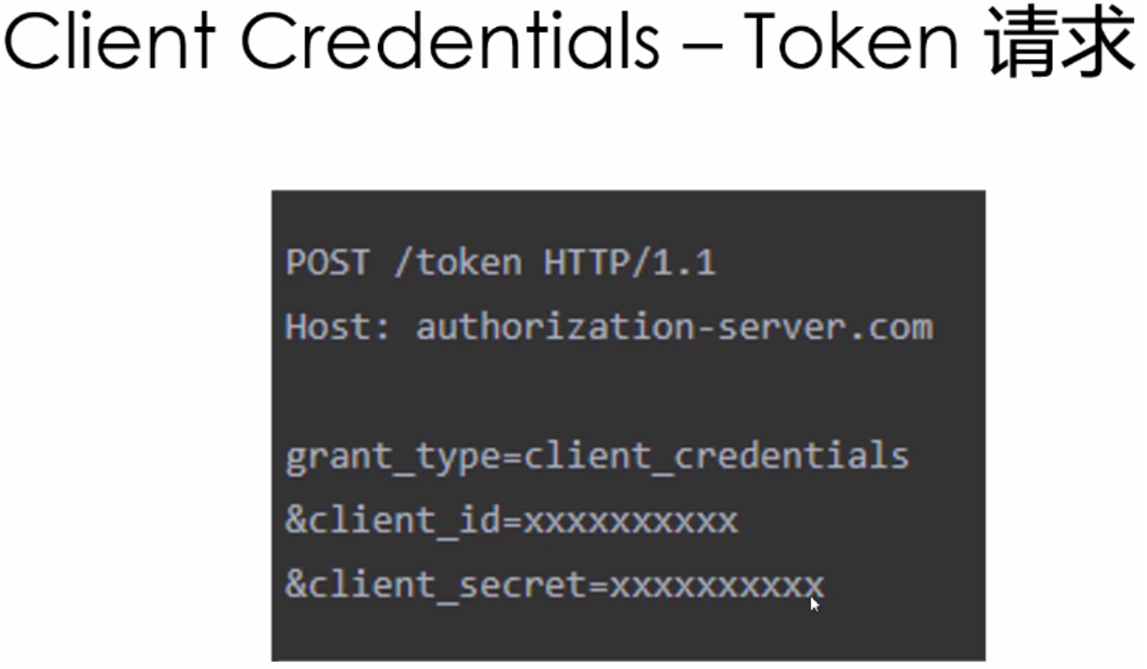
//Request access token,客户端必须带有:ClientCredentials
var tokenResponse =await client.RequestClientCredentialsTokenAsync(new ClientCredentialsTokenRequest {
Address = disco.TokenEndpoint,
ClientId = "console client",
ClientSecret = "511536EF-F270-4058-80CA-1C89C192F69A",
Scope= "api1"
});
if (tokenResponse.IsError)
{
Console.WriteLine(tokenResponse.Error);
return;
}
var apiClient = new HttpClient();
apiClient.SetBearerToken(tokenResponse.AccessToken);
var response = await apiClient.GetAsync("http://localhost:5002/api/values");
if (!response.IsSuccessStatusCode)
{
Console.WriteLine(response.StatusCode);
}
else
{
var content = await response.Content.ReadAsStringAsync();
Console.WriteLine(content);
}
}
asp.net core api资源应用:
public class Startup
{
public Startup(IConfiguration configuration)
{
Configuration = configuration;
}
public IConfiguration Configuration { get; }
// This method gets called by the runtime. Use this method to add services to the container.
public void ConfigureServices(IServiceCollection services)
{
//使用IdentityServer认证和授权
services.AddMvcCore().AddAuthorization().AddJsonFormatters();
services.AddAuthentication("Bearer")
.AddJwtBearer("Bearer", options =>
{
options.Authority = "http://localhost:5000";
options.RequireHttpsMetadata = false;
options.Audience = "api1";
});
}
public void Configure(IApplicationBuilder app, IHostingEnvironment env)
{ //使用identityserver
app.UseAuthentication();
app.UseMvc();
}
}
[Route("api/[controller]")]
[Authorize]
[ApiController]
public class ValuesController : ControllerBase
{
// GET api/values
[HttpGet]
public ActionResult<IEnumerable<string>> Get()
{
return new string[] { "value1", "value2","value3"};
}
}
总结:Client Credentials这种方式,客户端应用不代表用户,客户端应用本身就相当于是资源所有者;通常用于机器对机器的通信;客户端也需要身份认证。
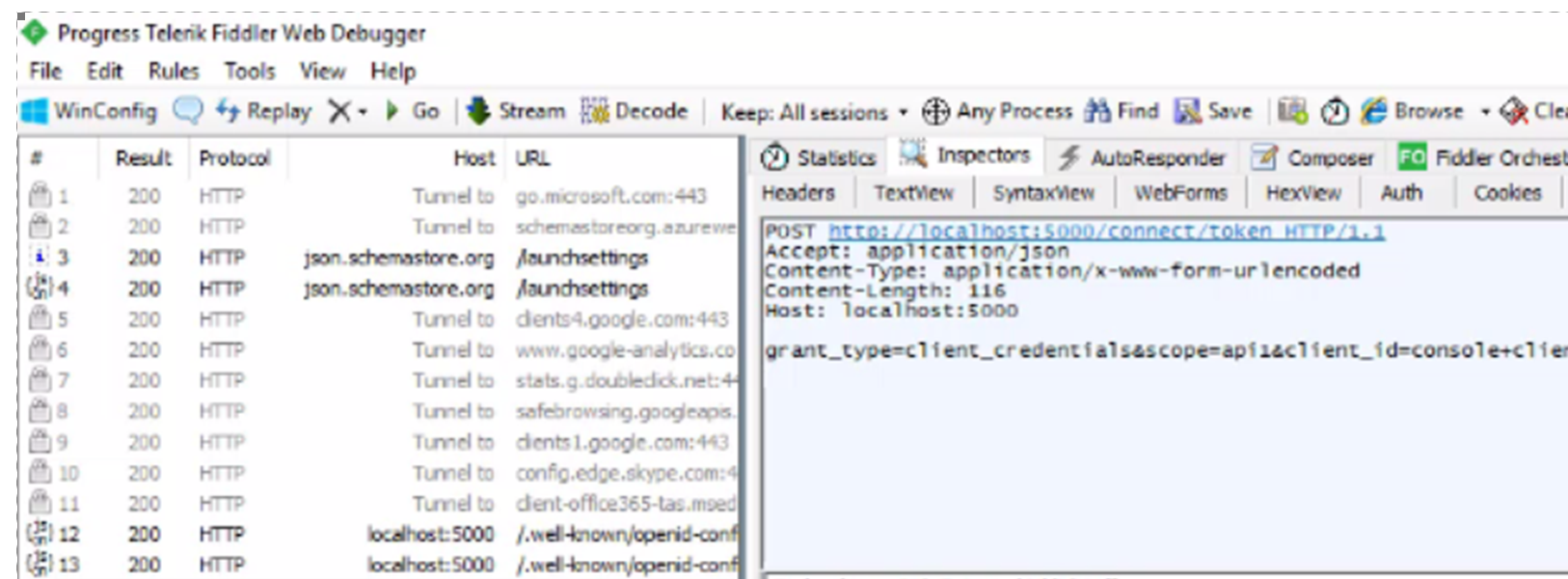
可采用工具软件监控客户端与服务端的通信:
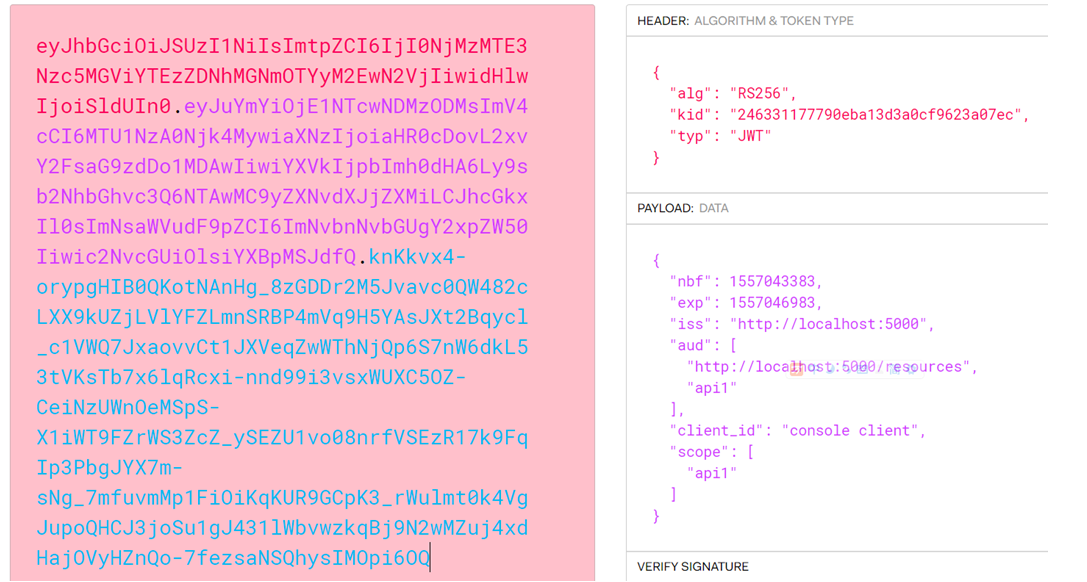
将获取的access token放到网站https://jwt.io/,进行解码,即可以看到token中包含的许多用用信息。
IdentityServer4专题之五:OpenID Connect及其Client Credentials流程模式的更多相关文章
- IdentityServer4专题之六:Resource Owner Password Credentials
实现代码: (1)IdentityServer4授权服务器代码: public static class Config { public static IEnumerable<Identity ...
- IdentityServer4+OAuth2.0+OpenId Connect 详解
一 Oauth 2.0 1 定义 OAuth(开放授权)是一个开放标准,允许用户让第三方应用访问该用户在某一网站上存储的私密的资源(如照片,视频,联系人列表),而无需将用户名和密码提供给第三方应用. ...
- MIT KIT OpenID Connect Demo Client
Hello world! You are NOT currently logged in. This example application is configured with several pa ...
- IdentityServer4 实现 OpenID Connect 和 OAuth 2.0
关于 OAuth 2.0 的相关内容,点击查看:ASP.NET WebApi OWIN 实现 OAuth 2.0 OpenID 是一个去中心化的网上身份认证系统.对于支持 OpenID 的网站,用户不 ...
- IdentityServer4 之Client Credentials走起来
前言 API裸奔是绝对不允许滴,之前专门针对这块分享了jwt的解决方案(WebApi接口裸奔有风险):那如果是微服务,又怎么解决呢?每一个服务都加认证授权也可以解决问题,只是显得认证授权这块冗余,重复 ...
- .NET Core IdentityServer4实战 第二章-OpenID Connect添加用户认证
内容:本文带大家使用IdentityServer4进行使用OpenID Connect添加用户认证 作者:zara(张子浩) 欢迎分享,但需在文章鲜明处留下原文地址. 在这一篇文章中我们希望使用Ope ...
- IdentityServer4【QuickStart】之利用OpenID Connect添加用户认证
利用OpenID Connect添加用户认证 利用OpenID Connect添加用户认证 在这个示例中我们想要通过OpenID Connect协议将交互用户添加到我们的IdentityServer上 ...
- 基于 IdentityServer3 实现 OAuth 2.0 授权服务【客户端模式(Client Credentials Grant)】
github:https://github.com/IdentityServer/IdentityServer3/ documentation:https://identityserver.githu ...
- OpenID Connect Core 1.0(一)介绍
IdentityServer4是基于OpenID Connect and OAuth 2.0框架,OpenID Connect Core 1.0是IdentityServer4最重要的文档 By 道法 ...
随机推荐
- HTTP接口调用方式
1.get方式,设置调用方式为get,参数直接在url中包含,直接调用获取返回值即可 2.post方式,content为application/x-www-form-urlencoded ,参数格式 ...
- 关于转入软件工程专业后第二次java课上作业的某些体会
今天是第二周的java课. 自从转入了软件工程专业后,在我没有学习c++的基础上,直接开始了学习java的过程.不得不说过程很艰辛.今天下午老师让编写一个随机产生作业的软件.而我的基础差到都不知道如何 ...
- SMBUS与I2C
SMBUS(系统管理总线)基于I2C总线,主要用于电池管理系统中.它工作在主/从模式:主器件提供时钟,在其发起一次传输时提供一个起始位,在其终止一次传输时提供一个停止位:从器件拥有一个唯一的7或10位 ...
- iOS 增强程序健壮性 - - 使用 NullSafe 对 <null> 处理
在项目开发中,和服务端交互数据时,若服务端数据为空时,会出现 <null>,客户端解析时会 Crash,为了增强程序的健壮性,减少 Crash 的发生,可以使用 NullSafe 这个类别 ...
- MD5 加密解密字符串
方法1: using System.Text; using System.Security.Cryptography; public string Hash(string toHash) { MD5C ...
- 电影推荐算法---HHR计划
1,先看FM部分. 2,看看冷启动. 0,热门召回源. 1,男女召回源,年龄召回源,职业召回源,score最高. 2,男女年龄职业相互组合: 3,存入redis.天级别更新. 3,召回+排序先搞懂. ...
- 笔记-Python-module
笔记-Python-module 1. 模块 关于模块: 每个模块都有自己的私有符号表,模块中所有的函数以它为全局符号表.因此,模块的作者可以在模块中使用全局变量,而不用担心与用户的全局变量 ...
- PAT A1091 Acute Stroke
对于坐标平面的bfs模板题~ #include<bits/stdc++.h> using namespace std; ; ][][]={false}; ][][]; int n,m,l, ...
- shell脚本中执行shell脚本
1.a.sh #!/bin/sh name="hello" ./b.sh $name 2.b.sh(这里把b.sh与a.sh放在同一目录下,便于演示) #!/bin/sh ech ...
- vue + element ui table表格二次封装 常用功能
因为在做后台管理项目的时候用到了大量的表格, 且功能大多相同,因此封装了一些常用的功能, 方便多次复用. 组件封装代码: <template> <el-table :data=&qu ...