
request库
0x00 环境简介和安装
我这里使用的是python2.7版本,直接使用pycharm2018这款IDE。
首先在pycharm中配置一下virtualenv环境,virtualenv是一个创建独立Python运行环境的工具,为一个应用创建一套“隔离”的Python运行环境。
创建new project时选择创建新的环境,修改你们自己的目录,如果主机内有多个版本的python解释器可自行选择

创建完成后可以在项目中安装requests库,file-settings打开如下界面
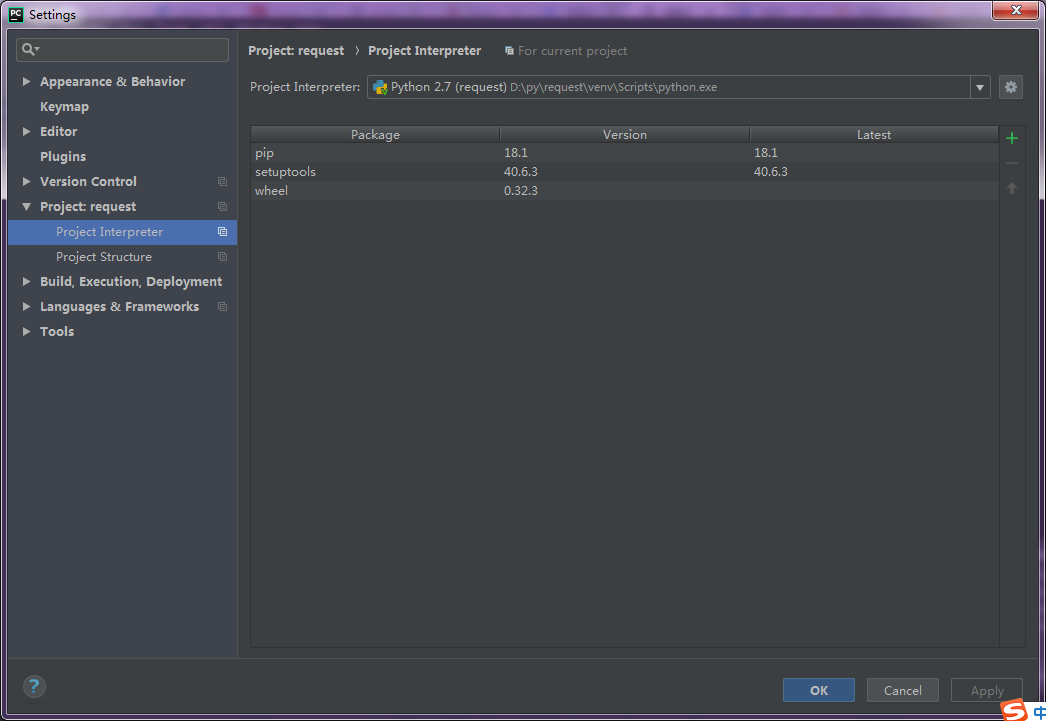
单击右上角绿色加号,搜索requests并install

这里如果你的pip版本大于等于10,安装的时候会报错,原因是由于新版pip的函数发生了变化,解决办法参考这个帖子
【Python】【亲测好用】安装第三方包报错:AttributeError:'module' object has no attribute 'main'
0x01 使用requests
请求方法
- GET: 查看资源
- POST: 增加资源
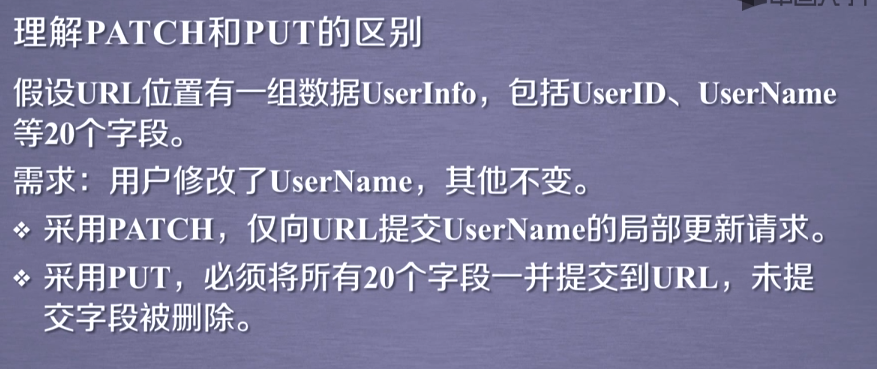
- PUT: 修改资源
- DELETE: 删除资源
- HEAD: 查看响应头
- patch: 局部更新url资源
基本用法:requests.[methon](url)
import requests

response = requests.get('https://www.cnblogs.com/Ragd0ll/p/10176258.html')

print(response.status_code)  # 打印状态码

print(response.url)          # 打印请求url

print(response.headers)      # 打印头信息

print(response.cookies)      # 打印cookie信息

print(response.text)  #以文本形式打印网页源码

print(response.content) #以字节流形式打印
request的可选参数
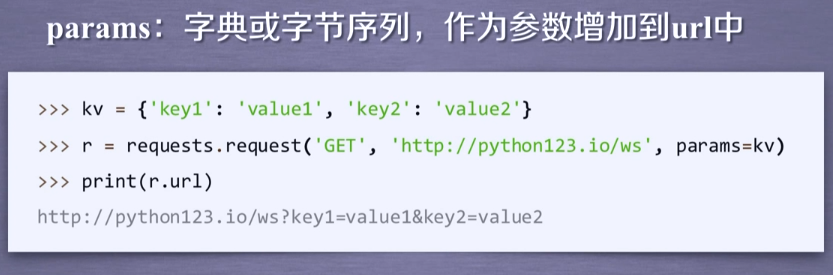
1.param
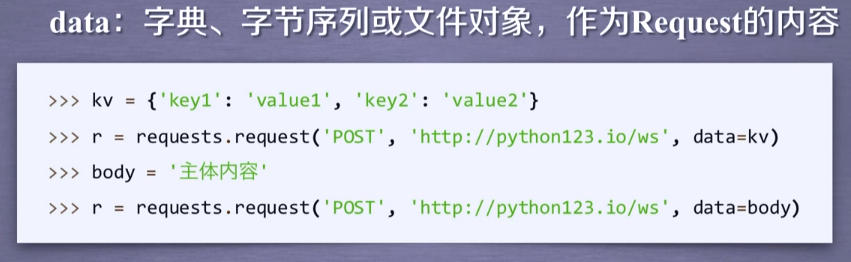
2.data
3.json
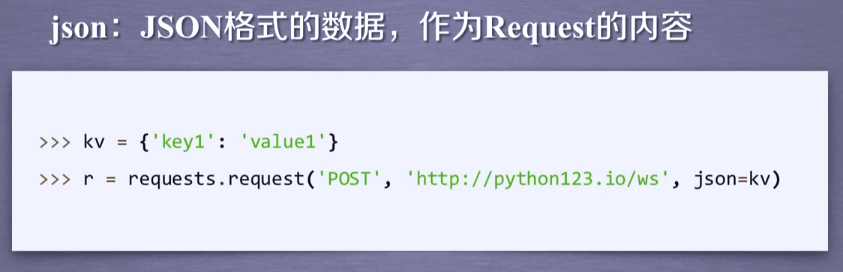
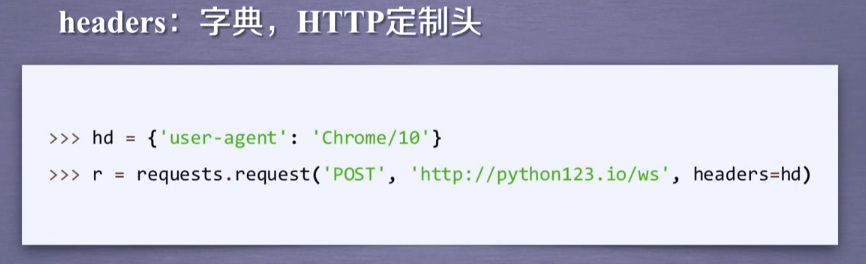
4.headers
5.cookies、auth

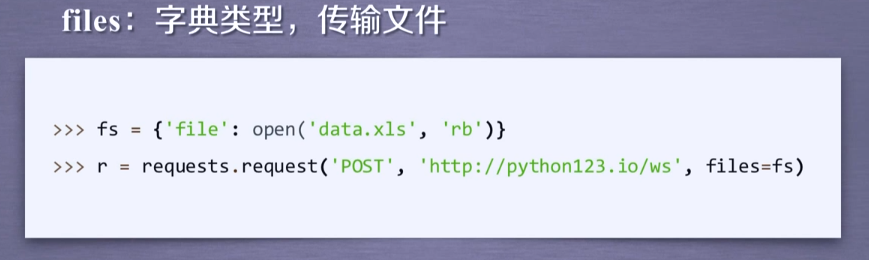
6.files
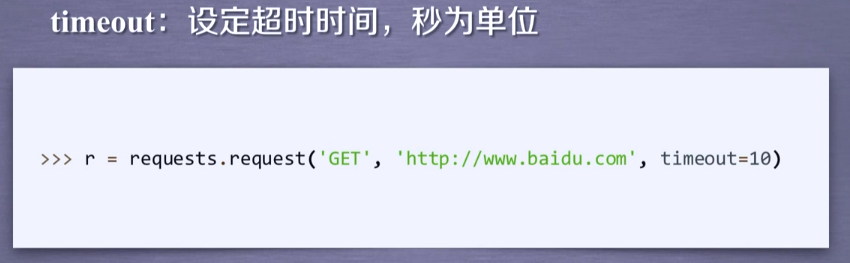
7.timeout
8.proxies
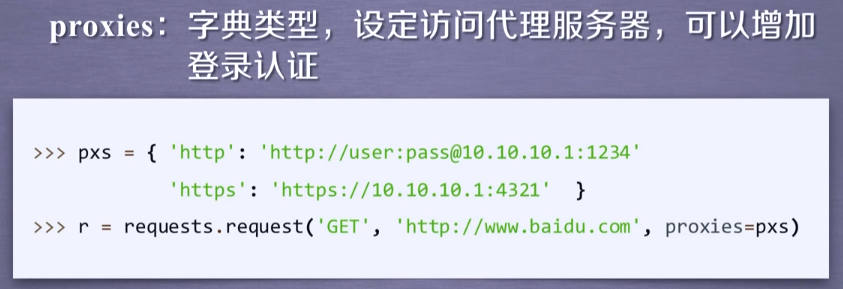
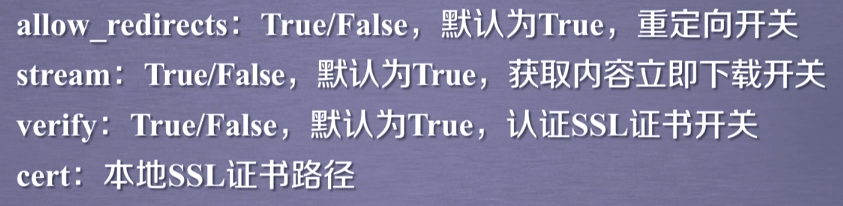
9.allow_redirects、stream、verify、cert
带参数的get请求:
第一种直接将参数放在url内
import requests

response = requests.get(http://httpbin.org/get?name=gemey&age=22)

print(response.text)
第二种是将参数放入字典,然后在请求时给params参数赋值
import requests

data = {

    'name': 'tom',

    'age': 20

}

response = requests.get('http://httpbin.org/get', params=data)

print(response.text)
两段代码的结果相同
基本POST请求:
import requests

data = {'name':'tom','age':''}

response = requests.post('http://httpbin.org/post', data=data)
简单保存一个二进制文件
import requests

response = requests.get('https://img2018.cnblogs.com/blog/1342178/201812/1342178-20181225201042109-1353349536.png')

b = response.content

with open('F://fengjing.jpg','wb') as f:

    f.write(b)
为你的请求添加头信息
import requests

heads = {}

heads['User-Agent'] = 'Mozilla/5.0 ' \

                          '(Macintosh; U; Intel Mac OS X 10_6_8; en-us) AppleWebKit/534.50 ' \

                          '(KHTML, like Gecko) Version/5.1 Safari/534.50'

 response = requests.get('https://home.cnblogs.com/u/Ragd0ll/',headers=headers)
获取cookie
import requests

response = requests.get('https://home.cnblogs.com/u/Ragd0ll/')

print(response.cookies)

print(type(response.cookies))

for k,v in response.cookies.items():

    print(k+':'+v)
会话维持
import requests

session = requests.Session()

session.get('http://httpbin.org/cookies/set/number/12345')

response = session.get('http://httpbin.org/cookies')

print(response.text)
证书验证设置
import requests

from requests.packages import urllib3

urllib3.disable_warnings()  #从urllib3中消除警告

response = requests.get('https://www.12306.cn',verify=False)  #证书验证设为FALSE

print(response.status_code)
超时异常捕获
import requests

from requests.exceptions import ReadTimeout

try:

    res = requests.get('http://httpbin.org', timeout=0.1)

    print(res.status_code)

except ReadTimeout:

    print(timeout)
异常处理
import requests

from requests.exceptions import ReadTimeout,HTTPError,RequestException

try:

    response = requests.get('http://www.baidu.com',timeout=0.5)

    print(response.status_code)

except ReadTimeout:

    print('timeout')

except HTTPError:

    print('httperror')

except RequestException:

    print('reqerror')
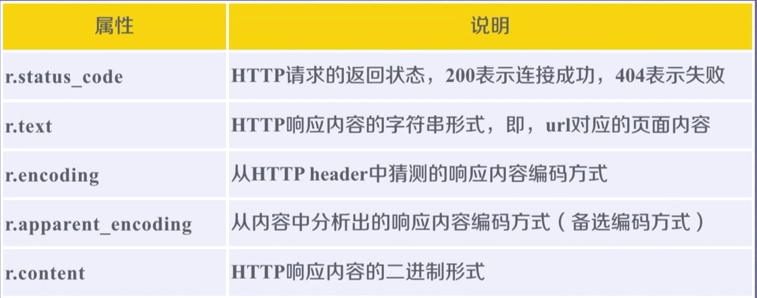
Response的方法
request库的更多相关文章
- Python3 urllib.request库的基本使用
Python3 urllib.request库的基本使用 所谓网页抓取,就是把URL地址中指定的网络资源从网络流中读取出来,保存到本地. 在Python中有很多库可以用来抓取网页,我们先学习urlli ...
- Python request库与爬虫框架
Requests库的7个主要方法 requests.request():构造一个请求,支持以下各方法的基础方法 requests.get():获取HTML网页的主要方法,对应于HTTP的GET ...
- Request库使用response.text返回乱码问题
我们日常使用Request库获取response.text,这种调用方式返回的text通常会有乱码显示: import requests res = requests.get("https: ...
- 爬虫——urllib.request库的基本使用
所谓网页抓取,就是把URL地址中指定的网络资源从网络流中读取出来,保存到本地.在Python中有很多库可以用来抓取网页,我们先学习urllib.request.(在python2.x中为urllib2 ...
- 爬虫request库规则与实例
Request库的7个主要方法: requests.request(method,url,**kwargs) method:请求方式,对应get/put/post等7种: r = reques ...
- Python网络爬虫与信息提取[request库的应用](单元一)
---恢复内容开始--- 注:学习中国大学mooc 嵩天课程 的学习笔记 request的七个主要方法 request.request() 构造一个请求用以支撑其他基本方法 request.get(u ...
- Request库的安装与使用
Request库的安装与使用 安装 pip install reqeusts Requests库的7个主要使用方法 requests.request() 构造一个请求,支撑以下各方法的基础方法 req ...
- python网络爬虫学习笔记(一)Request库
一.Requests库的基本说明 引入Rquests库的代码如下 import requests 库中支持REQUEST, GET, HEAD, POST, PUT, PATCH, DELETE共7个 ...
- Request库学习
0x00前言 这库让我爱上了python 碉堡! 开心去学了一些python,然后就来学这个时候神库~~ 资料来源:http://cn.python-requests.org/en/latest/u ...
- 爬虫入门【1】urllib.request库用法简介
urlopen方法 打开指定的URL urllib.request.urlopen(url, data=None, [timeout, ]*, cafile=None, capath=None, ca ...
随机推荐
- 网络编程-osi七层
一.操作系统基础 操作系统:(Operating System,简称OS)是管理和控制计算机硬件与软件资源的计算机程序,是直接运行在“裸机”上的最基本的系统软件,任何其他软件都必须在操作系统的支持下才 ...
- Codeforces Round #443 (Div. 2) C 位运算
C. Short Program time limit per test 2 seconds memory limit per test 256 megabytes input standard in ...
- HDU 5971 二分图判定
Wrestling Match Time Limit: 2000/1000 MS (Java/Others) Memory Limit: 65536/65536 K (Java/Others)T ...
- BFS:HDU-1242-Rescue(带守卫的迷宫问题)(优先队列)
解题心得: 1.读清楚题意,本题的题意是有多个'r'(起点),多个r多个bfs比较最短的时间即可,但是hdoj的数据比较水,直接一个起点就行了,迷宫里有多个守卫,如果在路途中遇到守卫会多花费一个时间点 ...
- 洛谷 P1736 创意吃鱼法(多维DP)
题目描述 回到家中的猫猫把三桶鱼全部转移到了她那长方形大池子中,然后开始思考:到底要以何种方法吃鱼呢(猫猫就是这么可爱,吃鱼也要想好吃法 ^_*).她发现,把大池子视为01矩阵(0表示对应位置无鱼,1 ...
- js 监听后退事件及跳转页面
//直接跳转 window.location.href="b.html"; //返回上一级页面 window.history.back(-1); //返回下一级页面 window. ...
- SparkStreaming和Kafka的整合
当我们正确地部署好Spark Streaming,我们就可以使用Spark Streaming提供的零数据丢失机制.需要满足以下几个先决条件: 1.输入的数据来自可靠的数据源和可靠的接收器: 2.应用 ...
- hadoop ha集群搭建
集群配置: jdk1.8.0_161 hadoop-2.6.1 zookeeper-3.4.8 linux系统环境:Centos6.5 3台主机:master.slave01.slave02 Hado ...
- 【NopCommerce 3.1】asp.net mvc 利用jQuery from.js上传用户头像
纯代码不解释. 在CusotmerControllers中添加上传方法 /// <summary> /// ajax上传用户头像 /// </summary> /// < ...
- laravel5.2总结--服务提供者,契约(Contracts)
首先理解两个概念 1.契约:一组定义了框架核心服务的接口 2.服务提供者:所有 Laravel 应用程序启动的中心所在. 包括你自己的应用程序,以及所有的 Laravel 核心服务,都是通过服务提供者 ...