
WPF 4 DataGrid 控件(进阶篇一)
上一篇《WPF 4 DataGrid 控件(自定义样式篇)》中,我们掌握了DataGrid 列表头、行表头、行、单元格相关的自定义样式方法,本篇我们继续对自定义样式进行一些高级设置。
DataGridTemplateColumn 类
除了下表所示的列类型外,我们还可以通过DataGridTemplateColumn 自定义列样式,为DataGrid 添加更完美的数据显示方式。

首先我们在类中添加ExamDate 用来在DataGrid 中显示学生考试日期,并为相应学生赋值。
public class Member

{

    public string Name { get; set; }

    public string Age { get; set; }

    public SexOpt Sex { get; set; }

    public bool Pass { get; set; }

    public DateTime ExamDate { get; set; }

    public Uri Email { get; set; }

}
… …
ObservableCollection<Member> memberData = new ObservableCollection<Member>();

… …

memberData.Add(new Member()

{

    Name = "Lucy", Age = "25",

    Sex = SexOpt.Female, Pass = true,

    ExamDate = new DateTime(2010, 4, 10),

    Email = new Uri("mailto:Lucy@school.com")

});

dataGrid.DataContext = memberData;
… …
接下来要在<Window.Resources> 中定义两种DataTemplate 样式模板(如下代码),第一个用来设置日期列的显示方式:
<DataTemplate x:Key="DateTemplate" >

    <StackPanel Width="40" Height="30">

        <Border Background="Orange" BorderBrush="Black" BorderThickness="1">

            <TextBlock Text="{Binding ExamDate, StringFormat={}{0:MM-dd}}"

                       FontSize="10" HorizontalAlignment="Center"/>

        </Border>

        <Border Background="White" BorderBrush="Black" BorderThickness="1">

            <TextBlock Text="{Binding ExamDate, StringFormat={}{0:yyyy}}"

                       FontSize="10" HorizontalAlignment="Center"/>

        </Border>

    </StackPanel>

</DataTemplate>
第二个用来设置日期列的编辑方式,这里将用到DataPicker:
<DataTemplate x:Key="EditingDateTemplate">

    <DatePicker SelectedDate="{Binding ExamDate}"/>

</DataTemplate>
模板设置完成后,就要在<DataGrid>中加入DataGridTemplateColumn 列显示学生的考试日期。
... ...

<DataGridTemplateColumn Header="Exam Date"

                        CellTemplate="{StaticResource DateTemplate}"

                        CellEditingTemplate="{StaticResource EditingDateTemplate}"/>

... ...
在XAML 代码中设置CellTemplate 和CellEditingTemplate 属性后便可运行程序测试一下效果。
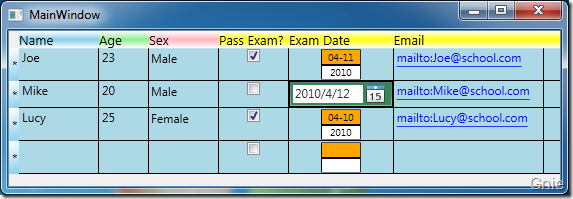
如上图所示,若对Exam Date 列进行修改时,其显示方式将变为DataPicker,用户可以方便的选择相应的日期进行修改。

修改后恢复原状:

WPF 4 DataGrid 控件(进阶篇一)的更多相关文章
- WPF 4 DataGrid 控件(进阶篇二)
原文:WPF 4 DataGrid 控件(进阶篇二) 上一篇<WPF 4 DataGrid 控件(进阶篇一)>中我们通过DataGridTemplateColumn 类自定义编辑 ...
- WPF 4 DataGrid 控件(基本功能篇)
原文:WPF 4 DataGrid 控件(基本功能篇) 提到DataGrid 不管是网页还是应用程序开发都会频繁使用.通过它我们可以灵活的在行与列间显示各种数据.本篇将详细介绍WPF 4 中 ...
- WPF 4 DataGrid 控件(自定义样式篇)
原文:WPF 4 DataGrid 控件(自定义样式篇) 在<WPF 4 DataGrid 控件(基本功能篇)>中我们已经学习了DataGrid 的基本功能及使用方法.本篇将继续 ...
- WPF的DataGrid控件从excel里复制数据然后粘贴
WPF的DataGrid控件不能像winform的DataGridView控件一样,支持值的粘贴.WPF的DataGrid控件本质上是跟数据绑定联系在一起,所以需要进行复制粘贴的操作,可以在wpf里用 ...
- WPF 自定义DataGrid控件样式
内容转自https://www.cnblogs.com/xiaogangqq123/archive/2012/05/07/2487166.html 一.DataGrid基本样式(一) 小刚已经把Dat ...
- WPF中DataGrid控件内Button的Command和CommandParameter的绑定
场景:视频上传功能,上传列表使用DataGrid控件,视频有不同的状态对应不同的操作,DataGrid中最后一列为操作列,里面是Button控件.希望点击Button后执行对应的操作,但是设置Butt ...
- WPF中DataGrid控件的过滤(Filter)性能分析及优化
DataGrid控件是一个列表控件, 可以进行过滤,排序等.本文主要针对DataGrid的过滤功能进行分析, 并提供优化方案. 1)DataGrid的过滤过程: 用户输入过滤条件 ...
- 关于使用MVVM模式在WPF的DataGrid控件中实现ComboBox编辑列
最近在做一个组态软件的项目,有一个需求需要在建立IO设备变量的时候选择变量的类型等. 建立IO变量的界面是一个DataGrid实现的,可以一行一行的新建变量,如下如所示: 这里需要使用带有ComboB ...
- Working Experience - WPF 中 DataGrid 控件的应用
问题: 添加控件后, 编辑单元格会出现异常 绑定 ItemsSource 属性后, 更新绑定对象的数据, UI 不刷新 如何显示控件中 ComboBox 类型 解决方法: 绑定 ItemsSource ...
随机推荐
- Linux基本命令(一)
目标 熟练使用 Linux常用的命令 ls clear cd pwd mkdir touch rm cp mv tree chmod find grep 重定向 软连接.硬链接 压缩 shutdown ...
- Android图表和图形创建库:EazeGraph
EazeGraph是一个 Android 库用于创建漂亮和花哨的图表.它具有易于使用和高度可定制的特点.当前支持四种不同的图表如下: Chart types Bar Chart Stacked Bar ...
- PatentTips -- 一种在CoAP网络中注册的方法及装置
技术领域 [0001] 本发明涉及一种在CoAP网络中注册的方法及装置,属于网络通信技术领域. 背景技术 [0002] (Internet of Things,物联网)作为新一代的信息技术,越来越受到 ...
- Kolya and Tandem Repeat
Kolya and Tandem Repeat time limit per test 2 seconds memory limit per test 256 megabytes input s ...
- 剔除list中相同的结构体数据
剔除list中相同的结构体数据,有三个思路:1.两层循环,逐个比较 2.使用set容器来剔除 3.使用unique方法去重 // deduplication.cpp : 定义控制台应用程序的入口点. ...
- android jni与java之间数据传输时怎么转换
1.c中的jstring数据类型就是java传入的String对象,经过jni函数的转化就能成为c的char*. Java 类型 本地c类型 说明 boolean jboolean 无符号 8 位 b ...
- php超实用正则表达式有哪些
php超实用正则表达式有哪些 一.总结 一句话总结: 二.php几个超实用正则表达式 对于开发人员来说,正则表达式是一个非常有用的功能,它提供了 查找,匹配,替换 句子,单词,或者其他格式的字符串.这 ...
- Oauth入门学习
在一些网站总是看到调用其他网站的信息的实例,比如在人人网中导入MSN联系人,在Facebook中导入gmail,yahoo mail好友,第三方网站不需要总知道你的密码,对于应用的授权完全交给你自己, ...
- java线程池框架源代码分析
相关类Executor,Executors.AbstractExecutorService.ExecutorService Executor:整个线程池运行者框架的顶层接口. 定义了一个execute ...
- NSstring封装
来自http://devtang.com/blog/2012/02/14/nsstring-java-like-wrapper/ NSStringWrapper.h #import <Found ...