
Unity3D - 图形性能优化:优化着色器载入时间
Unity官方文档之“图形性能优化-优化着色器载入时间”的翻译,E文链接。
Optimizing Shader Load Time 优化着色器载入时间
Shaders are small programs that execute on the GPU, and loading them can take some time. Each individual GPU program typically does not take much time to load, but shaders often have a lot of “variants” internally.
着色器是在GPU上运行的小程序,载入它们须要一些时间。每一个独立的GPU程序一般不须要多少时间载入,可是着色器经常有非常多内在的“变体”。
For example, the Standard shader, if fully compiled, ends up being many thousands of slightly different GPU programs.
This creates two potential problems:
比方。标准着色器假设全然编译。会生成几千个不同的小GPU程序。
这会造成两个潜在的问题:
- Large numbers of these shader variants increase game build time, and game data size.
- Loading large numbers of shader variants during game is slow and takes up memory.
- 这些着色器的大量变体会添加游戏打包时间。使游戏包变大。
- 在游戏中载入大量的着色器变体非常慢,而且消耗内存。
Shader build time stripping 着色器生成时去除
While building the game, Unity can detect that some of the internal shader variants are not used by the game, and skip them from build data. Build-time stripping is done for:
生成游戏包时,Unity能够检測到某些内在着色器变体没有被使用,然后忽略它们。生成时去除可用于:
- Individual shader features, for shaders that use
#pragma shader_feature. If none of the used materials use a particular variant, then it is not included into the build. Seeinternal
shader variants documentation. Out of built-in shaders, the Standard shader uses this. - Shader variants to handle Fog and Lightmapping modes not used by any of the scenes are not included into the game data. See Graphics
Settings if you want to override this behavior. - 个别着色器特性,使用#pragma着色器特性的着色器。假设一个变体没有被不论什么用到的材质使用,那么生成时就不把它打进去。
- 没被不论什么场景使用的处理雾和光照贴图模式的着色器变体,也不会打包到游戏数据中。
假设你想改变这个行为,请參考文档图形设置。
Combination of the above often substantially cuts down on shader data size. For example, a fully compiled Standard shader would take several hundred megabytes, but in typical projects it often ends up taking just a couple megabytes (and is often compressed
further by the application packaging process).
以上方式的结合能够大大降低着色器数据的大小。
比方,全然编译的标准着色器有几百兆,可是在一般的project中经常仅仅有几兆(并且app打包时会被进一步压缩)。
Default Unity shader loading behavior 默认Unity着色器载入行为
Under all default settings, Unity loads the shaderlab Shader object into memory, but does not create the internal
shader variants until they are actually needed.
默认设置下,Unity载入shaderlab着色器对象到内存中,可是内部着色器变体直到被真正用到的时候才创建。
This means that shader variants that are included into the game build can still potentially be used, but there’s no memory or load time cost paid until they are needed. For example, shaders always include a variant to handle point lights with shadows, but if
you never end up using a point light with shadows in your game, then there’s no point in loading this particular variant.
这意味着打进游戏包中的着色器变体潜在的可能被用到,可是在用到之前没有占用内存或者消耗时间载入。比方,着色器经常包括一个处理点光源阴影的变体,可是假设你的游戏里从来没实用到点光源阴影,那么载入这个变体就不是必需。
One downside of this default behavior, however, is a possible hiccup for when some shader variant is needed for the first time - since a new GPU program code has to be loaded into the graphics driver. This is often undesirable during gameplay, so Unity has ShaderVariantCollection assets
to help solve that.
然而,这样的默认行为的一个弊端是一些着色器变体第一次被用到的时候可能会出现卡顿(hiccup)——由于须要载入一个新的GPU程序代码到图形驱动。
在游戏中这是不能接受的。所以Unity有一个叫ShaderVariantCollection的资源来帮助解决问题。
Shader Variant Collections 着色器变体群
ShaderVariantCollection is an asset that is basically a list of Shaders, and for each of them, a list of Pass types and
shader keyword combinations to load.
ShaderVariantCollection基本上是一个着色器列表资源,每次载入一个由通道类型和着色器keyword组合的列表。
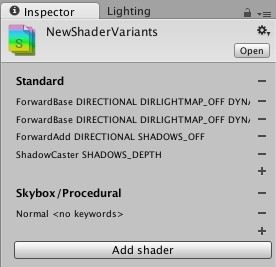
To help with creating these assets based on actually used shaders and their variants, the editor can track which shaders and their variants are actually used. In Graphics Settings, there is a button to create a new ShaderVariantCollection out of currently tracked
shaders, or to clear the currently tracked shader list.
为了帮助创建这些基于被真正用到的着色器和它们变体的资源,编辑器能够追踪哪些着色器和它们的变体被真正用到了。
当前追踪着色器的图形设置检视器上,有一个button能够创建一个新的ShaderVariantCollection。也能够清除当前追踪的着色器列表。

从编辑器使用的着色器创建ShaderVariantCollection
Once you have some ShaderVariantCollection assets, you can set for these variants to be automatically preloaded while loading the game (under Preloaded Shaders list in Graphics
Settings), or you can preload an individual shader variant collection from a script. See ShaderVariantCollection scripting
class.
一旦有了一些ShaderVariantCollection资源。你能够设置这些着色器变体在载入游戏时自己主动预载入(在图形设置的预载入着色器列表下)。或者你也能够用脚本预载入一个独立的着色器变体。
參考ShaderVariantCollection脚本类。
See Also 另外可參考
- Optimizing Graphics Performance. 中文翻译:Unity3D
- 图形性能优化。 - Graphics Settings. 图形设置。
- Shaders reference. 着色器參考。
Unity3D - 图形性能优化:优化着色器载入时间的更多相关文章
- (原)Unreal渲染模块 管线 - 着色器(1)
@author: 白袍小道 转载悄悄说明下 随缘查看,施主开心就好 说明: 本篇继续Unreal搬山部分的渲染模块的Shader部分, 主要牵扯模块RenderCore, ShaderCore, RH ...
- Unity3D Shader性能排行
整体上,性能由高到低: Unlit,仅为纹理,光线不产生效果 VertexLit Diffuse 漫反射 Normal Mapped 法线贴图 Specular 高光 Normal Mapped Sp ...
- BGFX 渲染引擎中着色器代码的调试方法
在实时渲染的图形开发中,着色器代码(Shader)越来越复杂,于是单纯的靠经验和不断试错的开发和调试方法早已不能满足实际需求.使用调试工具进行调试,成为开发中重要的方法.Bgfx 是一款跨平台.抽象封 ...
- 移动平台Unity3D 应用性能优化
WeTest 导读 做了大概半年多VR应用了,VR由于双眼double渲染的原因,对性能的优化要求比较高,在项目的进展过程中,总结了一些关于移动平台上Unity3D的性能优化经验,供分享. 一.移动平 ...
- Unity Shader着色器优化
https://mp.weixin.qq.com/s?__biz=MzU5MjQ1NTEwOA==&mid=2247493518&idx=1&sn=c51b92e9300bcf ...
- Unity3D 图形优化
Unity3D 图形优化 例如DrawCall,我得到的是一些并不完全正确的信息,例如将N个纹理打包成一个图集,这个图集就只会产生一个DrawCall,如果不打成图集,那么就会有N个DrawCall. ...
- Unity3d之Shader编程:子着色器、通道与标签的写法 & 纹理混合
一.子着色器 Unity中的每一个着色器都包含一个subshader的列表,当Unity需要显示一个网格时,它能发现使用的着色器,并提取第一个能运行在当前用户的显示卡上的子着色器. 我们知道,子着色器 ...
- Unity3d代码及效率优化总结
1.PC平台的话保持场景中显示的顶点数少于200K~3M,移动设备的话少于10W,一切取决于你的目标GPU与CPU. 2.如果你用U3D自带的SHADER,在表现不差的情况下选择Mobile或Unli ...
- 【浅墨Unity3D Shader编程】之三 光之城堡篇:子着色器、通道与标签的写法 & 纹理混合
本系列文章由@浅墨_毛星云 出品,转载请注明出处. 文章链接:http://hpw123.net/a/C__/kongzhitaichengxu/2014/1117/120.html 作者:毛星云 ...
随机推荐
- [SPOJ 30669] Ada and Trip
[题目链接] https://www.spoj.com/problems/ADATRIP/ [算法] 直接使用dijkstra堆优化算法即可 [代码] #include<bits/stdc++. ...
- [POJ 3345] Bribing FIPA
[题目链接] http://poj.org/problem?id=3345 [算法] 树形背包 [代码] #include <algorithm> #include <bitset& ...
- 测试数据准备中用到到csv写文件知识点
对于大数据测试中,有时需要自己去准备一些数据,用csvreader来写一个比较大的文件就比较方便,下面我就直接贴示例代码了: package com.acxm.amysu.test;import co ...
- Vue.js 2 vs Vue.js 3的实现 – 云栖社区
Vue.js 2 vs Vue.js 3的实现 – 云栖社区 vue.js核心团队已经讨论过将在Vue3实现的变化.虽然API不会改变,但是数据响应机制(译者注:对数据改变的监听和通知)发生了变化.这 ...
- android黑科技系列——破解游戏之修改金币数
我们在玩游戏的时候总是会遇到一些东东需要进行购买的,但是我们可能又舍不得花钱,那么我们该怎么办呢?那就是用游戏外挂吧!我们这里说的是Android中的游戏,在网上搜索一下移动端游戏外挂,可能会找到一款 ...
- **PCD数据获取:Kinect+OpenNI+PCL对接(代码)
前言: PCL使用点云作为数据格式,Kinect可以直接作为三维图像的数据源产生三维数据,其中的桥梁是OpenNI和PrimeSense.为了方便地使用Kinect的数据,还是把OpenNI获取的基础 ...
- 工欲善其事必先利其器之windows篇
Windows是我们最常用的系统,下面就让我们重新认识一下Windows有哪些可以让我们提高工作效率的快捷键以及部分技巧,,以及在外行看来可以看起来逼格高的技巧! 1.Windows最实用,最常用的快 ...
- AndroidStudio/Intellij 快捷键
说明 三年来一直使用Eclipse作为自己的IDE, 现在是时候走出自己的safety zone, 开始使用传说中的Intellij了. Eclipse/Intellij IDE环境为: OS X 1 ...
- map 解析
Observable.of(1, 2, 3) .map { $0 * $0 } .subscribe(onNext: { print($0) }) .disposed(by: disposeBag) ...
- 点击之后连接qq
<a class=" " style="" href="http://wpa.qq.com/msgrd?v=3&uin=40482 ...