
WPF利用radiobutton制作菜单按钮
版权声明:欢迎转载。转载请注明出处,谢谢 https://blog.csdn.net/wzcool273509239/article/details/56480631
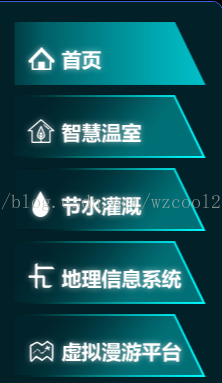
实现功能:鼠标移入和选中高亮显示,话不多说,直接上样式。
样式:
   <!--========================================================RadioButton 样式 通用====================================-->

    <Style x:Key="Tong_Yong_RadioButtonStyle" TargetType="{x:Type RadioButton}">

        <Setter Property="Foreground" Value="{DynamicResource {x:Static SystemColors.ControlTextBrushKey}}"/>

        <!--<Setter Property="Background" Value="#F4F4F4"/>

        <Setter Property="BorderBrush" Value="{StaticResource CheckBoxStroke}"/>-->

        <Setter Property="BorderThickness" Value="0"/>

        <Setter Property="HorizontalContentAlignment" Value="Center"/>

        <Setter Property="VerticalContentAlignment" Value="Center"/>

        <Setter Property="Padding" Value="0"/>

        <Setter Property="Margin" Value="10,10,0,0"></Setter>

        <Setter Property="Cursor" Value="Hand" />

        <Setter Property="Height" Value="{Binding Height}"></Setter>

        <Setter Property="Width" Value="{Binding Width}"></Setter>

        <Setter Property="Cursor" Value="Hand"></Setter>

        <Setter Property="Template">

            <Setter.Value>

                <ControlTemplate TargetType="{x:Type RadioButton}">

                    <Grid>

                        <!--选中或者鼠标移入颜色-->

                        <Grid x:Name="B" Visibility="Collapsed" Background="{TemplateBinding BorderBrush}"/>

                        <!--默认颜色-->

                        <Grid x:Name="A" Background="{TemplateBinding Background}"/>

                        <ContentPresenter x:Name="contentPresenter" RecognizesAccessKey="True" Visibility="Collapsed"/>

                    </Grid>

                    <ControlTemplate.Triggers>

                        <Trigger Property="IsChecked" Value="True">

                            <Setter Property="Visibility" TargetName="A" Value="Collapsed"/>

                            <Setter Property="Visibility" TargetName="B" Value="Visible"/>

                        </Trigger>

                        <Trigger Property="IsMouseOver" Value="True">

                            <!--<Setter Property="Visibility" TargetName="contentPresenter" Value="Visible"/>-->

                            <Setter Property="Visibility" TargetName="A" Value="Collapsed"/>

                            <Setter Property="Visibility" TargetName="B" Value="Visible"/>

                        </Trigger>

                    </ControlTemplate.Triggers>

                </ControlTemplate>

            </Setter.Value>

        </Setter>

    </Style>

    <!--========================================================RadioButton 样式 通用====================================-->
引用实例:
  <!--首页-->

            <RadioButton Name="rbHome" Style="{DynamicResource Tong_Yong_RadioButtonStyle}" Width="192" Height="63" IsChecked="True" Checked="RadioButton_Checked">

                <RadioButton.Background>

                    <ImageBrush ImageSource="/Agriculture.CommonUserControl;component/Images/MenuImages/home-.png"/>

                </RadioButton.Background>

                <RadioButton.BorderBrush>

                    <ImageBrush ImageSource="/Agriculture.CommonUserControl;component/Images/MenuImages/home.png"/>

                </RadioButton.BorderBrush>

                <Grid>

                    <Grid.Background>

                        <ImageBrush ImageSource="/Agriculture.CommonUserControl;component/Images/MenuImages/home.png"/>

                    </Grid.Background>

                </Grid>

            </RadioButton>
WPF利用radiobutton制作菜单按钮的更多相关文章
- WPF利用Image实现图片按钮
之前有一篇文章也是采用了Image实现的图片按钮,不过时间太久远了,忘记了地址.好吧,这里我进行了进一步的改进,原来的文章中需要设置4张图片,分别为可用时,鼠标悬浮时,按钮按下时,按钮不可用时的图片, ...
- wpf利用线程制作初始界面和关闭窗体特效
1.首先定义初始窗体,和主窗体. 初始窗体(StartWindow) 主窗体(MainWindow): 2.在主窗体界面中,加载初始窗体.注意在线程中操作UI元素需要使用BeginInvoke或者In ...
- 利用CSS制作背景变色的横向导航栏
1.表单 页面如下: <html> <head> <title>注册表单页面</title> </head> <body> &l ...
- 利用WIX制作安装包(2)
原文 利用WIX制作安装包(2) 这一篇文章将为大家介绍如何使用WIX自定义UI.上一篇文章我们讲过WIX为我们提供了五种安装界面.每种安装界面都是由不同的Dialog组成.在这里我们挑选一种比较常用 ...
- 利用Word2010制作流程图
利用Word2010制作流程图 原文链接:https://www.toutiao.com/i6483034968225235469/ 一.页面和段落的设置 启动Word2010,打开一个空白文档,并切 ...
- Expression Blend制作自定义按钮(转)
来源:http://www.cnblogs.com/iChina/archive/2011/11/25/2262854.html Expression Blend制作自定义按钮 1.从Blend工具箱 ...
- 【百度地图API】如何利用PhoneGap制作地图APP
原文:[百度地图API]如何利用PhoneGap制作地图APP 摘要:百度地图API是一套由javascript编写的地图程序接口,按说它应该运行在浏览器上.现在,只要利用PhoneGap,我们就能开 ...
- bootstrap学习笔记(菜单.按钮)
下拉菜单 <div class="dropdown"> <button class="btn btn-default dropdown-toggle&q ...
- Bootstrap学习-菜单-按钮-导航
1.下拉菜单(基本用法) 在使用Bootstrap框架的下拉菜单时,必须调用Bootstrap框架提供的bootstrap.js文件.当然,如果你使用的是未编译版本,在js文件夹下你能找到一个名为“d ...
随机推荐
- 2015 Multi-University Training Contest 10 hdu 5411 CRB and Puzzle
CRB and Puzzle Time Limit: 2000/1000 MS (Java/Others) Memory Limit: 65536/65536 K (Java/Others)To ...
- BA--关于江森的学习笔记
机房功率密度:“每机架”功耗 数据中心效率:平均 PUE 2.5,百度是1.36,苹果是1.06 绿色数据中心:PUE<1.58 机房环境:空气质量,配电,UPS,空气处理系统,发电机,江森OD ...
- 支付宝接口程序、文档及解读(ASP.NET)
最近需要为网站加入支付宝的充值接口,而目前关于支付宝接口开发的资料比较杂乱,这里就我此次开发所用到的资料进行汇总整理,希望能够帮助需要的朋友. 开发步骤: 1. 确定签约类型 支付宝的接口有多种类型, ...
- AOP经典2种配置演示样例
第一种: 使用aop指定切面aspect. <bean id="LogAdvice" class="com.thinkmore.framework.monitor. ...
- 为什么mysql中用\G表示按列方式显示
关于mysql的错误 - no query specified 学习了:http://blog.csdn.net/tenfyguo/article/details/7566941 sql语句可以用分号 ...
- hive join 优化 --小表join大表
1.小.大表 join 在小表和大表进行join时,将小表放在前边,效率会高.hive会将小表进行缓存. 2.mapjoin 使用mapjoin将小表放入内存,在map端和大表逐一匹配.从而省去red ...
- Codeforces Round #284 (Div. 1) B. Name That Tune(概率DP)(难)
B. Name That Tune time limit per test 1 second memory limit per test 256 megabytes input standard in ...
- XTU1201:模和除
题目描写叙述 两个整数x和y,满足1<=x<=a,1<=y<=b 且x%y等于x/y的x和y的对数有多少? x%y是x除以y的余数, x/y是x除以y的商,即整数除. 输入 不 ...
- HDOJ 题目3518 Boring counting(后缀数组,求不重叠反复次数最少为2的子串种类数)
Boring counting Time Limit: 2000/1000 MS (Java/Others) Memory Limit: 65536/32768 K (Java/Others) ...
- c8---递归
// // main.c // 递归函数 // // Created by xiaomage on 15/6/7. // Copyright (c) 2015年 xiaomage. All right ...