
windows下新增项目本地通过git bash推送至远程github
本地E盘workspace目录下新增了spring-cloud-alibaba-demo项目,还没有编译过,没有target等不需要推送至git的文件,所以就直接用git bash丢到github了。先在github上创建一个空项目,跟本地目录同名:
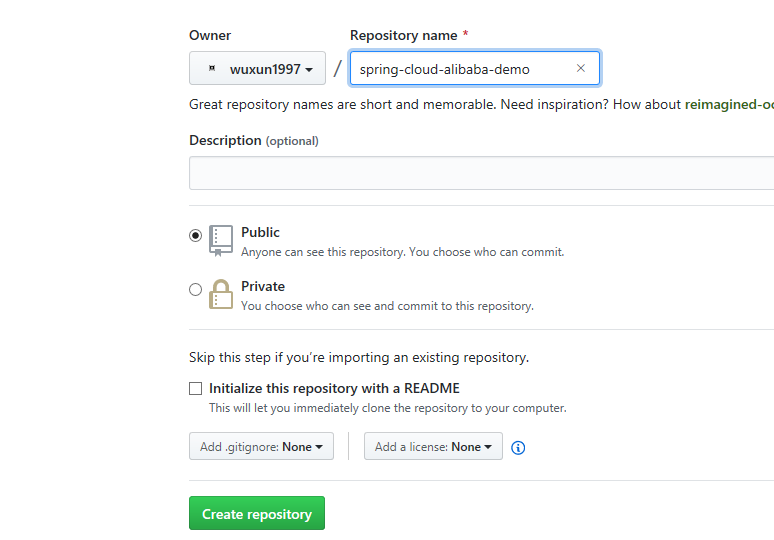
然后就纯命令行操作了,打开git bash:
wulf@wulf00 MINGW64 /c/Users

$ cd e:

wulf@wulf00 MINGW64 /e

$ cd workspace/spring-cloud-alibaba-demo/

wulf@wulf00 MINGW64 /e/workspace/spring-cloud-alibaba-demo

$ git init

Initialized empty Git repository in E:/workspace/spring-cloud-alibaba-demo/.git/

wulf@wulf00 MINGW64 /e/workspace/spring-cloud-alibaba-demo (master)

$ git remote add origin https://github.com/wuxun1997/spring-cloud-alibaba-demo.git

wulf@wulf00 MINGW64 /e/workspace/spring-cloud-alibaba-demo (master)

$ git add .

warning: LF will be replaced by CRLF in pom.xml.

The file will have its original line endings in your working directory.

warning: LF will be replaced by CRLF in spring-cloud-alibaba-consumer/pom.xml.

The file will have its original line endings in your working directory.

warning: LF will be replaced by CRLF in spring-cloud-alibaba-consumer/src/main/resources/application.properties.

The file will have its original line endings in your working directory.

warning: LF will be replaced by CRLF in spring-cloud-alibaba-gateway/pom.xml.

The file will have its original line endings in your working directory.

warning: LF will be replaced by CRLF in spring-cloud-alibaba-provider/pom.xml.

The file will have its original line endings in your working directory.

warning: LF will be replaced by CRLF in spring-cloud-alibaba-provider/src/main/java/com/wlf/alibaba/provider/TransProviderApplication.java.

The file will have its original line endings in your working directory.

warning: LF will be replaced by CRLF in spring-cloud-alibaba-provider/src/main/resources/application.properties.

The file will have its original line endings in your working directory.

warning: LF will be replaced by CRLF in spring-cloud-alibaba-provider/src/test/java/com/lingxicloud/lxytrans/provider/TransProviderApplicationTests.java.

The file will have its original line endings in your working directory.

wulf@wulf00 MINGW64 /e/workspace/spring-cloud-alibaba-demo (master)

$ git commit -m "first commit"

[master (root-commit) e75e0ee] first commit

 13 files changed, 525 insertions(+)

 create mode 100644 pom.xml

 create mode 100644 spring-cloud-alibaba-consumer/pom.xml

 create mode 100644 spring-cloud-alibaba-consumer/src/main/java/com/wlf/alibaba/consumer/TransConsumerApplication.java

 create mode 100644 spring-cloud-alibaba-consumer/src/main/resources/application.properties

 create mode 100644 spring-cloud-alibaba-gateway/pom.xml

 create mode 100644 spring-cloud-alibaba-gateway/src/main/java/com/wlf/alibaba/gate/GatewayConfiguration.java

 create mode 100644 spring-cloud-alibaba-gateway/src/main/java/com/wlf/alibaba/gate/TransGatewayApplication.java

 create mode 100644 spring-cloud-alibaba-gateway/src/main/resources/application.yml

 create mode 100644 spring-cloud-alibaba-provider/pom.xml

 create mode 100644 spring-cloud-alibaba-provider/src/main/java/com/wlf/alibaba/provider/TestService.java

 create mode 100644 spring-cloud-alibaba-provider/src/main/java/com/wlf/alibaba/provider/TransProviderApplication.java

 create mode 100644 spring-cloud-alibaba-provider/src/main/resources/application.properties

 create mode 100644 spring-cloud-alibaba-provider/src/test/java/com/lingxicloud/lxytrans/provider/TransProviderApplicationTests.java

wulf@wulf00 MINGW64 /e/workspace/spring-cloud-alibaba-demo (master)

$ git push -u origin master

Logon failed, use ctrl+c to cancel basic credential prompt.

Username for 'https://github.com': wuxun1997

Counting objects: 48, done.

Delta compression using up to 4 threads.

Compressing objects: 100% (28/28), done.

Writing objects: 100% (48/48), 5.81 KiB | 424.00 KiB/s, done.

Total 48 (delta 6), reused 0 (delta 0)

remote: Resolving deltas: 100% (6/6), done.

To https://github.com/wuxun1997/spring-cloud-alibaba-demo.git

 * [new branch]      master -> master

Branch 'master' set up to track remote branch 'master' from 'origin'.

wulf@wulf00 MINGW64 /e/workspace/spring-cloud-alibaba-demo (master)

$
最后推送时校验了用户名和密码,上面标黄处是我们密码输错了,所以下面又重新输了下。最后我们看到代码已经提交到git了:
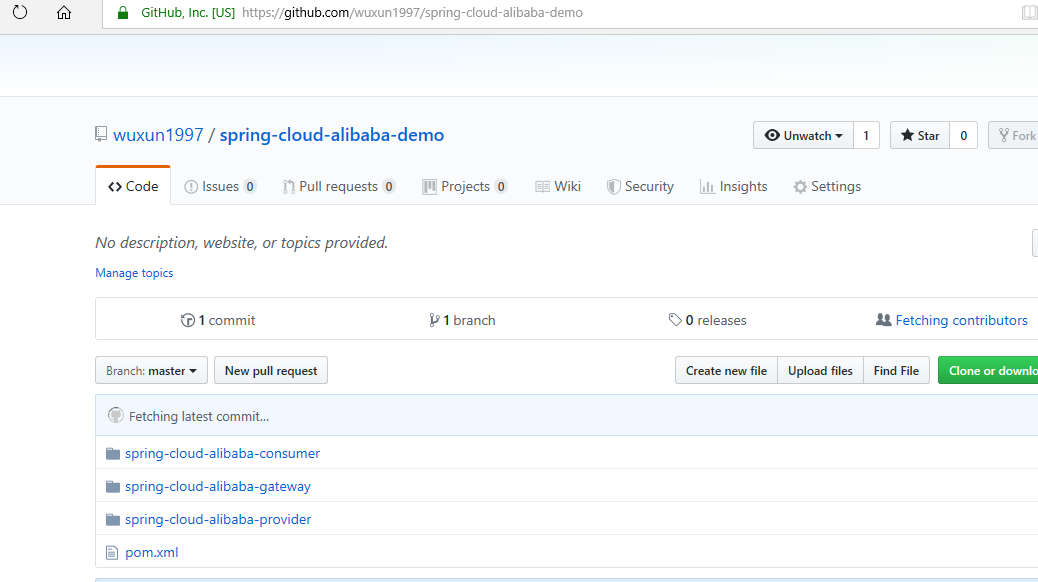
另外通过IDEA推送的方式参见IDEA新建本地项目关联远程git仓库。
windows下新增项目本地通过git bash推送至远程github的更多相关文章
- git 现在本地创建仓库 再 推送到 远程 github 仓库中
今天,需要再本地使用git管理代码,但是当代码创建好的时候,想发布到github上面的私有仓库中,但是没有提前创建远端仓库,所以需要把本地git仓库推送到远端另外一个仓库了,下面进行简要记录,刚刚经过 ...
- Git把本地代码推送到远程github仓库
运用Git版本控制系统进行代码的管理,以便于团队成员的协作,由于之前是使用svn来进行版本控制,所以对于Git使用还有待熟练掌握.Git与svn类似,个人认为两者之间比较直观的区别就是 Git 不需要 ...
- Git创建本地分支并推送到远程github仓库
- SourceTree 将本地已有的git项目推送到远程git仓库
1.在远程git仓库创建对应的项目: 2.用命令行生成本地的ssh key; 3.把公钥粘贴远程仓库对应的位置: 4.SourceTree 设置远程仓库的地址: 5.把本地对应的分支推送到远程仓库: ...
- 如何把已有的本地git仓库,推送到远程新的仓库(github private)并进行远程开发;
最近因为疫情,在家干活,连接不上之前的gitlab 服务器:所以不得把现有的代码迁移到github 的私有仓库来进行开发:下面简要记录迁移的过程: 首先,确保你已经配置好本地访问远程私有仓库的所有权限 ...
- git使用——推送本地文件到远程仓库
捣鼓了一下午之后总结如下: 1.首先可以照着这个链接里面博主给出的详细方法进行操作和配置: http://www.open-open.com/lib/view/open1454507333214. ...
- Git创建本地仓库并推送至远程仓库
作为一名测试同学,日常工作经常需要checkout研发代码进行code review.自己极少有机会创建仓库,一度以为这是一个非常复杂过程.操作一遍后,发现也不过六个步骤,so,让我们一起揭开这神秘面 ...
- Eclipse本地创建新的GIT分支,并推送至远程Git分支
本地创建新的GIT分支: 1.右击要创建新分支的项目——Team——Switch To——New Branch…: 2.在弹出的对话框中name框中输入要创建的分支名称,(如果是当前显示的要拷贝的分支 ...
- 12.Git分支-推送(push)、跟踪分支、拉取(pull)、删除远程分支
1.推送 本地的分支并不会自动与远程仓库同步,你可以显示的向远程仓库推送你的分支.例如你在本地创建了一个dev分支,你想其他的人和你一样在dev之下进行工作,可以使用 git push <rem ...
随机推荐
- python实现抖音多线程下载无水印视频【附源码】
昨天发了一个无水印解析,评论说想要多线程下载,还是比较简单的. py文件同目录下创建url.txt,把链接一行一行复制进去,就能批量下载. 代码中的延时不能去掉,由于是多线程,速度较快,延时很重要. ...
- 大小端示例-arm c51
大小端系列文章https://blog.csdn.net/liming0931/article/details/100016425 MDK(Keil5,STM32F407)C语言: #include ...
- python爬虫——数据爬取和具体解析
关于正则表达式的更多用法,可参考链接:https://blog.csdn.net/weixin_40040404/article/details/81027081 一.正则表达式: 1.常用正则匹配: ...
- JavaScript倒计时并刷新页面
//10秒倒计时效果自动补全09,08等<div id="we">10</div>s <script> window.onload = func ...
- car二手车购买原理
前提须知 1. Kbb,指著名的二手车估计网站 www.kbb.com .其中给出了具体年份里程车的参考价格. 2. Craigslist,简称 CL,著名的二手物品交易网站,美国的 58 同城. 3 ...
- 第三节.vue.js属性与方法
1. <!DOCTYPE html><html><head><meta charset="UTF-8"><title>I ...
- 2017.10.5 国庆清北 D5T1 拼不出的数
题目描述 3 个元素的集合{5,1,2}的所有子集的和分别是0,1,2,3,5,6,7,8.发现最小的不能由该集合子集拼出的数字是4. 现在给你一个n个元素的集合,问你最小的不能由该集合子集拼出的数字 ...
- Java Web之Servlet及Cookie/Session
Servlet参考文献: 1.http://www.cnblogs.com/luoxn28/p/5460073.html 2.http://www.cnblogs.com/xdp-gacl/p/376 ...
- RS码的突发纠错能力
RS码便于纠突发错误.所谓突发错误,是指burst errors. 即一长串连续位出错.例如 0011XXXX1010. 其中X表示出错.如果是GF(2^4)中定义的RS码,则可以由一个符号错误纠正. ...
- Resolving EACCES permissions errors when installing packages globally(npm 遇到 write access的问题)
If you see an EACCES error when you try to install a package globally, you can either: Reinstall npm ...