
win7下IntelliJ IDEA使用curl
curl是利用URL语法在命令行方式下工作的开源文件传输工具
curl命令可以在开发web应用时,模拟前端发起的HTTP请求
1.下载curl
https://curl.haxx.se/download.html

我选择的,Windows 64 bit 7.65.3 binary the curl project,curl-7.65.3_1-win64-mingw.zip
2.解压
curl-7.65.3_1-win64-mingw
3.设置环境变量
set PATH=E:\software\curl-7.65.3_1-win64-mingw\bin;%PATH%
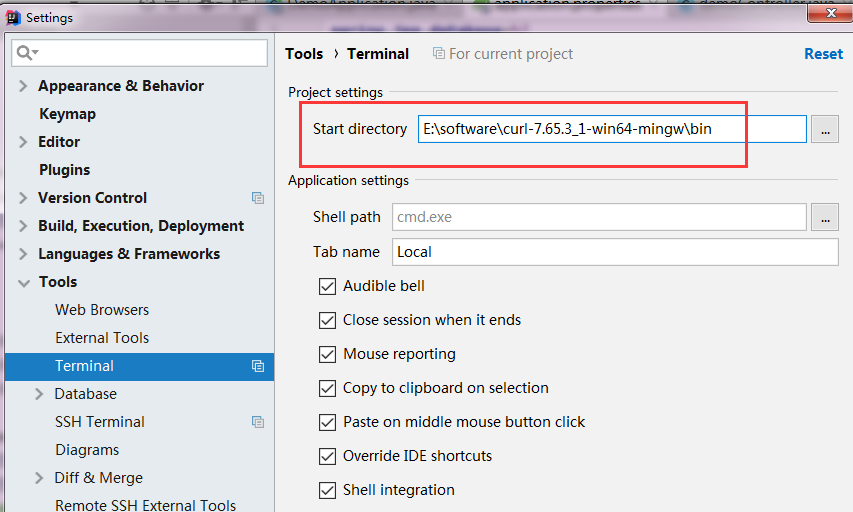
4.配置IntelliJ IDEA
file——>settings——>Terminal
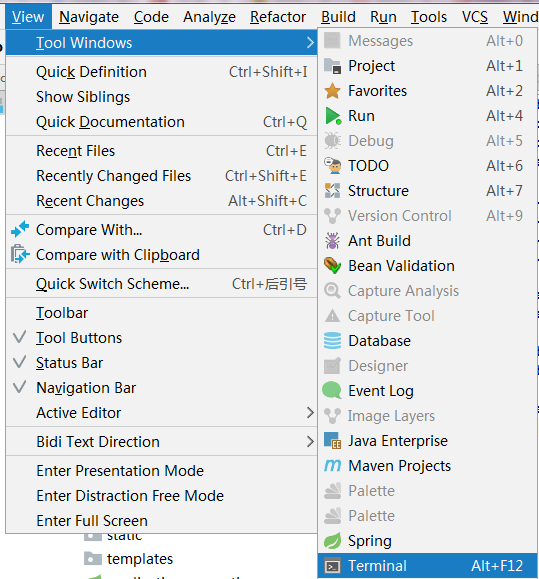
5.使用,打开
测试:
E:\software\curl-7.65.3_1-win64-mingw\bin>curl baidu.com
<html>
<meta http-equiv="refresh" content="0;url=http://www.baidu.com/">
</html>
-i 详细信息
E:\software\curl-7.65.3_1-win64-mingw\bin>curl -i baidu.com
HTTP/1.1 200 OK
Date: Mon, 02 Sep 2019 06:11:13 GMT
Server: Apache
Last-Modified: Tue, 12 Jan 2010 13:48:00 GMT
ETag: "51-47cf7e6ee8400"
Accept-Ranges: bytes
Content-Length: 81
Cache-Control: max-age=86400
Expires: Tue, 03 Sep 2019 06:11:13 GMT
Connection: Keep-Alive
Content-Type: text/html
<html>
<meta http-equiv="refresh" content="0;url=http://www.baidu.com/">
</html>
E:\software\curl-7.65.3_1-win64-mingw\bin>curl localhost:/find
[{"id":1,"name":"111"},{"id":2,"name":"222"},{"id":33,"name":"abc"},{"id":34,"name":"xyz"},{"id":65,"name":"abc"},{"id":66,"name":"xyz"}]
E:\software\curl-7.65.3_1-win64-mingw\bin>curl -i localhost:/find
HTTP/1.1 200
Content-Type: application/json;charset=UTF-8
Transfer-Encoding: chunked
Date: Mon, 02 Sep 2019 06:13:16 GMT
[{"id":1,"name":"111"},{"id":2,"name":"222"},{"id":33,"name":"abc"},{"id":34,"name":"xyz"},{"id":65,"name":"abc"},{"id":66,"name":"xyz"}]
模拟formdata数据
E:\software\curl-7.65.3_1-win64-mingw\bin>curl localhost:/api/getPost -X POST --data "id=1&name=abc"
{"id":1,"name":"abc","other":null,"string":" id=1 name=abc other=null"}
json数据
E:\software\curl-7.65.3_1-win64-mingw\bin>curl localhost:/api/getPostJson -X POST -H "Content-Type:application/json" --data "{\"id\":\"1\",\"name\":\"abc\",\"other\":\"\"}"
{"id":1,"name":"abc","other":"","string":" id=1 name=abc other="}
win7下IntelliJ IDEA使用curl的更多相关文章
- Win7下Intellij开发Scala环境搭建
1.Scala下载并安装 1.Scala的安装时需要依赖JDK的,目前我的电脑上,jdk是已经安装好了,这里就不再说明 2.在地址http://www.scala-lang.org/download/ ...
- WIN7下PHP无法开启CURL,终极解决方案
常规做法: 1)extension=php_curl.dll之外 2)把libeay32.dll.ssleay32.dll.php_curl.dll复制到C:\Windows\SysWOW64目录下 ...
- 解决win7 下 curl无法加载的问题
最近分别在WIN7和Windows8 上分别安装php 高版本!都遇到了这个问题! 一.win7系统64位, apache2.2, php 5.35 vc6 版本 这个比较容易: 1. phpinfo ...
- Win7下安装配置gVim
本文根据vim官网的<Simple Steps to Help You Install gVim on Windows 7>[1]一文整理而成. 1. 下载gVim 在http://www ...
- 解决Win7下运行php Composer出现SSL报错的问题
以前都在linux环境使用php composer.今天尝试在win7下运行composer却出现SSL报错: D:\data\www\mmoyu\symapp>php -f %phprc%\c ...
- win8和win7下解决php5.3和5.4、5.5等不能加载php_curl.dll的终极解决办法 收藏
win8和win7下解决php5.3和5.4.5.5等不能加载php_curl.dll的终极解决办法 收藏2015年01月11日 最近分别在WIN7和Windows8 上分别安装php 高版本!都遇到 ...
- (转载+新增)Win7下安装配置gVim
转载自 http://www.cnblogs.com/zhcncn/p/4151701.html.而后安装过程中加入自己遇到的问题解决方案. 本文根据vim官网的<Simple Steps to ...
- win7下利用ftp实现华为路由器的上传和下载
win7下利用ftp实现华为路由器的上传和下载 1. Win7下ftp的安装和配置 (1)开始->控制面板->程序->程序和功能->打开或关闭Windows功能 (2)在Wi ...
- QC在win7下不能访问QC服务器介绍
本地访问不了服务器QC的主要几个原因总结 服务器serverjbossextensionhpcmd 2016-03-24 兼容性问题: 1.在服务端QC的安装目录下jboss\server\def ...
随机推荐
- iis7设置http跳转https实测可用
前面ytkah和大家聊了Apache设置http如何301到https,现在我们说说iis7设置http跳转https,因为还是有很多人在用iis服务器.首先要先安装url rewrite modul ...
- Worldview in Context
Worldview in Context Figures 1 and 2 provide a basis for a deeper understanding of worldview. The se ...
- rhce备战笔记
1)配置selinuxvim /etc/slinux/config SELINUX=enforcingsetenforce 1getenforce两台都做 2)配置SSHvim /etc/ssh ...
- 何时使用 django 以及何时不用?
选择一种语言和框架,因为你在上一个项目中使用了它或者因为你更熟悉它,但是这不是正确的方法. 项目启动 在开始一个新的软件项目之前,您需要评估哪种语言和框架最适合您所期望的结果.什么对你最重要?安全性. ...
- oracle--CKPT
一,CKPT功能 ) 调度数据写: ) 会将已经完成的检查点写到数据文件头: ) 把已经完成的检查点写到控制文件: . other:其他进程: . 注意:磁盘.内存支持并行I/O,磁带不支持: . 服 ...
- error: 'for' loop initial declaration used outside C99 mode的解决方法
for(int i = 0;i<10;i++)这样写循环时可能会出现如题编译错误,解决方法有两种,如下:1 将文件后缀名由".c"改为".cpp"2 in ...
- Guava 库
https://www.yiibai.com/guava https://wizardforcel.gitbooks.io/guava-tutorial/content/1.html com.goog ...
- PHP系列 | [转] PHP中被忽略的性能优化利器:生成器
官方:https://www.php.net/manual/zh/language.generators.overview.php 原文:https://segmentfault.com/a/1190 ...
- 取response里 Json格式的字段值
1.
- pg中与超时设置有关的参数
statement_timeout控制语句执行时长,单位是ms.超过设定值,该语句将被中止.不推荐在postgresql.conf中设置,因为会影响所有的会话,如非要设置,应该设置一个较大值. loc ...