
vue.js生成S型拓扑图
1.前端代码
<link href="https://magicbox.bk.tencent.com/static_api/v3/assets/bootstrap-3.3.4/css/bootstrap.min.css" rel="stylesheet">

<link href="https://magicbox.bk.tencent.com/static_api/v3/assets/bkTopology-1.1/css/bkTopology.css" rel="stylesheet">

<script src="https://magicbox.bk.tencent.com/static_api/v3/assets/js/jquery-1.10.2.min.js"></script>

<script src="https://magicbox.bk.tencent.com/static_api/v3/assets/bootstrap-3.3.4/js/bootstrap.min.js"></script>

<script src="https://magicbox.bk.tencent.com/static_api/v3/assets/bkTopology-1.2/js/bkTopology.js"></script>

<div id="app" style="margin-top: 60px;">

    <el-row :gutter="40">

        <el-col :span="16" :offset="4">

            <div class="none node" id="node-templates" data-container="body" data-placement="top" data-html="true" data-trigger="hover">

                <div class="node-container"><span class="node-text"></span></div>

            </div>

            <div class="bktopo-container">

                <div class="bktopo_demo" id="bktopo_demo">

                    <div class="none node" id="node-templates" data-container="body" data-placement="top" data-html="true" data-trigger="hover">

                        <div class="node-container"><span class="node-text"></span></div>

                    </div>

                    <div class="bktopo_box" style="height:250px;"></div>

                </div>

            </div>

        </el-col>

    </el-row>

</div>
<script type="text/javascript">

    new Vue({

        el: '#app',

        data: {

        },

        mounted() {

            this.init()

        },

        methods: {

            init() {

                axios.get(site_url + "topo/").then(res => {

                    if (res.data.result){

                        $('#bktopo_demo .bktopo_box').bkTopology({

                            data: res.data.data, //配置数据源

                            lineType:[ //配置线条的类型

                                {type:'success',lineColor:'#46C37B'},

                                {type:'info',lineColor:'#4A9BFF'},

                                {type:'warning',lineColor:'#f0a63a'},

                                {type:'danger',lineColor:'#c94d3c'},

                                {type:'default',lineColor:'#aaa'}

                            ]

                        });

                    }else{

                        this.$message.error('获取拓朴数据失败');

                    }

                },'json');

            }

        }

    })

</script>
2.后端代码
def topo(request):

    data = {

        "nodes": [

            {

                "id": "demo3_node1", "x": 100, "y": 50, "height": 50,

                "width": 100, "text": "发起", "className": "node success"

            },

            {

                "id": "demo3_node2", "x": 250, "y": 50, "height": 50,

                "width": 100, "text": "过程1", "className": "node success"

            },

            {

                "id": "demo3_node3", "x": 400, "y": 50, "height": 50,

                "width": 100, "text": "过程2", "className": "node danger"

            },

            {

                "id": "demo3_node4", "x": 550, "y": 50, "height": 50,

                "width": 100, "text": "过程3", "className": "node success"

            },

            {

                "id": "demo3_node5", "x": 550, "y": 150, "height": 50,

                "width": 100, "text": "过程4", "className": "node success"

            },

            {

                "id": "demo3_node6", "x": 400, "y": 150, "height": 50,

                "width": 100, "text": "过程5", "className": "node warning"

            },

            {

                "id": "demo3_node7", "x": 250, "y": 150, "height": 50,

                "width": 100, "text": "过程6", "className": "node success"

            },

            {

                "id": "demo3_node8", "x": 100, "y": 150, "height": 50,

                "width": 100, "text": "过程7", "className": "node success"

            },

        ],

        "edges": [

            {

                "source": "demo3_node1", "sDirection": 'right',

                "target": "demo3_node2", "tDirection": 'left', "edgesType": "success"

            },

            {

                "source": "demo3_node2", "sDirection": 'right',

                "target": "demo3_node3", "tDirection": 'left', "edgesType": "danger"

            },

            {

                "source": "demo3_node3", "sDirection": 'right',

                "target": "demo3_node4", "tDirection": 'left', "edgesType": "success"

            },

            {

                "source": "demo3_node4", "sDirection": 'right',

                "target": "demo3_node5", "tDirection": 'right', "edgesType": "success"

            },

            {

                "source": "demo3_node5", "sDirection": 'right',

                "target": "demo3_node6", "tDirection": 'right', "edgesType": "warning"

            },

            {

                "source": "demo3_node6", "sDirection": 'right',

                "target": "demo3_node7", "tDirection": 'right', "edgesType": "success"

            },

            {

                "source": "demo3_node7", "sDirection": 'right',

                "target": "demo3_node8", "tDirection": 'right', "edgesType": "success"

            },

        ]

    }

    return JsonResponse({"result": True, "data": data})
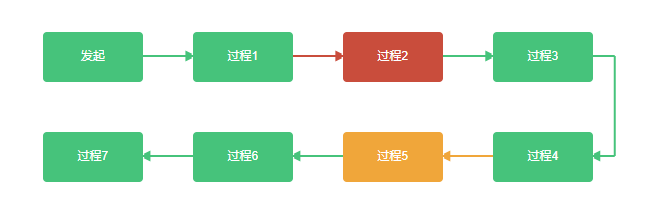
显示效果
vue.js生成S型拓扑图的更多相关文章
- vue.js生成纵向拓扑图
1.前端代码 <link href="https://magicbox.bk.tencent.com/static_api/v3/assets/bootstrap-3.3.4/css/ ...
- vue.js生成横向拓扑图
1.前端代码 <link href="https://magicbox.bk.tencent.com/static_api/v3/assets/bootstrap-3.3.4/css/ ...
- vue.js 二维码生成组件
安装 通过NPM安装 npm install vue-qart --save 插件应用 将vue-qart引入你的应用 import VueQArt from 'vue-qart' new Vue({ ...
- 基于 Vue.js 之 iView UI 框架非工程化实践记要 使用 Newtonsoft.Json 操作 JSON 字符串 基于.net core实现项目自动编译、并生成nuget包 webpack + vue 在dev和production模式下的小小区别 这样入门asp.net core 之 静态文件 这样入门asp.net core,如何
基于 Vue.js 之 iView UI 框架非工程化实践记要 像我们平日里做惯了 Java 或者 .NET 这种后端程序员,对于前端的认识还常常停留在 jQuery 时代,包括其插件在需要时就引 ...
- 在Vue&Element前端项目中,使用FastReport + pdf.js生成并展示自定义报表
在我的<FastReport报表随笔>介绍过各种FastReport的报表设计和使用,FastReport报表可以弹性的独立设计格式,并可以在Asp.net网站上.Winform端上使用, ...
- MVC、MVP、MVVM、Angular.js、Knockout.js、Backbone.js、React.js、Ember.js、Avalon.js、Vue.js 概念摘录
注:文章内容都是摘录性文字,自己阅读的一些笔记,方便日后查看. MVC MVC(Model-View-Controller),M 是指业务模型,V 是指用户界面,C 则是控制器,使用 MVC 的目的是 ...
- electron-vue:Vue.js 开发 Electron 桌面应用
相信很多同学都知道 Electron 可以帮助开发人员使用前端技术开发桌面客户端应用,今天介绍的 electron-vue 框架是一套基于 Vue.js 开发 Electron 桌面应用的脚手架,该项 ...
- 经典文摘:饿了么的 PWA 升级实践(结合Vue.js)
自 Vue.js 官方推特第一次公开到现在,我们就一直在进行着将饿了么移动端网站升级为 Progressive Web App 的工作.直到近日在 Google I/O 2017 上登台亮相,才终于算 ...
- Vue.js常用指令:v-show和v-if
一.v-show指令 v-show指令可以用来动态的控制DOM元素的显示或隐藏.v-show后面跟的是判断条件,语法如下: v-show="判断变量" 例如: v-show=&qu ...
随机推荐
- 使用 AI 绘制箭头
参考下面教程 有空再整理 https://jingyan.baidu.com/article/7082dc1cd77899e40b89bd5a.html http://www.360doc.com/c ...
- 阿里云 API 签名机制的 Python 实现
在调用阿里云 API 的时候,最让人头疼的就是 API 的签名(Signature)机制,阿里云在通用文档中也有专项说明,但是仅仅有基于 Java 的实现代码示例.所以这里基于 Python 来分析下 ...
- kali 更改图标村大小
1.“设置” --> "通用辅助功能" --> "大号字体" 2.在终端中输入 “gnome-tweaks” 打开 优化 --> 扩展 -- ...
- word 转 pfd
转自: https://www.cnblogs.com/qiwu1314/p/6101400.html demo: public class Doc2Pdf { public static boole ...
- TYPORA语法
原文链接:https://blog.csdn.net/SIMBA1949/article/details/79001226
- mosquitto: error while loading shared libraries: libwebsockets.so.12: cannot open shared object file
错误描述: # mosquitto -c /etc/mosquitto/mosquitto.conf -dmosquitto: error while loading shared libraries ...
- 高性能MYSQL(查询优化)
1.对查询进行优化,应尽量避免全表扫描,首先应考虑在 where 及 order by 涉及的列上建立索引. 2.应尽量避免在 where 子句中对字段进行 null 值判断,否则将导致引擎放弃使用索 ...
- C#:Json字符串、JsonArray字符串处理
今天在做Asp网站开发的时候接受到了一种下面这种样子的字符串: "[ { "mid": "123456", "nid": &quo ...
- C#多线程解决程序卡顿问题
描述: 在 C# 中,System.Threading.Thread 类用于线程的工作.它允许创建并访问多线程应用程序中的单个线程.进程中第一个被执行的线程称为主线程. 案例: static void ...
- 防止用iframe调用网页dom元素
<system.webServer> <httpProtocol> <customHeaders> <add name="X-Frame-Optio ...