
vue.js生成纵向拓扑图
1.前端代码
<link href="https://magicbox.bk.tencent.com/static_api/v3/assets/bootstrap-3.3.4/css/bootstrap.min.css" rel="stylesheet">

<link href="https://magicbox.bk.tencent.com/static_api/v3/assets/bkTopology-1.1/css/bkTopology.css" rel="stylesheet">

<script src="https://magicbox.bk.tencent.com/static_api/v3/assets/js/jquery-1.10.2.min.js"></script>

<script src="https://magicbox.bk.tencent.com/static_api/v3/assets/bootstrap-3.3.4/js/bootstrap.min.js"></script>

<script src="https://magicbox.bk.tencent.com/static_api/v3/assets/bkTopology-1.2/js/bkTopology.js"></script>

<div id="app" style="margin-top: 60px;">

    <el-row :gutter="40">

        <el-col :span="16" :offset="4">

            <div class="none node" id="node-templates" data-container="body" data-placement="top" data-html="true" data-trigger="hover">

                <div class="node-container"><span class="node-text"></span></div>

            </div>

            <div class="bktopo-container">

                <div class="bktopo_demo" id="bktopo_demo1">

                    <div class="none node" id="node-templates" data-container="body" data-placement="top" data-html="true" data-trigger="hover">

                        <div class="node-container"><span class="node-text"></span></div>

                    </div>

                    <div class="bktopo_box" style="height:570px;"></div>

                </div>

            </div>

        </el-col>

    </el-row>

</div>
<script type="text/javascript">

    new Vue({

        el: '#app',

        data: {

        },

        mounted() {

            this.init()

        },

        methods: {

            init() {

                axios.get(site_url + "topo/").then(res => {

                    if (res.data.result){

                        $('#bktopo_demo1 .bktopo_box').bkTopology({

                            lineWidth: 4,

                            data: res.data.data,      //配置数据源

                            drag: true,      //是否支持拖拽移动

                            lineType: [      //配置线条的类型

                                {type:'success',lineColor:'#46C37B'},

                                {type:'info',lineColor:'#4A9BFF'},

                                {type:'warning',lineColor:'#f0a63a'},

                                {type:'danger',lineColor:'#c94d3c'},

                                {type:'default',lineColor:'#aaa'}

                            ]

                        });

                        $(".node").popover();

                    }else{

                        this.$message.error('获取拓朴数据失败');

                    }

                },'json');

            }

        }

    })

</script>
2.后端代码
def topo(request):

    data = {

        "nodes": [

            {

                "id": "node1", "x": 361, "y": 20, "height": 50, "width": 180,

                "text": "浏览器发起'www.qq.com'请求", "className": "node success"

            },

            {

                "id": "node2",

                "x": 391, "y": 100, "height": 50, "width": 120, "text": "本地hosts文件解析",

                "className": "node success"

            },

            {

                "id": "node3", "x": 301, "y": 200, "height": 50, "width": 100, "text": "客户接入联通网", "className": "node"

            },

            {

                "id": "node4", "x": 400, "y": 200, "height": 50, "width": 100, "text": "客户接入移动网", "className": "node"

            },

            {

                "id": "node5", "x": 499, "y": 200, "height": 50, "width": 100, "text": "客户接入电信网",

                "className": "node success", "title": "如果hosts匹配成功则不经过DNS服务器解析。直接使用IP访问"

            },

            {

                "id": "node6", "x": 233, "y": 300, "height": 50, "width": 140, "text": "联通DNS服务器", "className": "node"

            },

            {

                "id": "node7", "x": 372, "y": 300, "height": 50, "width": 140, "text": "移动DNS服务器", "className": "node"

            },

            {

                "id": "node8", "x": 511, "y": 300, "height": 50, "width": 140, "text": "电信DNS服务器",

                "className": "node success"

            },

            {

                "id": "node9", "x": 233, "y": 400, "height": 50, "width": 370,

                "text": "核心骨干交换网集群","className": "node success"

            },

            {

                "id": "node19", "x": 343, "y": 500, "height": 50, "width": 150,

                "text": "WEb服务器", "className": "node success"

            },

        ],

        "edges": [

            {"source": "node1", "sDirection": 'bottom', "target": "node2", "tDirection": 'top', "edgesType": "success"},

            {"source": "node2", "sDirection": 'bottom', "target": "node5", "tDirection": 'top', "edgesType": "success"},

            {"source": "node3", "sDirection": 'bottom', "target": "node6", "tDirection": 'top', "edgesType": "danger"},

            {"source": "node6", "sDirection": 'bottom', "target": "node9", "tDirection": 'left', "edgesType": "danger"},

            {"source": "node4", "sDirection": 'bottom', "target": "node7", "tDirection": 'top', "edgesType": "danger"},

            {"source": "node5", "sDirection": 'bottom', "target": "node8", "tDirection": 'top', "edgesType": "success"},

            {"source": "node7", "sDirection": 'bottom', "target": "node9", "tDirection": 'top', "edgesType": "danger"},

            {"source": "node8", "sDirection": 'bottom', "target": "node9", "tDirection": 'right',"edgesType": "danger"},

            {"source": "node9", "sDirection": 'bottom', "target": "node19", "tDirection": 'top', "edgesType": "success"}

        ]

    }

    return JsonResponse({"result": True, "data": data})
显示效果
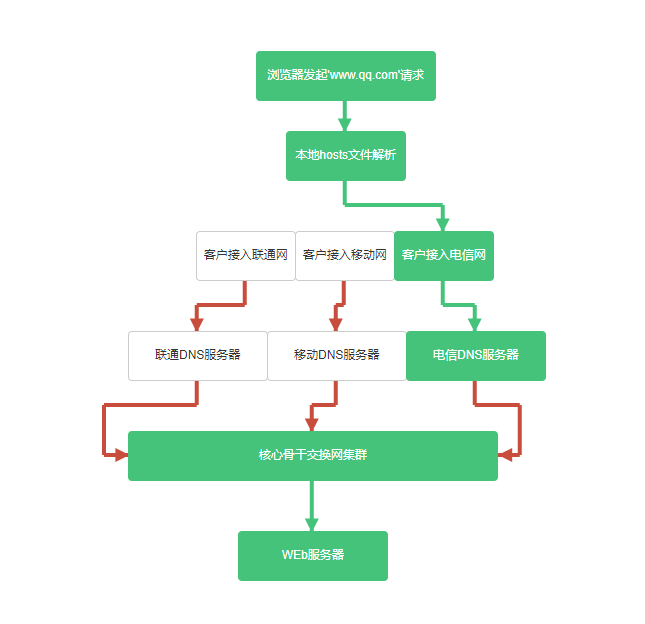
vue.js生成纵向拓扑图的更多相关文章
- vue.js生成横向拓扑图
1.前端代码 <link href="https://magicbox.bk.tencent.com/static_api/v3/assets/bootstrap-3.3.4/css/ ...
- vue.js生成S型拓扑图
1.前端代码 <link href="https://magicbox.bk.tencent.com/static_api/v3/assets/bootstrap-3.3.4/css/ ...
- vue.js 二维码生成组件
安装 通过NPM安装 npm install vue-qart --save 插件应用 将vue-qart引入你的应用 import VueQArt from 'vue-qart' new Vue({ ...
- 基于 Vue.js 之 iView UI 框架非工程化实践记要 使用 Newtonsoft.Json 操作 JSON 字符串 基于.net core实现项目自动编译、并生成nuget包 webpack + vue 在dev和production模式下的小小区别 这样入门asp.net core 之 静态文件 这样入门asp.net core,如何
基于 Vue.js 之 iView UI 框架非工程化实践记要 像我们平日里做惯了 Java 或者 .NET 这种后端程序员,对于前端的认识还常常停留在 jQuery 时代,包括其插件在需要时就引 ...
- 在Vue&Element前端项目中,使用FastReport + pdf.js生成并展示自定义报表
在我的<FastReport报表随笔>介绍过各种FastReport的报表设计和使用,FastReport报表可以弹性的独立设计格式,并可以在Asp.net网站上.Winform端上使用, ...
- Vue.js 2.0 和 React、Augular等其他框架的全方位对比
引言 这个页面无疑是最难编写的,但也是非常重要的.或许你遇到了一些问题并且先前用其他的框架解决了.来这里的目的是看看Vue是否有更好的解决方案.那么你就来对了. 客观来说,作为核心团队成员,显然我们会 ...
- Vue.js——60分钟webpack项目模板快速入门
概述 browserify是一个 CommonJS风格的模块管理和打包工具,上一篇我们简单地介绍了Vue.js官方基于browserify构筑的一套开发模板.webpack提供了和browserify ...
- Vue.js——60分钟browserify项目模板快速入门
概述 在之前的一系列vue.js文章,我们都是用传统模式引用vue.js以及其他的js文件的,这在开发时会产生一些问题. 首先,这限定了我们的开发模式是基于页面的,而不是基于组件的,组件的所有代码都直 ...
- 窥探Vue.js 2.0
title: 窥探Vue.js2.0 date: 2016-09-27 10:22:34 tags: vue category: 技术总结 --- 窥探Vue.js2.0 令人兴奋的Vue.js 2. ...
随机推荐
- Javascript Asynchronous Investigation
介绍 同步任务:在主线程上排队执行的任务,只有前一个任务执行完毕,才能执行后一个任务: 异步任务:不进入主线程,而进入任务队列中的任务,只有任务队列通知主线程,某个异步任务可以执行了,这个任务才会进入 ...
- 如何使用 Django中的 get_queryset, get_context_data和 get_object 等方法
原文: https://blog.csdn.net/HH2030/article/details/80994274
- [原创]UnLua Emmylua UE4开发环境搭建
前言 公司开发的第二个虚幻4项目已经上线了,慢慢趋于稳定.回想起开荒的日子,历历在目.从引擎脚本的选择,各工具(导表,协议生成...)的重构.开发, 引擎扩展(多骨骼支持,Notify扩展,技能编辑器 ...
- NeuCF源码中用到的模块(函数)
论文:<Neural Collaborative Filtering>源码中用到的模块(函数) from keras.layers import Embedding, Input, Den ...
- 企业SDLC建设不成熟设想
一.说明 1.1 背景说明 之前在N市,面试的是“IT系统安全工程师”的岗位但合同上签的是“集成工程师”的名头(前阵子找之前的邮件offer才注意到的),工作内容现在看来还是和当时离职时表述一样基本一 ...
- JMeter扩展插件实现对自定义协议进行支持 转
本文版权归xmeter.net 所有.欢迎转载,转载请注明出处. 摘要## JMeter本身提供了插件机制,允许第三方扩展JMeter以支持JMeter不支持的协议的测试.本文以扩展一个简单的Apac ...
- C++工程师养成 每日一题(vector使用)
题目: 链接:https://www.nowcoder.com/questionTerminal/6736cc3ffd1444a4a0057dee89be789b?orderByHotValue来源: ...
- Docker-Compose通过文件声明默认的环境变量
写文目的 在写本文之前,我在做一个docker-compose项目,这里需要在docker-compose.yml配置中引用到宿主机的ip,然而docker-compose并没有命令行一个输入的选项, ...
- 【题解】整数划分 [51nod1201] 整数划分 V2 [51nod1259]
[题解]整数划分 [51nod1201] 整数划分 V2 [51nod1259] 传送门:整数划分 \([51nod1201]\) 整数划分 \(V2\) \([51nod1259]\)** [题目描 ...
- Git系列 —— 记一次Mac上git push时总是403的错误
问题: 今天从github上clone下一个项目,然后修改后git push时总是出现: remote:Permission to lixyou/rw-split-plugin.git defined ...