
SpringCloud2.0 Turbine 断路器集群监控 基础教程(九)
1、启动基础工程
1.1、启动【服务中心】集群,工程名称:springcloud-eureka-server
1.2、启动【服务提供者】集群,工程名称:springcloud-eureka-client
1.3、启动【服务消费者】,工程名称:springcloud-eureka-ribbon
1.4、启动【服务消费者】,工程名称:springcloud-eureka-feign
1.5、启动【断路器仪表看板】,工程名称:springcloud-eureka-hystrix-dashboard
2、创建【断路器集群监控】,即 Eureka Turbine
2.1、新建 Spring Boot 工程,工程名称:springcloud-eureka-turbine
2.2、工程 pom.xml 文件添加如下依赖:
<dependency>

    <groupId>org.springframework.boot</groupId>

    <artifactId>spring-boot-starter-actuator</artifactId>

</dependency>

<dependency>

    <groupId>org.springframework.boot</groupId>

    <artifactId>spring-boot-starter-web</artifactId>

</dependency>

<dependency>

    <groupId>org.springframework.cloud</groupId>

    <artifactId>spring-cloud-starter-netflix-eureka-client</artifactId>

</dependency>

<dependency>

    <groupId>org.springframework.cloud</groupId>

    <artifactId>spring-cloud-starter-netflix-turbine</artifactId>

</dependency>
2.3、在工程启动类中,添加注解 @EnableTurbine
package com.miniooc.eurekaturbine;

import org.springframework.boot.SpringApplication;

import org.springframework.boot.autoconfigure.SpringBootApplication;

import org.springframework.cloud.netflix.turbine.EnableTurbine;

/**

 * EurekaTurbineApplication

 *

 * @author 宋陆

 * @version 1.0.0

 */

@EnableTurbine

@SpringBootApplication

public class EurekaTurbineApplication {

    public static void main(String[] args) {

        SpringApplication.run(EurekaTurbineApplication.class, args);

    }

}
2.4、新建工程配置文件 application.yml ,配置内容:
server:

  port: 52640

spring:

  application:

    name: eureka-turbine

eureka:

  instance:

    hostname: localhost

    # 表示eureka client间隔多久去拉取服务注册信息,默认为30秒,如果要迅速获取服务注册状态,可以缩小该值

    lease-renewal-interval-in-seconds: 5

    # 表示eureka server至上一次收到client的心跳之后,等待下一次心跳的超时时间,在这个时间内若没收到下一次心跳,则将移除该instance。

    # 默认为90秒

    # 如果该值太大,则很可能将流量转发过去的时候,该instance已经不存活了。

    # 如果该值设置太小了,则instance则很可能因为临时的网络抖动而被摘除掉。

    # 该值至少应该大于 leaseRenewalIntervalInSeconds

    lease-expiration-duration-in-seconds: 10

  client:

    serviceUrl:

      defaultZone: http://localhost:9527/eureka/,http://localhost:9528/eureka/,http://localhost:9529/eureka/

turbine:

  app-config: eureka-discovery-ribbon, eureka-discovery-feign

  aggregator:

    cluster-config: default

  cluster-name-expression: new String("default")

  #更改turbine连接的默认uri ,默认为actuator/hystrix.stream

  instanceUrlSuffix: hystrix.stream
2.5、启动【断路器集群监控】工程
2.6、打开浏览器,访问 http://localhost:52630/hystrix
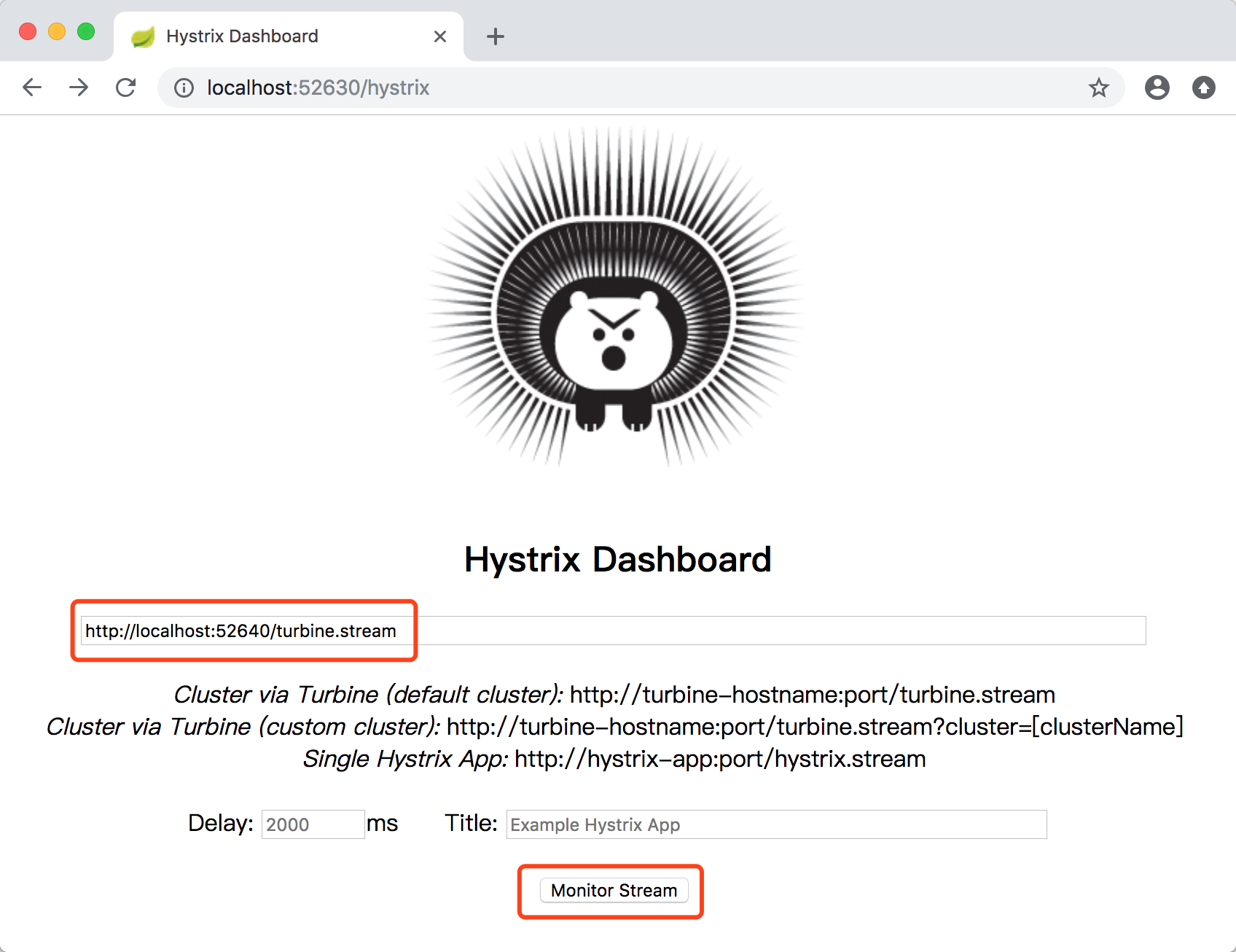
2.7、监控地址输入 http://localhost:52640/turbine.stream 来监控 springcloud-eureka-turbine 服务,点击【Monitor Stream】按钮,开启断路器指标看板
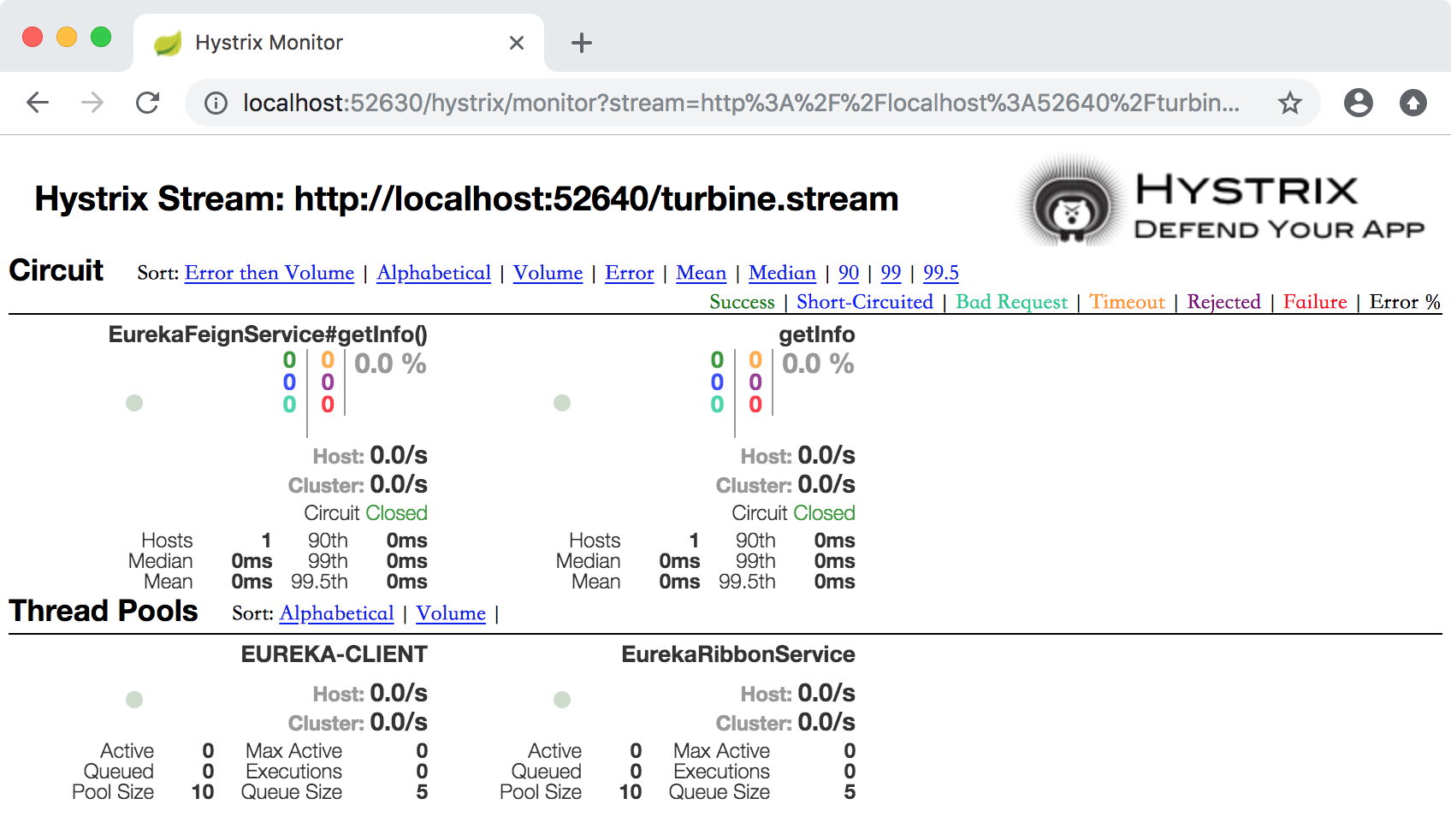
如果出现 Loading... 状态,只要请求一下 http://localhost:52610/ribbonInfo,http://localhost:52620/feignInfo,就可以看到数据指标了。
至此,我们简单实现了【断路器集群监控】,即同时监控了springcloud-eureka-ribbon, springcloud-eureka-feign两个服务
SpringCloud2.0 Turbine 断路器集群监控 基础教程(九)的更多相关文章
- 改造断路器集群监控Hystrix Turbine实现自动注册消费者、实时监控多个服务
在上一篇文章中,我们搭建了Hystrix Dashoard,对指定接口进行监控.但是只能对一个接口进行监听,功能比较局限: Turbine:汇总系统内多个服务的数据并显示到 Hystrix Dashb ...
- Spring Cloud :断路器集群监控(Turbine)
一. 简介 上一篇文章我们已经实现了对单个服务实例的监控,当然在实际应用中,单个实例的监控数据没有多大的价值,我们更需要的是一个集群系统的监控信息,这时我们就需要引入Turbine.Turb ...
- Turbine——Hystrix集群监控
上一篇文章讲述了如何利用Hystrix Dashboard去监控断路器的Hystrix command.当我们有很多个服务的时候,这就需要聚合所有服务的Hystrix Dashboard的数据了.这就 ...
- Redis3.0.7 cluster/集群 安装配置教程
1.前言 环境:CentOS-6.7-i386-LiveDVD 安装的CentOs系统 节点: 6个节点,3个主节点.3个从节点(由于redis默认需要3个主节点,如果想每个主节点有一个从节点,这是最 ...
- Spring Cloud项目之断路器集群监控Hystrix Dashboard
微服务(Microservices Architecture)是一种架构风格,一个大型复杂软件应用由一个或多个微服务组成.系统中的各个微服务可被独立部署,各个微服务之间是松耦合的.每个微服务仅关注于完 ...
- Spring Cloud第八篇 | Hystrix集群监控Turbine
本文是Spring Cloud专栏的第八篇文章,了解前七篇文章内容有助于更好的理解本文: Spring Cloud第一篇 | Spring Cloud前言及其常用组件介绍概览 Spring Clo ...
- 断路器Hystrix与Turbine集群监控-Spring Cloud学习第三天(非原创)
文章大纲 一.Hystrix基础介绍二.断路器Hystrix简单使用三.自定义Hystrix请求命令四.Hystrix的服务降级与异常处理五.Hystrix的请求缓存与请求合并六.Hystrix仪表盘 ...
- 服务容错保护断路器Hystrix之四:断路器监控(Hystrix Dashboard)-turbine集群监控
turbine 英[ˈtɜ:baɪn] n. 汽轮机; 涡轮机; 透平机; OK,上文我们看了一个监控单体应用的例子,在实际应用中,我们要监控的应用往往是一个集群,这个时候我们就得采取Turbine集 ...
- Spring Cloud Hystrix Dashboard熔断器-Turbine集群监控(六)
序言 上一篇说啦hystrix的使用方法与配置还有工作流程及为何存在,我去,上一篇这么屌,去看看吧,没这么屌的话,我贴的有官方文档,好好仔细看看 hystrix除啦基本的熔断器功能之外,还可以对接口的 ...
随机推荐
- windows下根据tcp端口查询对应的进程id(端口被占用)
如下: 查询监听LISTENING的端口1027 netstat -navo|find /i "listen"|find /i ":1027" 结果如下(最后一 ...
- 初识HDFS(10分钟了解HDFS、NameNode和DataNode)
概览 首先我们来认识一下HDFS, HDFS(Hadoop Distributed File System )Hadoop分布式文件系统.它其实是将一个大文件分成若干块保存在不同服务器的多个节点中.通 ...
- centos7.3部署memcached服务
我们需要下载libevent和memcached这两个压缩包进行安装,可使用以下百度网盘链接进行下载 链接:https://pan.baidu.com/s/1vehZ5odzXFKwNjWT9_W0T ...
- 为什么选择.NETCore
为什么选择.NETCore? 学习新的开发框架是一项巨大的投资.您需要学习如何在新框架中编写,构建,测试,部署和维护应用程序.作为开发人员,有许多框架可供选择,很难知道什么是最适合的.即使您正在使用 ...
- .Net Core 1.1 + CentOs 7 环境配置
centos7下使用yum安装mysql5.7.10 参考:http://www.cnblogs.com/hwd-cnblogs/p/5213337.html http://www.jb51.net/ ...
- 【OpenCV开发】OpenCV3后IPLimage转换成MAT的问题
IplImage* img1 = cvCreateImage(cvGetSize(resizeRes), IPL_DEPTH_8U, 1);//创建目标图像 Mat test = img1; 报错 ...
- 基于 appium 的 UI 自动化测试
其中主要的目录和文件为: /MPTestCases ----------- 存放测试用例 /errorScreenShot ------------ 用例执行失败生成的错误截图 startTest.p ...
- LeetCode 669. 修剪二叉搜索树(Trim a Binary Search Tree)
669. 修剪二叉搜索树 669. Trim a Binary Search Tree 题目描述 LeetCode LeetCode669. Trim a Binary Search Tree简单 J ...
- FineUI window弹层设置
需在页面先设置 <f:Window ID="Window1" runat="server" Height="600px" Widt ...
- Servlet知识点小结
Servlet: server applet * 概念:运行在服务器端的小程序 * Servlet就是一个接口,定义了Java类被浏览器访问到(tomcat识别)的规则. * 将来我们自定义一个类,实 ...