
Turbine——Hystrix集群监控
上一篇文章讲述了如何利用Hystrix Dashboard去监控断路器的Hystrix command。当我们有很多个服务的时候,这就需要聚合所有服务的Hystrix Dashboard的数据了。这就需要用到Spring Cloud的另一个组件了,即Hystrix Turbine。
一、Hystrix Turbine简介
看单个的Hystrix Dashboard的数据并没有什么多大的价值,要想看多个系统或集群系统的Hystrix Dashboard数据就需要用到Hystrix Turbine。Hystrix Turbine将每个服务Hystrix Dashboard数据进行了整合。Hystrix Turbine的使用非常简单,只需要引入相应的依赖和加上注解和配置就可以了。
二、准备工作
因为我们需要监控多个服务的Dashboard,所以需要搭建一个Turbine服务来聚合监控 Hystrix 断路器,取名为spring-cloud-hystrix-turbine。
三、创建spring-cloud-hystrix-turbine
1、引入pom依赖
<project xmlns="http://maven.apache.org/POM/4.0.0" xmlns:xsi="http://www.w3.org/2001/XMLSchema-instance"

    xsi:schemaLocation="http://maven.apache.org/POM/4.0.0 http://maven.apache.org/xsd/maven-4.0.0.xsd">

    <modelVersion>4.0.0</modelVersion>

    <parent>

        <groupId>org.springframework.boot</groupId>

        <artifactId>spring-boot-starter-parent</artifactId>

        <version>1.5.9.RELEASE</version>

    </parent>

    <artifactId>spring-cloud-hystrix-turbine</artifactId>

    <dependencies>

        <dependency>

            <groupId>org.springframework.boot</groupId>

            <artifactId>spring-boot-starter-web</artifactId>

        </dependency>

        <dependency>

            <groupId>org.springframework.cloud</groupId>

            <artifactId>spring-cloud-starter-consul-discovery</artifactId>

        </dependency>

        <dependency>

            <groupId>org.springframework.cloud</groupId>

            <artifactId>spring-cloud-starter-consul-config</artifactId>

        </dependency>

        <dependency>

            <groupId>org.springframework.cloud</groupId>

            <artifactId>spring-cloud-starter-hystrix</artifactId>

        </dependency>

        <dependency>

            <groupId>org.springframework.cloud</groupId>

            <artifactId>spring-cloud-starter-hystrix-dashboard</artifactId>

        </dependency>

        <dependency>

            <groupId>org.springframework.boot</groupId>

            <artifactId>spring-boot-starter-actuator</artifactId>

        </dependency>

        <dependency>

            <groupId>org.springframework.cloud</groupId>

            <artifactId>spring-cloud-starter-netflix-turbine</artifactId>

            <exclusions>

                <exclusion>

                    <groupId>org.springframework.cloud</groupId>

                    <artifactId>

                        spring-cloud-starter-netflix-eureka-client

                    </artifactId>

                </exclusion>

            </exclusions>

        </dependency>

    </dependencies>

</project>
2、配置文件application.yml
spring:

  application:

    name: spring-cloud-hystrix-turbine

  cloud:

    consul:

      discovery:

        prefer-ip-address: true

        instanceId: ${spring.application.name}:${server.port}

      host: localhost

      port: 8500

server:

  port: 8810

turbine:

  aggregator:

    #监控所有微服务集群

    #hytrix仪表盘:http://localhost:8810/hystrix/

    #监控地址:http://localhost:8810/turbine.stream

    #在hystrix仪表盘中监控上面的地址即可

    clusterConfig: default

  #要监控的微服务serviceId

  appConfig: mcc-feign-hystrix,mcc-ribbon-hystrix,mcc-ribbon-hystrix-propagating

  clusterNameExpression: "'default'"
3、TurbineApplication——Turbine入口程序
package com.lynch.consumer.turbine;

import org.springframework.boot.SpringApplication;

import org.springframework.boot.autoconfigure.SpringBootApplication;

import org.springframework.cloud.netflix.hystrix.dashboard.EnableHystrixDashboard;

import org.springframework.cloud.netflix.turbine.EnableTurbine;

@SpringBootApplication

//开启Turbine支持,用来进行集群监控

@EnableTurbine

//开启Hystrix仪表盘

@EnableHystrixDashboard

public class TurbineApplication {

    public static void main(String[] args) {

        SpringApplication.run(TurbineApplication.class, args);

    }

}
四、Turbine演示
依次开启mcc-feign-hystrix、mcc-ribbon-hystrix、mcc-ribbon-hystrix-propagating、spring-cloud-hystrix-turbine工程。
打开浏览器输入:http://localhost:8810/turbine.stream,界面如下: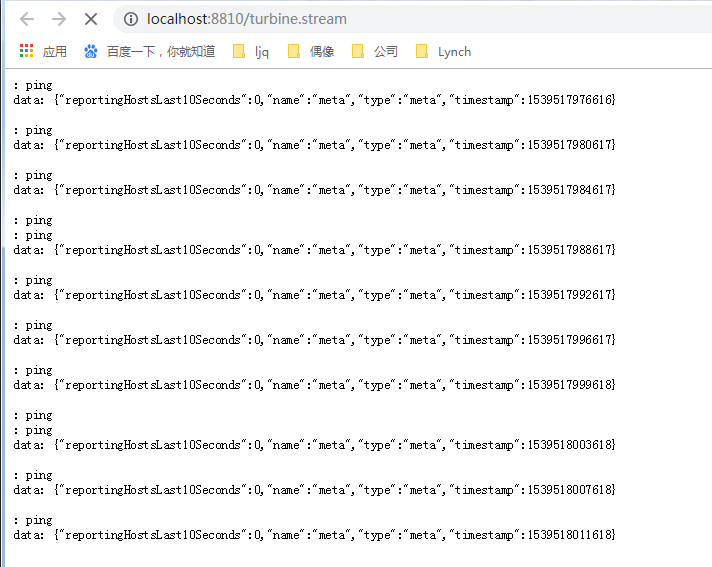
依次多次请求:
http://localhost:8807/ribbon/get/aa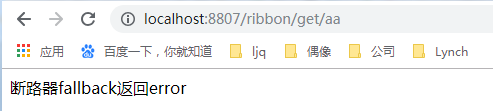
http://localhost:8808/feign1/get/aa
hystrix断路器生效。
打开:http://localhost:8810/hystrix/,输入监控流http://localhost:8810/turbine.stream
点击monitor stream 进入页面: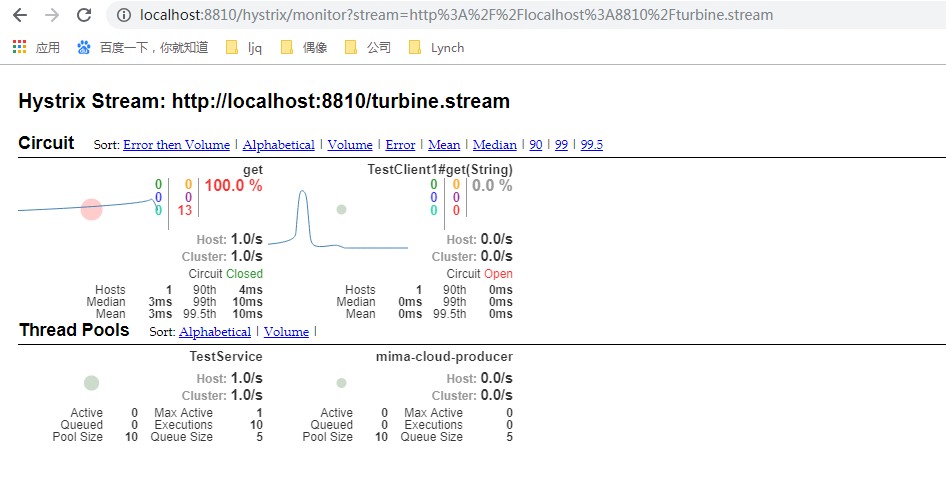
可以看到这个页面聚合了2个service的hystrix dashbord数据。
参数详解
OK,仪表盘已经显示出来了,那么仪表盘上的各项数据都是什么意思呢?我们来看下面一张图: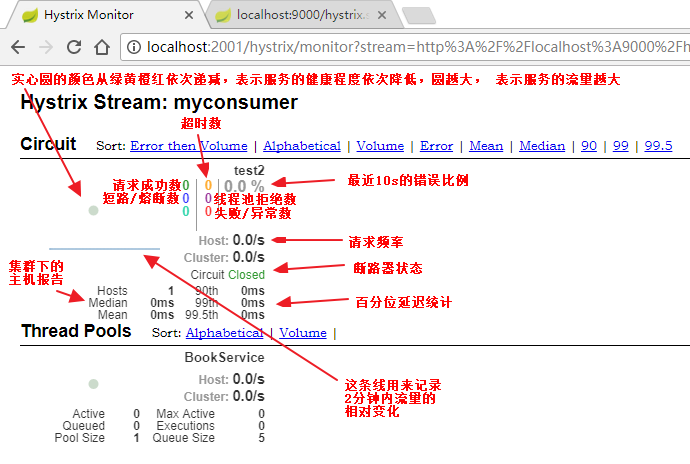
Turbine——Hystrix集群监控的更多相关文章
- Spring Cloud第八篇 | Hystrix集群监控Turbine
本文是Spring Cloud专栏的第八篇文章,了解前七篇文章内容有助于更好的理解本文: Spring Cloud第一篇 | Spring Cloud前言及其常用组件介绍概览 Spring Clo ...
- SpringCloud2.0 Turbine 断路器集群监控 基础教程(九)
1.启动基础工程 1.1.启动[服务中心]集群,工程名称:springcloud-eureka-server 参考 SpringCloud2.0 Eureka Server 服务中心 基础教程(二) ...
- SpringCloud之Hystrix集群监控turbine仪表盘
1.引入 在前一节中我们演示了单机模式下Hystrix服务监控Dashboard仪表盘,但是在实际生产中微服务都是集群模式, 为了更接近世界生产,我们在这里也给大家讲一下如何监控集群模式 2.准备工作 ...
- 改造断路器集群监控Hystrix Turbine实现自动注册消费者、实时监控多个服务
在上一篇文章中,我们搭建了Hystrix Dashoard,对指定接口进行监控.但是只能对一个接口进行监听,功能比较局限: Turbine:汇总系统内多个服务的数据并显示到 Hystrix Dashb ...
- 服务容错保护断路器Hystrix之四:断路器监控(Hystrix Dashboard)-turbine集群监控
turbine 英[ˈtɜ:baɪn] n. 汽轮机; 涡轮机; 透平机; OK,上文我们看了一个监控单体应用的例子,在实际应用中,我们要监控的应用往往是一个集群,这个时候我们就得采取Turbine集 ...
- 断路器Hystrix与Turbine集群监控-Spring Cloud学习第三天(非原创)
文章大纲 一.Hystrix基础介绍二.断路器Hystrix简单使用三.自定义Hystrix请求命令四.Hystrix的服务降级与异常处理五.Hystrix的请求缓存与请求合并六.Hystrix仪表盘 ...
- Hystrix集群及集群监控turbine
Hystrix集群及监控turbine 前面Dashboard演示的仅仅是单机服务监控,实际项目基本都是集群,所以这里集群监控用的是turbine. turbine是基于Dashboard的. 先搞个 ...
- Spring Cloud Hystrix Dashboard熔断器-Turbine集群监控(六)
序言 上一篇说啦hystrix的使用方法与配置还有工作流程及为何存在,我去,上一篇这么屌,去看看吧,没这么屌的话,我贴的有官方文档,好好仔细看看 hystrix除啦基本的熔断器功能之外,还可以对接口的 ...
- SpringCloud之Hystrix集群及集群监控turbine
目的: Hystrix集群及监控turbine Feign.Hystrix整合之服务熔断服务降级彻底解耦 集群后超时设置 Hystrix集群及监控turbine 新建一个springboot工程mic ...
随机推荐
- vue js校验金钱、数字
// 校验保留两位小数金额 export function isMoney(money) { var reg = /(^[1-9]([0-9]+)?(\.[0-9]{1,2})?$)|(^(0){1} ...
- mysql sql_mode=only_full_group_by错误解析
实测,解决问题; 1.错误提示: 2.检查参数设置: 3.mysql的配置文件my.cnf里面可以修改, 但是,改完以后,你检查所有的参数设置都是对的,就是运行不了.怎么办?怎么办? 4.如果还是不行 ...
- 搭建Fabric网络(四)运行网络
启动网络 docker-compose -f docker-compose-cli.yaml up -d如果container cli关闭了,可以手动启动 docker start cli 设置环境变 ...
- django by example 第四章 dashboard处html无法渲染问题
描述: 实现django by example 代码时,第四章 dashboard处html无法渲染问题. 此时报错,NoReverseMatch at /account/login/, Error ...
- Spring 框架下 事务的配置(复杂)
//db.properties配置 src下的文件 jdbc.jdbcUrl=jdbc:mysql:///day43jdbc.driverClass=com.mysql.jdbc.Driverjdb ...
- JS基础-分支结构-循环-数组
1.分支结构 1.if结构 语法: if(条件){ 语句块: } 注意: 1.条件尽量是boolean的,如果不是boolean的,以下条件值,会当做f ...
- Django手册
Django教程 Python一直是我最喜欢的语言,在Django和Tornado之间我选择了前者,没有特别的原因,网上人云亦云的,肯定不会有一方离另一方差很远,我就直接去看了看Github上两个项目 ...
- DedeCMS文章页去img图片width和height属性
方法一:正则匹配去除 打开include/ arc.archives.class.php,查找代码: //设置全局环境变量 $this->Fields['typename'] = $this-& ...
- verilog HDL-并行语句之assign
线网型数据对象: 是verilog hdl常用数据对象之一,起到电路节点之间的互联作用,类似于电路板上的导线. wire是verilog hdl默认的线网型数据对象. 线网型数据对象的读操作在代码任何 ...
- Ubuntu 中 iptables 增删查改
iptables是linux系统自带的防火墙,功能强大.如果iptables不熟悉的话可以用apf,是一款基于iptables的防墙. 一.安装并启动防火墙 $ /etc/init.d/iptable ...