
dialog 中装listview并让每一个item分隔悬空,并具有radiobutton的效果
先上图
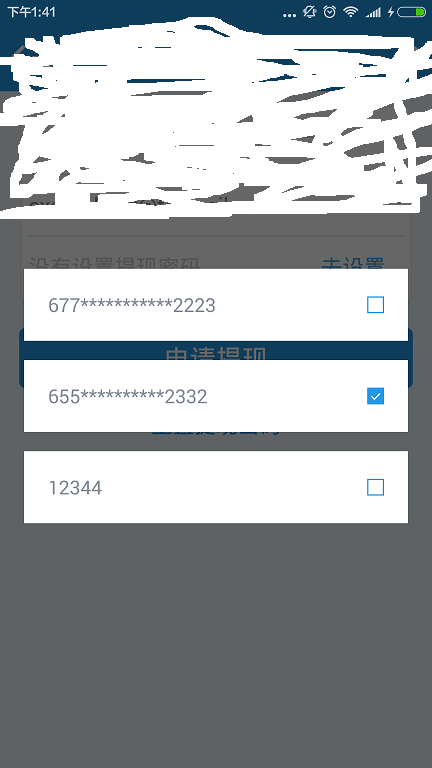
两个关键地方,一是让dialog全透明,二是让listitem分开。
首先定义一个自定义的dialog
布局文件,这个只是包含一个listview而已
<?xml version="1.0" encoding="utf-8"?>
<LinearLayout xmlns:android="http://schemas.android.com/apk/res/android"
    android:layout_width="wrap_content"
    android:layout_height="wrap_content"
    android:background="@android:color/transparent"
    android:orientation="vertical">
    <ListView
        android:id="@+id/lv_withdraw_account"
        android:background="@android:color/transparent"
        android:layout_width="match_parent"
        android:layout_height="wrap_content"
        android:dividerHeight="16dp"             //这个比较关键,指定分隔距离
        android:divider="@android:color/transparent"></ListView>    //让分隔线透明,这样看起来就是上下成员分开了一样

</LinearLayout>
样式文件,让dialog背景透明,在调用时用到
<style name="dialog" parent="@android:style/Theme.Dialog">
    <item name="android:windowFrame">@null</item><!--边框-->
    <item name="android:windowIsFloating">true</item><!--是否浮现在activity之上-->
    <item name="android:windowIsTranslucent">true</item><!--半透明-->
    <item name="android:windowNoTitle">true</item><!--无标题-->
    <item name="android:windowBackground">@android:color/transparent</item><!--背景透明-->
    <item name="android:backgroundDimEnabled">true</item><!--模糊-->   //为false时,整个屏幕无主次之分,就像dialog直接帖在active上面,其它区域没有变灰效果
</style>
自定义dialog java代码
public class TransparentDialog  extends AlertDialog {

    public TransparentDialog(Context context, int theme) {

        super(context, theme);

    }

    public TransparentDialog(Context context) {

        super(context);

    }

    @Override

    protected void onCreate(Bundle savedInstanceState) {

        super.onCreate(savedInstanceState);

        setContentView(R.layout.dialog__withdraw_cash_account);

    }

}
显示dialog
mAlertDialog = new TransparentDialog(this,R.style.dialog);//创建Dialog并设置样式主题

                mAlertDialog.show();

                //dialog在show出来后才能发现他的子控件

                lvWithdrawAccount = (ListView)mAlertDialog.findViewById(R.id.lv_withdraw_account);

                lvWithdrawAccount.setAdapter(mWithdrawCashAdapter);
实现单选效果
首先为listview里的每个选项设置一个背景效果,文件名为selector_item_radio_icon
<?xml version="1.0" encoding="utf-8"?>
<selector xmlns:android="http://schemas.android.com/apk/res/android">

    <item android:drawable="@mipmap/ico_radiochecked" android:state_selected="true"></item>
    <item android:drawable="@mipmap/ico_radio"></item>

</selector>
listitem的布局文件为
<LinearLayout xmlns:android="http://schemas.android.com/apk/res/android"
    android:layout_width="match_parent"
    android:layout_height="match_parent"
    android:background="@android:color/white"
    android:orientation="horizontal"
    android:paddingLeft="20dp"
    android:paddingRight="20dp">

    <TextView
        android:id="@+id/tv_title"
        android:layout_width="0dp"
        android:layout_height="60dp"
        android:layout_weight="1"
        android:gravity="center_vertical"
        android:text="2015/11/23"
        android:focusable="false"
        android:textColor="@color/content_font_color"
        android:textSize="@dimen/text_large" />

    <ImageView
        android:id="@+id/iv_checked"
        android:layout_width="wrap_content"
        android:layout_height="60dp"
        android:gravity="center_vertical"
        android:focusable="false"
        android:src="@drawable/selector_item_radio_icon"/>    //这个表示在该控件在被选中时所显示图片,用于达到切换的效果

</LinearLayout>
java code用法
lvWithdrawAccount.setOnItemClickListener(new AdapterView.OnItemClickListener() {

                    @Override

                    public void onItemClick(AdapterView<?> parent, View view, int position, long id) {

                        view.setSelected(true);   //在被点击时,设该选项为选中状态,这样就好了

                    }

                });
保证dialog里最多显示三个item
lvWithdrawAccount.setAdapter(mWithdrawCashAdapter);

                //设置对话框的高度,最多只能显示3条

                //先取item高度

                ListAdapter listAdapter = lvWithdrawAccount.getAdapter();

                if (listAdapter == null) {

                    return;

                }

                View listItem = listAdapter.getView(0, null, lvWithdrawAccount);

                listItem.measure(0, 0);

                int itemHeight = listItem.getMeasuredHeight();

                AlertManager.toast(context, "height : " + itemHeight);

                if(mWithdrawCashAccounts.size() > 3){

                    params = lvWithdrawAccount.getLayoutParams();

                    params.height = itemHeight * 3 + WindowUtils.dpToPixels(this, 32);

                    lvWithdrawAccount.setLayoutParams(params);

                }
dialog 中装listview并让每一个item分隔悬空,并具有radiobutton的效果的更多相关文章
- listview当选中某一个item时设置背景色其他的不变
listview当选中某一个item时设置背景色其他的不变: 可以使用listview.setOnFoucsChangeListener(listener) ; /** * listview获得焦点和 ...
- Android 点击ListView(或GridView)的一个item,使其里面textview变色,点击另一个这个恢复原来颜色
今天作一个项目,就是做视频app,如果电视剧的话有许多剧集,点击一个item,播放不同的剧集,要有点击效果,并且默认是选择第一个.花费了一段时间,自己觉得有点难 度,现在和大家分享一下,下面是效果显示 ...
- 解决“listView点击一个Item,另外几个Item也跟着改变”的问题
如图所看到的: 我点击Item,右边的checkBox就会对应的变化.可是当我第一次做的时候.点击第一个Item,右边的checkBox变为绿色,可是当我listView往下拉的时候,发现以下也有是绿 ...
- Android ListView 之 SimpleAdapter 二 (包含 item 中按钮监听)
1 MainActivity.java package com.myadapter; import java.util.ArrayList; import java.util.HashMap; ...
- Android 高级UI设计笔记03:使用ListView实现左右滑动删除Item
1. 这里就是实现一个很简单的功能,使用ListView实现左右滑动删除Item: (1)当我们在ListView的某个Item,向左滑动显示一个删除按钮,用户点击按钮,即可以删除该项item,并且有 ...
- android小知识之多个listview在同一界面只有item高亮
我的工程里面一个activity有两个有圆角的listview,就是 自定义的 CornerListView继承ListView, 然后 我想圆角的listview A点击之后一个item会高亮 ...
- 它们的定义ListView,实现Item除去滑动和滑出菜单效果
这个程序是基于变化从网上开源项目,详情货源忘记.懒得去搜索,.假设有不合适的地方.请与我联系作者.我会及时回复和处理! 序中主要包括两个ListView,一个是实现側滑删除.一个是側滑出菜单,代码中的 ...
- 【转】Android ListView加载不同的item布局
原创教程,转载请保留出处:http://www.eoeandroid.com/thread-72369-1-1.html 最近有需求需要在listView中载入不同的listItem布局,开始 ...
- ListView刷新某一项Item
ListView现在已经很少被使用,但还是在这里列出来说一下,有时候我们仅仅需要改变listView的某个Item,如果调用adapter的notifyDataSetChanged()方法效率不高,并 ...
随机推荐
- 【原】升级nginx注意点
1.通知nginx将pid文件改名为nginx.pid.oldbin,并启动新的nginx kill -USR2 `cat /usr/local/nginx/logs/nginx.pid` 2.通知旧 ...
- Apache性能优化、超时设置,linux 重启apache
在httpd.conf中去掉Include conf/extra/httpd-default.conf前的#以使httpd-default.php生效.其中调节以下参数Timeout 15 (连接超时 ...
- 【VB.NET】文本框快捷键支持
我们知道VB.NET中的文本框是不支持Ctrl+A的快捷键的. 如果让它支持呢? Private Sub txtSQL_KeyDown(ByVal sender As Object, ByVal e ...
- path和classpath
对于Java的初学者,这两个环境变量,总是要遇到的.这里做一下总结. 1.path和classpath的含义 path是Windows操作系统的一个环境变量. 当操作系统需要运行一个程序,它需要知道该 ...
- ubuntu 12.04 设置代理
一. Ubuntu 12.04 apt-get 代理设置 由于公司通过代理上网,firefox的代理设置很容易就搞定了,但是通过apt-get安装软件还是不行,于是,查阅了很多资料,最多的方法就是网上 ...
- Spring MVC入门知识总结
2.1.Spring Web MVC是什么 Spring Web MVC是一种基于Java的实现了Web MVC设计模式的请求驱动类型的轻量级Web框架,即使用了MVC架构模式的思想,将web层进行职 ...
- 纸上谈兵:栈(stack)
作者:Vamei 出处:http://www.cnblogs.com/vamei 欢迎转载,也请保留这段声明.谢谢! 栈(stack)是简单的数据结构,但在计算机中使用广泛.它是有序的元素集合.栈最显 ...
- C++学习基础九——继承
1.不同于Java中通过extends实现继承,C++是通过:实现的. 2.C++中同样包含public,private,protected三个关键字: public关键字表示在任意其他类中可调用该成 ...
- Analyze network packet files very carefully
As a professional forensic guy, you can not be too careful to anlyze the evidence. Especially when t ...
- 学习java第8天
今天主要是学习了多态,多态指同一个对象在不同时刻体现出来的不同状态.多态的前提:有继承或者实现关系.有方法重写.有父类或者父接口引用指向子类对象. class Fu {} class Zi ext ...