
[转]Web Service Authentication
本文转自:http://www.codeproject.com/Articles/9348/Web-Service-Authentication
Introduction
This is a simple mechanism to authenticate users to a Web Service, using a Time Token and MD5 Hashing to encrypt password.
Background
In CodeProject, you can find at least two others' mechanism to authenticate users to a Web Service. Dan_P wroteAuthentication for Web Services as a Simple authentication for web services using SOAP headers. But the username and password are sent in clear text and there is no encryption for the data. HENDRIK R. is the author of An introduction to Web Service Security using WSE, that is really a complete solution, but too much complicated for my purposes. The username is sent in clear text, but it is possible to use Password Digest to encrypt the password. The data are encrypted using XML Encryption specification to encrypt portions of the SOAP messages.
My solution is something in the middle of the above two. The username is sent in clear text, but I use MD5 to encrypt the password. I do not need to send sensitive data, so the data returned by the Web Service is not encrypted.
Using the Code
The basic idea is to send UserName and Password from the client to the Web Service using MD5 Hash Code as encryption system. In this way, the password never travels in clear over the network. The Web Service retrieves the user password from a DB or anything else and uses the same MD5 algorithm to test if the password is correct. To be sure that if someone intercepts the Hash, this can be used to authenticate in a later time, I added a timestamp before hashing the Key string. Last, as we are not always on the same server and/or the client clock may be in a different Time Zone or simply not synchronized, I added the possibility to request a Token containing the time mark to the server.
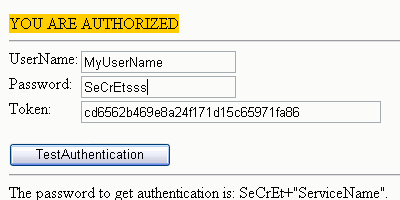
I provided a sample in ASP.NET C# for the client side, but it is possible to use any language: ASP classical JScript or VBScript, PHP, Python, etc. Anyway, on the client side we need to build up the Key using UserName, Password and the hashed timestamp Token previously got from the same Web Service. We can then call the Service and we will get the answer (or an authentication failure warning) that is displayed on the web page.
 Collapse | Copy Code
private void ButtonUseToken_Click(object sender, System.EventArgs e)
{
string ret;
string UserName, Password, ServiceName, Token;
string Key, ToHash; UserName=this.TextBoxUserName.Text;
Password=this.TextBoxPwd.Text;
ServiceName=this.TextBoxService.Text;
Token=this.TextBoxToken.Text;
ToHash=UserName.ToUpper()+"|"+Password+"|"+Token;
Key=Hash(ToHash)+"|"+UserName; ServicePointReference.ServicePoint Authenticate =
new ServicePointReference.ServicePoint();
ret=Authenticate.UseService(Key, ServiceName);
this.ServResponse.Text=ret;
}
The MD5 Hash procedure is very simple in C#; this one was written by Vasudevan Deepak Kumar in Securing Web Accounts.
Collapse | Copy Codeprivate string Hash(string ToHash)
{
// First we need to convert the string into bytes,
// which means using a text encoder.
Encoder enc = System.Text.Encoding.ASCII.GetEncoder(); // Create a buffer large enough to hold the string
byte[] data = new byte[ToHash.Length];
enc.GetBytes(ToHash.ToCharArray(), 0, ToHash.Length, data, 0, true); // This is one implementation of the abstract class MD5.
MD5 md5 = new MD5CryptoServiceProvider();
byte[] result = md5.ComputeHash(data); return BitConverter.ToString(result).Replace("-", "").ToLower();
}
On Web Service server side, I implemented just three Web Methods:
GetToken is used to get the Time-marked token. The token you get this way is intended to be used in the basicAuthenticate method, or in the UseService that can also verify the access rights for the users authenticated to the requested service. The core of the system is implemented by TestHash. Here the password is hard-coded, but in the sample provided, you have also the code to get it from a database:
Collapse | Copy Codeprivate bool TestHash (string HashStr,
string UserName, int minutes, string ServiceName)
{
string Pwd, ToHash;
string sResult, sResultT, sResultToken;
try
{
// JUST FOR TEST: the password is hard-coded:
Pwd="SeCrEt"; DateTime dt = DateTime.Now;
System.TimeSpan minute = new System.TimeSpan(0,0,minutes,0,0);
dt = dt-minute;
//before hashing we have:
//USERNAME|PassWord|YYYYMMDD|HHMM
ToHash=UserName.ToUpper()+"|"+Pwd+"|"+dt.ToString("yyyyMMdd")+
"|"+dt.ToString("HHmm");
sResult = Hash(ToHash);
//TokenWeGotBefore
ToHash=dt.ToString("yyyyMMdd")+"|"+dt.ToString("HHmm");
sResultToken = Hash(ToHash);
//USERNAME|PassWord|TokenWeGotBefore
ToHash=UserName.ToUpper()+"|"+Pwd+"|"+sResultToken;
sResultT = Hash(ToHash); if ((sResult==HashStr) || (sResultT==HashStr))
return true;
else
if (minutes==0) // allowed max 2 minutes - 1
// second to call web service
return TestHash (HashStr, UserName, 1, ServiceName);
else
return false;
}
catch
{
return false;
}
}
To request a hashed time-stamped Token to the Web Service, the method is:
Collapse | Copy Code[WebMethod]
public string GetToken ()
{
string ToHash, sResult;
DateTime dt = DateTime.Now;
ToHash=dt.ToString("yyyyMMdd")+"|"+dt.ToString("HHmm");
sResult = Hash(ToHash);
return sResult;
}
The method that checks the user authentication is also kept very simple; in a real application you normally need to access a database to check the authentication level and may need to return some data to the caller:
Collapse | Copy Code[WebMethod]
public string UseService (string Key, string ServiceName)
{
string [] HashArray;
string UserName, level; // Key string: HASH|User|OptionalData
HashArray=Key.Split('|');
level = "-1"; //default level if (TestHash(HashArray[0], HashArray[1], 0, ServiceName))
{
try
{
UserName=HashArray[1];
// JUST FOR TEST: the User authentication level is hard-coded
// but may/should be retrieved from a DataBase
switch (UserName)
{
case "MyUserName":
level="1";
break;
case "OtherUser":
level="2";
break;
default:
level="-1";
break;
}
if (level=="1") return "YOU ARE AUTHORIZED";
}
catch (Exception exc)
{
return "Authentication failure: " + exc.ToString();
}
}
return "Authentication failure";
}
Points of Interest
TestHash checks to see if the Hash contains a timestamp or an already-hashed token, and calls itself once again in case of failure: if someone is calling the service, let's say, at 11:34:58 the Key is valid from 11:34:00 until 11:35:59, that is during two minutes minus one second.
The client side may be implemented in any language: ASP classical, JScript or VBScript, PHP, Python, etc. I have the intention to post this code too next time...
[转]Web Service Authentication的更多相关文章
- Error in WCF client consuming Axis 2 web service with WS-Security UsernameToken PasswordDigest authentication scheme
13down votefavorite 6 I have a WCF client connecting to a Java based Axis2 web service (outside my c ...
- 关于WEB Service&WCF&WebApi实现身份验证之WebApi篇
之前先后总结并发表了关于WEB Service.WCF身份验证相关文章,如下: 关于WEB Service&WCF&WebApi实现身份验证之WEB Service篇. 关于WEB S ...
- 关于WEB Service&WCF&WebApi实现身份验证之WEB Service篇
在这个WEB API横行的时代,讲WEB Service技术却实显得有些过时了,过时的技术并不代表无用武之地,有些地方也还是可以继续用他的,我之所以会讲解WEB Service,源于我最近面试时被问到 ...
- Web Service 的工作原理
Web Service基本概念 Web Service也叫XML Web Service WebService是一种可以接收从Internet或者Intranet上的其它系统中传递过来的请求,轻量级的 ...
- Web Service实现分布式服务的基本原理
简单的说, 就是客户端根据WSDL 生成 SOAP 的请求消息, 通过 HTTP 传输方式(也可以是其它传输方式, 如 FTP 或STMP 等,目前 HTTP 传输方式已经成为 J2EE Web Se ...
- Summary of Amazon Marketplace Web Service
Overview Here I want to summarize Amazon marketplace web service (MWS or AMWS) that can be used for ...
- wsse:InvalidSecurity Error When Testing FND_PROFILE Web Service in Oracle Applications R 12.1.2 from SOAP UI (Doc ID 1314946.1)
wsse:InvalidSecurity Error When Testing FND_PROFILE Web Service in Oracle Applications R 12.1.2 from ...
- Web Service工作原理
Web Service基本概念 Web Service也叫XML Web Service WebService是一种可以接收从Internet或者Intranet上的其它系统中传递过来的请求,轻量级的 ...
- web service接口测试工具选型
1 简介 1.1 范围 1.2 目的 本文档用于指导测试部进行接口测试. 2013-03-11磁针石 #承接软件自动化实施与培训等gtalk:ouyangchongwu#gmail.com ...
随机推荐
- JSON和GSON操作json数据
1,JSON操作json import net.sf.json.JSONArray; import net.sf.json.JSONObject; //json操作数据 public static S ...
- kindEditort图片自动上传
参考:http://www.cnblogs.com/jaxu/p/3824583.html (赞一个)
- 《Java程序性能优化》学习笔记 设计优化
豆瓣读书:http://book.douban.com/subject/19969386/ 第一章 Java性能调优概述 1.性能的参考指标 执行时间: CPU时间: 内存分配: 磁盘吞吐量: 网络吞 ...
- Android Bander设计与实现 - 设计篇
转自:http://blog.csdn.net/universus/article/details/6211589#t7 Binder Android IPC Linux 内核 驱动 摘要 Binde ...
- 【spring 区别】ClassXmlAplicationContext和FileSystemXmlApplicationContext的区别
今天写一个简单的spring使用例子,遇到这个问题: 项目结构如下: 代码如下: package com.it.sxd; import java.nio.file.FileSystem; import ...
- 判断checkbox是否被选中事件
第一种////////////////////////////////////////////////////////<input type="checkbox" value ...
- 使用egypt+graphviz生成函数调用关系图示例
总结: make (-fdump-rtl-expand) 去除编译优化,比如-O3 egypt test.c.128r.expand >test.dot 可以手动打开dot文件去除一些孤立 ...
- Class文件结构
各种不同平台的虚拟机与所有平台都统一使用的程序存储格式--字节码(ByteCode)是构成平台无关性的基石,除了平台无关性,虚拟机的另外一种中立特性--语言无关性正越来越被开发者所重视.在Java发展 ...
- Xamarin Android长度单位区别
Xamarin Android长度单位区别 Android中长度单位有6种:px.in.mm.pt.dp/dip.sp.其中,px表示显示设备的一个像素:in表示显示设备的1英寸:mm表示显示设备的1 ...
- 2016 Multi-University Training Contest 7
6/12 2016 Multi-University Training Contest 7 期望 B Balls and Boxes(BH) 题意: n个球放到m个盒子里,xi表示第i个盒子里的球的数 ...