
[ZZ] Adventures with Gamma-Correct Rendering
http://renderwonk.com/blog/index.php/archive/adventures-with-gamma-correct-rendering/
Adventures with Gamma-Correct Rendering
Aug 3rd, 2007 by Naty
I’ve been spending a fair amount of time recently making our game’s rendering pipeline gamma-correct, which turned out to involve quite a bit more than I first suspected. I’ll give some background and then outline the issues I encountered - hopefully others trying to “gamma-correct” their renderers will find this useful.
In a renderer implemented with no special attention to gamma-correctness, the entire pipeline is in the same color space as the final display surface - usually the sRGB color space (pdf). This is nice and consistent; colors (in textures, material editor color pickers, etc.) appear the same in-game as in the authoring app. Most game artists are very used to and comfortable with working in this space. The sRGB color space has the further advantage of being (approximately)perceptually uniform. This means that constant increments in this space correspond to constant increases in perceived brightness. This maximally utilizes the available bit-depth of textures and frame buffers.
However, sRGB is not physically uniform; constant increments do not correspond to constant increases in physical intensity. This means that computing lighting and shading in this space is incorrect. Such computations should be performed in the physically uniform linear color space. Computing shading in sRGB space is like doing math in a world where 1+1=3.
The rest of this post is a bit lengthy; more details after the jump.
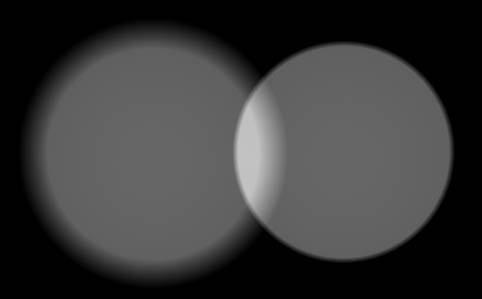
Theoretical considerations aside, why should we care about our math being correct? The answer is that the results just don’t look right when you shade in sRGB space. To illustrate, here are two renderings of a pair of spotlights shining on a plane (produced using Turtle).
The first image was rendered without any color-space conversions, so the spotlights were combined in sRGB space:
The second image was rendered with proper conversions, so , so the spotlights were combined in linear space:
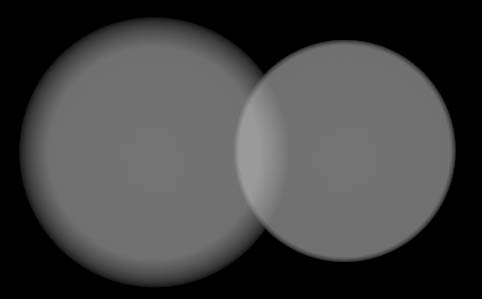
The first image looks obviously wrong - two dim lights are combining in the middle to produce an unrealistically bright area, which is an example of the “1+1=3″ effect I mentioned earlier. The second image looks correct.
So how do we ensure our shading is performed in linear space? One approach would be to move the entire pipeline to that space. This is usually not feasible, for three reasons:
- 8-bit-per-channel textures and frame buffers lack the precision to represent linear values without objectionable banding, and it’s usually not practical to use floats for all textures, render targets and display buffers.
- Most applications used by artists to manipulate colors work in sRGB space (a few apps like Photoshop do allow selection of the working color space).
- The hardware platform used sometimes requires that the final display buffer is in sRGB space.
Since most of the inputs to the rendering pipeline are in sRGB space, as well as (almost always) the final output, and we want most of the “stuff in the middle” to be in linear space, we end up doing a bunch of conversions between color spaces. Such conversions are done using the following functions, implemented in hardware (usually in approximate form), in shader code or in tools code:
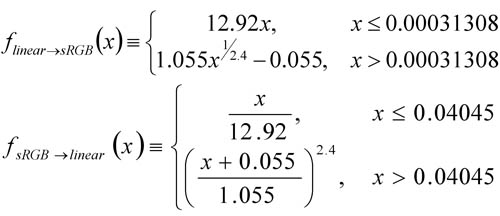
These functions are only defined over the 0-1 range; using them for values outside the range may yield unexpected results.
Most modern GPUs support automatic linear to sRGB conversions on render target writes, and these are fairly simple to set up (links to Direct3D andOpenGL documentation). However, not all GPUs with this feature necessarily handle blending properly.
The correct thing to do is to perform blending like any other shading calculation - in linear space. Some GPUs screw this up, with varyingly bad results. I’ll discuss the alpha-blending case as an example, but similar problems exist for other blend modes. The following equations use lowercase c for values in sRGB space, and uppercase C for linear space (x is for generic values which can be in either space). Note that the alpha value itself represents a physical coverage amount, thus it is always in linear space and never has to be converted.
As is well known, the alpha blend equation is:

Since we are giving the GPU a color in linear space, and the render target color is in sRGB space before and after the blend operation, we want the GPU to do this:

The D3D10 and OpenGL extension specs require this behavior. However, most D3D9-class GPUs will convert to sRGB space, and then blend there:

In this situation, shader calculations occur in linear space, and blending calculations occur in sRGB space. This is incorrect in theory; how much of a problem it is in practice is another question. If your game only uses blending for special effects, the results might not be too horrible. If you are using a ‘pass-per-light’ approach to combine lights using the blending hardware, then lights are being combined in sRGB space, which eliminates most of the benefits of having a gamma-correct rendering pipeline. Note that this problem is equally bad whether you are using the automatic hardware conversion or converting in the shader, since in both cases the conversion happens before the blend.
What do you do if you don’t want sRGB-space blending, but you are stuck supporting GPUs which don’t handle blending across color spaces correctly? You could blend into an HDR linear buffer, which is then converted into sRGB in a post-process. If an HDR buffer is not practical, perhaps you could try an LDR linear-space buffer, but banding is likely to be a problem.
Using automatic hardware conversion on GPUs which don’t handle blending correctly is even worse if you use premultiplied alpha (Tom Forsyth has a nice explanation of why premultiplied alpha is good). Then the premultiplication occurs in the shader, before the hardware color-space conversion, and you get this:

Which looks really bad. In this case you can convert in the shader rather than using the automatic conversion, which leaves you no worse off than in the non-premultiplied case.
sRGB to linear conversions on texture reads are also simple to set up (links toDirect3D and OpenGL documentation) and inexpensive, but again much D3D9-class hardware botches the conversion by doing it after filtering, instead of before. This means that filtering is done in sRGB space. In practice, this is usually not so bad.
One detail which is often overlooked is the need to compute MIP-maps in linear space - given the cascading nature of MIP-map computations results can be quite wrong otherwise. Fortunately, most libraries used for this purpose used for this purpose support gamma-correct MIP generation (includingNVTextureTools and D3DX). Typically, the library will take flags which specify the color spaces for the input texture and the output MIP chain; it will then convert the input texture to linear space, do all filtering there (ideally in higher precision than the result format), and finally convert to the appropriate color space on output.
All color-pickers values in the DCC (Digital Content Creation; Maya, etc.) applications need to be converted from sRGB space to linear space before passing on to the rendering pipeline (since they are typically stored as floats, this conversion can be done in the tools). This includes material colors, light source colors, etc. Cutting corners here will bring down the wrath of the artists upon you when their carefully selected colors no longer match the shaded result. Note that only values between 0 and 1 can be meaningfully converted, so this doesn’t apply to unbounded quantities like light intensity sliders.
If your artists typically paint vertex colors in the DCC app, these are most likely visualized in sRGB space as well and will need to be converted to linear space (ideally at export time). Certain grayscale values like ambient occlusion may need to be converted as well if manually painted. As Chris Tchou points out in his talk (see list of references at end), vertex colors rarely need to be stored in sRGB space since quantization errors are hidden by the (high-precision) interpolation.
If lighting information (which includes environment maps, lightmaps, baked vertex lighting, SH light probes, etc. ) is stored in an HDR format (which is much preferable if you can do it!) then it is linear and no conversions are needed. If you have to store lighting in an LDR format then you might want to store it in sRGB space. Note that light baking tools will need to be configured to generate their result in the desired space, and to convert any input textures they use. Ideally light colors would also be converted while baking, so that baked light sources match dynamic ones.
All of these conversions need to be done in tools for export, light baking and previewing. All keyframes of any sRGB animated quantities need to be converted as well. All in all, there is a lot of code that needs to be touched.
After all this, you can sit back and bask in everyone’s adulation at the resulting realistic renders, right? Well, not necessarily; it turns out that there are some visual side-effects of moving to a gamma-correct rendering pipeline which may also need to be addressed. I have to start packing for SIGGRAPH, so the details will have to wait for a future post.
If you want to learn more about this subject, there are a bunch of good resources available. Simon Brown’s web site has a good summary. Charles Poynton’s Gamma FAQ goes into more details on the theory, and his bookhas a really good in-depth discussion. The slides for Chris Tchou’s Meltdown 2006 presentation, “HDR The Bungie Way” (available here) go into great detail on some of the more practical issues, like the approximations to the sRGB curve used by typical hardware.
Posted in Rendering | 1 Comment
One Response to “Adventures with Gamma-Correct Rendering”
- on 14 Apr 2008 at 12:29 am1realtimecollisiondetection.net - the blog » A brief graphics blog summary
[…] his article, but almost the very first day the system was up it helped catch a subtle bug where the gamma correction had just been broken in the tools. Visually the images looked almost the same, so had we not had […]
[ZZ] Adventures with Gamma-Correct Rendering的更多相关文章
- [ZZ] [siggraph10]color enhancement and rendering in film and game productio
原文link:<color enhancement and rendering in film and game production> 是siggraph 2010,“Color Enh ...
- 39. Volume Rendering Techniques
Milan Ikits University of Utah Joe Kniss University of Utah Aaron Lefohn University of California, D ...
- [ZZ] HDR the bungie way
http://blog.csdn.net/toughbro/article/details/6755394 bufferencoding游戏float算法 bungie 06年,gamefest上的p ...
- From Alpha to Gamma (II)
这篇文章被拖延得这么久是因为我没有找到合适的引言 -- XXX 这一篇接着讲Gamma.近几年基于物理的渲染(Physically Based Shading, 后文简称PBS)开始在游戏业界受到关注 ...
- 由浅入深学习PBR的原理和实现
目录 一. 前言 1.1 本文动机 1.2 PBR知识体系 1.3 本文内容及特点 二. 初阶:PBR基本认知和应用 2.1 PBR的基本介绍 2.1.1 PBR概念 2.1.2 与物理渲染的差别 2 ...
- 【Away3D代码解读】(三):渲染核心流程(渲染)
还是老样子,我们还是需要先简略的看一下View3D中render方法的渲染代码,已添加注释: //如果使用了 Filter3D 的话会判断是否需要渲染深度图, 如果需要的话会在实际渲染之前先渲染深度图 ...
- Delphi资源大全
A curated list of awesome Delphi frameworks, libraries, resources, and shiny things. Inspired by awe ...
- Awesome Delphi
Awesome Delphi A curated list of awesome Delphi frameworks, libraries, resources, and shiny things. ...
- iOS苹果官方Demo合集
Mirror of Apple’s iOS samples This repository mirrors Apple’s iOS samples. Name Topic Framework Desc ...
随机推荐
- Linux配置SSH公钥认证与Jenkins远程登录进行自动发布
公钥认证,是使用一对加密字符串,一个称为公钥(public key), 任何人都可以看到其内容,用于加密:另一个称为密钥(private key),只有拥有者才能看到,用于解密. 在使用jenkins ...
- 【读书笔记】读《JavaScript设计模式》之门面模式
一.前言 门面模式,也称Facade(外观)模式.核心的两点作用—— 1> 简化类的接口(让接口变得更加容易理解.容易应用.更加符合对应业务),来掩盖一个非常不同或者复杂的实现 2> 消除 ...
- Zabbix discoverer processes more than 75% busy
[root@86 ~]# grep -n "StartDiscoverers" /usr/local/zabbix/etc/zabbix_server.conf 176:### O ...
- Linux查询网址
1.man查询手册 LINUX MAN PAGES ONLINE: http://man.he.net/ 2.编码规范 https://www.kernel.org/doc/Documentation ...
- Java Hour 11
有句名言,叫做10000小时成为某一个领域的专家.姑且不辩论这句话是否正确,让我们到达10000小时的时候再回头来看吧. 本文作者Java 现经验约为11 Hour,请各位不吝赐教. Hour 11 ...
- 2016"百度之星" - 初赛(Astar Round2A)1002 / HDU 5691 状态压缩DP
Sitting in Line Problem Description 度度熊是他同时代中最伟大的数学家,一切数字都要听命于他.现在,又到了度度熊和他的数字仆人们玩排排坐游戏的时候了.游戏的规则十 ...
- Aqua Data Studio中文乱码
使用Aqua Data Studio 查询数据时,如果表中的数据有中文时,会显示乱码,如下图: 解决方法很简单,只能更改字体即可,步骤如下: 更改字体后,显示的结果如下:
- Selenium测试规划
开源工具经过近几年的发展,已经出现了一大批成熟的可应用到实际项目中的产品,其中,在WEB自动化测试领域,Selenium支持广泛的浏览器和脚本开发语言,高效的执行效率,获得广泛的应用. 本课程结合Se ...
- Unity资源Assetmport New Asset对话框
Unity资源Assetmport New Asset对话框 1.2.2 资源 开发游戏一定会使用很多东西,如网格.纹理.电影.动画.声音.音乐.文本等等.这些文件都被Unity称为资源(Asset ...
- 介绍开发Android手持终端PDA盘点APP软件
介绍开发Android手持终端PDA盘点APP软件 软件需要自动识别我导入的TXT格式或者excl格式的盘点表,然后自动生成一个复盘数据,做AB比对,界面上需要显示的有总数量,单品数量,条码,编码,商 ...