
[Unit Testing] AngularJS Unit Testing - Karma
Install Karam:
npm install -g karma
npm install -g karma-cli
Init Karam:
karma init
First test:
1. Add test file to the karma.conf.js:
    // list of files / patterns to load in the browser

    files: [

        'test/hello.js'

    ],
2. Add test file:
describe('First Unit testing with Karma', function() {

    it('sholud work', function() {

        expect(true).toBe(false);

    })

})
Of course, it will failed.
Then we make it pass:
describe('First Unit testing with Karma', function() {

    it('sholud work', function() {

        expect(true).toBe(true);

    })

})
Testing with AngularJS
Install angular-mocks:
npm install angular-mocks
Include the angular.js and angular-mocks.js file before the test file:
    // list of files / patterns to load in the browser

    files: [

        'test/hello.js',

        'bower_components/angular/angular.js',

        'node_modules/angular-mocks/angular-mocks.js',

        'test/anuglarjs.js'

    ],
Write the test file:
describe('Testing with AngularJS', function() {

    //Want $scope and element can be used globally

    var $scope,

        element;

    //We need to inject $compile, $rootScope

    beforeEach(inject(function($compile, $rootScope) {

        $scope = $rootScope;

        //create an 'angular element'

        element = angular.element("<div>{{2+2}}</div>");

        //then compile it to real angular element

        //also it requires link function and scope

        element = $compile(element)($rootScope);

    }));

    it('should equals to 4', function() {

        //make sure to $digest() it to get the change

        $scope.$digest();

        expect(element.html()).toBe("5");  // change to "4" to make it pass

    })

})
Now, "4" is not "5", then it will failed, switch to "4" to make it pass.
Testing Directive:
    .directive('aGreatEye', function () {

        return {

            restrict: 'E',

            replace: true,   //Important to add replace: true, otherwise, it would be <h1 class="ng-binding">...</h1>"

            template: '<h1>lidless, wreathed in flame, {{1 + 1}} times</h1>'

        };

    });
describe('Testing directive', function() {

    var $scope,

        $compile,

        element;

    beforeEach(module('app'));

    beforeEach(inject(function(_$compile_, _$rootScope_) {

        $compile = _$compile_;

        $scope = _$rootScope_;

    }));

    it("Replaces the element with the appropriate content", function() {

        element = $compile('<a-great-eye></a-great-eye>')($scope);

        $scope.$digest();

        expect(element.html()).toBe('lidless, wreathed in flame, 2 times');

    })

});
Underscore notation: The use of the underscore notation (e.g.: _$rootScope_) is a convention wide spread in AngularJS community to keep the variable names clean in your tests. That's why the $injector strips out the leading and the trailing underscores when matching the parameters. The underscore rule applies only if the name starts and ends with exactly one underscore, otherwise no replacing happens.
Testing Directives With External Templates:
1. Install 'karma-ng-html2js-preprocessor': https://github.com/karma-runner/karma-ng-html2js-preprocessor
npm install karma-ng-html2js-preprocessor --save-dev
2. Add config to karma.config.js:
    // preprocess matching files before serving them to the browser

    // available preprocessors: https://npmjs.org/browse/keyword/karma-preprocessor

    preprocessors: {

        '*.html': ['ng-html2js']

    },

      ngHtml2JsPreprocessor: {

          // strip this from the file path

          stripPrefix: '/'  //because currently all the html files are located in / root

      },
3. Add html into beforeEach:
describe('Testing directive', function() {

    var $scope,

        $compile,

        element;

    beforeEach(module('app'));

    // Add html file here

    beforeEach(module('directivetest.html'));

    beforeEach(inject(function(_$compile_, _$rootScope_) {

        $compile = _$compile_;

        $scope = _$rootScope_;

    }));

    it("Replaces the element with the appropriate content", function() {

        element = $compile('<a-great-eye></a-great-eye>')($scope);

        $scope.$digest();

        expect(element.html()).toBe('lidless, wreathed in flame, 2 times');

    })

});
    .directive('aGreatEye', function () {

        return {

            restrict: 'E',

            replace: true,

            templateUrl: 'directivetest.html'

        };

    });

   /*directivetest.html*/

   <h1>lidless, wreathed in flame, {{1 + 1}} times</h1>
Testing Directive Scope:
1. Check after a click event, scope value changed:
    .directive('aGreatEye', function () {

        return {

            restrict: 'EA',

            replace: true,

            templateUrl: 'directivetest.html',

            link: function(scope, element) {

                scope.isClicked = false;

                element.bind('click', function() {

                    scope.isClicked = true;

                })

            }

        };

    });
    it("isClicked is true after click", function() {

        element = $compile('<a-great-eye></a-great-eye>')($scope);

        $scope.$digest();

        element.triggerHandler('click');

        expect($scope.isClicked).toBe(true);

    });
2. Isolated scope testing:
    .directive('aGreatEye', function () {

        return {

            restrict: 'EA',

            replace: true,

            scope: {},

            templateUrl: 'directivetest.html',

            link: function(scope, element) {

                scope.isClicked = false;

                element.bind('click', function() {

                    scope.isClicked = true;

                })

            }

        };

    });
    it("isolated scope testing", function() {

        element.triggerHandler('click');

        expect(element.isolateScope().isClicked).toBe(true);

    });
You can no long use "element.scope()" or "$scope", you should use "element.isolateScope()".
Testing Directive Scope Binding:
Tow ways binding:
    .directive('aGreatEye', function () {

        return {

            restrict: 'EA',

            replace: true,

            scope: {

                flavor: "=" //Accpet an object

            },

            templateUrl: 'directivetest.html',

            link: function(scope, element) {

                element.bind('click', function() {

                    scope.isClicked = true;

                    scope.flavor.message += " World!";

                })

            }

        };

    });
    beforeEach(inject(function(_$compile_, _$rootScope_) {

        $compile = _$compile_;

        $scope = _$rootScope_;

        $scope.goPro = {message: "Hello"};

        element = $compile('<div a-great-eye flavor="goPro"></div>')($scope);

        $scope.$digest();

    }));

    it("after click the scope.data should be Hello World!", function() {

        element.triggerHandler('click');

        expect($scope.goPro.message).toBe('Hello World!');

        expect(element.isolateScope().flavor.message).toBe("Hello World!");

    });
Testing Speed:
Using ddescriber plugin to speed up unit testing.
Install the plugin "ddscriber for jasmine". Ctrl+Shift+D, to open the dailog. In the dialog you can choose which test to be included or not.
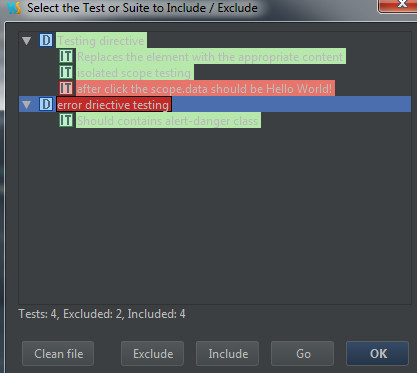
The code is modfied as:
/**

 * Created by Answer1215 on 1/16/2015.

 */

ddescribe('Testing directive', function() {

    var $scope,

        $compile,

        element;

    beforeEach(module('app'));

    beforeEach(module('directivetest.html'));

    beforeEach(inject(function(_$compile_, _$rootScope_) {

        $compile = _$compile_;

        $scope = _$rootScope_;

        $scope.goPro = {message: "Hello"};

        element = $compile('<div a-great-eye flavor="goPro"></div>')($scope);

        $scope.$digest();

    }));

    iit("Replaces the element with the appropriate content", function() {

        expect(element.html()).toContain("lidless, wreathed in flame, 2 times");

    });

    //it("isClicked is true after click", function() {

    //    element.triggerHandler('click');

    //    expect($scope.isClicked).toBe(true);

    //});

    iit("isolated scope testing", function() {

        element.triggerHandler('click');

        //expect(element.isolateScope().isClicked).toBe(true);

    });

    xit("after click the scope.data should be Hello World!", function() {

        element.triggerHandler('click');

        expect($scope.goPro.message).toBe('Hello World!');

        //expect(element.isolateScope().flavor.message).toBe("Hello World!");

    });

});

xdescribe("error driective testing", function() {

    var $scope, $compile, element;

    beforeEach(module('app'));

    beforeEach(module('error.html'));

    beforeEach(inject(function(_$compile_, _$rootScope_) {

        $scope = _$rootScope_;

        $compile = _$compile_;

        element = $compile('<error></error>')($scope);

        $scope.$digest();

    }));

    iit("Should contains alert-danger class", function() {

        expect(element.find('div').hasClass('alert-danger')).toBe(true);

    });

});
ddscribe / iit -- include
xdscribe / xit -- exclude
Testing Service:
Testing service, you need to inject the service into beforeEach.
ddescribe('testing service', function() {

    var SmithService;

    beforeEach(module('app'));

    beforeEach(inject(function(_SmithService_) {

        SmithService = _SmithService_;

    }));

    iit('should append Smith after each name', function() {

        expect(SmithService.getName("John")).toBe("John Smith");

    })

});
This testing case is test whenever use a service to get a name we will append " Smith" to the end.
  .service('SmithService', function() {

        var SmithService = {};

        SmithService.getName = function(name) {

            return name + " Smith";

        }

        return SmithService;

    });
Testing Controller:
Testing controller, you need to inject the $controller into beforeEach. And get ctrl instence by using:
appCtrl = $controller("AppCtrl")
ddescribe('Test Controller', function() {

    var ctrl;

    beforeEach(module('app'));

    beforeEach(inject(function(_$controller_) {

        ctrl = _$controller_("TestCtrl");

    }));

    iit('Test Controller', function() {

        expect(ctrl.message).toBe("Hello");

    });

});
    .controller('TestCtrl', function() {

        var vm = this;

        vm.message = "Hello";

    });
[Unit Testing] AngularJS Unit Testing - Karma的更多相关文章
- Unit Testing, Integration Testing and Functional Testing
转载自:https://codeutopia.net/blog/2015/04/11/what-are-unit-testing-integration-testing-and-functional- ...
- Difference Between Performance Testing, Load Testing and Stress Testing
http://www.softwaretestinghelp.com/what-is-performance-testing-load-testing-stress-testing/ Differen ...
- AngularJS测试框架 karma备忘
AngularJS测试框架karma安装 安装karma $ --save-dev 安装karma组件 $ npm install karma-jasmine karma-chrome-launche ...
- Go testing 库 testing.T 和 testing.B 简介
testing.T 判定失败接口 Fail 失败继续 FailNow 失败终止 打印信息接口 Log 数据流 (cout 类似) Logf format (printf 类似) SkipNow 跳过当 ...
- [Angular + Unit] AngularJS Unit testing using Karma
http://social.technet.microsoft.com/wiki/contents/articles/32300.angularjs-unit-testing-using-karma- ...
- [AngularJS Unit tesint] Testing keyboard event
HTML: <div ng-focus="vm.onFocus(month)", aria-focus="{{vm.focus == month}}", ...
- [AngularJS + Unit Testing] Testing Directive's controller with bindToController, controllerAs and isolate scope
<div> <h2>{{vm.userInfo.number}} - {{vm.userInfo.name}}</h2> </div> 'use str ...
- [AngularJS + Unit Testing] Testing a component with requiring ngModel
The component test: describe('The component test', () => { let component, $componentController, $ ...
- [Unit Testing] Fundamentals of Testing in Javascript
In this lesson, we’ll get the most fundamental understanding of what an automated test is in JavaScr ...
随机推荐
- Install nutch
1. Install nutch on single node: $apt-get install subversion $apt-get install ant $svn co https://sv ...
- swoole 安装
swoole 安装: 1. 下载源代码,我下载的是1.8.6版本wget https://github.com/swoole/swoole-src/archive/1.8.6-stable.tar.g ...
- 创建 kylin Module/Cube
1. 首先要创建 Project 2. 再把Hive 表加载进来: 3. 创建model 3.1. 首先选择或者创建一个project 3.2.创建一个新modle 3.3. 选择数据库 ...
- 只有好的棋手才会走运-《打造Facebook》读后感
王淮的<打造Facebook>一书不厚,花半天时间轻松读完.书中没有大段的说教,只有近乎流水的陈述.正如作者所说,打造Facebook这本书由巴克伯格来写再合适不过.可惜他至少在近几年内没 ...
- [ThingWorx] Install PostgreSQL Issue
ThingWorx application need PostgreSQL, I try configurate it in macbook. The first step is install Po ...
- JS几种数组遍历方式以及性能分析对比
前言 这一篇与上一篇 JS几种变量交换方式以及性能分析对比 属于同一个系列,本文继续分析JS中几种常用的数组遍历方式以及各自的性能对比 起由 在上一次分析了JS几种常用变量交换方式以及各自性能后,觉得 ...
- 菜鸟学习WCF笔记-契约(Contract)
契约,契约确保了服务的正常调用,客户端以契约的方式进行服务端调用,而服务则需要按照契约规定的方式提供服务. 契约是服务提供的一组操作的描述 功能上讲:每个操作对应着某个具体的功能实现,以及调用这个操作 ...
- hdu 2191 多重背包 悼念512汶川大地震遇难同胞——珍惜现在,感恩生活
http://acm.hdu.edu.cn/showproblem.php?pid=2191 New~ 欢迎“热爱编程”的高考少年——报考杭州电子科技大学计算机学院关于2015年杭电ACM暑期集训队的 ...
- C# 设置和获取一个字节的某一位的值的方法
自己工作中遇到需要对单字节的高位.低位进行赋值,即一个字节byte,想要给每一位都赋值,这个值是动态来的,是0或是1. 好不容易收集到一些珍贵资料,整理一下: 一.设置 方法code: /// < ...
- ssh sftp scp命令
scp local_file remote_username@remote_ip:remote_folder 或者 scp local_file remote_username@remote_ip:r ...