
阿里巴巴开源的Asynchronous I/O Design and Implementation
Motivation
I/O access, for the most case, is a time-consuming process, making the TPS for single operator much lower than in-memory computing, particularly for streaming job, when low latency is a big concern for users. Starting multiple threads may be an option to handle this problem, but the drawbacks are obvious: The programming model for end users may become more complicated as they have to implement thread model in the operator. Furthermore, they have to pay attention to coordinate with checkpointing.
Terms
AsyncFunction: Async I/O will be triggered in AsyncFunction.
AsyncWaitOperator: An StreamOperator which will invoke AsyncFunction.
AsyncCollector: For each input streaming record, an AsyncCollector will be created and passed into user's callback to get the async i/o result.
AsyncCollectorBuffer: A buffer to keep all AsyncCollectors.
Emitter Thread: A working thread in AsyncCollectorBuffer, being signalled while some of AsyncCollectors have finished async i/o and emitting results to the following opeartors.
Public Interfaces
A helper class, named AsyncDataStream, is added to provide methods to add AsyncFunction, which will do async i/o operation, into FLINK streaming job.
public class AsyncDataStream {

 /**

  * Add an AsyncWaitOperator. The order of output stream records may be reordered.

  *

  * @param in Input data stream

  * @param func AsyncFunction

  * @bufSize The max number of async i/o operation that can be triggered

  * @return A new DataStream.

  */

 public static DataStream<OUT> unorderedWait(DataStream<IN> in, AsyncFunction<IN, OUT> func, int bufSize);

 public static DataStream<OUT> unorderedWait(DataStream<IN> in, AsyncFunction<IN, OUT> func);

 /**

  * Add an AsyncWaitOperator. The order of output stream records is guaranteed to be the same as input ones.

  *

  * @param func AsyncWaitFunction

  * @param func AsyncFunction

  * @bufSize The max number of async i/o operation that can be triggered

  * @return A new DataStream.

  */

 public static DataStream<OUT> orderedWait(DataStream<IN> in, AsyncFunction<IN, OUT> func, int bufSize);

 public static DataStream<OUT> orderedWait(DataStream<IN> in, AsyncFunction<IN, OUT> func);

}
Proposed Changes
Overview
The following diagram illustrates how the streaming records are processed while
- arriving at AsyncWaitOperator
- recovering from task failover
- snapshotting state
- being emitted by Emitter Thread
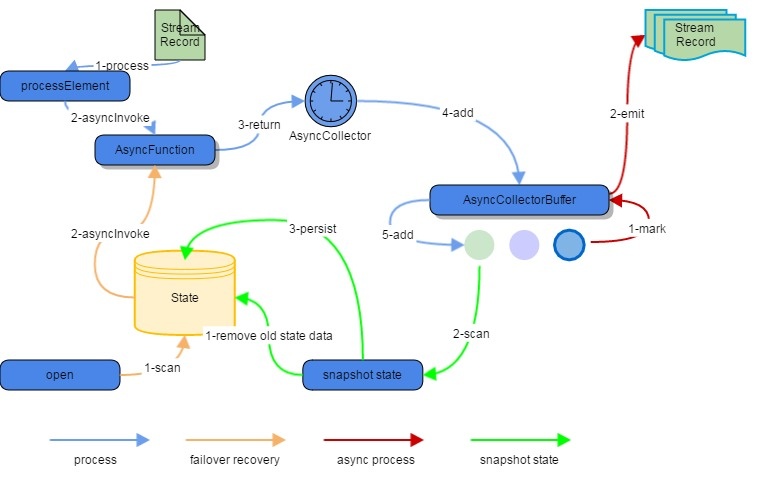
Sequence Diagram

AsyncFunction
AsyncFunction works as a user function in AsyncWaitOperator which looks like StreamFlatMap operator, having open()/processElement(StreamRecord<IN> record)/processWatermark(Watermark mark).
For user’s concrete AsyncFunction, the asyncInvoke(IN input, AsyncCollector<OUT> collector) has to be overriden to supply codes to start an async operation.
public interface AsyncFunction<IN, OUT> extends Function, Serializable {

  /**

   * Trigger async operation for each stream input.

   * The AsyncCollector should be registered into async client.

   *

   * @param input Stream Input

   * @param collector AsyncCollector

   */

  void asyncInvoke(IN input, AsyncCollector<OUT> collector) throws Exception;

}

public abstract class RichAsyncFunction<IN, OUT> extends AbstractRichFunction

    implements AsyncFunction<IN, OUT> {

  @Override

  public abstract void asyncInvoke(IN input, AsyncCollector<OUT> collector) throws Exception;

}
For each input stream record of AsyncWaitOperator, they will be processed by AsyncFunction.asyncInvoke(IN input, AsyncCollector<OUT> cb). Then AsyncCollector will be append into AsyncCollectorBuffer. We will cover AsyncCollector and AsyncCollectorBuffer later.
AsyncCollector
AsyncCollector is created by AsyncWaitOperator, and passed into AsyncFunction, where it should be added into user’s callback. It acts as a role to get results or errors from user codes and notify the AsyncCollectorBuffer to emit results.
The functions specific for the user is the collect, and they should be called when async operation is done or errors are thrown out.
public class AsyncCollector<OUT> {

  private List<OUT> result;

  private Throwable error;

  private AsyncCollectorBuffer<OUT> buffer;

  /**

   * Set result

   * @param result A list of results.

   */

  public void collect(List<OUT> result) {

    this.result = result;

    buffer.mark(this);

  }

  /**

   * Set error

   * @param error A Throwable object.

   */

  public void collect(Throwable error) {

    this.error = error;

    buffer.mark(this);

  }

  /**

   * Get result. Throw RuntimeException while encountering an error.

   * @return A List of result.

   * @throws RuntimeException RuntimeException wrapping errors from user codes.

   */

  public List<OUT> getResult() throws RuntimeException { ... }

}
How is it used
Before calling AsyncFunction.asyncInvoke(IN input, AsyncCollector<OUT> collector), AsyncWaitOperator will try to get an instance of AsyncCollector from AsyncCollectorBuffer. Then it will be taken into user’s callback function. If the buffer is full, it will wait until some of ongoing callbacks has finished.
Once async operation has done, the AsyncCollector.collect() will take results or errors and AsyncCollectorBuffer will be notified.
AsyncCollector is implemented by FLINK.
AsyncCollectorBuffer
AsyncCollectorBuffer keeps all AsyncCollectors, and emit results to the next nodes.
When AsyncCollector.collect() is called, a mark will be placed in AsyncCollectorBuffer, indicating finished AsyncCollectors. A working thread, named Emitter, will also be signalledonce a AsyncCollector gets results, and then try to emit results depending on the ordered or unordered setting.
For simplicity, we will refer task to AsycnCollector in the AsyncCollectorBuffer in the following text.

Ordered and Unordered
Based on the user configuration, the order of output elements will or will not be guaranteed. If not guaranteed, the finished AsyncCollectors coming later will be emitted earlier.
Emitter Thread
The Emitter Thread will wait for finished AsyncCollectors. When it is signalled, it will process tasks in the buffer as follow:
Ordered Mode
If the first task in the buffer is finished, then Emitter will collect its results, and then proceed to the second task. If the first task is not finished yet, just wait for it again.
Unordered Mode
Check all finished tasks in the buffer, and collect results from those tasks which are prior to the oldest Watermark in the buffer.
The Emitter Thread and Task Thread will access exclusively by acquiring/releasing the lock.
Signal Task Thread when all tasks have finished to notify it that all data has been processed, and it is OK to close the operator.
Signal Task Thread after removing some tasks from the buffer.
Propagate Exceptions to Task Thread.
Task Thread
Access AsyncCollectorBuffer exclusively against the Emitter Thread.
Get and Add a new AsyncCollector to the buffer, wait while buffer is full.
Watermark
All watermarks will also be kept in AsyncCollectorBuffer. A watermark will be emitted if and only if after all AsyncCollectors coming before current watermark have been emitted.
State, Failover and Checkpoint
State and Checkpoint
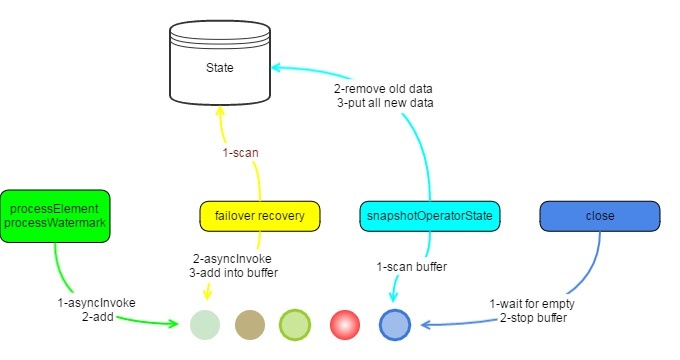
All input StreamRecords will be kept in state. Instead of storing each input stream records into state one by one while processing, AsyncWaitOperator will put all input stream records in AsyncCollectorBuffer into state while snapshotting operator state. Old data in the state will be cleared before persisting those records.
When all barriers have arrived at the operator, checkpoint can be carried out immediately.
Failover
While restoring the operator’s state, the operator will scan all elements in the state, get AsyncCollectors, call AsyncFunction.asyncInvoke() and insert them back into AsyncCollectorBuffer.
Notes
Async Resource Sharing
For the case to share async resources(like connection to hbase, netty connections) among different slots(task workers) in the same TaskManager(a.k.a the same JVM), we can make the connection static so that all threads in the same process can share the same instance.
Of course, please pay attention to thread safety while using those resources.
Example
For callback
/***  ***/

public class HBaseAsyncFunction implements AsyncFunction<String, String> {

  // initialize it while reading object

  transient Connection connection;

  @Override

  public void asyncInvoke(String val, AsyncCollector<String> c) {

    Get get = new Get(Bytes.toBytes(val));

    Table ht = connection.getTable(TableName.valueOf(Bytes.toBytes("test")));

    // UserCallback is from user’s async client.

    ((AsyncableHTableInterface) ht).asyncGet(get, new UserCallback(c));

  }

}

// create data stream

public void createHBaseAsyncTestStream(StreamExecutionEnvironment env) {

  DataStream<String> source = getDataStream(env);

  DataStream<String> stream = AsyncDataStream.unorderedWait(source, new HBaseAsyncFunction());

  stream.print();

}
For ListenableFuture
import com.google.common.util.concurrent.FutureCallback;

import com.google.common.util.concurrent.Futures;

import com.google.common.util.concurrent.MoreExecutors;

import com.google.common.util.concurrent.ListenableFuture;

public class HBaseAsyncFunction implements AsyncFunction<String, String> {

  // initialize it while reading object

  transient Connection connection;

  @Override

  public void asyncInvoke(String val, AsyncCollector<String> c) {

    Get get = new Get(Bytes.toBytes(val));

    Table ht = connection.getTable(TableName.valueOf(Bytes.toBytes("test")));

    ListenableFuture<Result> future = ht.asyncGet(get);

    Futures.addCallback(future,

      new FutureCallback<Result>() {

        @Override public void onSuccess(Result result) {

          List ret = new ArrayList<String>();

          ret.add(result.get(...));

          c.collect(ret);

        }

        @Override public void onFailure(Throwable t) {

          c.collect(t);

        }

      },

      MoreExecutors.newDirectExecutorService()

    );

  }

}

// create data stream

public void createHBaseAsyncTestStream(StreamExecutionEnvironment env) {

  DataStream<String> source = getDataStream(env);

  DataStream<String> stream = AsyncDataStream.unorderedWait(source, new HBaseAsyncFunction());

  stream.print();

}
源码完整DEMO
flink\flink-examples\flink-examples-streaming\src\main\java\org\apache\flink\streaming\examples\async\AsyncIOExample.java
/*

 * Licensed to the Apache Software Foundation (ASF) under one or more

 * contributor license agreements.  See the NOTICE file distributed with

 * this work for additional information regarding copyright ownership.

 * The ASF licenses this file to You under the Apache License, Version 2.0

 * (the "License"); you may not use this file except in compliance with

 * the License.  You may obtain a copy of the License at

 *

 *    http://www.apache.org/licenses/LICENSE-2.0

 *

 * Unless required by applicable law or agreed to in writing, software

 * distributed under the License is distributed on an "AS IS" BASIS,

 * WITHOUT WARRANTIES OR CONDITIONS OF ANY KIND, either express or implied.

 * See the License for the specific language governing permissions and

 * limitations under the License.

 */

package org.apache.flink.streaming.examples.async;

import org.apache.flink.api.common.functions.FlatMapFunction;

import org.apache.flink.api.java.tuple.Tuple2;

import org.apache.flink.api.java.utils.ParameterTool;

import org.apache.flink.configuration.Configuration;

import org.apache.flink.runtime.state.filesystem.FsStateBackend;

import org.apache.flink.streaming.api.CheckpointingMode;

import org.apache.flink.streaming.api.TimeCharacteristic;

import org.apache.flink.streaming.api.checkpoint.ListCheckpointed;

import org.apache.flink.streaming.api.datastream.AsyncDataStream;

import org.apache.flink.streaming.api.datastream.DataStream;

import org.apache.flink.streaming.api.environment.StreamExecutionEnvironment;

import org.apache.flink.streaming.api.functions.async.AsyncFunction;

import org.apache.flink.streaming.api.functions.async.ResultFuture;

import org.apache.flink.streaming.api.functions.async.RichAsyncFunction;

import org.apache.flink.streaming.api.functions.source.SourceFunction;

import org.apache.flink.util.Collector;

import org.slf4j.Logger;

import org.slf4j.LoggerFactory;

import java.util.ArrayList;

import java.util.Collections;

import java.util.List;

import java.util.Random;

import java.util.concurrent.ExecutorService;

import java.util.concurrent.Executors;

import java.util.concurrent.TimeUnit;

/**

 * Example to illustrates how to use {@link AsyncFunction}.

 */

public class AsyncIOExample {

    private static final Logger LOG = LoggerFactory.getLogger(AsyncIOExample.class);

    private static final String EXACTLY_ONCE_MODE = "exactly_once";

    private static final String EVENT_TIME = "EventTime";

    private static final String INGESTION_TIME = "IngestionTime";

    private static final String ORDERED = "ordered";

    /**

     * A checkpointed source.

     */

    private static class SimpleSource implements SourceFunction<Integer>, ListCheckpointed<Integer> {

        private static final long serialVersionUID = 1L;

        private volatile boolean isRunning = true;

        private int counter = ;

        private int start = ;

        @Override

        public List<Integer> snapshotState(long checkpointId, long timestamp) throws Exception {

            return Collections.singletonList(start);

        }

        @Override

        public void restoreState(List<Integer> state) throws Exception {

            for (Integer i : state) {

                this.start = i;

            }

        }

        public SimpleSource(int maxNum) {

            this.counter = maxNum;

        }

        @Override

        public void run(SourceContext<Integer> ctx) throws Exception {

            while ((start < counter || counter == -) && isRunning) {

                synchronized (ctx.getCheckpointLock()) {

                    ctx.collect(start);

                    ++start;

                    // loop back to 0

                    if (start == Integer.MAX_VALUE) {

                        start = ;

                    }

                }

                Thread.sleep(10L);

            }

        }

        @Override

        public void cancel() {

            isRunning = false;

        }

    }

    /**

     * An sample of {@link AsyncFunction} using a thread pool and executing working threads

     * to simulate multiple async operations.

     *

     * <p>For the real use case in production environment, the thread pool may stay in the

     * async client.

     */

    private static class SampleAsyncFunction extends RichAsyncFunction<Integer, String> {

        private static final long serialVersionUID = 2098635244857937717L;

        private static ExecutorService executorService;

        private static Random random;

        private int counter;

        /**

         * The result of multiplying sleepFactor with a random float is used to pause

         * the working thread in the thread pool, simulating a time consuming async operation.

         */

        private final long sleepFactor;

        /**

         * The ratio to generate an exception to simulate an async error. For example, the error

         * may be a TimeoutException while visiting HBase.

         */

        private final float failRatio;

        private final long shutdownWaitTS;

        SampleAsyncFunction(long sleepFactor, float failRatio, long shutdownWaitTS) {

            this.sleepFactor = sleepFactor;

            this.failRatio = failRatio;

            this.shutdownWaitTS = shutdownWaitTS;

        }

        @Override

        public void open(Configuration parameters) throws Exception {

            super.open(parameters);

            synchronized (SampleAsyncFunction.class) {

                if (counter == ) {

                    executorService = Executors.newFixedThreadPool();

                    random = new Random();

                }

                ++counter;

            }

        }

        @Override

        public void close() throws Exception {

            super.close();

            synchronized (SampleAsyncFunction.class) {

                --counter;

                if (counter == ) {

                    executorService.shutdown();

                    try {

                        if (!executorService.awaitTermination(shutdownWaitTS, TimeUnit.MILLISECONDS)) {

                            executorService.shutdownNow();

                        }

                    } catch (InterruptedException e) {

                        executorService.shutdownNow();

                    }

                }

            }

        }

        @Override

        public void asyncInvoke(final Integer input, final ResultFuture<String> resultFuture) throws Exception {

            this.executorService.submit(new Runnable() {

                @Override

                public void run() {

                    // wait for while to simulate async operation here

                    long sleep = (long) (random.nextFloat() * sleepFactor);

                    try {

                        Thread.sleep(sleep);

                        if (random.nextFloat() < failRatio) {

                            resultFuture.completeExceptionally(new Exception("wahahahaha..."));

                        } else {

                            resultFuture.complete(

                                Collections.singletonList("key-" + (input % )));

                        }

                    } catch (InterruptedException e) {

                        resultFuture.complete(new ArrayList<String>());

                    }

                }

            });

        }

    }

    private static void printUsage() {

        System.out.println("To customize example, use: AsyncIOExample [--fsStatePath <path to fs state>] " +

                "[--checkpointMode <exactly_once or at_least_once>] " +

                "[--maxCount <max number of input from source, -1 for infinite input>] " +

                "[--sleepFactor <interval to sleep for each stream element>] [--failRatio <possibility to throw exception>] " +

                "[--waitMode <ordered or unordered>] [--waitOperatorParallelism <parallelism for async wait operator>] " +

                "[--eventType <EventTime or IngestionTime>] [--shutdownWaitTS <milli sec to wait for thread pool>]" +

                "[--timeout <Timeout for the asynchronous operations>]");

    }

    public static void main(String[] args) throws Exception {

        // obtain execution environment

        StreamExecutionEnvironment env = StreamExecutionEnvironment.getExecutionEnvironment();

        // parse parameters

        final ParameterTool params = ParameterTool.fromArgs(args);

        final String statePath;

        final String cpMode;

        final int maxCount;

        final long sleepFactor;

        final float failRatio;

        final String mode;

        final int taskNum;

        final String timeType;

        final long shutdownWaitTS;

        final long timeout;

        try {

            // check the configuration for the job

            statePath = params.get("fsStatePath", null);

            cpMode = params.get("checkpointMode", "exactly_once");

            maxCount = params.getInt("maxCount", );

            sleepFactor = params.getLong("sleepFactor", );

            failRatio = params.getFloat("failRatio", 0.001f);

            mode = params.get("waitMode", "ordered");

            taskNum = params.getInt("waitOperatorParallelism", );

            timeType = params.get("eventType", "EventTime");

            shutdownWaitTS = params.getLong("shutdownWaitTS", );

            timeout = params.getLong("timeout", 10000L);

        } catch (Exception e) {

            printUsage();

            throw e;

        }

        StringBuilder configStringBuilder = new StringBuilder();

        final String lineSeparator = System.getProperty("line.separator");

        configStringBuilder

            .append("Job configuration").append(lineSeparator)

            .append("FS state path=").append(statePath).append(lineSeparator)

            .append("Checkpoint mode=").append(cpMode).append(lineSeparator)

            .append("Max count of input from source=").append(maxCount).append(lineSeparator)

            .append("Sleep factor=").append(sleepFactor).append(lineSeparator)

            .append("Fail ratio=").append(failRatio).append(lineSeparator)

            .append("Waiting mode=").append(mode).append(lineSeparator)

            .append("Parallelism for async wait operator=").append(taskNum).append(lineSeparator)

            .append("Event type=").append(timeType).append(lineSeparator)

            .append("Shutdown wait timestamp=").append(shutdownWaitTS);

        LOG.info(configStringBuilder.toString());

        if (statePath != null) {

            // setup state and checkpoint mode

            env.setStateBackend(new FsStateBackend(statePath));

        }

        if (EXACTLY_ONCE_MODE.equals(cpMode)) {

            env.enableCheckpointing(1000L, CheckpointingMode.EXACTLY_ONCE);

        }

        else {

            env.enableCheckpointing(1000L, CheckpointingMode.AT_LEAST_ONCE);

        }

        env.getConfig().setTracingMetricsEnabled(true);

        // enable watermark or not

        if (EVENT_TIME.equals(timeType)) {

            env.setStreamTimeCharacteristic(TimeCharacteristic.EventTime);

        }

        else if (INGESTION_TIME.equals(timeType)) {

            env.setStreamTimeCharacteristic(TimeCharacteristic.IngestionTime);

        }

        // create input stream of an single integer

        DataStream<Integer> inputStream = env.addSource(new SimpleSource(maxCount));

        // create async function, which will *wait* for a while to simulate the process of async i/o

        AsyncFunction<Integer, String> function =

                new SampleAsyncFunction(sleepFactor, failRatio, shutdownWaitTS);

        // add async operator to streaming job

        DataStream<String> result;

        if (ORDERED.equals(mode)) {

            result = AsyncDataStream.orderedWait(

                inputStream,

                function,

                timeout,

                TimeUnit.MILLISECONDS,

                ).setParallelism(taskNum);

        }

        else {

            result = AsyncDataStream.unorderedWait(

                inputStream,

                function,

                timeout,

                TimeUnit.MILLISECONDS,

                ).setParallelism(taskNum);

        }

        // add a reduce to get the sum of each keys.

        result.flatMap(new FlatMapFunction<String, Tuple2<String, Integer>>() {

            private static final long serialVersionUID = -938116068682344455L;

            @Override

            public void flatMap(String value, Collector<Tuple2<String, Integer>> out) throws Exception {

                out.collect(new Tuple2<>(value, ));

            }

        }).keyBy().sum().print();

        // execute the program

        env.execute("Async IO Example");

    }

}
阿里巴巴开源的Asynchronous I/O Design and Implementation的更多相关文章
- Google、亚马逊、微软 、阿里巴巴开源软件一览
Google.亚马逊.微软 .阿里巴巴开源软件一览 大公司为什么要发布开源项目?一是开源能够帮助他人更快地开发软件,促进世界创新,主要是社会价值层面的考虑.二是开源能够倒逼工程师写出更好的代码.三是开 ...
- 阿里巴巴开源项目:分布式数据库同步系统otter(解决中美异地机房) - agapple - ITeye技术网站
阿里巴巴开源项目:分布式数据库同步系统otter(解决中美异地机房) - agapple - ITeye技术网站 阿里巴巴开源项目:分布式数据库同步系统otter(解决中美异地机房)
- Alibaba阿里巴巴开源软件列表
整理和分享我大阿里的开源项目的相关网址: Git Hub上的开源软件网址: 1.https://github.com/alibaba 阿里巴巴开源技术汇总:115个软件 2.https://yq.al ...
- 阿里巴巴开源项目汇总-(JAVA)
来源:https://segmentfault.com/a/1190000017346799 1.分布式应用服务开发的一站式解决方案 Spring Cloud Alibaba Spring Cloud ...
- 阿里巴巴开源 Spring Cloud Alibaba,加码微服务生态建设
本周,Spring Cloud联合创始人Spencer Gibb在Spring官网的博客页面宣布:阿里巴巴开源 Spring Cloud Alibaba,并发布了首个预览版本.随后,Spring Cl ...
- android使用ARouter跳转activity(阿里巴巴开源的)
android使用ARouter跳转activity(阿里巴巴开源的) 使用ARouter方式,点击按钮跳转到其他activitypublic void buyOrSell(String str){ ...
- alibaba/fescar 阿里巴巴 开源 分布式事务中间件
Fescar 是 阿里巴巴 开源的 分布式事务中间件,以 高效 并且对业务 0 侵入 的方式,解决 微服务 场景下面临的分布式事务问题. 示例:https://github.com/windwant/ ...
- 阿里巴巴开源性能监控神器Arthas初体验
如果问性能测试中最难的是哪部分,相信很多人会说“性能调优”.确实是这样,性能调优是一个非常复杂.技术含量很高的工作.涉及到的知识面很广.以我多年从业经验来看,在企业里,大多数的性能调优都是由开发架构师 ...
- 阿里巴巴开源性能监控神器Arthas jvm
原文:https://www.cnblogs.com/testfan2019/p/11038791.html 如果问性能测试中最难的是哪部分,相信很多人会说“性能调优”.确实是这样,性能调优是一个非常 ...
随机推荐
- asp.net core 系列 16 Web主机 IWebHostBuilder
一.概述 在asp.net core中,Host主机负责应用程序启动和生存期管理.host主机包括Web 主机(IWebHostBuilder)和通用主机(IHostBuilder).Web 主机是适 ...
- 对于ASP.NET MVC中页面强类型的个人理解
进入ASP.NET MVC学习 发现很多和winfrom不同的东西,但是利用的C#语言还是没有变化,更多的是利用了新的语言,html jquery ajax.....唉 心累,一本书一本书看的去 看完 ...
- 自定义微信小程序导航(兼容各种手机)
详细代码请见github,请点击地址,其中有原生小程序的实现,也有wepy版本的实现 了解小程序默认导航 如上图所示,微信导航分为两部分,第一个部分为statusBarHeight,刘海屏手机(iPh ...
- ES6躬行记(17)——Map
一.Map Map类似于Object(对象),可用来存储键值对,但需要通过SameValueZero算法保持键的唯一性.与Set一样,在使用之前也得要实例化,如下代码所示,构造函数Map()中的参数也 ...
- SpringCloud-Greenwich版本新特性探索(1)---SpringCloudGateway
一.前言 1.SpringCloudGateway是SpringCloud新推出的网关框架,比较于上一代Zuul,功能和性能有很大的提升.Zuul1.x采用的是阻塞多线程方式,也就是一个线程处理一个连 ...
- 痞子衡嵌入式:ARM Cortex-M内核那些事(2)- 第一款微控制器
大家好,我是痞子衡,是正经搞技术的痞子.今天痞子衡给大家介绍的是第一款Cortex-M微控制器. 1.天生荣耀:ARM Cortex-M处理器由来 ARM公司自2004年推出ARMv7内核架构时,摒弃 ...
- 痞子衡嵌入式:ARM Cortex-M文件那些事(1)- 源文件(.c/.h/.s)
大家好,我是痞子衡,是正经搞技术的痞子.今天痞子衡给大家讲的是嵌入式开发里的source文件. 众所周知,嵌入式开发属于偏底层的开发,主要编程语言是C和汇编.所以本文要讲的source文件主要指的就是 ...
- frame buffer简单应用
现在我们要在LCD上画一个点,我们无法直接对LCD屏进行操作.这时候就需要用到FrameBuffer,Linux可以FrameBuffer这个设备来供用户态进程实现直接写屏.首先我们先简单看一下lin ...
- .NET WebAPI 利用特性捕捉异常
声明:本方式及代码只使用与.NET Web API. 先创建类继承ExceptionFilterAttribute类型并复写OnException方法. 代码如下: using System; usi ...
- Tomcat配置文件Executor元素属性介绍
该元素可用于Tomcat 6.0.11以及更高版本. 允许您为一个Service的所有Connector配置一个共享线程池.在运行多个Connector的状况下,这样处理非常有用,而且每个Connec ...