
企业级Docker-Harbor
【docker环境部署】
[root@harbor-server ~]# yum install -y yum-utils device-mapper-persistent-data lvm2    #安装docker-ce版本所依赖的软件程序

[root@harbor-server ~]# echo "13.224.2.103 download.docker.com" >>/etc/hosts     #本地host解析,防止下载docker-ce的repo源报错

[root@harbor-server ~]# yum-config-manager --add-repo https://download.docker.com/linux/centos/docker-ce.repo   #下载docker-ce的repo的源

[root@harbor-server ~]# yum install -y docker-ce    #安装docker-ce

[root@harbor-server ~]# systemctl start docker     #启动docker并设置自启

[root@harbor-server ~]# systemctl enable docker
【安装docker-compos】
docker-compos是一个用户定义和运行多个容器的docker应用程序,使用定义YAML文件配置应用的服务,只需简单命令即可创建启动所配置的所有服务
docker-compos基本三个流程:
- 在Dockerfile中定义你的应用环境,使其在任何地方复制
- 在docker-conpos.yml中,定义组成应用程序的服务,方便在隔离的环境中一起运行·
- 运行docker up -d.compose将启动并运行整个应用程序
- 参考github上,docker-compos安装https://github.com/docker/compose/releases
[root@harbor-server ~]# yum update nss curl -y

[root@harbor-server ~]# echo "52.216.239.107 github-production-release-asset-2e65be.s3.amazonaws.com" >>/etc/hosts

[root@harbor-server ~]# echo "13.250.177.223 github.com" >>/etc/hosts

[root@harbor-server ~]# curl -L https://github.com/docker/compose/releases/download/1.24.0/docker-compose-`uname -s`-`uname -m` -o /usr/local/bin/docker-compose

[root@harbor-server ~]# chmod +x /usr/local/bin/docker-compose

[root@harbor-server ~]# ll -d  /usr/local/bin/docker-compose

-rwxr-xr-x  root root  5月   : /usr/local/bin/docker-compose

[root@harbor-server ~]# docker-compose --version

docker-compose version 1.24., build 0aa59064
PS:curl: (35) Peer reports incompatible or unsupported protocol version. #如果上述命令执行出现这种报错,则是因为ncc和url版本过低导致的更新即可,yum update nss curl -y
【安装docker-harbor】
[root@harbor-server ~]# https://storage.googleapis.com/harbor-releases/release-1.7.0/harbor-offline-installer-v1.7.1.tgz
[root@harbor-server ~]# tar zxvf harbor-offline-installer-v1.7.1.tgz -C /usr/local/
root@localhost ~]# cd /usr/local/harbor/
[root@harbor-server ~]# mkdir -p /usr/local/harbor/ssl/
[root@harbor-server ssl]# openssl req -newkey rsa:4096 -nodes -sha256 -keyout ca.key -x509 -days 365 -out ca.crt
Generating a  bit RSA private key

..++

...................................................................................................................................++

writing new private key to 'ca.key'

-----

You are about to be asked to enter information that will be incorporated

into your certificate request.

What you are about to enter is what is called a Distinguished Name or a DN.

There are quite a few fields but you can leave some blank

For some fields there will be a default value,

If you enter '.', the field will be left blank.

-----

Country Name ( letter code) [XX]:CN

State or Province Name (full name) []:

Locality Name (eg, city) [Default City]:

Organization Name (eg, company) [Default Company Ltd]:

Organizational Unit Name (eg, section) []:

Common Name (eg, your name or your server's hostname) []:bixiaoyu

Email Address []:
[root@harbor-server ssl]# openssl req -newkey rsa:4096 -nodes -sha256 -keyout reg.bixiaoyu.com.key -out reg.bixiaoyu.com.csr
Generating a  bit RSA private key

............................++

................................++

writing new private key to 'reg.bixiaoyu.com.key'

-----

You are about to be asked to enter information that will be incorporated

into your certificate request.

What you are about to enter is what is called a Distinguished Name or a DN.

There are quite a few fields but you can leave some blank

For some fields there will be a default value,

If you enter '.', the field will be left blank.

-----

Country Name ( letter code) [XX]:CN

State or Province Name (full name) []:

Locality Name (eg, city) [Default City]:

Organization Name (eg, company) [Default Company Ltd]:

Organizational Unit Name (eg, section) []:

Common Name (eg, your name or your server's hostname) []:reg.bixiaoyu.com

Email Address []:

Please enter the following 'extra' attributes

to be sent with your certificate request

A challenge password []:

An optional company name []:
[root@harbor-server ssl]# openssl x509 -req -days 365 -in reg.bixiaoyu.com.csr -CA ca.crt -CAkey ca.key -CAcreateserial -out reg.bixiaoyu.com.crt
Signature ok

subject=/C=CN/L=Default City/O=Default Company Ltd/CN=reg.bixiaoyu.com

Getting CA Private Key
【配置harbor】
[root@localhost harbor]# vim harbor.cfg
hostname = reg.bixiaoyu.com     #设置harbor仓库访问的域名

ui_url_protocol = https   #支持https协议

ssl_cert = /usr/local/harbor/ssl/reg.bixiaoyu.com.crt    #设置证书认证

ssl_cert_key = /usr/local/harbor/ssl/reg.bixiaoyu.com.key

harbor_admin_password = 12345    #访问harbor登录密码
[root@harbor-server harbor]# ./prepare
Generated and saved secret to file: /data/secretkey

Generated configuration file: ./common/config/nginx/nginx.conf

Generated configuration file: ./common/config/adminserver/env

Generated configuration file: ./common/config/core/env

Generated configuration file: ./common/config/registry/config.yml

Generated configuration file: ./common/config/db/env

Generated configuration file: ./common/config/jobservice/env

Generated configuration file: ./common/config/jobservice/config.yml

Generated configuration file: ./common/config/log/logrotate.conf

Generated configuration file: ./common/config/registryctl/env

Generated configuration file: ./common/config/core/app.conf

Generated certificate, key file: ./common/config/core/private_key.pem, cert file: ./common/config/registry/root.crt

The configuration files are ready, please use docker-compose to start the service.
[root@harbor-server harbor]# ./install.sh
[Step ]: checking existing instance of Harbor ...

[Step ]: starting Harbor ...

Creating network "harbor_harbor" with the default driver

Creating harbor-log ... done

Creating harbor-adminserver ... done

Creating registryctl        ... done

Creating registry           ... done

Creating harbor-db          ... done

Creating redis              ... done

Creating harbor-core        ... done

Creating harbor-jobservice  ... done

Creating harbor-portal      ... done

Creating nginx              ... done

✔ ----Harbor has been installed and started successfully.----

Now you should be able to visit the admin portal at https://reg.bixiaoyu.com.

For more details, please visit https://github.com/goharbor/harbor .
[root@harbor-server harbor]# docker-compose ps #检查关于harbor容器已经运行
       Name                     Command                  State                                    Ports

-------------------------------------------------------------------------------------------------------------------------------------

harbor-adminserver   /harbor/start.sh                 Up (healthy)

harbor-core          /harbor/start.sh                 Up (healthy)

harbor-db            /entrypoint.sh postgres          Up (healthy)   /tcp

harbor-jobservice    /harbor/start.sh                 Up

harbor-log           /bin/sh -c /usr/local/bin/ ...   Up (healthy)   127.0.0.1:->/tcp

harbor-portal        nginx -g daemon off;             Up (healthy)   /tcp

nginx                nginx -g daemon off;             Up (healthy)   0.0.0.0:->/tcp, 0.0.0.0:->/tcp, 0.0.0.0:->/tcp

redis                docker-entrypoint.sh redis ...   Up             /tcp

registry             /entrypoint.sh /etc/regist ...   Up (healthy)   /tcp

registryctl          /harbor/start.sh                 Up (healthy)
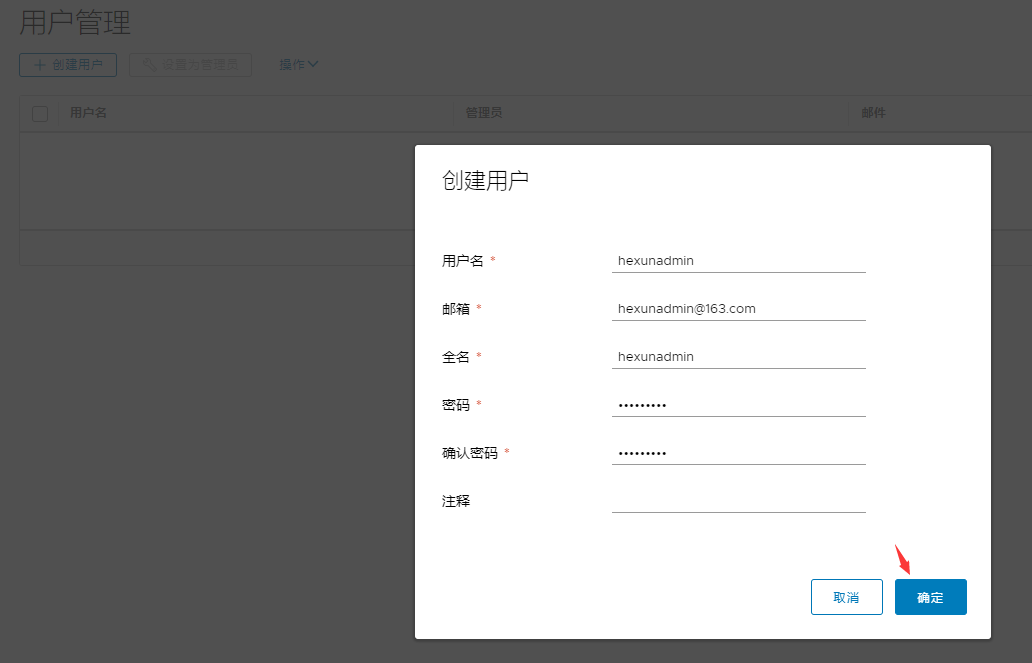
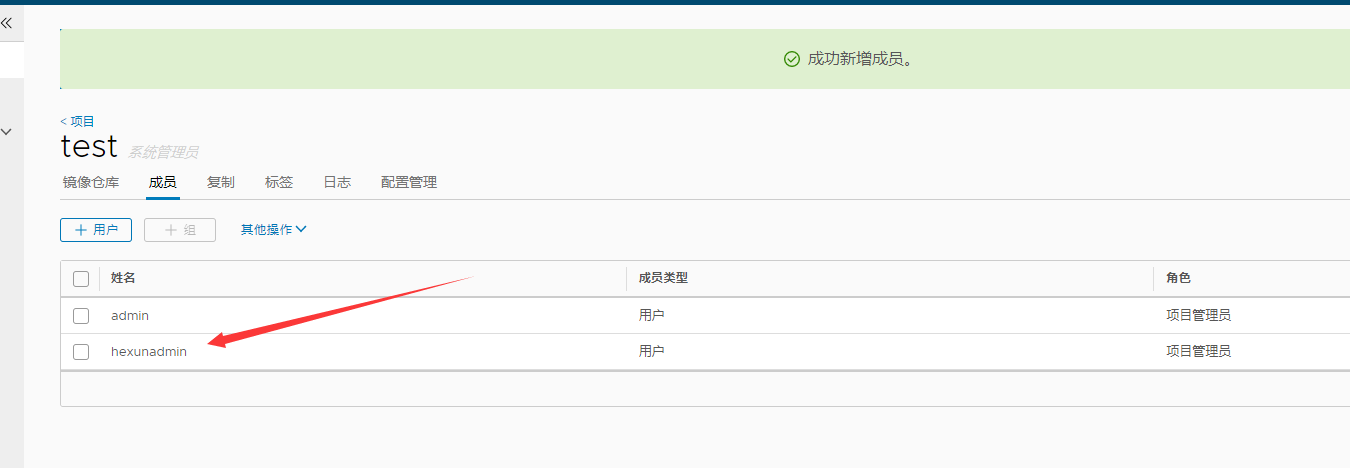
Ps:如果在本机访问reg.bixiaoyu.com的harbor域名,需要在本地host解析,这里不再具体说明



【镜像上传】
[root@localhost ~]# scp root@192.168.175.100:/usr/local/harbor/ssl/reg.bixiaoyu.com.crt /etc/docker/certs.d/reg.bixiaoyu.com/
[root@localhost ~]# scp root@192.168.175.100:/usr/local/harbor/ssl/reg.bixiaoyu.com.key /etc/docker/certs.d/reg.bixiaoyu.com/
[root@localhost ~]# ls /etc/docker/certs.d/reg.bixiaoyu.com/
reg.bixiaoyu.com.crt reg.bixiaoyu.com.key
[root@localhost ~]# docker login reg.bixiaoyu.com
Username: hexunadmin
Password:
Login Succeeded
[root@localhost ~]# docker tag 675bd9a877ed reg.bixiaoyu.com/test/tomcat:v1
[root@localhost ~]# docker push reg.bixiaoyu.com/test/tomcat:v1
[root@localhost ~]# docker pull reg.bixiaoyu.com/test/tomcat:v1
企业级Docker-Harbor的更多相关文章
- 搭建Harbor企业级docker仓库
搭建Harbor企业级docker仓库 一.Harbor简介 1.Harbor介绍 Harbor是一个用于存储和分发Docker镜像的企业级Registry服务器,通过添加一些企业必需的功能特性,例如 ...
- ubuntu 安装企业级容器 docker harbor
安装docker harbor 企业级容器 环境说明: 操作系统: ubuntu16.04.5 LTS IP地址: 192.168.31.129 https://github.com/goh ...
- docker的企业级仓库-harbor
Harbor 一.背景 Docker中要使用镜像,我们一般都会从本地.Docker Hub公共仓库或者其它第三方的公共仓库中下载镜像,但是出于安全和一些内外网的原因考虑,企业级上不会轻易使用.普通的D ...
- .NET遇上Docker - Harbor的安装与基本使用
Harbor是一个开源企业级Docker注册中心,可以用于搭建私有的Docker Image仓库.可以实现权限控制等. 安装Harbor 首先,需要安装Docker和Docker Compose,参考 ...
- Docker Harbor私有仓库部署与管理 (超详细配图)
Docker Harbor私有仓库部署与管理 1.Harbor 介绍 2.Harbor部署 3.Harbor管理 1.Harbor 介绍: 什么是 Harbor ? Harbor 是 VMware 公 ...
- 014.Docker Harbor+Keepalived+LVS+共享存储高可用架构
一 多Harbor高可用介绍 共享后端存储是一种比较标准的方案,将多个Harbor实例共享同一个后端存储,任何一个实例持久化到存储的镜像,都可被其他实例中读取.通过前置LB组件,如Keepalived ...
- Kubernetes(k8s)集群部署(k8s企业级Docker容器集群管理)系列目录
0.目录 整体架构目录:ASP.NET Core分布式项目实战-目录 k8s架构目录:Kubernetes(k8s)集群部署(k8s企业级Docker容器集群管理)系列目录 一.感谢 在此感谢.net ...
- Kubernetes(k8s)集群部署(k8s企业级Docker容器集群管理)系列之集群部署环境规划(一)
0.前言 整体架构目录:ASP.NET Core分布式项目实战-目录 k8s架构目录:Kubernetes(k8s)集群部署(k8s企业级Docker容器集群管理)系列目录 一.环境规划 软件 版本 ...
- Kubernetes(k8s)集群部署(k8s企业级Docker容器集群管理)系列之自签TLS证书及Etcd集群部署(二)
0.前言 整体架构目录:ASP.NET Core分布式项目实战-目录 k8s架构目录:Kubernetes(k8s)集群部署(k8s企业级Docker容器集群管理)系列目录 一.服务器设置 1.把每一 ...
- Kubernetes(k8s)集群部署(k8s企业级Docker容器集群管理)系列之flanneld网络介绍及部署(三)
0.前言 整体架构目录:ASP.NET Core分布式项目实战-目录 k8s架构目录:Kubernetes(k8s)集群部署(k8s企业级Docker容器集群管理)系列目录 一.flanneld介绍 ...
随机推荐
- bzoj-1179(缩点+最短路)
题意:中文题面 解题思路:因为他能重复走且边权都正的,那么肯定一个环的是必须走完的,所以先缩点,在重新建一个图跑最长路 代码: #include<iostream> #include< ...
- Elasticsearch 创建以及修改索引结构
从问题出发,这篇内容可以解决以下几个问题: 一:如何开启关闭Es索引(数据库)? 二:如何创建索引(数据库)结构? 三:如何向已有索引(数据库)中添加类型(表)结构? 四:如何向已有类型(表)中添加新 ...
- mybatis返回结果封装为map的探索
需求 根据课程id 列表,查询每个课程id的总数,放到一个map里 最简单的就是循环遍历,每一个都查询一次网上说mybatis可以返回Map 和 List<Map>两种类型 尝试 直接返回 ...
- Wannafly Union#1
题目链接:http://vjudge.net/contest/142053#overview A.题意:有一个3*n的隧道,人和车轮流走,人先向右走一步,然后选在是在原地不动还是上下移动一格,之后车开 ...
- Django分布式任务队列celery的实践
不使用数据库作为 Broker Broker 的选择大致有消息队列和数据库两种,这里建议尽量避免使用数据库作为 Broker,除非你的业务系统足够简单.在并发量很高的复杂系统中,大量 Workers ...
- Spring mvc 整合PageHelper
Integer page=queryBean.getPage(); Integer pageSize=queryBean.getPageSize(); response.setContentType( ...
- jq动画实现左右滑动
<!DOCTYPE html> <html> <head> <title>jquery动画滑动</title> <style type ...
- DirectX11 With Windows SDK--17 利用几何着色器实现公告板效果
前言 上一章我们知道了如何使用几何着色器将顶点通过流输出阶段输出到绑定的顶点缓冲区.接下来我们继续利用它来实现一些新的效果,在这一章,你将了解: 实现公告板效果 Alpha-To-Coverage 对 ...
- ArcGIS Server 10.0 安装及使用完整攻略
引言 ArcGIS Server 10.0在使用和安装的过程中,需要进行比较全面的学习,才能正确使用.缺乏正确的指引,用户很容易在安装及使用中遇到问题.所以笔者在此总结Server 10.0的安装及使 ...
- Quartz C#使用
参考:https://www.cnblogs.com/lazyInsects/p/8075487.htmlQuartz是一款比较好用的定时任务执行工具类,虽然我们平时也可以自己写代码实现定时执行,但是 ...