
C#开发基于Http的LaTeX数学公式转换器
本文将讲解如何通过codecogs.com和Google.com提供的API接口来将LaTeX数学函数表达式转化为图片形式。具体思路如下:
(1)通过TextBox获取用户输入的LaTeX数学表达式,然后对表达式格式化使之便于网络传输。
(2)将格式化之后的字符串,通过Http请求发送至codecogs.com或者Google.com。
(3)获取网站返回的数据流,将其转化为图片,并显示在PictureBox上。
具体过程为:
首先,我们在这个网站输入LaTeX数学公式然后返回图片时,即“http://latex.codecogs.com/gif.latex?“后面跟上我们输入的公式内容。比如”http://latex.codecogs.com/gif.latex?\alpha”就显示一个希腊字母。所以我们可以在其后加上我们希望转换的公式即可。但是需要注意的是,网络URL中的空格有时候会自动转化为加号”+“。所以,我们在传输的时候需要将空格去掉。或者将其转换为”%20“。
建立如图所示的Form。一个TextBox,六个Button和一个PictureBox。
用例为著名的“薛定谔方程”:
i\hbar\frac{\partial \psi}{\partial {t}} = \frac{-\hbar^2}{2m} \left( \frac{\partial^2}{\partial {x^2}} + \frac{\partial^2}{\partial {y^2}} + \frac{\partial^2}{\partial {z^2}} \right) \psi + V \psi
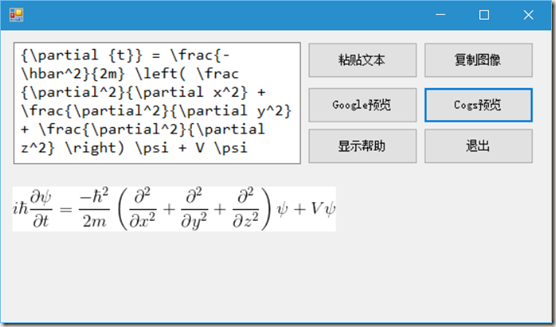
“粘贴文本”按钮添加如下单击事件。
           private void btnPasteText_Click(object sender, EventArgs e)

        {

            string content = Clipboard.GetText();   // 获取剪切板文本信息

            textBox.Text = content;                 // 将信息显示到TextBox

        }

        private bool check()

        {

            if(textBox.Text.Trim() == "") // 如果TextBox为空

            {

                MessageBox.Show(this, "请填写 LaTeX 函数代码!");

                return false;

            }

            return true;

        }
“Google预览”按钮添加如下事件。
           private void btnPreviewGoogle_Click(object sender, EventArgs e)

        {

            if (check())

            {

                // 首先将文本信息格式化,作为URL信息。

                string ImgUrl = String.Format(PicUrlGoogle, HttpUtility.UrlPathEncode(textBox.Text));

                pictureBox.ImageLocation = ImgUrl;  // 加载网络图片到PictureBox

                btnCopyImg.Enabled = true;          // 使“复制图像”按钮可用

            }

            else

                btnCopyImg.Enabled = false;         // 否则使“复制图像”按钮不可用

        }
“Cogs预览”按钮添加如下事件。
         private void btnPreviewCogs_Click(object sender, EventArgs e)

        {

            if (check())

            {

                // 首先将文本信息格式化,作为URL信息。

                string ImgUrl = String.Format(PicUrlCogs, HttpUtility.UrlPathEncode(textBox.Text));

                pictureBox.ImageLocation = ImgUrl;  // 加载网络图片到PictureBox

                btnCopyImg.Enabled = true;          // 使“复制图像”按钮可用

            }

            else

                btnCopyImg.Enabled = false;         // 否则使“复制图像”按钮不可用

        }
“复制图像”按钮添加如下单击事件。
        private void btnCopyImg_Click(object sender, EventArgs e)

        {

            if(pictureBox.Image != null)

                Clipboard.SetImage(pictureBox.Image);  // 将Picture图片复制到剪切板

        }
“显示帮助”按钮添加如下事件。
        private void btnHelp_Click(object sender, EventArgs e)

        {

            textBox.Text = "1、LaTex 公式前后无需 $ 符号;\r\n"

                         + "2、需要联网,Google丑,Cogs慢;\r\n"

                         + "3、尽量多使用 {} 将字段括起来;\r\n"

                         + "4、于 2015年11月13日。";

        }
“退出”按钮添加如下事件。
        private void btnExit_Click(object sender, EventArgs e)

        {

            System.Environment.Exit(0);      // 退出程序

        }
完整代码如下:
using System;

using System.Windows.Forms;

using System.Web;

namespace LaTeX_Win

{

    public partial class Form1 : Form

    {

        private static string PicUrlGoogle = @"http://chart.apis.google.com/chart?cht=tx&chl={0}";

        private static string PicUrlCogs = @"http://latex.codecogs.com/gif.latex?{0}";

        public Form1()

        {

            InitializeComponent();

        }

        private void btnPasteText_Click(object sender, EventArgs e)

        {

            string content = Clipboard.GetText();

            textBox.Text = content;

        }

        private void btnPreviewGoogle_Click(object sender, EventArgs e)

        {

            if (check())

            {

                string ImgUrl = String.Format(PicUrlGoogle, HttpUtility.UrlPathEncode(textBox.Text));

                pictureBox.ImageLocation = ImgUrl;

                btnCopyImg.Enabled = true;

            }

            else

                btnCopyImg.Enabled = false;

        }

        private void btnPreviewCogs_Click(object sender, EventArgs e)

        {

            if (check())

            {

                string ImgUrl = String.Format(PicUrlCogs, HttpUtility.UrlPathEncode(textBox.Text));

                pictureBox.ImageLocation = ImgUrl;

                btnCopyImg.Enabled = true;

            }

            else

                btnCopyImg.Enabled = false;

        }

        private void btnCopyImg_Click(object sender, EventArgs e)

        {

            if(pictureBox.Image != null)

                Clipboard.SetImage(pictureBox.Image);

        }

        private bool check()

        {

            if(textBox.Text.Trim() == "")

            {

                MessageBox.Show(this, "请填写 LaTeX 函数代码!");

                return false;

            }

            return true;

        }

        private void btnExit_Click(object sender, EventArgs e)

        {

            System.Environment.Exit(0);

        }

        private void btnHelp_Click(object sender, EventArgs e)

        {

            textBox.Text = "1、LaTex 公式前后无需 $ 符号;\r\n"

                         + "2、需要联网,Google丑,Cogs慢;\r\n"

                         + "3、尽量多使用 {} 将字段括起来;\r\n"

                         + "4、于 2015年11月13日。";

        }

    }

}
C#开发基于Http的LaTeX数学公式转换器的更多相关文章
- Android开发手记(29) 基于Http的LaTeX数学公式转换器
本文将讲解如何通过codecogs.com和Google.com提供的API接口来将LaTeX数学函数表达式转化为图片形式.具体思路如下: (1)通过EditText获取用户输入的LaTeX数学表达式 ...
- Spring7——开发基于注解形式的spring
开发基于注解形式的spring SpringIOC容器的2种形式: (1)xml配置文件:applicationContext.xml; 存bean:<bean> 取bean: Appli ...
- [Intel Edison开发板] 05、Edison开发基于MRAA实现IO控制,特别是UART通信
一.前言 下面是本系列文章的前几篇: [Intel Edison开发板] 01.Edison开发板性能简述 [Intel Edison开发板] 02.Edison开发板入门 [Intel Edison ...
- {VS2010C#}{WinForm}{ActiveX}VS2010C#开发基于WinForm的ActiveX控件
在VS2010中使用C#开发基于WinForm的ActiveX控件 常见的一些ActiveX大部分是使用VB.Delphi.C++开发,使用C#开发ActiveX要解决下面三个问题: 使.NET组件可 ...
- markdown下编辑latex数学公式
在利用为知笔记编写笔记的时候,有时需要用的markdown,只要把文件名加上后缀.md,就可以使用markdown语法,以下介绍在markdown下编辑latex数学公式. 使用LaTeX写公式的基本 ...
- Form_Form Builder开发基于视图页面和自动代码生成包(案例)
2014-01-06 Created By BaoXinjian
- 转】Mahout分步式程序开发 基于物品的协同过滤ItemCF
原博文出自于: http://blog.fens.me/hadoop-mahout-mapreduce-itemcf/ 感谢! Posted: Oct 14, 2013 Tags: Hadoopite ...
- Markdown 添加 Latex 数学公式
添加公式的方法 Latex 数学公式语法 添加公式的方法 行内公式 $行内公式$ 行间公式 $$行间公式$$ Latex 数学公式语法 角标(上下标) 上标命令^{} 下标命令_{} 上下标命令用来放 ...
- 最简单的基于FFMPEG的封装格式转换器(无编解码)
本文介绍一个基于FFMPEG的封装格式转换器.所谓的封装格式转换,就是在AVI,FLV,MKV,MP4这些格式之间转换(相应.avi,.flv,.mkv,.mp4文件).须要注意的是,本程序并不进行视 ...
随机推荐
- mysql中TimeStamp和Date的转换
mysql 查询时间戳(TIMESTAMP)转成常用可读时间格式 from_unixtime()是MySQL里的时间函数 date为需要处理的参数(该参数是Unix 时间戳),可以是字段名,也可以直接 ...
- android调用百度地图API
http://blog.csdn.net/lyq8479/article/details/6384428
- 单独启动tomcat
原料: jdk-1_5_0_13-windows-i586-p.exe apache-tomcat-5.5.25.zip 安装jdk,路径为:C:\Program Files\Java\jdk1.5. ...
- java基础(十三)常用类总结(三)
这里有我之前上课总结的一些知识点以及代码大部分是老师讲的笔记 个人认为是非常好的,,也是比较经典的内容,真诚的希望这些对于那些想学习的人有所帮助! 由于代码是分模块的上传非常的不便.也比较多,讲的也是 ...
- 通过UIImagePickerController完成照相和相片的选取
UIImagePickerController是用于选取现有照片,或者用照相机现场照一张相片使用的 定义: @interface ShowViewController : UIViewControll ...
- HTML Meta, http-equiv, Refresh
原文: http://www.lifelaf.com/blog/?p=481 在HTML页面中,如果想实现定时刷新或重定向,我们可以使用meta标签的refresh功能: <!-- 5秒后刷新页 ...
- 《A First Course in Probability》-chaper2-概率论公理
概率论自身有一套很深的理论体系,读过<几何原本>的读者会知道,伟大的欧几里得之所以伟大,是因为它基于几条最基本的公理,推导除了整个欧式几何学的理论体系,同样,在概率论这里,一切的推导都是源 ...
- poj 2253 Frogger【最小生成树变形】【kruskal】
Frogger Time Limit: 1000MS Memory Limit: 65536K Total Submissions: 30427 Accepted: 9806 Descript ...
- hdoj 4883 TIANKENG’s restaurant【贪心区间覆盖】
TIANKENG’s restaurant Time Limit: 2000/1000 MS (Java/Others) Memory Limit: 131072/65536 K (Java/O ...
- hdoj 2277 Change the ball【找规律】
Change the ball Time Limit: 2000/1000 MS (Java/Others) Memory Limit: 32768/32768 K (Java/Others)T ...