
IOS 学习笔记 2015-03-27 我理解的OC-代理模式
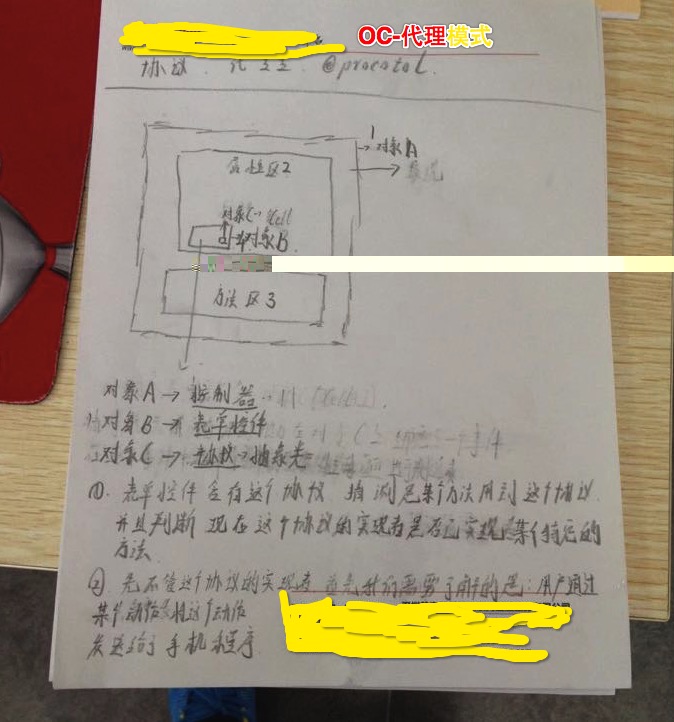
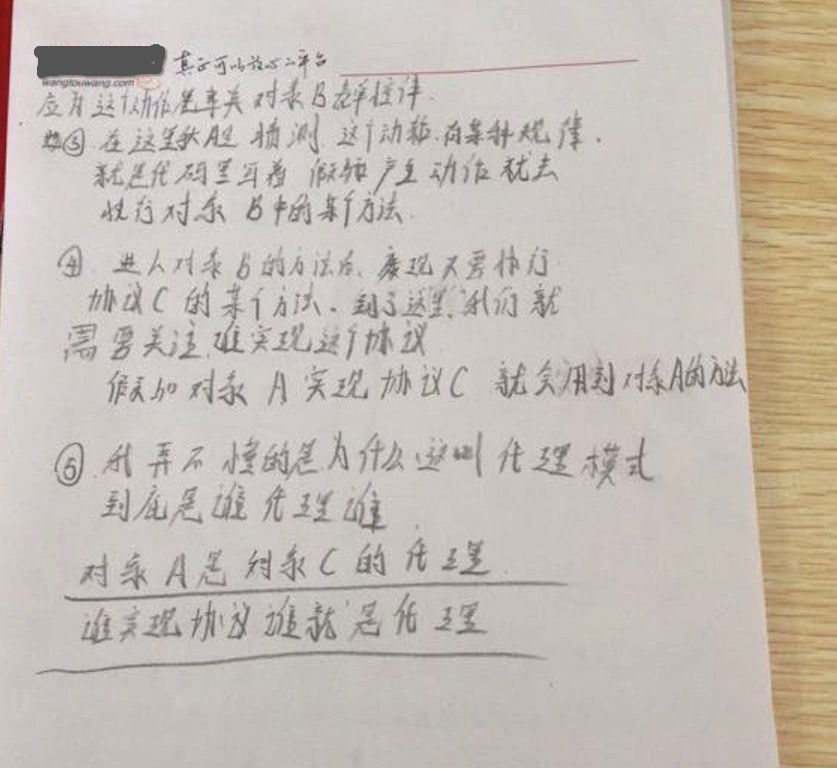
案例1
KCButton.h

//

//  KCButton.h

//  Protocol&Block&Category

//

//  Created by Kenshin Cui on 14-2-2.

//  Copyright (c) 2014年 Kenshin Cui. All rights reserved.

//

#import <Foundation/Foundation.h>

@class KCButton;

//一个协议可以扩展另一个协议,例如KCButtonDelegate扩展了NSObject协议

@protocol KCButtonDelegate <NSObject>

@required //@required修饰的方法必须实现

-(void)onClick:(KCButton *)button;

@optional //@optional修饰的方法是可选实现的

-(void)onMouseover:(KCButton *)button;

-(void)onMouseout:(KCButton *)button;

@end

@interface KCButton : NSObject

#pragma mark - 属性

#pragma mark 代理属性,同时约定作为代理的对象必须实现KCButtonDelegate协议

@property (nonatomic,retain) id<KCButtonDelegate> delegate;

#pragma mark - 公共方法

#pragma mark 点击方法

-(void)click;

@end
KCButton.m

//

//  KCButton.m

//  Protocol&Block&Category

//

//  Created by Kenshin Cui on 14-2-2.

//  Copyright (c) 2014年 Kenshin Cui. All rights reserved.

//

#import "KCButton.h"

@implementation KCButton

-(void)click{

    NSLog(@"Invoke KCButton's click method.");

    //判断_delegate实例是否实现了onClick:方法(注意方法名是"onClick:",后面有个:)

    //避免未实现ButtonDelegate的类也作为KCButton的监听

    if([_delegate respondsToSelector:@selector(onClick:)]){

        [_delegate onClick:self];

    }

}

@end

MyListener.h

//

//  MyListener.h

//  Protocol&Block&Category

//

//  Created by Kenshin Cui on 14-2-2.

//  Copyright (c) 2014年 Kenshin Cui. All rights reserved.

//

#import <Foundation/Foundation.h>

@class KCButton;

@protocol KCButtonDelegate;

@interface MyListener : NSObject<KCButtonDelegate>

-(void)onClick:(KCButton *)button;

@end

MyListener.m

//

//  MyListener.m

//  Protocol&Block&Category

//

//  Created by Kenshin Cui on 14-2-2.

//  Copyright (c) 2014年 Kenshin Cui. All rights reserved.

//

#import "MyListener.h"

#import "KCButton.h"

@implementation MyListener

-(void)onClick:(KCButton *)button{

    NSLog(@"Invoke MyListener's onClick method.The button is:%@.",button);

}

@end

main.m

//

//  main.m

//  Protocol&Block&Category

//

//  Created by Kenshin Cui on 14-2-2.

//  Copyright (c) 2014年 Kenshin Cui. All rights reserved.

//

#import <Foundation/Foundation.h>

#import "KCButton.h"

#import "MyListener.h"

int main(int argc, const char * argv[]) {

    @autoreleasepool {

        KCButton *button=[[KCButton alloc]init];

        MyListener *listener=[[MyListener alloc]init];

        button.delegate=listener;

        [button click];

        /* 结果:

         Invoke KCButton's click method.

         Invoke MyListener's onClick method.The button is:<KCButton: 0x1001034c0>.

         */

    }

    return ;

}
我们通过例子模拟了一个按钮的点击过程,有点类似于Java中事件的实现机制。通过这个例子我们需要注意以下几点内容:

id可以表示任何一个ObjC对象类型,类型后面的”<协议名>“用于约束作为这个属性的对象必须实现该协议(注意:使用id定义的对象类型不需要加“*”);

MyListener作为事件触发者,它实现了KCButtonDelegate代理(在ObjC中没有命名空间和包的概念,通常通过前缀进行类的划分,“KC”是我们自定义的前缀)

在.h文件中如果使用了另一个文件的类或协议我们可以通过@class或者@protocol进行声明,而不必导入这个文件,这样可以提高编译效率(注意有些情况必须使用@class或@protocol,例如上面KCButton.h中上面声明的KCButtonDelegate协议中用到了KCButton类,而此文件下方的KCButton类声明中又使用了KCButtonDelegate,从而形成在一个文件中互相引用关系,此时必须使用@class或者@protocol声明,否则编译阶段会报错),但是在.m文件中则必须导入对应的类声明文件或协议文件(如果不导入虽然语法检查可以通过但是编译链接会报错);

使用respondsToSelector方法可以判断一个对象是否实现了某个方法(需要注意方法名不是”onClick”而是“onClick:”,冒号也是方法名的一部分);

属性中的(nonatomic,retain)不是这篇文章的重点,在接下来的文章中我们会具体介绍。
案例2
//

//  WPContactsViewController.h

//  OC-UI-表单-单元格

//

//  Created by wangtouwang on 15/3/26.

//  Copyright (c) 2015年 wangtouwang. All rights reserved.

//

#import <UIKit/UIKit.h>

@interface WPContactsViewController : UIViewController

{

    UITableView *_tableView;//表单UI控件

    NSMutableArray *_mutableArrayContacts;//联系人集合模型

    NSIndexPath *_selectedIndexPath;//当前选中的组和行

}

@end
//

//  WPContactsViewController.m

//  OC-UI-表单-单元格

//

//  Created by wangtouwang on 15/3/26.

//  Copyright (c) 2015年 wangtouwang. All rights reserved.

//

#import "WPContactsViewController.h"

#import "WPContacts.h"

#import "WPContactsGroup.h"

@interface WPContactsViewController ()<UITableViewDataSource,UITableViewDelegate,UIAlertViewDelegate>

@end

@implementation WPContactsViewController

- (void)viewDidLoad {

    [super viewDidLoad];

    //初始化数据

    [self initObjectData];

    //创建一个分组样式的UITableView

    _tableView=[[UITableView alloc]initWithFrame:self.view.bounds style:UITableViewStyleGrouped];

    //设置数据源,注意必须实现对应的UITableViewDataSource协议

    _tableView.dataSource=self;

    //设置代理

    _tableView.delegate=self;

    [self.view addSubview:_tableView];

}

- (void)didReceiveMemoryWarning {

    [super didReceiveMemoryWarning];

    // Dispose of any resources that can be recreated.

}

#pragma mark 加载数据

-(void)initObjectData{

     _mutableArrayContacts=[[NSMutableArray alloc]init];

    WPContacts *contact1=[WPContacts initStaticWithFirstName:@"Cui" andLastName:@"Kenshin" andPhoneNumber:@""];

    WPContacts *contact2=[WPContacts initStaticWithFirstName:@"Cui" andLastName:@"Tom" andPhoneNumber:@""];

    WPContactsGroup *group1=[WPContactsGroup initStaticWithName:@"C" andDescript:@"With names beginning with C" andConcats:[NSMutableArray arrayWithObjects:contact1,contact2, nil]];

    [_mutableArrayContacts addObject:group1];

    WPContacts *contact3=[WPContacts initStaticWithFirstName:@"Dui" andLastName:@"JACK" andPhoneNumber:@""];

    WPContacts *contact4=[WPContacts initStaticWithFirstName:@"Dui" andLastName:@"LUCY" andPhoneNumber:@""];

    WPContactsGroup *group2=[WPContactsGroup initStaticWithName:@"D" andDescript:@"With names beginning with D" andConcats:[NSMutableArray arrayWithObjects:contact3,contact4, nil]];

    [_mutableArrayContacts addObject:group2];

}

#pragma mark 返回分组数

-(NSInteger)numberOfSectionsInTableView:(UITableView *)tableView{

    NSLog(@"计算分组数");

    return _mutableArrayContacts.count;

}

#pragma mark 返回每组行数

- (NSInteger)tableView:(UITableView *)tableView numberOfRowsInSection:(NSInteger)section{

    NSLog(@"计算每组(组%lu)行数",(unsigned long)section);

//    WPContactsGroup *group1 = _mutableArrayContacts[section];

    return  ((WPContactsGroup *)_mutableArrayContacts[section])._concats.count;

}

#pragma mark返回每行的单元格

- (UITableViewCell *)tableView:(UITableView *)tableView cellForRowAtIndexPath:(NSIndexPath *)indexPath{

     NSLog(@"生成单元格(组:%lu,行%lu)",(unsigned long)indexPath.section,(unsigned long)indexPath.row);

   WPContactsGroup *group= _mutableArrayContacts[indexPath.section];

    WPContacts *contacts = group._concats[indexPath.row];

    UITableViewCell *cell = [[UITableViewCell alloc] initWithStyle:UITableViewCellStyleValue1 reuseIdentifier:nil];

    cell.textLabel.text=[contacts getName];

    cell.detailTextLabel.text = [contacts _phoneNumber];

    return cell;

}

#pragma mark 返回每组头标题名称

- (NSString *)tableView:(UITableView *)tableView titleForHeaderInSection:(NSInteger)section{

     NSLog(@"生成组(组%lu)名称",(unsigned long)section);

    WPContactsGroup *group =  _mutableArrayContacts[section];

    return group._name;

}

#pragma mark 返回每组尾部说明

- (NSString *)tableView:(UITableView *)tableView titleForFooterInSection:(NSInteger)section{

    NSLog(@"生成尾部(组%lu)详情",(unsigned long)section);

    return ((WPContactsGroup *)_mutableArrayContacts[section])._descript;

}

#pragma mark 生成索引

- (NSArray *)sectionIndexTitlesForTableView:(UITableView *)tableView{

    NSLog(@"生成组索引");

    NSMutableArray *indexs = [[NSMutableArray alloc] init];

    for (WPContactsGroup *group in _mutableArrayContacts) {

        [indexs addObject:group._name];

    }

    return indexs;

}

#pragma mark 设置分组标题高度

- (CGFloat)tableView:(UITableView *)tableView heightForHeaderInSection:(NSInteger)section{

    NSLog(@"设置分组标题高度");

    return ;

}

#pragma mark 设置分组尾部内容高度

- (CGFloat)tableView:(UITableView *)tableView heightForFooterInSection:(NSInteger)section{

    NSLog(@"设置分组尾部内容高度");

    return ;

}

#pragma mark 设置每行高度

- (CGFloat)tableView:(UITableView *)tableView heightForRowAtIndexPath:(NSIndexPath *)indexPath{

       NSLog(@"设置每行高度");

    return ;

}

#pragma mark 复写设置点击行触发事件(复写的方法是在TableViewDelegate协议中已有,回调)

-(void)tableView:(UITableView *)tableView didSelectRowAtIndexPath:(NSIndexPath *)indexPath{

    NSLog(@"触发我吧");

     _selectedIndexPath=indexPath;

    //获取单元格包装的对象WPContacts

   WPContacts *contacts = ((WPContactsGroup *)_mutableArrayContacts[indexPath.section])._concats[indexPath.row];

    //初始化弹出框

    UIAlertView *alertView = [[UIAlertView alloc] initWithTitle:@"System Info" message:[contacts getName] delegate:self cancelButtonTitle:@"Cancle" otherButtonTitles:@"OK", nil];

    //设置窗口样式

    alertView.alertViewStyle=UIAlertViewStylePlainTextInput;

    //获取文本框

    UITextField *textFild =  [alertView textFieldAtIndex:];

    //设置文本框内容

    textFild.text = contacts._phoneNumber;

    //显示窗口

    [alertView show];

}

#pragma mark 设置弹出框后续按钮事件 复写UIAlerViewDelegate协议 的点击按钮 clickedButtonAtIndex方法

- (void)alertView:(UIAlertView *)alertView clickedButtonAtIndex:(NSInteger)buttonIndex{

    NSLog(@"设置弹出框后续按钮事件 clickedButtonAtIndex");

    if (buttonIndex==) {

        //获取文本框内容

        NSString *phoneNumber = [alertView textFieldAtIndex:].text;

        //获取选中的UITableViewCell 包装的对象

       WPContacts *contacts =  ((WPContactsGroup *)_mutableArrayContacts[_selectedIndexPath.section])._concats[_selectedIndexPath.row];

        contacts._phoneNumber = phoneNumber;

         NSArray *indexPaths=@[_selectedIndexPath];//需要局部刷新的单元格的组、行

            //此处优化 将全局跟新 该变到 选择行 局部更新

        [_tableView reloadRowsAtIndexPaths:indexPaths withRowAnimation:UITableViewRowAnimationLeft];

        //[_tableView reloadData];

    }

}

@end
IOS 学习笔记 2015-03-27 我理解的OC-代理模式的更多相关文章
- ios学习笔记图片+图片解释(c语言 oc语言 ios控件 ios小项目 ios小功能 swift都有而且笔记完整喔)
下面是目录其中ios文件夹包括了大部分ios控件的介绍和演示,swift的时完整版,可以学习完swift(这个看的是swift刚出来一周的视频截图,可能有点赶,但是完整),c语言和oc语言的也可以完整 ...
- IOS学习笔记48--一些常见的IOS知识点+面试题
IOS学习笔记48--一些常见的IOS知识点+面试题 1.堆和栈什么区别? 答:管理方式:对于栈来讲,是由编译器自动管理,无需我们手工控制:对于堆来说,释放工作由程序员控制,容易产生memor ...
- iOS学习笔记-精华整理
iOS学习笔记总结整理 一.内存管理情况 1- autorelease,当用户的代码在持续运行时,自动释放池是不会被销毁的,这段时间内用户可以安全地使用自动释放的对象.当用户的代码运行告一段 落,开始 ...
- iOS学习笔记总结整理
来源:http://mobile.51cto.com/iphone-386851_all.htm 学习IOS开发这对于一个初学者来说,是一件非常挠头的事情.其实学习IOS开发无外乎平时的积累与总结.下 ...
- IOS学习笔记07---C语言函数-printf函数
IOS学习笔记07---C语言函数-printf函数 0 7.C语言5-printf函数 ------------------------- ----------------------------- ...
- IOS学习笔记02---语言发展概述,计算机语言简介.
IOS学习笔记02---语言发展概述,计算机语言简介. ------------------------------------------------------------------------ ...
- iOS学习笔记-自定义过渡动画
代码地址如下:http://www.demodashi.com/demo/11678.html 这篇笔记翻译自raywenderlick网站的过渡动画的一篇文章,原文用的swift,由于考虑到swif ...
- iOS学习笔记——AutoLayout的约束
iOS学习笔记——AutoLayout约束 之前在开发iOS app时一直以为苹果的布局是绝对布局,在IB中拖拉控件运行或者直接使用代码去调整控件都会发上一些不尽人意的结果,后来发现iOS在引入了Au ...
- IOS学习笔记25—HTTP操作之ASIHTTPRequest
IOS学习笔记25—HTTP操作之ASIHTTPRequest 分类: iOS2012-08-12 10:04 7734人阅读 评论(3) 收藏 举报 iosios5网络wrapper框架新浪微博 A ...
- IOS学习笔记之关键词@dynamic
IOS学习笔记之关键词@dynamic @dynamic这个关键词,通常是用不到的. 它与@synthesize的区别在于: 使用@synthesize编译器会确实的产生getter和setter方法 ...
随机推荐
- 导入excel数据
前提条件:先要安装好EXCEL软件. 程序中经常要用到导入excel数据的功能.其实通过ole操作excel就简单的几行代码,但记性不好,经常要用经常要找, 还是作篇笔记吧. var ExcelApp ...
- Java 随机生成中文姓名,手机号,邮编,住址
package lovo; import java.util.HashMap; import java.util.Map; /** * 随机生成中文姓名,性别,Email,手机号,住址 * @auth ...
- [SCOI2005]互不侵犯King
题目描述 在N×N的棋盘里面放K个国王,使他们互不攻击,共有多少种摆放方案.国王能攻击到它上下左右,以及左上左下右上右下八个方向上附近的各一个格子,共8个格子. ——by洛谷 https://www. ...
- 用Regex类计算一个字符串出现次数是最好方法【转载】
我的一个朋友问我,怎么在c#或vb.net中,计算一个字符串中查找另一个字符串中出现的次数,他说在网上打了好多方法,我看了一下,有的是用replace的方法去实现,这种方法不是太好,占资源太大了.其实 ...
- Java实现文件的RSA和DES加密算法
根据密钥类型不同将现代密码技术分为两类:对称加密算法(秘密钥匙加密)和非对称加密算法(公开密钥加密) 对称钥匙加密系统是加密和解密均采用同一把秘密钥匙,而且通信双方都必须获得这把钥匙,并保持钥匙的秘密 ...
- uva340 数字匹配检索问题
这道题目大意是:给定一个secret code,然后输入guess code,让你编程给出提示,提示的格式是(i,j),其中i表示strong match的个数,j表示weak match的个数.所谓 ...
- 多线程读写共享变量时,synchronized与volatile的作用
在<effective java>中看的的知识点,在工作中确实遇到了~ keywordsynchronized能够保证在同一时刻,仅仅有一个线程能够运行某一个方法,或者某一个代码块. 同步 ...
- TCP/IP 中的二进制反码求和算法
对于这个算法,很多书上只是说一下思路,没有具体的实现.我在这里举个例子吧 以4bit(计算方便一点,和16bit是一样的)做检验和来验证. 建设原始数据为 1100 , 1010 , 0000(校验位 ...
- Foundation: NSNotificationCenter
一个NSNotificationCenter对象(通知中心)提供了在程序中广播消息的机制,它实质上就是一个通知分发表.这个分发表负责维护为各个通知注册的观察者,并在通知到达时,去查找相应的观察者,将通 ...
- Big Clock
Problem Description Our vicar raised money to have the church clock repaired for several weeks. The ...