
StopWatch
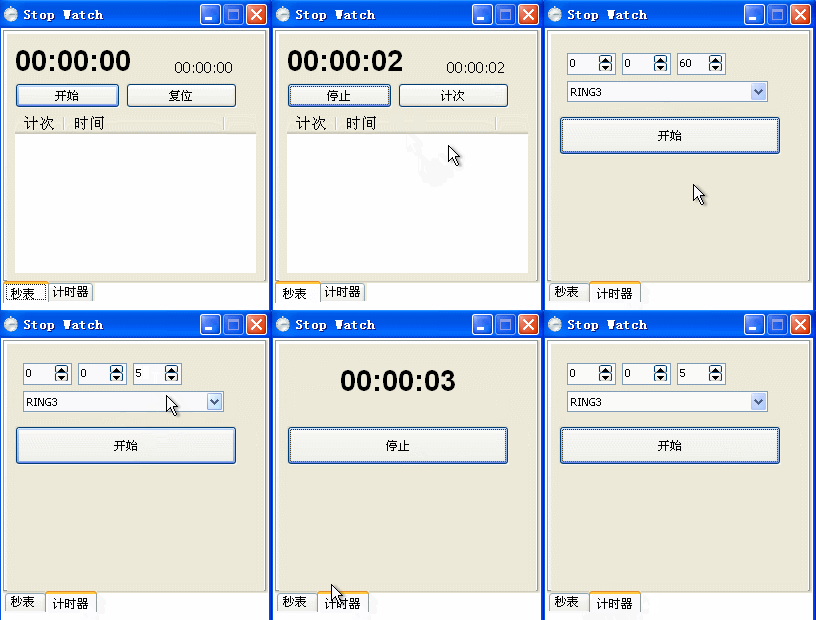
附件
http://download.csdn.net/detail/teststudio/6575241
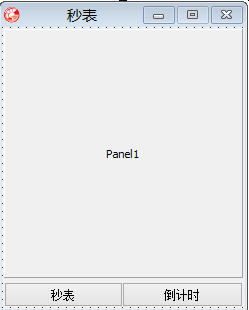
主窗体UNIT
unit MainForm;

interface

uses

  Windows, Messages, SysUtils, Variants, Classes, Graphics, Controls, Forms,

  Dialogs, ExtCtrls, StdCtrls, ComCtrls;

type

  TFormMain = class(TForm)

    Button2: TButton;

    Button1: TButton;

    Panel1: TPanel;

    procedure FormCreate(Sender: TObject);

    procedure Button1Click(Sender: TObject);

    procedure Button2Click(Sender: TObject);

  private

    { Private declarations }

  public

    { Public declarations }

  end;

var

  FormMain: TFormMain;

implementation

uses Unit2, Unit3;

{$R *.dfm}

var

  frm_StopWatch: TForm2;

  frm_CountDown: TForm3;

procedure ShowStopWatch;

begin

  with frm_StopWatch do

  begin

    Parent := FormMain.Panel1;

    BorderStyle := BsNone;

    Align := alClient;

    Show;

  end;

end;

procedure ShowCountDown;

begin

  with frm_CountDown do

  begin

    Parent := FormMain.Panel1;

    BorderStyle := BsNone;

    Align := alClient;

    Show;

  end;

end;

procedure SetButtonEnabled1;

begin

  FormMain.Caption:='秒表';

  FormMain.Button1.Enabled := False;

  FormMain.Button2.Enabled := True;

end;

procedure SetButtonEnabled2;

begin

  FormMain.Caption:='倒计时';

  FormMain.Button1.Enabled := True;

  FormMain.Button2.Enabled := False;

end;

procedure TFormMain.Button1Click(Sender: TObject);

begin

  // 秒表

  SetButtonEnabled1;

  ShowStopWatch;

  frm_CountDown.Hide;

end;

procedure TFormMain.Button2Click(Sender: TObject);

begin

  SetButtonEnabled2;

  ShowCountDown;

  frm_StopWatch.Hide;

end;

procedure TFormMain.FormCreate(Sender: TObject);

begin

  frm_StopWatch := TForm2.Create(self);

  frm_CountDown := TForm3.Create(self);

  ShowStopWatch;

end;

end.
主窗体FRM
object FormMain: TFormMain

  Left =

  Top =

  BorderIcons = [biSystemMenu, biMinimize]

  BorderStyle = bsSingle

  Caption = ##

  ClientHeight =

  ClientWidth =

  Color = clBtnFace

  Font.Charset = DEFAULT_CHARSET

  Font.Color = clWindowText

  Font.Height = -

  Font.Name = 'Tahoma'

  Font.Style = []

  FormStyle = fsStayOnTop

  OldCreateOrder = False

  Position = poDesktopCenter

  OnCreate = FormCreate

  PixelsPerInch =

  TextHeight =

  object Button2: TButton

    Left =

    Top =

    Width =

    Height =

    Caption = ###

    TabOrder =

    OnClick = Button2Click

  end

  object Button1: TButton

    Left =

    Top =

    Width =

    Height =

    Caption = ##

    Enabled = False

    TabOrder =

    OnClick = Button1Click

  end

  object Panel1: TPanel

    Left =

    Top =

    Width =

    Height =

    Caption = 'Panel1'

    TabOrder =

  end

end
主窗体FRM

//秒表Unit2
unit Unit2;

interface

uses

  Windows, Messages, SysUtils, Variants, Classes, Graphics, Controls, Forms,

  Dialogs, ExtCtrls, StdCtrls, ComCtrls, Menus,

     Buttons;

type

  TForm2 = class(TForm)

    Timer1: TTimer;

    ListView1: TListView;

    Label2: TLabel;

    Timer2: TTimer;

    Label1: TLabel;

    Button1: TButton;

    Button2: TButton;

    procedure Timer1Timer(Sender: TObject);

    procedure Button1Click(Sender: TObject);

    procedure Button2Click(Sender: TObject);

    procedure Timer2Timer(Sender: TObject);

    procedure FormClick(Sender: TObject);

  private

    { Private declarations }

    procedure AddListViewItem;

    procedure CleanLabel2;

    procedure tglForm;

  public

    { Public declarations }

  end;

var

  Form2: TForm2;

implementation

{$R *.dfm}

procedure TForm2.Button1Click(Sender: TObject);

begin

  if Button1.Caption = '开始' then

  begin

    Button1.Caption := '停止';

    Button2.Caption := '计次';

    Timer1.Enabled := True;

    Timer2.Enabled := True;

    // Button1.Color:=clRed;

  end

  else

  begin

    Button1.Caption := '开始';

    Button2.Caption := '复位';

    Timer1.Enabled := False;

    Timer2.Enabled := False;

   // Button1.Color:=clGreen;

  end;

end;

procedure TForm2.AddListViewItem;

var

  i: Integer;

begin

  i := ListView1.Items.Count + ;

  with ListView1.Items.Add do

  begin

    Caption := IntToStr(i);

    SubItems.Add(Label2.Caption);

  end;

  SendMessage(ListView1.Handle, WM_VSCROLL, SB_BOTTOM, );

end;

var

  h: Integer = ;

  m: Integer = ;

  s: Integer = ;

  h1: Integer = ;

  m1: Integer = ;

  s1: Integer = ;

procedure TForm2.CleanLabel2;

begin

  if Button2.Caption = '计次' then

  begin

    h := ;

    m := ;

    s := ;

    Label2.Caption := Format('%.2d:%.2d:%.2d', [h, m, s]);

  end;

  if Button2.Caption = '复位' then

  begin

    h := ;

    m := ;

    s := ;

    h1 := ;

    m1 := ;

    s1 := ;

    Label1.Caption := Format('%.2d:%.2d:%.2d', [h1, m1, s1]);

    Label2.Caption := Format('%.2d:%.2d:%.2d', [h, m, s]);

    ListView1.Clear;

  end;

end;

procedure TForm2.tglForm;

begin

  if Height =  then

    Height :=

  else

    Height := ;

end;

procedure TForm2.FormClick(Sender: TObject);

begin

  tglForm;

end;

procedure TForm2.Button2Click(Sender: TObject);

begin

  AddListViewItem;

  CleanLabel2;

end;

procedure TForm2.Timer1Timer(Sender: TObject);

begin

  inc(s1);

  if s1 >=  then

  begin

    inc(m1);

    s1 := ;

  end;

  if m1 >=  then

  begin

    inc(h1);

    m1 := ;

  end;

  Label1.Caption := Format('%.2d:%.2d:%.2d', [h1, m1, s1]);

end;

procedure TForm2.Timer2Timer(Sender: TObject);

begin

  inc(s);

  if s >=  then

  begin

    inc(m);

    s := ;

  end;

  if m >=  then

  begin

    inc(h);

    m := ;

  end;

  Label2.Caption := Format('%.2d:%.2d:%.2d', [h, m, s]);

end;

end.
object Form2: TForm2

  Left =

  Top =

  BorderIcons = [biSystemMenu, biMinimize]

  Caption = ##

  ClientHeight =

  ClientWidth =

  Color = clBtnFace

  Font.Charset = DEFAULT_CHARSET

  Font.Color = clNone

  Font.Height = -

  Font.Name = 'Tahoma'

  Font.Style = []

  OldCreateOrder = False

  Position = poDesktopCenter

  OnClick = FormClick

  DesignSize = (

    )

  PixelsPerInch =

  TextHeight =

  object Label2: TLabel

    Left =

    Top =

    Width =

    Height =

    AutoSize = False

    Caption = '00:00:00'

    Color = clBackground

    Font.Charset = DEFAULT_CHARSET

    Font.Color = clBlack

    Font.Height = -

    Font.Name = 'Tahoma'

    Font.Style = []

    ParentColor = False

    ParentFont = False

  end

  object Label1: TLabel

    Left =

    Top =

    Width =

    Height =

    AutoSize = False

    Caption = '00:00:00'

    Font.Charset = ANSI_CHARSET

    Font.Color = clNone

    Font.Height = -

    Font.Name = ####

    Font.Style = [fsBold]

    ParentFont = False

  end

  object ListView1: TListView

    Left =

    Top =

    Width =

    Height =

    Anchors = [akLeft, akTop, akRight, akBottom]

    BorderStyle = bsNone

    Color = clCream

    Columns = <

      item

        Caption = ##

        Width =

      end

      item

        Caption = ##

        Width =

      end>

    ColumnClick = False

    Font.Charset = ANSI_CHARSET

    Font.Color = clNone

    Font.Height = -

    Font.Name = ####

    Font.Style = []

    FlatScrollBars = True

    HideSelection = False

    MultiSelect = True

    RowSelect = True

    ParentFont = False

    TabOrder =

    ViewStyle = vsReport

  end

  object Button1: TButton

    Left =

    Top =

    Width =

    Height =

    Caption = ##

    Default = True

    TabOrder =

    OnClick = Button1Click

  end

  object Button2: TButton

    Left =

    Top =

    Width =

    Height =

    Cancel = True

    Caption = ##

    TabOrder =

    OnClick = Button2Click

  end

  object Timer1: TTimer

    Enabled = False

    OnTimer = Timer1Timer

    Left =

    Top =

  end

  object Timer2: TTimer

    Enabled = False

    OnTimer = Timer2Timer

    Left =

    Top =

  end

end
Unit2.DFM

unit Unit3;

interface

uses

  Windows, Messages, SysUtils, Variants, Classes, Graphics, Controls, Forms,

  Dialogs, ExtCtrls, StdCtrls, Spin;

type

  TForm3 = class(TForm)

    Timer1: TTimer;

    Label1: TLabel;

    Button1: TButton;

    Panel1: TPanel;

    SpinEdit1: TSpinEdit;

    SpinEdit2: TSpinEdit;

    SpinEdit3: TSpinEdit;

    Timer2: TTimer;

    ComboBox1: TComboBox;

    procedure Timer1Timer(Sender: TObject);

    procedure Button1Click(Sender: TObject);

    procedure FormCreate(Sender: TObject);

    procedure ComboBox1CloseUp(Sender: TObject);

  private

    { Private declarations }

  public

    { Public declarations }

  end;

var

  Form3: TForm3;

implementation

uses MmSystem;

{$R SOUND.RES}

{$R *.dfm}

var

  h1: Integer = ;

  m1: Integer = ;

  s1: Integer = ;

  SoundID: PChar = 'RING3';

procedure TForm3.Button1Click(Sender: TObject);

begin

  h1 := SpinEdit1.Value;

  m1 := SpinEdit2.Value;

  s1 := SpinEdit3.Value;

  if Button1.Caption = '开始' then

  begin

    Button1.Caption := '停止';

    Timer1.Enabled := True;

    panel1.Visible:=False;

    label1.Visible:=True;

  end

  else

  begin

    Button1.Caption := '开始';

    Timer1.Enabled := false;

    PlaySound(, , );

    panel1.Visible:=True;

    label1.Visible:=False;

  end;

end;

procedure TForm3.ComboBox1CloseUp(Sender: TObject);

begin

  case ComboBox1.ItemIndex of

    :

      SoundID := 'RING1';

    :

      SoundID := 'RING2';

    :

      SoundID := 'RING3';

  end;

end;

procedure TForm3.FormCreate(Sender: TObject);

begin

  ComboBox1.ItemIndex := ;

  label1.Left:=;

  Label1.Top:=;

  label1.Visible:=False;

end;

procedure TForm3.Timer1Timer(Sender: TObject);

begin

  if (h1 <= ) and (m1 <= ) and (s1 <= ) then

  begin

    Timer1.Enabled := false;

    Button1.Caption := '结束';

    label1.Caption:='00:00:00';

    PlaySound(SoundID, , snd_ASync or snd_Loop or snd_Resource );

    exit;

  end;

  Dec(s1);

  if s1 <=  then

  begin

    if (m1 > ) or (h1 > ) then

    begin

      Dec(m1);

      s1 := ;

    end;

  end;

  if m1 <  then

  begin

    if h1 >  then

    begin

      Dec(h1);

      m1 := ;

    end;

  end;

  Label1.Caption := Format('%.2d:%.2d:%.2d', [h1, m1, s1]);

end;

end.
object Form3: TForm3

  Left =

  Top =

  Caption = ###

  ClientHeight =

  ClientWidth =

  Color = clBtnFace

  Font.Charset = DEFAULT_CHARSET

  Font.Color = clWindowText

  Font.Height = -

  Font.Name = 'Tahoma'

  Font.Style = []

  OldCreateOrder = False

  Position = poDesktopCenter

  OnCreate = FormCreate

  PixelsPerInch =

  TextHeight =

  object Label1: TLabel

    Left =

    Top =

    Width =

    Height =

    Alignment = taCenter

    AutoSize = False

    Caption = '00:00:00'

    Font.Charset = ANSI_CHARSET

    Font.Color = clNone

    Font.Height = -

    Font.Name = ####

    Font.Style = [fsBold]

    ParentFont = False

    Transparent = True

  end

  object Button1: TButton

    Left =

    Top =

    Width =

    Height =

    Caption = ##

    Default = True

    TabOrder =

    OnClick = Button1Click

  end

  object Panel1: TPanel

    Left =

    Top =

    Width =

    Height =

    BevelOuter = bvNone

    TabOrder =

    object SpinEdit1: TSpinEdit

      Left =

      Top =

      Width =

      Height =

      MaxValue =

      MinValue =

      TabOrder =

      Value =

    end

    object SpinEdit2: TSpinEdit

      Left =

      Top =

      Width =

      Height =

      MaxValue =

      MinValue =

      TabOrder =

      Value =

    end

    object SpinEdit3: TSpinEdit

      Left =

      Top =

      Width =

      Height =

      MaxValue =

      MinValue =

      TabOrder =

      Value =

    end

    object ComboBox1: TComboBox

      Left =

      Top =

      Width =

      Height =

      Style = csDropDownList

      ImeName = ##' - QQ'#####

      TabOrder =

      OnCloseUp = ComboBox1CloseUp

      Items.Strings = (

        'RING1'

        'RING2'

        'RING3')

    end

  end

  object Timer1: TTimer

    Enabled = False

    OnTimer = Timer1Timer

    Left =

    Top =

  end

  object Timer2: TTimer

    Enabled = False

    Left =

    Top =

  end

end
倒计时窗体文件
StopWatch的更多相关文章
- java stopwatch 功能
C#中有一个stopwatch的功能,主要是用来监测程序执行时间的.java之前一直都在用如下方式完成: public static void main(String[] args) { long s ...
- 计时器StopWatch示例
计时器 StopWatch stwatch = new StopWatch(getClass().getSimpleName()); try{ stwatch.start(joinPoint.getS ...
- 监测程序运行的时间,stopWatch
ArrayList arrInt = new ArrayList(); //用stopwatch来计时 运行的时间 Stopwatch watch = new Stopwatch(); watch.S ...
- [转]使用Stopwatch类实现高精度计时
对一段代码计时同查通常有三种方法.最简单就是用DateTime.Now来进行比较了,不过其精度只有3.3毫秒,可以通过DllImport导入QueryPerformanceFrequency和Quer ...
- Stopwatch 类
Stopwatch 为计时器的实现. 主要属性方法 属性和方法 说明 static GetTimestamp() 如果Stopwatch使用高分辨率的性能计数器,则返回该计数器的当前值:如果Stopw ...
- Mini projects #3 ---- Stopwatch: The Game
课程全名:An Introduction to Interactive Programming in Python,来自 Rice University 授课教授:Joe Warren, Scott ...
- C# StopWatch的使用
在做项目的时候,需要输出数据库操作的耗时,自己写了个方法.老大看到后,奇怪我为什么不用现成的.才知道有StopWatch这个类. 属性 名称 说明 Elapsed 获取当前实例测量得出的总 ...
- 使用.net Stopwatch class 来分析你的代码
当我们在调试,优化我们的代码的时候,想知道某段代码的真正的执行时间,或者我们怀疑某段代码,或是某几段代码执行比较慢, 需要得到具体的某段代码的具体执行时间的时候.有一个很好用的类Stopwatch. ...
- 一个简单的任务执行时间监视器 StopWatch
有时我们在做开发的时候需要记录每个任务执行时间,或者记录一段代码执行时间,最简单的方法就是打印当前时间与执行完时间的差值,然后这样如果执行大量测试的话就很麻烦,并且不直观, 如果想对执行的时间做进一步 ...
- C# 检测程序运行时间的方法,Stopwatch类
//需要引用命名空间,System.Diagnostics Stopwatch watch = new Stopwatch(); //实例化一个计时器 watch.Start(); //开始计时 #r ...
随机推荐
- PLSQL性能优化技巧
1.理解执行计划1-1.什么是执行计划 oracle数据库在执行sql语句时,oracle的优化器会根据一定的规则确定sql语句的执行路径,以确保sql语句能以最优性能执行.在oracle数据库系统中 ...
- Centos6.5安装
前奏:CentOS 6.5下载地址http://mirror.centos.org/centos/6.5/isos/x86_64/CentOS-6.5-x86_64-bin-DVD1to2.torre ...
- Apache 多站点(虚拟主机)
普遍 apache多站点(灰色(连接一起的红色)字体 为命令) 编辑文件:httpd.conf 找到以下内容: # Virtual hosts # Include /private/etc/apach ...
- 使用awstats统计分析tengine日志访问量及各种http网站数据
下载awstats最新安装包并解压 cd /usr/local/src wget http://www.awstats.org/files/awstats-7.3.tar.gz tar -zxvf a ...
- git 基础命令
1.git init git 初始化仓库 2.git add . git 添加全部文件 3.git add xxx.txt git 添加单独文件 4.git commit -m "提交的 ...
- iOS 仪表式数字跳动动画-b
前几天搞了 双曲线波浪动画(http://www.jianshu.com/p/7db295fd38eb)和环形倒计时动画(http://www.jianshu.com/p/d1d16dff33c9)而 ...
- code jam训练
https://code.google.com/codejam/contests.html http://student.csdn.net/mcs/programming_challenges
- imacros实现Excel数据自动录入到网页中
一.工具选择 最近接到一个项目,需要将excel数据逐条录入.保存到网页中.经过搜集资料,能实现功能的大概有以下几种方式,按键精灵.autoit.imacros.python+selenium. 按键 ...
- 菜鸟的ubuntu学习笔记
初识ubuntu感觉这个系统绝对够高大上,简洁的桌面,流畅的操作界面,在加上神秘的终端控制,突然感觉自己的世界真的好渺小,所以我下定决心在接下来的日子里我要告别windows,把ubuntu学好,尝试 ...
- c语言exit和return区别,在fork和vfork中使用
转自c语言exit和return区别,在fork和vfork中使用 exit函数在头文件stdlib.h中. 简述: exit(0):正常运行程序并退出程序: exit(1):非正常运行导致退出程序: ...