
Mini projects #3 ---- Stopwatch: The Game
课程全名:An Introduction to Interactive Programming in Python,来自 Rice University
授课教授:Joe Warren, Scott Rixner, John Greiner, Stephen Wong
工具:http://www.codeskulptor.org/, simplegui 模块
这是第三次作业,前面两次主要是熟悉Python动手做起来都很简单,就不记录了。
作业需要完成一个关于手表的游戏,估计很多人也都玩过。初中和高中考试做完卷子,但离收卷还有很久,就折腾手上的电子表用来掐秒,锻炼反应力。这里要实现的游戏是一个道理,就是酱紫。
这个Mini project开始采用事件驱动(event-driven)的交互方式,所以先明确一些问题。
1. 界面canvas的drawing速率大概是 60 frams/sec
2. 每一个应用程序需要注册一个特殊的事件句柄叫做 draw handler
3. 在simplegui 模块中,创建和注册draw handler最后的绘制是在canvas中
4. 绘制的操作有很多种,例如线、圆、多边形等,这些都在simplegui模块里面定义,具体查看doc
canvas的布局如下,原点在左上角,第一个坐标是宽度,第二个坐标是高度
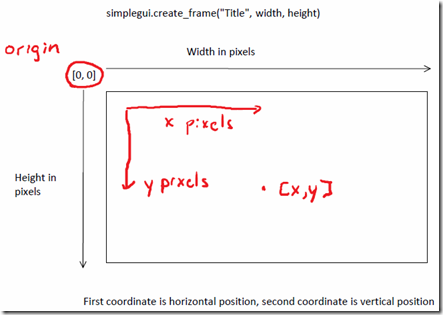
Stopwatch完成的结果如下:
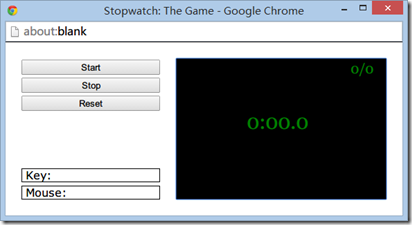
Start开始游戏,Stop暂停,Reset重置。右上角记录 成功停在整数秒次数/尝试次数
需要的元素:
frame:主界面
start button, stop button, reset button.
timer: 计时
逻辑设计:
start button事件: 开始计时
def start_handler():

    global is_running

    if is_running is False:

        timer.start()

        is_running = True
stop button事件:停止计时,更新右上角记录
def stop_handler():

    global num_stop, num_succ_stop, is_running

    if is_running is True:

        timer.stop()

        num_stop += 1

        if tick % 10 == 0 and tick != 0:

            num_succ_stop += 1

        is_running = False
reset button事件:停止计时,重置相关参数
def reset_handler():

    global tick, num_stop, num_succ_stop, is_running

    timer.stop()

    num_succ_stop, num_stop, tick = 0, 0, 0

    is_running = False
timer 事件:负责计时不断增加,每次0.1s
def timer_handler():

    global tick

    tick += 1
draw事件:界面元素绘制
def draw_handler(canvas):

    canvas.draw_text(format(tick), [100, 100], 30, "Green")

    canvas.draw_text(str(num_succ_stop) + "/" + str(num_stop), [250, 20], 20, "Green")
定义了一个辅助的方法format用来转换当前时间t为00:00.0格式
def format(t):

    D = str(t % 10)

    BC = t / 10 % 60

    if BC < 10:

        BC = '0'+str(BC)

    else:

        BC = str(BC)

    A = str(t / 10 / 60)

    return A + ":" + BC + "." + D
整体完整代码如下:
# template for "Stopwatch: The Game"

import simplegui

# define global variables

tick = 0

num_stop = 0

num_succ_stop = 0

is_running = False

# define helper function format that converts time

# in tenths of seconds into formatted string A:BC.D

def format(t):

    D = str(t % 10)

    BC = t / 10 % 60

    if BC < 10:

        BC = '0'+str(BC)

    else:

        BC = str(BC)

    A = str(t / 10 / 60)

    return A + ":" + BC + "." + D

# define event handlers for buttons; "Start", "Stop", "Reset"

def start_handler():

    global is_running

    if is_running is False:

        timer.start()

        is_running = True

def stop_handler():

    global num_stop, num_succ_stop, is_running

    if is_running is True:

        timer.stop()

        num_stop += 1

        if tick % 10 == 0 and tick != 0:

            num_succ_stop += 1

        is_running = False

def reset_handler():

    global tick, num_stop, num_succ_stop, is_running

    timer.stop()

    num_succ_stop, num_stop, tick = 0, 0, 0

    is_running = False

# define event handler for timer with 0.1 sec interval

def timer_handler():

    global tick

    tick += 1

# define draw handler

def draw_handler(canvas):

    canvas.draw_text(format(tick), [100, 100], 30, "Green")

    canvas.draw_text(str(num_succ_stop) + "/" + str(num_stop), [250, 20], 20, "Green")

# create frame

frame = simplegui.create_frame('Stopwatch: The Game', 300, 200)

# register event handlers

start_btn = frame.add_button('Start', start_handler, 200)

stop_btn = frame.add_button('Stop', stop_handler, 200)

reset_btn = frame.add_button('Reset', reset_handler, 200)

frame.set_draw_handler(draw_handler)

timer = simplegui.create_timer(100, timer_handler)

# start frame

frame.start()

# Please remember to review the grading rubric
其中is_running用来记录当前timer是否在运行,防止重复点击stop出现计数错误的问题。
整体逻辑也比较简单,课程挺有意思,声音听着超棒,锻炼听力挺不错。每个老师相当的负责和认真。感叹自己本科那时初学C的时候,授课的差距是那么大,也感慨现在有这么多好的资源可以利用。学无止境。
Mini projects #3 ---- Stopwatch: The Game的更多相关文章
- Mini projects #8–RiceRocks
课程全名:An Introduction to Interactive Programming in Python,来自 Rice University 授课教授:Joe Warren, Scott ...
- Mini projects #7 ---- Spaceship
课程全名:An Introduction to Interactive Programming in Python,来自 Rice University 授课教授:Joe Warren, Scott ...
- Mini projects #6 ---- Blackjack
课程全名:An Introduction to Interactive Programming in Python,来自 Rice University 授课教授:Joe Warren, Scott ...
- Mini projects #5 ---- Memory
课程全名:An Introduction to Interactive Programming in Python,来自 Rice University 授课教授:Joe Warren, Scott ...
- Mini projects #4 ---- Pong
课程全名:An Introduction to Interactive Programming in Python,来自 Rice University 授课教授:Joe Warren, Scott ...
- A Complete List of .NET Open Source Developer Projects
http://scottge.net/2015/07/08/a-complete-list-of-net-open-source-developer-projects/?utm_source=tuic ...
- Building Xcode iOS projects and creating *.ipa file from the command line
For our development process of iOS applications, we are using Jenkins set up on the Mac Mini Server, ...
- All the Apache Streaming Projects: An Exploratory Guide
The speed at which data is generated, consumed, processed, and analyzed is increasing at an unbeliev ...
- Golang优秀开源项目汇总, 10大流行Go语言开源项目, golang 开源项目全集(golang/go/wiki/Projects), GitHub上优秀的Go开源项目
Golang优秀开源项目汇总(持续更新...)我把这个汇总放在github上了, 后面更新也会在github上更新. https://github.com/hackstoic/golang-open- ...
随机推荐
- 【python】迭代器&生成器
源Link:http://www.cnblogs.com/huxi/archive/2011/07/01/2095931.html 迭代器 迭代器是访问集合元素的一种方式.迭代器对象从集合的第一个元素 ...
- 开启gpu加速的高性能移动端相框组件!
通过设置新的css3新属性translateX来代替传统的绝对定位改变left值的动画原理,新属性translateX会开启浏览器自带的gpu硬件加速动画性能,提高流畅度从而提高用户体验, 代码有很详 ...
- java环境配置步骤
1. jdk下载 官网:http://www.oracle.com/technetwork/java/javase/downloads/jdk8-downloads-2133151.html ...
- mysql中的SUBSTRING_INDEX
SUBSTRING_INDEX(str,delim,count) Returns the substring from string str before count occurrences of t ...
- 博弈论揭示了深度学习的未来(译自:Game Theory Reveals the Future of Deep Learning)
Game Theory Reveals the Future of Deep Learning Carlos E. Perez Deep Learning Patterns, Methodology ...
- atoi()函数
原型:int atoi (const char *nptr) 用法:#include <stdlib.h> 功能:将字符串转换成整型数:atoi()会扫描参数nptr字符串,跳过前 ...
- iOS修改button的点击范围
一般来说,按钮的点击范围是跟按钮的大小一样的.若按钮很小时,想增大点击区域,网上通用的方法有①设置btn图片setImage,然后将btn的size设置的比图片大②在btn上添加一个比较大的透明btn ...
- 解决mac升级后,出现的 xcrun: error: invalid active developer path, missing xcrun 错误
最近升级了mac系统,然后接着写代码就出问题了. 报错信息如下: xcrun: error: invalid active developer path (/Library/Developer/Com ...
- inndb存储引擎调优
inndb存储引擎调优介绍: InnoDB给MySQL提供了具有提交,回滚和崩溃恢复能力的事务安全(ACID兼容)存储引擎.InnoDB锁定在行级并且也在SELECT语句提供一个Oracle风格一致的 ...
- html理解
dispay:inline-block: display:inline不会独占一行,会排在同一行里 display:block 独占一行多个block会各自重起一行 margin:容器外间距 容器到 ...