
吴恩达课后习题第二课第三周:TensorFlow Introduction
第二课第三周:TensorFlow Introduction
Introduction to TensorFlow
TensorFlow 2.3 has made significant improvements over its predecessor, some of which you'll encounter and implement here!
By the end of this assignment, you'll be able to do the following in TensorFlow 2.3:
- Use
tf.Variableto modify the state of a variable- Explain the difference between a variable and a constant
- Train a Neural Network on a TensorFlow dataset
Programming frameworks like TensorFlow not only cut down on time spent coding, but can also perform optimizations that speed up the code itself
1 - Packages
import h5py

import numpy as np

import tensorflow as tf

import matplotlib.pyplot as plt

from tensorflow.python.framework.ops import EagerTensor

from tensorflow.python.ops.resource_variable_ops import ResourceVariable

import time
1.1 - Checking TensorFlow Version
You will be using v2.3 for this assignment, for maximum speed and efficiency.
tf.__version__
2 - Basic Optimization with GradientTape
The beauty of TensorFlow 2 is in its simplicity. Basically, all you need to do is implement forward propagation through a computational graph. TensorFlow will compute the derivatives for you, by moving backwards through the graph recorded with
GradientTape. All that's left for you to do then is specify the cost function and optimizer you want to use!
When writing a TensorFlow program, the main object to get used and transformed is thetf.Tensor. These tensors are the TensorFlow equivalent of Numpy arrays, i.e. multidimensional arrays of a given data type that also contain information about the computational graph.
Below, you'll usetf.Variableto store the state of your variables. Variables can only be created once as its initial value defines the variable shape and type. Additionally, thedtypearg intf.Variablecan be set to allow data to be converted to that type. But if none is specified, either the datatype will be kept if the initial value is a Tensor, orconvert_to_tensorwill decide. It's generally best for you to specify directly, so nothing breaks!
Here you'll call the TensorFlow dataset created on a HDF5 file, which you can use in place of a Numpy array to store your datasets. You can think of this as a TensorFlow data generator!
You will use the Hand sign data set, that is composed of images with shape 64x64x3.
train_dataset = h5py.File('datasets/train_signs.h5', "r")

test_dataset = h5py.File('datasets/test_signs.h5', "r")

x_train = tf.data.Dataset.from_tensor_slices(train_dataset['train_set_x'])

y_train = tf.data.Dataset.from_tensor_slices(train_dataset['train_set_y'])

x_test = tf.data.Dataset.from_tensor_slices(test_dataset['test_set_x'])

y_test = tf.data.Dataset.from_tensor_slices(test_dataset['test_set_y'])

type(x_train)
Since TensorFlow Datasets are generators, you can't access directly the contents unless you iterate over them in a for loop, or by explicitly creating a Python iterator using
iterand consuming its elements usingnext. Also, you can inspect theshapeanddtypeof each element using theelement_specattribute.
The dataset that you'll be using during this assignment is a subset of the sign language digits. It contains six different classes representing the digits from 0 to 5.
unique_labels = set()

for element in y_train:

    unique_labels.add(element.numpy())

print(unique_labels)
You can see some of the images in the dataset by running the following cell.
images_iter = iter(x_train)

labels_iter = iter(y_train)

plt.figure(figsize=(10, 10))

for i in range(25):

    ax = plt.subplot(5, 5, i + 1)

    plt.imshow(next(images_iter).numpy().astype("uint8"))

    plt.title(next(labels_iter).numpy().astype("uint8"))

    plt.axis("off")
There's one more additional difference between TensorFlow datasets and Numpy arrays: If you need to transform one, you would invoke the map method to apply the function passed as an argument to each of the elements.
def normalize(image):

    """

    Transform an image into a tensor of shape (64 * 64 * 3, )

    and normalize its components.

    Arguments

    image - Tensor.

    Returns:

    result -- Transformed tensor

    """

    image = tf.cast(image, tf.float32) / 255.0

    image = tf.reshape(image, [-1,])

    return image
new_train = x_train.map(normalize)

new_test = x_test.map(normalize)

new_train.element_spec
2.1 - Linear Function
Let's begin this programming exercise by computing the following equation: Y = WX + b, where W and X are random matrices and b is a random vector.
Exercise 1 - linear_function
Compute WX + b where W, X, and b are drawn from a random normal distribution. W is of shape (4, 3), X is (3,1) and b is (4,1). As an example, this is how to define a constant X with the shape (3,1):
X = tf.constant(np.random.randn(3,1), name = "X")
Note that the difference between
tf.constantandtf.Variableis that you can modify the state of atf.Variablebut cannot change the state of atf.constant.
You might find the following functions helpful:
- tf.matmul(..., ...) to do a matrix multiplication
- tf.add(..., ...) to do an addition
- np.random.randn(...) to initialize randomly
# GRADED FUNCTION: linear_function

def linear_function():

    """

    Implements a linear function:

            Initializes X to be a random tensor of shape (3,1)

            Initializes W to be a random tensor of shape (4,3)

            Initializes b to be a random tensor of shape (4,1)

    Returns:

    result -- Y = WX + b

    """

    np.random.seed(1)

    """

    Note, to ensure that the "random" numbers generated match the expected results,

    please create the variables in the order given in the starting code below.

    (Do not re-arrange the order).

    """

    # (approx. 4 lines)

    # X = ...

    # W = ...

    # b = ...

    # Y = ...

    # YOUR CODE STARTS HERE

    X =tf.constant(np.random.randn(3,1), name = "X")

    W =tf.constant(np.random.randn(4,3), name = "W")

    b =tf.constant(np.random.randn(4,1),name="b")

    Y =tf.add(tf.matmul(W,X),b)#矩阵乘法

    # YOUR CODE ENDS HERE

    return Y
result = linear_function()

print(result)

assert type(result) == EagerTensor, "Use the TensorFlow API"

assert np.allclose(result, [[-2.15657382], [ 2.95891446], [-1.08926781], [-0.84538042]]), "Error"

print("\033[92mAll test passed")
2.2 - Computing the Sigmoid
Amazing! You just implemented a linear function. TensorFlow offers a variety of commonly used neural network functions like
tf.sigmoidandtf.softmax.
For this exercise, compute the sigmoid of z.
In this exercise, you will: Cast your tensor to type
float32usingtf.cast, then compute the sigmoid usingtf.keras.activations.sigmoid.
Exercise 2 - sigmoid
Implement the sigmoid function below. You should use the following:
tf.cast("...", tf.float32)tf.keras.activations.sigmoid("...")
# GRADED FUNCTION: sigmoid

def sigmoid(z):

    """

    Computes the sigmoid of z

    Arguments:

    z -- input value, scalar or vector

    Returns:

    a -- (tf.float32) the sigmoid of z

    """

    # tf.keras.activations.sigmoid requires float16, float32, float64, complex64, or complex128.

    # (approx. 2 lines)

    # z = ...

    # a = ...

    # YOUR CODE STARTS HERE

    z = tf.cast(z, tf.float32)#将 z变为floa32型

    a =tf.keras.activations.sigmoid(z)#激活函数sigmoid

    # YOUR CODE ENDS HERE

    return a
。
result = sigmoid(-1)

print ("type: " + str(type(result)))

print ("dtype: " + str(result.dtype))

print ("sigmoid(-1) = " + str(result))

print ("sigmoid(0) = " + str(sigmoid(0.0)))

print ("sigmoid(12) = " + str(sigmoid(12)))

def sigmoid_test(target):

    result = target(0)

    assert(type(result) == EagerTensor)

    assert (result.dtype == tf.float32)

    assert sigmoid(0) == 0.5, "Error"

    assert sigmoid(-1) == 0.26894143, "Error"

    assert sigmoid(12) == 0.9999939, "Error"

    print("\033[92mAll test passed")

sigmoid_test(sigmoid)
2.3 - Using One Hot Encodings
Many times in deep learning you will have a Y vector with numbers ranging from 0 to C-1, where C is the number of classes. If C is for example 4, then you might have the following y vector which you will need to convert like this:
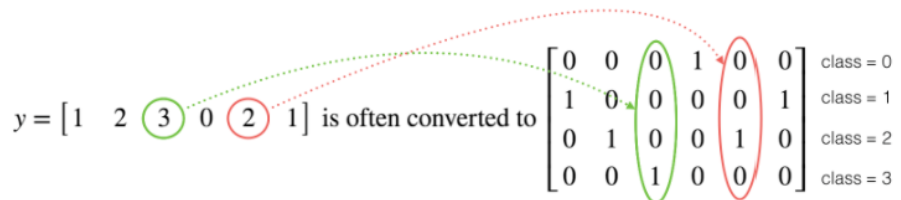
This is called "one hot" encoding, because in the converted representation, exactly one element of each column is "hot" (meaning set to 1). To do this conversion in numpy, you might have to write a few lines of code. In TensorFlow, you can use one line of code:
- tf.one_hot(labels, depth, axis=0)
axis=0indicates the new axis is created at dimension 0
Exercise 3 - one_hot_matrix
Implement the function below to take one label and the total number of classes C, and return the one hot encoding in a column wise matrix. Use
tf.one_hot()to do this, andtf.reshape()to reshape your one hot tensor!
tf.reshape(tensor, shape)
# GRADED FUNCTION: one_hot_matrix

def one_hot_matrix(label, depth=6):

    """

    Computes the one hot encoding for a single label


    Arguments:

        label --  (int) Categorical labels

        depth --  (int) Number of different classes that label can take


    Returns:

         one_hot -- tf.Tensor A single-column matrix with the one hot encoding.

    """

    # (approx. 1 line)

    # one_hot = ...

    # YOUR CODE STARTS HERE

    #one_hot =tf.one_hot(label,depth,axis=0)

#将lable变为热键,由上图可见,2即为该列第2位为1(0开始),axis=0即上下维度(竖向)

    one_hot=tf.reshape(tensor=tf.one_hot(label,depth,axis=0), shape=[-1])#[-1]表示这一维度不定义大小,而是根据数据情况进行匹配。

    print(one_hot)

    # YOUR CODE ENDS HERE

    return one_hot
def one_hot_matrix_test(target):

    label = tf.constant(1)

    depth = 4

    result = target(label, depth)

    print("Test 1:",result)

    assert result.shape[0] == depth, "Use the parameter depth"

    assert np.allclose(result, [0., 1. ,0., 0.] ), "Wrong output. Use tf.one_hot"

    label_2 = [2]

    result = target(label_2, depth)

    print("Test 2:", result)

    assert result.shape[0] == depth, "Use the parameter depth"

    assert np.allclose(result, [0., 0. ,1., 0.] ), "Wrong output. Use tf.reshape as instructed"

    print("\033[92mAll test passed")

one_hot_matrix_test(one_hot_matrix)
new_y_test = y_test.map(one_hot_matrix)

new_y_train = y_train.map(one_hot_matrix)
2.4 - Initialize the Parameters
Now you'll initialize a vector of numbers with the Glorot initializer. The function you'll be calling is
tf.keras.initializers.GlorotNormal, which draws samples from a truncated normal distribution centered on 0, withstddev = sqrt(2 / (fan_in + fan_out)), wherefan_inis the number of input units andfan_outis the number of output units, both in the weight tensor.
To initialize with zeros or ones you could use
tf.zeros()ortf.ones()instead.
Exercise 4 - initialize_parameters
Implement the function below to take in a shape and to return an array of numbers using the GlorotNormal initializer.
tf.keras.initializers.GlorotNormal(seed=1)tf.Variable(initializer(shape=())
# GRADED FUNCTION: initialize_parameters

def initialize_parameters():

    """

    Initializes parameters to build a neural network with TensorFlow. The shapes are:

                        W1 : [25, 12288]

                        b1 : [25, 1]

                        W2 : [12, 25]

                        b2 : [12, 1]

                        W3 : [6, 12]

                        b3 : [6, 1]

    Returns:

    parameters -- a dictionary of tensors containing W1, b1, W2, b2, W3, b3

    """

    initializer = tf.keras.initializers.GlorotNormal(seed=1)

    #(approx. 6 lines of code)

    # W1 = ...

    # b1 = ...

    # W2 = ...

    # b2 = ...

    # W3 = ...

    # b3 = ...

    # YOUR CODE STARTS HERE

    W1 =tf.Variable(initializer(shape=(25,12288)),name="W1")

    b1 =tf.Variable(initializer(shape=(25,1)),name="b1")

    W2 =tf.Variable(initializer(shape=(12,25)),name="W2")

    b2 =tf.Variable(initializer(shape=(12,1)),name="b2")

    W3 =tf.Variable(initializer(shape=(6,12)),name="W3")

    b3 =tf.Variable(initializer(shape=(6,1)),name="b3")

    # YOUR CODE ENDS HERE

    parameters = {"W1": W1,

                  "b1": b1,

                  "W2": W2,

                  "b2": b2,

                  "W3": W3,

                  "b3": b3}

    return parameters
def initialize_parameters_test(target):

    parameters = target()

    values = {"W1": (25, 12288),

              "b1": (25, 1),

              "W2": (12, 25),

              "b2": (12, 1),

              "W3": (6, 12),

              "b3": (6, 1)}

    for key in parameters:

        print(f"{key} shape: {tuple(parameters[key].shape)}")

        assert type(parameters[key]) == ResourceVariable, "All parameter must be created using tf.Variable"

        assert tuple(parameters[key].shape) == values[key], f"{key}: wrong shape"

        assert np.abs(np.mean(parameters[key].numpy())) < 0.5,  f"{key}: Use the GlorotNormal initializer"

        assert np.std(parameters[key].numpy()) > 0 and np.std(parameters[key].numpy()) < 1, f"{key}: Use the GlorotNormal initializer"

    print("\033[92mAll test passed")

initialize_parameters_test(initialize_parameters)
parameters = initialize_parameters()
3 - Building Your First Neural Network in TensorFlow
In this part of the assignment you will build a neural network using TensorFlow. Remember that there are two parts to implementing a TensorFlow model:
- Implement forward propagation
- Retrieve the gradients and train the model
Let's get into it!
3.1 - Implement Forward Propagation
One of TensorFlow's great strengths lies in the fact that you only need to implement the forward propagation function and it will keep track of the operations you did to calculate the back propagation automatically.
Exercise 5 - forward_propagation
Implement the forward_propagation function.
Note Use only the TF API.
- tf.math.add
- tf.linalg.matmul
- tf.keras.activations.relu
# GRADED FUNCTION: forward_propagation

def forward_propagation(X, parameters):

    """

    Implements the forward propagation for the model: LINEAR -> RELU -> LINEAR -> RELU -> LINEAR

    Arguments:

    X -- input dataset placeholder, of shape (input size, number of examples)

    parameters -- python dictionary containing your parameters "W1", "b1", "W2", "b2", "W3", "b3"

                  the shapes are given in initialize_parameters

    Returns:

    Z3 -- the output of the last LINEAR unit

    """

    # Retrieve the parameters from the dictionary "parameters"

    W1 = parameters['W1']

    b1 = parameters['b1']

    W2 = parameters['W2']

    b2 = parameters['b2']

    W3 = parameters['W3']

    b3 = parameters['b3']

    #(approx. 5 lines)                   # Numpy Equivalents:

    # Z1 = ...                           # Z1 = np.dot(W1, X) + b1

    # A1 = ...                           # A1 = relu(Z1)

    # Z2 = ...                           # Z2 = np.dot(W2, A1) + b2

    # A2 = ...                           # A2 = relu(Z2)

    # Z3 = ...                           # Z3 = np.dot(W3, A2) + b3

    # YOUR CODE STARTS HERE

    Z1 = tf.math.add(tf.linalg.matmul(W1, X) ,b1)

    A1 = tf.keras.activations.relu(Z1)

    Z2 = tf.math.add(tf.linalg.matmul(W2, A1) ,b2)

    A2 = tf.keras.activations.relu(Z2)

    Z3 = tf.math.add(tf.linalg.matmul(W3, A2) ,b3)

    # YOUR CODE ENDS HERE

    return Z3
def forward_propagation_test(target, examples):

    minibatches = examples.batch(2)

    for minibatch in minibatches:

        forward_pass = target(tf.transpose(minibatch), parameters)

        print(forward_pass)

        assert type(forward_pass) == EagerTensor, "Your output is not a tensor"

        assert forward_pass.shape == (6, 2), "Last layer must use W3 and b3"

        assert np.allclose(forward_pass,

                            [[-0.13430887,  0.14086473],

                             [ 0.21588647, -0.02582335],

                             [ 0.7059658,   0.6484556 ],

                             [-1.1260961,  -0.9329492 ],

                             [-0.20181894, -0.3382722 ],

                             [ 0.9558965,   0.94167566]]), "Output does not match"

        break

    print("\033[92mAll test passed")

forward_propagation_test(forward_propagation, new_train)
3.2 Compute the Cost
All you have to do now is define the loss function that you're going to use. For this case, since we have a classification problem with 6 labels, a categorical cross entropy will work!
Exercise 6 - compute_cost
Implement the cost function below.
- It's important to note that the "
y_pred" and "y_true" inputs of tf.keras.losses.categorical_crossentropy are expected to be of shape (number of examples, num_classes).
tf.reduce_meanbasically does the summation over the examples.
# GRADED FUNCTION: compute_cost

def compute_cost(logits, labels):

    """

    Computes the cost

    Arguments:

    logits -- output of forward propagation (output of the last LINEAR unit), of shape (6, num_examples)

    labels -- "true" labels vector, same shape as Z3

    Returns:

    cost - Tensor of the cost function

    """

    #(1 line of code)

    # cost = ...

    # YOUR CODE STARTS HERE

    cost =tf.reduce_mean(tf.keras.losses.categorical_crossentropy(labels, logits,from_logits=False))

    #本部分结果并不正确

    #cost =tf.keras.losses.categorical_crossentropy(labels,logits)

    # YOUR CODE ENDS HERE

    return cost
本部分答案并不准确,仅供参考
def compute_cost_test(target, Y):

    pred = tf.constant([[ 2.4048107,   5.0334096 ],

             [-0.7921977,  -4.1523376 ],

             [ 0.9447198,  -0.46802214],

             [ 1.158121,    3.9810789 ],

             [ 4.768706,    2.3220146 ],

             [ 6.1481323,   3.909829  ]])

    minibatches = Y.batch(2)

    for minibatch in minibatches:

        result = target(pred, tf.transpose(minibatch))

        break

    print(result)

    assert(type(result) == EagerTensor), "Use the TensorFlow API"

    assert (np.abs(result - (0.25361037 + 0.5566767) / 2.0) < 1e-7), "Test does not match. Did you get the mean of your cost functions?"

    print("\033[92mAll test passed")

compute_cost_test(compute_cost, new_y_train )
3.3 - Train the Model
Let's talk optimizers. You'll specify the type of optimizer in one line, in this case
tf.keras.optimizers.Adam(though you can use others such as SGD), and then call it within the training loop.
Notice the
tape.gradientfunction: this allows you to retrieve the operations recorded for automatic differentiation inside theGradientTapeblock. Then, calling the optimizer methodapply_gradients, will apply the optimizer's update rules to each trainable parameter. At the end of this assignment, you'll find some documentation that explains this more in detail, but for now, a simple explanation will do.
Here you should take note of an important extra step that's been added to the batch training process:
tf.Data.dataset = dataset.prefetch(8)
What this does is prevent a memory bottleneck that can occur when reading from disk.
prefetch()sets aside some data and keeps it ready for when it's needed. It does this by creating a source dataset from your input data, applying a transformation to preprocess the data, then iterating over the dataset the specified number of elements at a time. This works because the iteration is streaming, so the data doesn't need to fit into the memory.
def model(X_train, Y_train, X_test, Y_test, learning_rate = 0.0001,

          num_epochs = 1500, minibatch_size = 32, print_cost = True):

    """

    Implements a three-layer tensorflow neural network: LINEAR->RELU->LINEAR->RELU->LINEAR->SOFTMAX.

    Arguments:

    X_train -- training set, of shape (input size = 12288, number of training examples = 1080)

    Y_train -- test set, of shape (output size = 6, number of training examples = 1080)

    X_test -- training set, of shape (input size = 12288, number of training examples = 120)

    Y_test -- test set, of shape (output size = 6, number of test examples = 120)

    learning_rate -- learning rate of the optimization

    num_epochs -- number of epochs of the optimization loop

    minibatch_size -- size of a minibatch

    print_cost -- True to print the cost every 10 epochs

    Returns:

    parameters -- parameters learnt by the model. They can then be used to predict.

    """

    costs = []                                        # To keep track of the cost

    train_acc = []

    test_acc = []

    # Initialize your parameters

    #(1 line)

    parameters = initialize_parameters()

    W1 = parameters['W1']

    b1 = parameters['b1']

    W2 = parameters['W2']

    b2 = parameters['b2']

    W3 = parameters['W3']

    b3 = parameters['b3']

    optimizer = tf.keras.optimizers.Adam(learning_rate)

    # The CategoricalAccuracy will track the accuracy for this multiclass problem

    test_accuracy = tf.keras.metrics.CategoricalAccuracy()

    train_accuracy = tf.keras.metrics.CategoricalAccuracy()

    dataset = tf.data.Dataset.zip((X_train, Y_train))

    test_dataset = tf.data.Dataset.zip((X_test, Y_test))

    # We can get the number of elements of a dataset using the cardinality method

    m = dataset.cardinality().numpy()

    minibatches = dataset.batch(minibatch_size).prefetch(8)

    test_minibatches = test_dataset.batch(minibatch_size).prefetch(8)

    #X_train = X_train.batch(minibatch_size, drop_remainder=True).prefetch(8)# <<< extra step

    #Y_train = Y_train.batch(minibatch_size, drop_remainder=True).prefetch(8) # loads memory faster

    # Do the training loop

    for epoch in range(num_epochs):

        epoch_cost = 0.

        #We need to reset object to start measuring from 0 the accuracy each epoch

        train_accuracy.reset_states()

        for (minibatch_X, minibatch_Y) in minibatches:

            with tf.GradientTape() as tape:

                # 1. predict

                Z3 = forward_propagation(tf.transpose(minibatch_X), parameters)

                # 2. loss

                minibatch_cost = compute_cost(Z3, tf.transpose(minibatch_Y))

            # We acumulate the accuracy of all the batches

            train_accuracy.update_state(tf.transpose(Z3), minibatch_Y)

            trainable_variables = [W1, b1, W2, b2, W3, b3]

            grads = tape.gradient(minibatch_cost, trainable_variables)

            optimizer.apply_gradients(zip(grads, trainable_variables))

            epoch_cost += minibatch_cost

        # We divide the epoch cost over the number of samples

        epoch_cost /= m

        # Print the cost every 10 epochs

        if print_cost == True and epoch % 10 == 0:

            print ("Cost after epoch %i: %f" % (epoch, epoch_cost))

            print("Train accuracy:", train_accuracy.result())

            # We evaluate the test set every 10 epochs to avoid computational overhead

            for (minibatch_X, minibatch_Y) in test_minibatches:

                Z3 = forward_propagation(tf.transpose(minibatch_X), parameters)

                test_accuracy.update_state(tf.transpose(Z3), minibatch_Y)

            print("Test_accuracy:", test_accuracy.result())

            costs.append(epoch_cost)

            train_acc.append(train_accuracy.result())

            test_acc.append(test_accuracy.result())

            test_accuracy.reset_states()

    return parameters, costs, train_acc, test_acc
parameters, costs, train_acc, test_acc = model(new_train, new_y_train, new_test, new_y_test, num_epochs=100)
Numbers you get can be different, just check that your loss is going down and your accuracy going up!
# Plot the cost

plt.plot(np.squeeze(costs))

plt.ylabel('cost')

plt.xlabel('iterations (per fives)')

plt.title("Learning rate =" + str(0.0001))

plt.show()
# Plot the train accuracy

plt.plot(np.squeeze(train_acc))

plt.ylabel('Train Accuracy')

plt.xlabel('iterations (per fives)')

plt.title("Learning rate =" + str(0.0001))

# Plot the test accuracy

plt.plot(np.squeeze(test_acc))

plt.ylabel('Test Accuracy')

plt.xlabel('iterations (per fives)')

plt.title("Learning rate =" + str(0.0001))

plt.show()
Congratulations! You've made it to the end of this assignment, and to the end of this week's material. Amazing work building a neural network in TensorFlow 2.3!
Here's a quick recap of all you just achieved:
- Used
tf.Variableto modify your variables- Trained a Neural Network on a TensorFlow dataset
You are now able to harness the power of TensorFlow to create cool things, faster. Nice!
4 - Bibliography
In this assignment, you were introducted to tf.GradientTape, which records operations for differentation. Here are a couple of resources for diving deeper into what it does and why:
Introduction to Gradients and Automatic Differentiation:
https://www.tensorflow.org/guide/autodiff
GradientTape documentation:
https://www.tensorflow.org/api_docs/python/tf/GradientTape
吴恩达课后习题第二课第三周:TensorFlow Introduction的更多相关文章
- 深度学习 吴恩达深度学习课程2第三周 tensorflow实践 参数初始化的影响
博主 撸的 该节 代码 地址 :https://github.com/LemonTree1994/machine-learning/blob/master/%E5%90%B4%E6%81%A9%E8 ...
- 【吴恩达课后测验】Course 1 - 神经网络和深度学习 - 第二周测验【中英】
[中英][吴恩达课后测验]Course 1 - 神经网络和深度学习 - 第二周测验 第2周测验 - 神经网络基础 神经元节点计算什么? [ ]神经元节点先计算激活函数,再计算线性函数(z = Wx + ...
- 吴恩达课后作业学习2-week1-1 初始化
参考:https://blog.csdn.net/u013733326/article/details/79847918 希望大家直接到上面的网址去查看代码,下面是本人的笔记 初始化.正则化.梯度校验 ...
- 吴恩达课后作业学习2-week1-2正则化
参考:https://blog.csdn.net/u013733326/article/details/79847918 希望大家直接到上面的网址去查看代码,下面是本人的笔记 4.正则化 1)加载数据 ...
- 吴恩达课后作业学习1-week4-homework-two-hidden-layer -1
参考:https://blog.csdn.net/u013733326/article/details/79767169 希望大家直接到上面的网址去查看代码,下面是本人的笔记 两层神经网络,和吴恩达课 ...
- 吴恩达课后作业学习1-week4-homework-multi-hidden-layer -2
参考:https://blog.csdn.net/u013733326/article/details/79767169 希望大家直接到上面的网址去查看代码,下面是本人的笔记 实现多层神经网络 1.准 ...
- 【吴恩达课后测验】Course 1 - 神经网络和深度学习 - 第一周测验【中英】
[吴恩达课后测验]Course 1 - 神经网络和深度学习 - 第一周测验[中英] 第一周测验 - 深度学习简介 和“AI是新电力”相类似的说法是什么? [ ]AI为我们的家庭和办公室的个人设备供电 ...
- 【中文】【deplearning.ai】【吴恩达课后作业目录】
[目录][吴恩达课后作业目录] 吴恩达深度学习相关资源下载地址(蓝奏云) 课程 周数 名称 类型 语言 地址 课程1 - 神经网络和深度学习 第1周 深度学习简介 测验 中英 传送门 无编程作业 编程 ...
- 【吴恩达课后编程作业】第二周作业 - Logistic回归-识别猫的图片
1.问题描述 有209张图片作为训练集,50张图片作为测试集,图片中有的是猫的图片,有的不是.每张图片的像素大小为64*64 吴恩达并没有把原始的图片提供给我们 而是把这两个图片集转换成两个.h5文件 ...
随机推荐
- 【良心保姆级教程】java手把手教你用swing写一个学生的增删改查模块
很多刚入门的同学,不清楚如何用java.swing去开发出一个系统? 不清楚如何使用java代码去操作数据库进行增删改查一些列操作,不清楚java代码和数据库(mysql.sqlserver)之间怎么 ...
- Java的参数传递是值传递还是引用传递?
一.前言 首先先说结论,Java中方法参数传递方式是按值传递.如果参数是基本类型,传递的是基本类型的字面量值的拷贝.如果参数是引用类型,传递的是该参量所引用的对象在堆中地址值的拷贝. 接下来深入了解一 ...
- 20210718 noip19
考场 去年考过这场,心态直接爆炸 T1 一眼 T2 当初是我讲的,基本都记得(flag) T3 只记得是树形 DP,但觉得 rush 完前两题后用大量时间应该能搞出来 结果 T2 写了好久,还写假了. ...
- 给dubbo贡献源码,做梦都在修bug
本文已收录 https://github.com/lkxiaolou/lkxiaolou 欢迎star. 一 在之前的文章<redis在微服务领域的贡献>中,从一次面试经历中了解了redi ...
- io流-文件流\节点流
FileOutputStream类(jdk1.0) 描述 java.io.FileOutputStream 类是文件字节输出流,用于将数据写入到文件中. 构造方法 //构造方法 FileOutputS ...
- ECMAScript 2021(ES12)新特性简介
简介 ES12是ECMA协会在2021年6月发行的一个版本,因为是ECMAScript的第十二个版本,所以也称为ES12. ES12发行到现在已经有一个月了,那么ES12有些什么新特性和不一样的地方呢 ...
- 织梦arclist文章标题字数太短
解决dedecms UTF-8首页文章标题显示字数太短的办法原因分析:因为UTF-8编码1个中文汉字占用的是3个字节,GBK占用的是2个字节,所以,原先$titlelen = AttDef($titl ...
- 基于pgpool搭建postgressql集群部署
postgresql集群搭建 基于pgpool中间件实现postgresql一主多从集群部署,这里用两台服务器作一主一从示例 虚拟机名 IP 主从划分 THApps 192.168.1.31 主节点 ...
- jmeter加密解密(解密篇)
上一篇已经讲解了公钥加密,这篇讲解公钥解密.解密比较简单,直接操作吧. 需求是:接口中的请求体的部分参数需要先加密再请求,返回的结果中部分字段需解密. 1.在请求下新建beanshell后置处理程序, ...
- CF786C-Till I Collapse【树状数组倍增,优先队列】
正题 题目链接:https://www.luogu.com.cn/problem/CF786C 题目大意 给出一个长度为\(n\)的序列. 对于每个\(k\in[1,n]\)求将\(n\)分成最少的段 ...