
【SpringBoot】No 'Access-Control-Allow-Origin' header is present on the requested resource.
关键字:跨域,Access-Control-Allow-Origin,转码,解码
在做一个前后端分离项目,本来前端项目都可以正常访问后端接口,跨域是这么设置的,接口可以正常访问
@Configuration

public class WebConfig implements WebMvcConfigurer {

    @Override

    public void addCorsMappings(CorsRegistry registry) {

        registry.addMapping("/**");

    }

}
但是在访问一个新的接口时,前端控制台错误:
Response to preflight request doesn't pass access control check: No 'Access-Control-Allow-Origin' header is present on the requested resource.
后端错误:
java.lang.IllegalArgumentException: Invalid character found in the request target. The valid characters are defined in RFC 7230 and RFC 3986

	at org.apache.coyote.http11.Http11InputBuffer.parseRequestLine(Http11InputBuffer.java:468) ~[tomcat-embed-core-9.0.29.jar:9.0.29]

	at org.apache.coyote.http11.Http11Processor.service(Http11Processor.java:260) ~[tomcat-embed-core-9.0.29.jar:9.0.29]

	at org.apache.coyote.AbstractProcessorLight.process(AbstractProcessorLight.java:65) [tomcat-embed-core-9.0.29.jar:9.0.29]

	at org.apache.coyote.AbstractProtocol$ConnectionHandler.process(AbstractProtocol.java:860) [tomcat-embed-core-9.0.29.jar:9.0.29]

	at org.apache.tomcat.util.net.NioEndpoint$SocketProcessor.doRun(NioEndpoint.java:1591) [tomcat-embed-core-9.0.29.jar:9.0.29]

	at org.apache.tomcat.util.net.SocketProcessorBase.run(SocketProcessorBase.java:49) [tomcat-embed-core-9.0.29.jar:9.0.29]

	at java.util.concurrent.ThreadPoolExecutor.runWorker(ThreadPoolExecutor.java:1149) [na:1.8.0_191]

	at java.util.concurrent.ThreadPoolExecutor$Worker.run(ThreadPoolExecutor.java:624) [na:1.8.0_191]

	at org.apache.tomcat.util.threads.TaskThread$WrappingRunnable.run(TaskThread.java:61) [tomcat-embed-core-9.0.29.jar:9.0.29]

	at java.lang.Thread.run(Thread.java:748) [na:1.8.0_191]
在网上找了一下解决方法,都是说跨域问题
参考:response设置响应头,解决跨域请求问题,No ‘Access-Control-Allow-Origin’ header is present on the requested resource
解决方法:
1、加注解----对我没用。。。
@CrossOrigin        //跨域

public class BookController {

}
2、设置响应头----还是不行。。。
@PostMapping(path = "/add")

public JsonResult<Object> addBook(Book book, HttpServletResponse response) {

    response.setHeader("Access-Control-Allow-Origin", "*");

    response.setHeader("Cache-Control", "no-cache");

}
3、不要参数,试一下,竟然好了。。。。看来出现这个问题的原因是参数的原因
前端请求:
this.$axios({method: 'post', url: '/book/add'}).then(res => {

    console.log(res.data)

}).catch(res => {

});
后端接口:
@PostMapping(path = "/add")

public JsonResult<Object> addBook() {

}
又看到一篇文章说可能是参数太多:
参考:Error parsing HTTP request header Note: further occurrences of HTTP header parsing errors will ***
那就继续试,这是我原来要传的参数:
 book: {

          name: '',

          author: '',

          type: '',

          publishHouse: '',

          price: 0,

          description: '',

          number: 0,

          sales: 0,

          status: true,

          image: ''

        },
我又重新写了一个jsonData,作为参数来代替上面的book
bookTest: {},
先给bookTest里面少放点参数,发起异步请求,竟然成功了。。。:
//给里面少放点数据

this.bookTest.name = this.book.name;

this.bookTest.author = this.book.author;

this.bookTest.type = this.book.type;

this.$axios({method: 'post', url: '/book/add', params: this.bookTest})

 .then(res => {

   console.log(res.data)

 }).catch(res => {

});
后端代码:
@RequestMapping(path = "/book")

public class BookController {

	@PostMapping(path = "/add")

	public JsonResult addBook( Book newBook) {

	     System.out.println("addBook");

	     System.out.println(newBook);

	     JsonResult<Object> result = new JsonResult<>();

	     result = result.builder().data(newBook).message("添加成功").code("1").build();

	     return result;

	 }

}
继续增加参数,除了this.bookTest.image = this.book.image;:
this.bookTest.name = this.book.name;

this.bookTest.author = this.book.author;

this.bookTest.type = this.book.type;

this.bookTest.publishHouse = this.book.publishHouse;

this.bookTest.price = this.book.price;

this.bookTest.description = this.book.description;

this.bookTest.number = this.book.number;

this.bookTest.sales = this.book.sales;

this.bookTest.status = this.book.status;
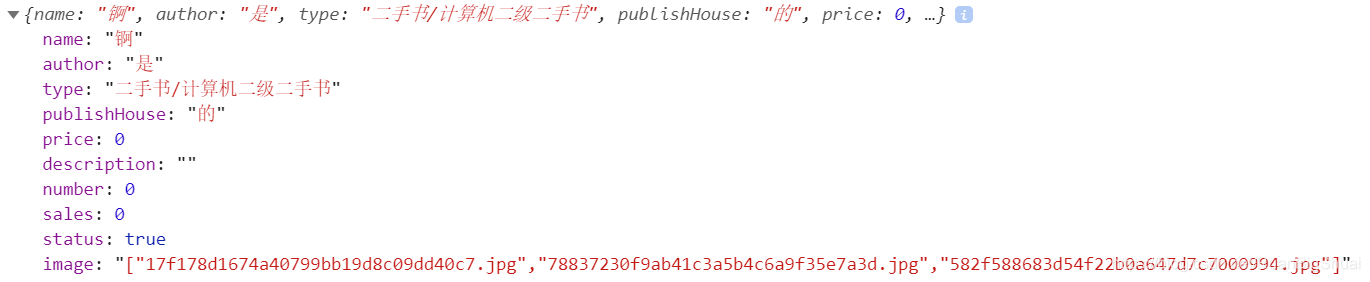
仍然可以接收参数,但是加上this.bookTest.image = this.book.image;就又开始报这个错误了,看来问题就是出在了这个image上。
下图的image有问题
2020.3.7更新:
问题已经找出,就出在了image字符串上,因为image这个字符串有特殊字符,必须先转码,传输到后端,再解码
前端:转码,对有特殊字符的字符串进行转码
 this.book.image= encodeURI(JSON.stringify(imageArray))

 //imageArray是一个数组,JSON.stringify()是把数组转为字符串,encodeURI()是转码的
转码前,image是这样的:
["/images/ac57249167ce4af5.jpg","/images/9d7bf84bdf40e030.jpg"]
转码后,image是这样的:
%22/images/ac57249167ce4af5.jpg%22%7D,%22/images/9d7bf84bdf40e030.jpg%22%7D%5D
后端:解码
@PostMapping(path = "/a")

public JsonResult add(Book book) {

        String imageJson= URLDecoder.decode(book.getImage(),"utf-8" );

    return null;

}
解码前:后端接收到的book.getImage()就是前端转码后的样子:
%22/images/ac57249167ce4af5.jpg%22%7D,%22/images/9d7bf84bdf40e030.jpg%22%7D%5D
解码后:
["/images/ac57249167ce4af5.jpg","/images/9d7bf84bdf40e030.jpg"]
参考:java-encodeURI decodeURI 解决地址传参乱码问题
【SpringBoot】No 'Access-Control-Allow-Origin' header is present on the requested resource.的更多相关文章
- .Net Core 处理跨域问题Response to preflight request doesn't pass access control check: No 'Access-Control-Allow-Origin' header is present on the requested resource
网页请求报错: Response to preflight request doesn't pass access control check: No 'Access-Control-Allow-Or ...
- has been blocked by CORS policy: Response to preflight request doesn't pass access control check: No 'Access-Control-Allow-Origin' header is present on the requested resource.
前端显示: has been blocked by CORS policy: Response to preflight request doesn't pass access control che ...
- WCF REST开启Cors 解决 No 'Access-Control-Allow-Origin' header is present on the requested resource. Origin 'http://localhost' is therefore not allowed access. The response had HTTP status code 405.
现象: 编写了REST接口: [ServiceContract] public interface IService1 { [OperationContract] [WebInvoke(UriTemp ...
- Failed to load http://wantTOgo.com/get_sts_token/: No 'Access-Control-Allow-Origin' header is present on the requested resource. Origin 'http://fromHere.com' is therefore not allowed access.
Failed to load http://wantTOgo.com/get_sts_token/: No 'Access-Control-Allow-Origin' header is presen ...
- java、ajax 跨域请求解决方案('Access-Control-Allow-Origin' header is present on the requested resource. Origin '请求源' is therefore not allowed access.)
1.情景展示 ajax调取java服务器请求报错 报错信息如下: 'Access-Control-Allow-Origin' header is present on the requested ...
- 跨域问题解决----NO 'Access-Control-Allow-Origin' header is present on the requested resource.Origin'http://localhost:11000' is therfore not allowed access'
NO 'Access-Control-Allow-Origin' header is present on the requested resource.Origin'http://localhost ...
- 【MongoDB】The Access control of mongodb
In this blog we mainly talk about the access control including limitation of ip, setting listen port ...
- 【HTTP】HTTP access control (CORS)
https://developer.mozilla.org/en-US/docs/Web/HTTP/Access_control_CORS Cross-site HTTP requests are H ...
- Access to XMLHttpRequest at 'http://localhost:8090/user/getotp' from origin 'null' has been blocked by CORS policy: No 'Access-Control-Allow-Origin' header is present on the requested resource.
ajax跨域请求错误 解决: springboot中: 加注解 @CrossOrigin
随机推荐
- IDE搬进浏览器里——JetBrains Projector
发展 提起 JetBrains,你会想到什么?各路强大的 IDE,比如 Android Studio.IDEA.WebStorm--这些对于开发者来说耳熟能详的产品都出自这家公司,这些 IDE 的功能 ...
- ES6 object.defineProperty
Object.defineProperty() 方法会直接在一个对象上定义一个新属性,或者修改一个对象的现有属性, 并返回这个对象. Object.defineProperty(obj, prop, ...
- mybatis联合查询
1.有学生实体 @Component @Scope("prototype") public class StudentInfo { private Integer studentI ...
- MVC+Servlet+mysql+jsp读取数据库信息
首先有以下几个包: 1.controller 控制层,对用户的请求进行响应 2.dao 数据层接口标准 3.daoimpl 数据层实现层 4.model 实体类层 5.service 业务层接口标准 ...
- 在vue3中使用router-link-active遇到的坑
在使用 router-link-active 设置链接激活时CSS类名时,发现在例如 /member/order 和 /member/order/:id 这两个都包含 /member/order的路由 ...
- CPU测试工具
目录 一.简介 二.大量计算 三.大量IO 四.大量进程 一.简介 使用stress-ng是一个 Linux 系统压力测试工具,模拟进程平均负载升高的场景. 使用sysstat来检查监控和分析. mp ...
- [BUUCTF]PWN——others_babystack
others_babystack 附件 步骤: 例行检查,64位程序,开了挺多保护 本地试运行一下程序 64位ida载入,看main函数 1是read函数,存在栈溢出:2是puts函数,3退出 利用思 ...
- IDEA添加yaml自动补全语法插件
问题:编写yml文件的时候,系统不能给自动补全 解决办法:File---->Settings---->Plugins---->搜索Spring Assistant x 项目效果预览
- 分布式文件系统fastdfs安装以及python调用
fastfds的安装和使用 一.所需依赖 操作系统:centos7.x(注意的是centos使用yum安装相关依赖) fastdfs:V6.06.tar.gz libfastcommon:V1.0.4 ...
- 前端文本框插件KindEditor
KindEditor 1.进入官网 2.下载 官网下载:http://kindeditor.net/down.php 本地下载:http://files.cnblogs.com/files/wup ...