
WPF:如何实现单实例的应用程序(Single Instance)
原文:WPF:如何实现单实例的应用程序(Single Instance)
好吧,这是我将WPF与Windows Forms进行比较的系列文章的第四篇,讨论一下如何实现单实例(single instance)
先来看第一种最简单粗暴的做法:
检测进程名,如果名称一样,则表示程序已经启动了,就不再启动.
    protected override void OnStartup(StartupEventArgs e)

    {

        // Get Reference to the current Process

        Process thisProc = Process.GetCurrentProcess();

        // Check how many total processes have the same name as the current one

        if (Process.GetProcessesByName(thisProc.ProcessName).Length > 1)

        {

            // If ther is more than one, than it is already running.

            MessageBox.Show("Application is already running.");

            Application.Current.Shutdown();

            return;

        }

        base.OnStartup(e);

    }

很简单,不是吗?但简单有什么错呢? 它很实用.
[注意]这个代码如果在visual studio中调试则无效,因为visual studio调试用的进程是加了一个vshost的后缀的。
第二种方案我觉得应该还是可以用mutex来实现嘛,看看下面的代码
using System;

using System.Collections.Generic;

using System.Configuration;

using System.Data;

using System.Linq;

using System.Windows;

using System.Diagnostics;

using System.Threading;

namespace WpfApplication1

{

    ///


    /// App.xaml 的交互逻辑

    ///

    public partial class App : Application

    {

        protected override void OnStartup(StartupEventArgs e)

        {

            bool createNew;

            Mutex mutex = new Mutex(true, "MyApplication", out createNew);

            if (createNew)

                base.OnStartup(e);

            else

            {

                MessageBox.Show("程序已经启动了");

                Application.Current.Shutdown();

            }

        }

    }

}
.csharpcode, .csharpcode pre
{
font-size: small;
color: black;
font-family: consolas, "Courier New", courier, monospace;
background-color: #ffffff;
/*white-space: pre;*/
}
.csharpcode pre { margin: 0em; }
.csharpcode .rem { color: #008000; }
.csharpcode .kwrd { color: #0000ff; }
.csharpcode .str { color: #006080; }
.csharpcode .op { color: #0000c0; }
.csharpcode .preproc { color: #cc6633; }
.csharpcode .asp { background-color: #ffff00; }
.csharpcode .html { color: #800000; }
.csharpcode .attr { color: #ff0000; }
.csharpcode .alt
{
background-color: #f4f4f4;
width: 100%;
margin: 0em;
}
.csharpcode .lnum { color: #606060; }
这一种做法的结果与第一种很类似,或者说没有任何区别。
看起来解决问题了,但仍然不是很理想的。最好的情况是,当用户开启第二个实例的时候,如果第一个实例没有处于活动状态,则应该激活它。
我们很自然还是联想到了原先在Windows Forms时代的WindowsFormsApplicationBase,那里面做这个事情太简单了。
首先,添加Microsoft.VisualBasic的引用
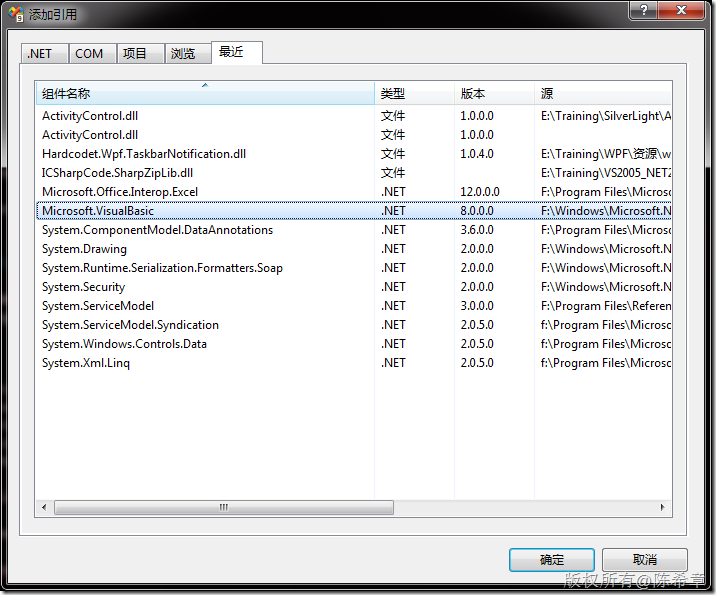
namespace WpfApplication1

{

    public class EntryPoint

    {

        [STAThread]

        public static void Main(string[] args)

        {

            SingleInstanceManager manager = new SingleInstanceManager();

            manager.Run(args);

        }

    }

    // Using VB bits to detect single instances and process accordingly:

    //  * OnStartup is fired when the first instance loads

    //  * OnStartupNextInstance is fired when the application is re-run again

    //    NOTE: it is redirected to this instance thanks to IsSingleInstance

    public class SingleInstanceManager : WindowsFormsApplicationBase

    {

        SingleInstanceApplication app;

        public SingleInstanceManager()

        {

            this.IsSingleInstance = true;

        }

        protected override bool OnStartup(Microsoft.VisualBasic.ApplicationServices.StartupEventArgs e)

        {

            // First time app is launched

            app = new SingleInstanceApplication();

            app.Run();

            return false;

        }

        protected override void OnStartupNextInstance(StartupNextInstanceEventArgs eventArgs)

        {

            // Subsequent launches

            base.OnStartupNextInstance(eventArgs);

            app.Activate();

        }

    }

    public class SingleInstanceApplication : Application

    {

        protected override void OnStartup(System.Windows.StartupEventArgs e)

        {

            base.OnStartup(e);

            // Create and show the application's main window

            //MainWindow window = new MainWindow();

            Window1 window = new Window1();

            window.Show();

        }

        public void Activate()

        {

            // Reactivate application's main window

            this.MainWindow.Show();

            this.MainWindow.Activate();

        }

    }

}
.csharpcode, .csharpcode pre
{
font-size: small;
color: black;
font-family: consolas, "Courier New", courier, monospace;
background-color: #ffffff;
/*white-space: pre;*/
}
.csharpcode pre { margin: 0em; }
.csharpcode .rem { color: #008000; }
.csharpcode .kwrd { color: #0000ff; }
.csharpcode .str { color: #006080; }
.csharpcode .op { color: #0000c0; }
.csharpcode .preproc { color: #cc6633; }
.csharpcode .asp { background-color: #ffff00; }
.csharpcode .html { color: #800000; }
.csharpcode .attr { color: #ff0000; }
.csharpcode .alt
{
background-color: #f4f4f4;
width: 100%;
margin: 0em;
}
.csharpcode .lnum { color: #606060; }
WPF:如何实现单实例的应用程序(Single Instance)的更多相关文章
- 使用 WPF 创建单实例应用程序
一个简单的例子就是大家在使用很多应用程序,例如在使用Microsoft Word 时会遇到一种情况,不管你打开多少个文档,系统一次只能加载一个winword.exe 实例.当打开新文档时,文档在新窗口 ...
- WPF点滴(2) 创建单实例应用程序
最近有同事问道在应用程序启动之后,再次双击应用程序,如何保证不再启动新的应用程序,而是弹出之前已经启动的进程,本质上这就是创建一个单实例的WPF应用程序.在VS的工程树中有一个App.xaml和App ...
- Python静态方法实现单实例模式
单实例模式 当程序中需要同一个实例就可以解决问题的场景,可以使用单实例模式
- WPF 单实例应用程序
例如:Microsoft Word,不管打开多少个文档(也不管它们是如何打开的),一次只能加载 winword.exe 一个实例. 这便是单实例应用程序. 对于这种单实例应用程序,WPF 本身并未提供 ...
- WPF使用Mutex创建单实例程序失效
vs2019 1.引入名称空间 using System.Threading; using System.Runtime.InteropServices; 2.导入dll并声明方法 [DllImpor ...
- C# 实现单实例程序
在我们经常使用的软件中,当我们已经打开后,再次打开时,有的软件不会出现两个.例如有道词典,会将上次的界面显示出来,或者提示我们“该程序已经运行...”.我通过一个简单的C# WPF例子来说明. 首先我 ...
- windows应用程序单实例
前言 这才第几天博客就跟不上了,看来一天一篇博客的目标还是有点大,写博客还是挺费时间的,写了不满意删,删完再写...直到自己没了耐心.今天先写个前言,实质性的内容明天再补吧.今天一天的收获还是挺多的, ...
- [WPF]WPF设置单实例启动
WPF设置单实例启动 使用Mutex设置单实例启动 using System; using System.Threading; using System.Windows; namespace Test ...
- Qt实现应用程序单实例运行--LocalServer方式
使Qt应用程序能够单实例运行的典型实现方法是使用共享内存实现.该方法实现简单,代码简洁. 但有一个致命缺陷:共享内存(QSharedMemory)实现的单程序运行,当运行环境是UNIX时,并且程序不幸 ...
随机推荐
- 【转】 Android ListView与Button的显示----不错不错
原文网址:http://blog.csdn.net/zy987654zy/article/details/39225819 在开发中有时候会碰见一些很简单的问题,但是当初没想通的时候 死都搞不定. 我 ...
- eclipse tomcat 网页404的一个小问题
之前一篇文章说过关于修改tomcat布置的应用的localhost路径.因为有两个项目在eclipse,所以我每次启动tomcat的时候都会加载两个项目, 但我其实只用调试其中一个项目,所以我就在se ...
- Android笔记(二):从savedIndstanceState发散
savedIndstanceState savedIndstanceState位于ActivityonCreate(Bundle savedInstanceState)方法的参数中.对这个参数的理解要 ...
- wpf在异步中给前台赋值
wpf,新建异步方法: Thread newThread = new Thread(new ParameterizedThreadStart(GetResult)); newThread.Start( ...
- CSS3: box-sizing 属性的简单认识
定义和用法: box-sizing 属性允许您以特定的方式定义匹配某个区域的特定元素. 默认值:content-box; 继承性:无: css版本:css3 语法:box-sizing: conten ...
- 【剑指Offer学习】【面试题56:链表中环的入口结点】
题目:一个链表中包括环.怎样找出环的入口结点? 解题思路 能够用两个指针来解决问题.先定义两个指针P1和P2指向链表的头结点.假设链表中环有n个结点,指针P1在链表上向前移动n步,然后两个指针以同样的 ...
- @IBDesignable和@IBInspectable
近期一直在看苹果公司提供的两本swift官方教程电子书,一部是<The Swift Programming Language>,还有一部是<Using Swift With Coco ...
- Eclipse颜色主题插件-Eclipse Color Theme
Eclipse颜色主题插件-Eclipse Color Theme 由于看烦了eclipse自带的的配色方案,自己动手配置又太麻烦,无意间在 http://eclipsecolorthemes.org ...
- HBase学习(十四)LINUX下用Eclipse构建HBase开发环境
Eclipse,HBase版本号眼下没有发现须要特别指定 1:从HBase集群中复制一份Hbase部署文件,放置在开发端某一文件夹下(如在/app/hadoop/hbase096文件夹下). 2:在e ...
- 广播接收者 BroadcastReceiver 示例-1
广播机制概述 Android广播分为两个方面:广播发送者和广播接收者,通常情况下,BroadcastReceiver指的就是广播接收者.广播作为Android组件间的通信方式,可以使用的场景如下: 1 ...