
使用 WPF 创建单实例应用程序
一个简单的例子就是大家在使用很多应用程序,例如在使用Microsoft Word 时会遇到一种情况,不管你打开多少个文档,系统一次只能加载一个winword.exe 实例。当打开新文档时,文档在新窗口显示,但是始终只有一个应用程序控制所有文档窗口;如:可以提供平铺当前所有文档中相邻窗口的文档的特性。
对于创建单实例的应用程序,WPF本身没有提供自带的解决方法,但可以通过变通的方式来实现——思路是当触发ApplicationStartup事件时,检查另一个实例是否在运行。方法是通过使用全局的mutex对像(mutex是操做系统中提供的用于进程间通信的同步方法)。虽然简单,但功能有限,如新实例无法与已经存在的实例进行通信。尤其是对于基于文档的用于程序而言,这确实是一个问题,如果新实例需要告诉已经存在的实例打开一个新的文档或者该文档是通过命令行参数传递的情况,那该使用什么方法来解决问题呢??
WPF团队推荐我们一种最简单的方法就是:使用Windows 窗体提供的内置支持,该内置支持最初是用于VisualBasic 应用程序的,使用Window窗体和VisualBasic 的这一特新来开发基于C#的WPF程序会存在一个新旧应用程序之分,本质上旧式应用程序充当了WPF应用程序的封装器。流程是:当启动程序时将创建旧式应用程序,旧式应用程序接着创建WPF应用程序,旧式应用程序处理实例管理,而WPF应用程序处理正真的应用。
下面我们通过一个实例来演示创建单实例应用程序的具体步骤:
一.创建WPF窗体项目,并添加Microsoft.VisualBasic.dll 引用。
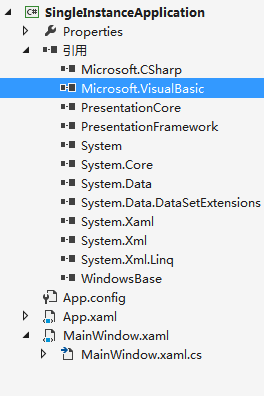
二.首先创建一个Document.xaml,和 DocumentList.xaml 窗口文件,使用定义的类DocumentReference 表示对Document引用。
DocumentReference :
 public class DocumentReference

     {

         private Document document;

         public Document Document

         {

             get { return document; }

             set { document = value; }

         }

         private string name;

         public string Name

         {

             get { return name; }

             set { name = value; }

         }

         public DocumentReference(Document document, string name)

         {

             Document = document;

             Name = name;

         }

     }
Document.LoadFile() 通过文件名读取文档内容,Document.OnClosed() 事件在文档窗体关闭时触发,用于从动态集合移除实例。
 public partial class Document : Window

    {

        private DocumentReference docRef;

        public Document()

        {

            InitializeComponent();

        }

        public void LoadFile(DocumentReference docRef)

        {

            this.docRef = docRef;

            this.Content = File.ReadAllText(docRef.Name);

            this.Title = docRef.Name;

        }

        protected override void OnClosed(EventArgs e)

        {

            base.OnClosed(e);

            ((WpfApp)Application.Current).Documents.Remove(docRef);

        }

    }
DocumentList 窗体放置一个 <ListBox Name="lstDocuments"></ListBox> 的 lstDocuments控件,用于显示当前文档列表。
 public partial class DocumentList : Window

     {

         public DocumentList()

         {

             InitializeComponent();

             lstDocuments.DisplayMemberPath = "Name";

             lstDocuments.ItemsSource = ((WpfApp)Application.Current).Documents;

         }

     }
三.接着创建一个自定义的WPF类WpfApp.cs,该类继承于Windows.Application。在这里每当通过命令行参数传递给SingleInstanceApplication 类文件名时,会触发 SingleInstanceApplication 类的 OnStartupNextInstance 方法,并调用自定义的 ShowDocument() 方法为指定的文档加载文档窗体。
WpfApp:
  public class WpfApp : Application

     {

         private ObservableCollection<DocumentReference> documents =

             new ObservableCollection<DocumentReference>();

         public ObservableCollection<DocumentReference> Documents

         {

             get { return documents; }

             set { documents = value; }

         }

         protected override void OnStartup(System.Windows.StartupEventArgs e)

         {

             base.OnStartup(e);

             //WpfApp.Current = this;

             DocumentList list = new DocumentList();

             this.MainWindow = list;

             list.Show();

             // Load the document that was specified as an argument.

             if (e.Args.Length > ) ShowDocument(e.Args[]);

         }

         public void ShowDocument(string fileName)

         {

             try

             {

                 Document doc = new Document();

                 DocumentReference docRef = new DocumentReference(doc, fileName);

                 doc.LoadFile(docRef);

                 doc.Owner = this.MainWindow;

                 doc.Show();

                 doc.Activate();

                 Documents.Add(docRef);

             }

             catch

             {

                 MessageBox.Show("Could not load document.");

             }

         }

     }
四.创建继承于WindowsFormsApplicationBase 的自定义类 SingleInstanceApplication.cs 该类将提供3个用于管理实例的重要成员。
- IsSingleInstance 用于确定此应用程序是否为单实例应用程序,在构造函数中设置值为true。
- 重写 OnStartup(),程序启动时,重写该方法并创建WPF应用程序对象。
- 重写 OnStartupNextInstance(),当另一个应用程序启动时触发该方法,该方法提供了访问命令行的参数的功能。此时可以调用WPF应用程序类的方法来创建窗口,但不能创建另一个应用程序对象。
SingleInstanceApplication:
 public class SingleInstanceApplication : WindowsFormsApplicationBase

     {

         private WpfApp App;

         public SingleInstanceApplication()

         {

             this.IsSingleInstance = true;

         }

         protected override bool OnStartup(Microsoft.VisualBasic.ApplicationServices.StartupEventArgs eventArgs)

         {

             string extension = ".testDoc";

             string title = "SingleInstanceApplication";

             string extensionDescription = "A Test Document";

             //return base.OnStartup(eventArgs);

             App = new WpfApp();

             App.Run();

             return false;

         }

         protected override void OnStartupNextInstance(StartupNextInstanceEventArgs eventArgs)

         {

             //base.OnStartupNextInstance(eventArgs);

             if (eventArgs.CommandLine.Count > )

                 App.ShowDocument(eventArgs.CommandLine[]);

         }

     }
五. 由于应用程序需要在APP类之前就要创建SingleInstanceApplication 类,所以这里就需要同过传统的Main方法作为启动入口。
 public class Startup

    {

        [STAThread]

        public static void Main(string[] args)

        {

            SingleInstanceApplication wrapper = new SingleInstanceApplication();

            wrapper.Run(args);

        }

    }
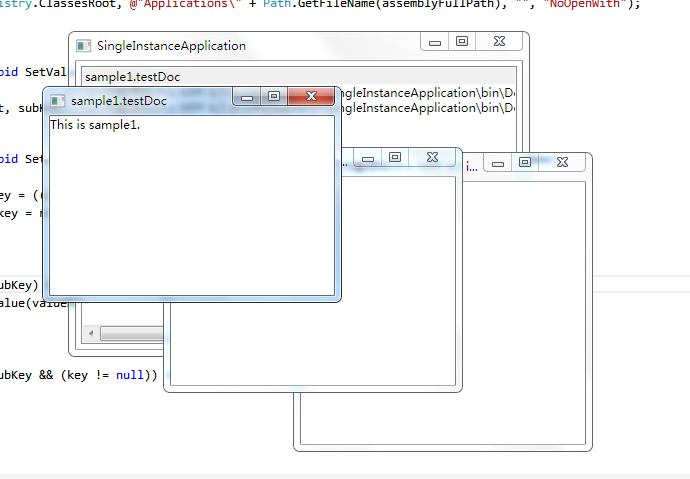
六,为了测试单例程序,需要使用Window文件扩展名与程序相关联,将其文件类型注册。运行结果如下:
使用 WPF 创建单实例应用程序的更多相关文章
- WPF学习笔记 - 如何用WPF创建单实例应用程序
使用一个已命名的(操作系统范围的)互斥量. bool mutexIsNew; using(System.Threading.Mutex m = new System.Threading.Mulex(t ...
- WPF点滴(2) 创建单实例应用程序
最近有同事问道在应用程序启动之后,再次双击应用程序,如何保证不再启动新的应用程序,而是弹出之前已经启动的进程,本质上这就是创建一个单实例的WPF应用程序.在VS的工程树中有一个App.xaml和App ...
- WPF 单实例应用程序
例如:Microsoft Word,不管打开多少个文档(也不管它们是如何打开的),一次只能加载 winword.exe 一个实例. 这便是单实例应用程序. 对于这种单实例应用程序,WPF 本身并未提供 ...
- [WPF]WPF设置单实例启动
WPF设置单实例启动 使用Mutex设置单实例启动 using System; using System.Threading; using System.Windows; namespace Test ...
- WPF使用Mutex创建单实例程序失效
vs2019 1.引入名称空间 using System.Threading; using System.Runtime.InteropServices; 2.导入dll并声明方法 [DllImpor ...
- Oracle - 给rac创建单实例dg,并做主从切换
一.概述 本文将介绍如何给rac搭建单节点的dg,以及如何对其进行角色转换.预先具备的知识(rac搭建,单实例-单实例dg搭建) 二.实验环境介绍 主库rac(已安装rac,并已有数据库orcl)ra ...
- 关于struts和Spring 结合到一起之后存在ACtion创建单实例还是多
struts 2的Action是多实例的并非单例,也就是每次请求产生一个Action的对象.原因是:struts 2的Action中包含数据,例如你在页面填写的数据就会包含在Action的成员变量里面 ...
- C# 实现单实例程序
在我们经常使用的软件中,当我们已经打开后,再次打开时,有的软件不会出现两个.例如有道词典,会将上次的界面显示出来,或者提示我们“该程序已经运行...”.我通过一个简单的C# WPF例子来说明. 首先我 ...
- DevExpress Winform使用单例运行程序方法和非DevExpress使用Mutex实现程序单实例运行且运行则激活窗体的方法
原文:DevExpress Winform使用单例运行程序方法和非DevExpress使用Mutex实现程序单实例运行且运行则激活窗体的方法 版权声明:本文为博主原创文章,遵循CC 4.0 BY-SA ...
随机推荐
- hdu-4418-Time travel-高斯+概率dp
把N个点先转化为2*N-2个点. 比方说把012345转化成0123454321. 这样,就能够找出随意两两个点之间的关系. 然后依据关系能够得出来一个一元多项式的矩阵. 然后就用高斯消元求出矩阵就可 ...
- 如果在线显示php源代码
原文:如果在线显示php源代码 通过php提供的函数highlight_file和highlight_string实现
- windows mysql安装、配置
一.MySQL的下载: 上图中,我们选择红框部分的社区版本进行下载,MySQL支持许多平台: 我的操作系统是64位的,选择对应版本MSI版下载,弹出login界面, 选择no thanks,just ...
- Leetcode_num13_Climbing Stairs
称号: You are climbing a stair case. It takes n steps to reach to the top. Each time you can either cl ...
- Struts2中指定的校验文件不起作用的原因
转载请注意出处:http://blog.csdn.net/bettarwang/article/details/39801733 我们知道,假设要为某个Action指定校验文件.那么就要将" ...
- 使用WiX Toolset创建.NET程序发布Bootstrapper(安装策略管理)(二)——自定义安装
原文:使用WiX Toolset创建.NET程序发布Bootstrapper(安装策略管理)(二)--自定义安装 自定义产品卸载方式 继续从上一次的基础上前进,现在我们已经知道了最简单的bootstr ...
- J2EE互联网产品打造
CSDN的各位技术朋友们,你们好: 我司最近正在研发一套J2EE的互联网产品,前期功能设计例如以下: 1.权限管理 2.菜单管理 3.系统设置 4.页面管理[主要做静态化] 5.任务管理[数据同步以及 ...
- VS2010升级VS2013后,出现没有定义类型“PowerPacks.ShapeContainer”错误解决方法
开发说明: http://msdn.microsoft.com/zh-tw/library/microsoft.visualbasic.powerpacks.aspx Microsoft.Visual ...
- Eureka 的 Application Client client的执行演示样例
上篇以一个 demo 演示样例介绍了 Eureka 的 Application Service 客户端角色.今天我们继续了解 Eureka 的 Application Client 客 ...
- 树上第k小,可持久化线段树+倍增lca
给定一颗树,树的每个结点都有权值, 有q个询问,每个询问是 u v k ,表示u到v路径上第k小的权值是多少. 每个结点所表示的线段树,是父亲结点的线段树添加该结点的权值之后形成的新的线段树 c[ro ...