
封装一个漂亮的ant design form标签组件
在ant design 的form组件中 能用于提交的组件比较少,所以我在这写了一个可以单选、多选标签提交的组件,调用非常简单。
代码:
 import React,{Fragment} from 'react';

 import { Tag,Icon,Input } from 'antd';

 export interface TagDataType{

     data:string,

     color:string,

     key:string

 }

 export interface Props {

     data:Array<TagDataType>,

     click?:boolean,//是否可点击

     defaultKey?:string | Array<string>,//默认选择tag的key

     checkbox?:boolean,//多选

     form?:any,//form表单

     dataValidationName?:string,//设置提交名称,若用此参数提交则提交选中的data,用于菜单提交获取

     keyValidationName?:string,//设置提交名称,若用此参数提交则提交选中的key,用于菜单提交获取

     notNull?:boolean,//选项不能为空

 }

 export interface State {

     keys:string,//选中的标签的key,用','分割

     datas:string,//选中的标签的data,用','分割

     styleState:number | Array<number>,//选中的下标集

 }

 class TagOpt extends React.Component<Props, State> {

     constructor(props: Props) {

         super(props);

         //验证传入数据的合法性

         if(this.props.notNull && !!!this.props.defaultKey){

             throw Error('TagOpt选中项为空,设置defaultKey!');

         }

         if(!!this.props.form && !!!this.props.keyValidationName && !!!this.props.dataValidationName){

             throw Error('若要使用form提交,请设置keyValidationName或dataValidationName!');

         }

         this.state=this.setDefaultVal();

     }

     //鼠标点击标签事件

     TagClick = (tagData:TagDataType,index:number) =>{

         if(this.props.click !== undefined && this.props.click){

             if(this.props.checkbox){

                 const optIf = this.optIf(index);

                 let styleState:Array<number> = new Array();;

                 if(typeof this.state.styleState === 'object'){

                     styleState = [...this.state.styleState];

                 }else{

                     styleState = [this.state.styleState];

                 }

                 if(optIf.state){

                     //点击已选择

                     //如果设置不为空且选中选项大于1或者没有设置不为空选项

                     //则清空

                     if(this.props.notNull && styleState.length>1 || !!!this.props.notNull){

                         styleState.splice(optIf.index,1);

                         this.setState({

                             keys:this.moveSubString(this.state.keys,tagData.key),

                             datas:this.moveSubString(this.state.datas,tagData.data),

                             styleState

                         },()=>{this.setVal(this.state.datas,'data');this.setVal(this.state.keys,'key')});

                     }

                 }else{

                     //点击未选择

                     styleState.splice(styleState.length,0,index);

                     this.setState({

                         keys:this.addSubString(this.state.keys,tagData.key),

                         datas:this.addSubString(this.state.datas,tagData.data),

                         styleState

                     },()=>{this.setVal(this.state.datas,'data');this.setVal(this.state.keys,'key')});

                 }

             }else{

                 if(this.state.styleState === index){

                     //点击已选择

                     //若设置可以为空

                     //则清空

                     if(!!!this.props.notNull){

                         this.setState({keys:'',datas:'',styleState:this.props.data.length}

                         ,()=>{this.setVal(this.state.datas,'data');this.setVal(this.state.keys,'key')});

                     }

                 }else{

                     //点击未选择

                     this.setState({keys:tagData.key,datas:tagData.data,styleState:index}

                     ,()=>{this.setVal(this.state.datas,'data');this.setVal(this.state.keys,'key')});

                 }

             }

         }

     }

     //返回移出指定子串的字符串,移出所有重复子串

     moveSubString = (str:string,subString:string):string => {

         let array:Array<string> = str.split(',');

         for(let i=0;i<array.length;i++){

             if(array[i] === subString){

                 array.splice(i,1);

             }

         }

         return array.toString();

     }

     //返回增加子串的字符串,重复则不增加

     addSubString = (str:string,subString:string|Array<string>) =>{

         if(typeof subString === 'string'){

             let comma = str !==''?',':'';

             return str +comma+subString;

         }else{

             let s:string = str;

             for(let i=0;i<subString.length;i++){

                 let comma = s !==''?',':'';

                 s+=comma+subString[i];

             }

             return s;

         }

     }

     //选择判断

     optIf = (index:number):{state:boolean,index:number} => {

         if(typeof this.state.styleState ==='number'){

             return {state:this.state.styleState === index,index:0};

         }else{

             let falg:boolean = false;

             const styleState = this.state.styleState;

             let i=0;

             for(;i<styleState.length;i++){

                 if(styleState[i] === index){

                     falg = true;

                     break;

                 }

             }

             return {state:falg,index:i};

         }

     }

     //写入表单

     setVal = (data:string,type:string) => {

         if(this.props.form != undefined){

             let json:object = {}

             if(type === 'data'){

                 if(this.props.dataValidationName !== undefined){

                     json[this.props.dataValidationName] = data;

                     this.props.form.setFieldsValue(json);

                 }

             }else if(type === 'key'){

                 if(this.props.keyValidationName !== undefined){

                     json[this.props.keyValidationName] = data;

                     this.props.form.setFieldsValue(json);

                 }

             }

         }

     }

     //默认值转换

     setDefaultVal=():State=>{

         if(this.props.checkbox){

             //多选框,值为1个或数组

             let styleState:Array<number> = new Array();

             let keys:Array<string> = new Array();

             let datas:Array<string> = new Array();

             const {defaultKey,data} = this.props;

             if(typeof defaultKey === 'object'){

                 for(let i=0;i<defaultKey.length;i++){

                     for(let j=0;j<data.length;j++){

                         if(defaultKey[i] === data[j].key){

                             styleState.push(i);

                             keys.push(data[j].key);

                             datas.push(data[j].data);

                         }

                     }

                 }

                 return {

                     keys:this.addSubString('',keys),

                     datas:this.addSubString('',datas),

                     styleState

                 }

             }else{

                 let i:number = 0;

                 let key:string = '';

                 let dat:string = '';

                 for(;i<data.length;i++){

                     if(data[i].key === defaultKey){

                         key=data[i].key;

                         dat=data[i].data;

                         break;

                     }

                 }

                 return { keys:key,datas:dat,styleState: i };

             }

         }else if(this.props.checkbox === undefined && typeof this.props.defaultKey ==='string' ||

             !this.props.checkbox && typeof this.props.defaultKey ==='string'){

             //多选未设置且默认值为1个或单选且默认值为一个

             let i:number = 0;

             let key:string = '';

             let dat:string = '';

             if(this.props.defaultKey !== undefined){

                 const data = this.props.data;

                 for(;i<data.length;i++){

                     if(data[i].key === this.props.defaultKey){

                         key=data[i].key;

                         dat=data[i].data;

                         break;

                     }

                 }

             }

             return { keys:key,datas:dat,styleState: i };

         }else if(this.props.defaultKey === undefined || this.props.defaultKey === '' || this.props.defaultKey === []){

             if(this.props.checkbox){

                 return { keys:'',datas:'',styleState: [] };

             }else{

                 return { keys:'',datas:'',styleState: this.props.data.length };

             }

         }else{

             return {keys:'',datas:'',styleState: this.props.data.length};

         }

     }

     render() {

         const content:any = this.props.data.map((tagData:TagDataType,index:number)=>{

             const cursor:any = this.props.click !== undefined && this.props.click ?'pointer':'default';

             return(

                 <Tag color={tagData.color} key={tagData.key} onClick={this.TagClick.bind(this,tagData,index)} style={{cursor}}>

                     {tagData.data}

                     {this.optIf(index).state?<Icon type="check" />:undefined}

                 </Tag>

             )

         });

         return (

             <Fragment>

                 {content}

                 {

                     !!this.props.click && !!this.props.form && !!this.props.form.getFieldDecorator && !!this.props.keyValidationName?

                     this.props.form.getFieldDecorator(this.props.keyValidationName, {

                         initialValue:this.state.keys,

                     })(<Input type="hidden"/>)

                     :undefined

                 }

                 {

                     !!this.props.click && !!this.props.form &&!!this.props.form.getFieldDecorator && !!this.props.dataValidationName

                     && !!!this.props.keyValidationName?

                     this.props.form.getFieldDecorator(this.props.dataValidationName, {

                         initialValue:this.state.datas,

                     })(<Input type="hidden"/>)

                     :undefined

                 }

             </Fragment>

          );

     }

 }

 export default TagOpt;

效果:
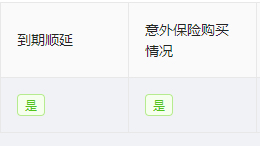
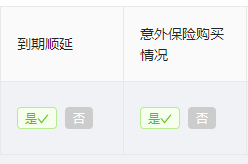

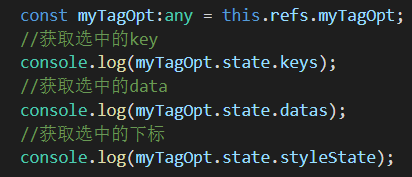
也可以在普通页面中调用:

获取值
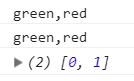
效果:
封装一个漂亮的ant design form标签组件的更多相关文章
- 2017.11.6 - ant design table等组件的使用,以及 chrome 中 network 的使用
一.今日主要任务 悉尼小程序后台管理开发: 景点管理页面: 获取已有数据列表,选取部分数据呈现在表格中,根据景点名称.分类过滤出对应的景点. 二.难点 1. 项目技术选取: ant design. ...
- 使用Ant Design的select组件时placeholder不生效/不起作用的解决办法
先来说说使用Ant Design和Element-ui的感觉吧. 公司的项目开发中用的是vue+element-ui,使用了一通下来后,觉得element-ui虽然也有一些问题或坑,但这些小问题或坑凭 ...
- react的ant design的UI组件库
PC官网:https://ant.design/ 移动端网址:https://mobile.ant.design/docs/react/introduce-cn antd-mobile :是 Ant ...
- 基于ant design form的二次封装
// standardForm.js import React, { PureComponent } from 'react'; import PropTypes from 'prop-types'; ...
- ant design 的Table组件固定表头时不对齐
现在有一个表格,里面的列数是不固定的(可以重复写入数据),且列数行数都可能很多,就带来一个问题: 必须要固定表头,但是antd 的表格组件设置了固定表格 scroll={{x:1000,y:300}} ...
- Ant Design 日期选择组件RangePicker 选择时间范围后计算范围内的天数。
/** *需求:同年同月,同年不同月(两个月相减大于1,小于1),不同年(两个年相减大于1(是否为闰年),小于1),起止包含的月份及天 */ //首先引入组件 import { DatePicker} ...
- Ant Design of Vue 组件库的使用
文档里面很清楚 安装步骤 这是全部引入的 1 有的组价涉及到汉化的问题 import moment from 'moment' import '../../../../node_modules ...
- 使用Ant Design写一个仿微软ToDo
实习期的第一份活,自己看Ant Design的官网学习,然后用Ant Design写一个仿微软ToDo. 不做教学目的,只是记录一下. 1.学习 Ant Design 是个组件库,想要会用,至少要知道 ...
- 同时使用 Ant Design of React 中 Mention 和 Form
使用场景,在一个列表中,点击每一行会弹出一个表单,通过修改表单数据并提交来修改这一行的数据,其中某个数据的填写需要通过Mention实现动态提示及自动补全的功能. 具体效果为: 遇到的问题: 1.希望 ...
随机推荐
- PHP毫秒
PHP毫秒 php的毫秒是没有默认函数的,但提供了一个microtime()函数,该函数返回包含两个元素,一个是秒数,一个是小数表示的毫秒数,借助此函数,可以很容易定义一个返回毫秒数的函数,例如: ...
- Exception in thread "http-apr-8080-exec-1" java.lang.StackOverflowError
Exception in thread "http-apr-8080-exec-1" java.lang.StackOverflowError 可能执行了递归,陷入了死循环 如下我 ...
- 回顾 Monty Hall (三门问题)
一.问题描述 Monty Hall Problem 源于美国的一档电视节目<Let's Make a Deal>,其中Monty Hall 是这个节目的主持人. 节目中有三扇门1.2.3, ...
- 在 linux 上运行 oracle sql脚本
方法一 su - oracle //切换到oracle用户模式下 sqlplus /nolog //登录sqlplus connect /as sysdba; //连接orcale @sql脚本路 ...
- LitElement(五)事件
1.概述 1.1 在何处添加事件监听器 您需要以一种可以在事件发生之前触发的方法添加事件监听器.但是,为了获得最佳的加载性能,应尽可能晚添加事件监听器. 你可以在以下位置添加事件监听器: 1.1.1 ...
- Harmonic Number (II) 数学找规律
I was trying to solve problem '1234 - Harmonic Number', I wrote the following code long long H( int ...
- AcWing 3. 完全背包问题
朴素 #include<iostream> #include<algorithm> using namespace std ; ; int n,m; int v[N],w[N] ...
- KMP算法例题
链接:https://codeforces.com/contest/1200/problem/E 题意:依次合并两个单词,每次合并将删去最长相同前后缀,输出结果. 思路:用kmp跑出每个需要被连接的单 ...
- 爬山 启发式合并 / STL
题目 其实 Kano 曾经到过由乃山,当然这名字一看山主就是 Yuno 嘛.当年 Kano 看见了由乃山,内心突然涌出了一股杜甫会当凌绝顶,一览众山小的豪气,于是毅然决定登山. 但是 Kano 总是习 ...
- sudo用户找不到环境变量 sudo找不到/usr/local/bin 下的执行文件,
出于安全方面的考虑,使用sudo执行命令将在一个最小化的环境中执行,环境变量都重置成默认状态. 所以PATH这个变量不包括用户自定义设置的内容,如找不到/usr/local/bin/下面的命令在sud ...