
Spark SQL 之自定义删除外部表
前言
Spark SQL 在删除外部表时,本不能删除外部表的数据的。本篇文章主要介绍如何修改Spark SQL 源码实现在删除外部表的时候,可以带额外选项来删除外部表的数据。
本文的环境是我一直使用的 spark 2.4.3 版本。
1. 修改ANTLR4 语法文件
修改 SqlBase.g4文件中drop Table 相关语句,添加(WITH DATA)?, 修改完之后如下:
DROP TABLE (IF EXISTS)? tableIdentifier (WITH DATA)? PURGE? #dropTable
因为,删除external表也不是必须的,所以添加WITH DATA 为可选项,跟 IF EXISTS类似。
2. 修改相关方法
2.1 修改SparkSqlParser.scala文件
  /**
   * Create a [[DropTableCommand]] command.
   */
  override def visitDropTable(ctx: DropTableContext): LogicalPlan = withOrigin(ctx) {
    DropTableCommand(
      visitTableIdentifier(ctx.tableIdentifier),
      ctx.EXISTS != null,
      ctx.VIEW != null,
      ctx.PURGE != null,
      ctx.WITH() != null && ctx.DATA() != null)
  }
2.2 修改DropTableCommand.scala等相关文件
首先修改构造函数,在最后一个参数后面添加withData方法,默认为false:
case class DropTableCommand(
    tableName: TableIdentifier,
    ifExists: Boolean,
    isView: Boolean,
    purge: Boolean,
    withData:Boolean = false // TODO 外部表是否需要删除表数据
    ) extends RunnableCommand
DropTableCommand本质上其实是用了command设计模式,实际在运行时,会调用其run方法,修改 run 方法,如下:
 override def run(sparkSession: SparkSession): Seq[Row] = {
     val catalog = sparkSession.sessionState.catalog
     val isTempView = catalog.isTemporaryTable(tableName)

     if (!isTempView && catalog.tableExists(tableName)) {
       // If the command DROP VIEW is to drop a table or DROP TABLE is to drop a view
       // issue an exception.
       catalog.getTableMetadata(tableName).tableType match {
         case CatalogTableType.VIEW if !isView =>
           throw new AnalysisException(
             "Cannot drop a view with DROP TABLE. Please use DROP VIEW instead")
         case o if o != CatalogTableType.VIEW && isView =>
           throw new AnalysisException(
             s"Cannot drop a table with DROP VIEW. Please use DROP TABLE instead")
         case _ =>
       }
     }

     if (isTempView || catalog.tableExists(tableName)) {
       try {
         sparkSession.sharedState.cacheManager.uncacheQuery(
           sparkSession.table(tableName), cascade = !isTempView)
       } catch {
         case NonFatal(e) => log.warn(e.toString, e)
       }
       catalog.refreshTable(tableName)
       log.warn(s"withData:${withData}")
       catalog.dropTable(tableName, ifExists, purge, withData)
     } else if (ifExists) {
       // no-op
     } else {
       throw new AnalysisException(s"Table or view not found: ${tableName.identifier}")
     }
     Seq.empty[Row]
   }
在第 28 行,为 catalog对象的dropTable 添加 withData 参数。其中catalog是 org.apache.spark.sql.catalyst.catalog.SessionCatalog 的实例。其子类并没有重写其 dropTable 方法,故只需要修改其dropTable 方法即可。具体修改代码如下:
 /**
    * Drop a table.
    *
    * If a database is specified in `name`, this will drop the table from that database.
    * If no database is specified, this will first attempt to drop a temporary view with
    * the same name, then, if that does not exist, drop the table from the current database.
    */
   def dropTable(
       name: TableIdentifier,
       ignoreIfNotExists: Boolean,
       purge: Boolean,
       withData:Boolean = false // 外部表是否需要在hdfs上删除其对应的数据
                ): Unit = synchronized {
     val db = formatDatabaseName(name.database.getOrElse(currentDb))
     val table = formatTableName(name.table)
     if (db == globalTempViewManager.database) {
       val viewExists = globalTempViewManager.remove(table)
       if (!viewExists && !ignoreIfNotExists) {
         throw new NoSuchTableException(globalTempViewManager.database, table)
       }
     } else {
       if (name.database.isDefined || !tempViews.contains(table)) {
         requireDbExists(db)
         // When ignoreIfNotExists is false, no exception is issued when the table does not exist.
         // Instead, log it as an error message.
         if (tableExists(TableIdentifier(table, Option(db)))) {
           logError(s"withData :${withData}")
           externalCatalog.dropTable(db, table, ignoreIfNotExists = true,purge = purge, withData)
         } else if (!ignoreIfNotExists) {
           throw new NoSuchTableException(db = db, table = table)
         }
       } else {
         tempViews.remove(table)
       }
     }
   }
为防止在test中有很多的测试类在调用该方法,在编译时报错,新添加的withData给默认值,为false,保证该方法默认行为跟之前未修改前一致。
withData 参数继续传递给 externalCatalog.dropTable 方法,其中,externalCatalog 是 org.apache.spark.sql.catalyst.catalog.ExternalCatalog 类型变量,ExternalCatalog 是一个trait,ExternalCatalog 实现类关系如下:
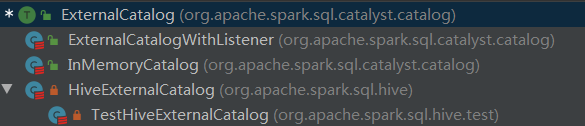
首先修改ExternalCatalog 的dropTable 方法,如下:
def dropTable(
      db: String,
      table: String,
      ignoreIfNotExists: Boolean,
      purge: Boolean,
      withData:Boolean=false): Unit
参数加载最后,给默认值false。
org.apache.spark.sql.catalyst.catalog.ExternalCatalogWithListener 是一个包装类,其内部在原来ExternalCatalog 的行为之外添加了监听的行为。先修改这个包装类的dropTable,如下:
override def dropTable(
      db: String,
      table: String,
      ignoreIfNotExists: Boolean,
      purge: Boolean,
      withData:Boolean): Unit = {
    postToAll(DropTablePreEvent(db, table))
    delegate.dropTable(db, table, ignoreIfNotExists, purge, withData)
    postToAll(DropTableEvent(db, table))
  }
其中,delegate 就是真正执行 dropTable操作的ExternalCatalog对象。
catlog有两个来源,分别是 in-memory和 hive, in-memory的实现类是org.apache.spark.sql.catalyst.catalog.InMemoryCatalog,只需要添加 方法参数列表即可,在方法内部不需要做任何操作。
hive的实现类是 org.apache.spark.sql.hive.HiveExternalCatalog, 其dropTable 方法如下:
override def dropTable(
      db: String,
      table: String,
      ignoreIfNotExists: Boolean,
      purge: Boolean,
      withData:Boolean): Unit = withClient {
    requireDbExists(db)
    val tableLocation: URI = client.getTable(db,table).location
    client.dropTable(db, table, ignoreIfNotExists, purge)
    val path: Path = new Path(tableLocation)
    val fileSystem: FileSystem = FileSystem.get(hadoopConf)
    val fileExists: Boolean = fileSystem.exists(path)
    logWarning(s"withData:${withData}, ${path} exists : ${fileExists}")
    if (withData && fileExists) {
      fileSystem.delete(path, true)
    }
  }
3. 打包编译
在生产环境编译,编译命令如下:
./dev/-cdh5./bin/mvn -Pyarn -Phadoop--cdh5.14.0 -X
注:由于编译的是 cdh版本,一些jar包不在中央仓库,在pom.xml文件中,添加 cloudera maven 源:
<repository>
   <id>cloudera</id>
   <url>https://repository.cloudera.com/artifactory/cloudera-repos</url>
</repository>
为了加快 maven编译的速度, 在 make-distribution.sh 文件中,修改了编译的并行度,在171行,把1C改为4C,具体修改如下:
BUILD_COMMAND=("$MVN" -T 4C clean package -DskipTests $@)
执行编译结束之后,在项目的根目录下,会有 spark-2.4.3-bin-2.6.0-cdh5.14.0.tgz 这个压缩包,这就是binary 文件,可以解压到指定目录进行相应配置了。
4. 配置spark
把原来集群中spark 的配置以及相关jar包拷贝到新的spark相应目录。
5. 测试
5.1 创建外部表
spark sql
spark-sql> use test;
spark-sql> create external table ext1 location '/user/hive/warehouse/test.db/ext1' as select * from person;
spark-sql> select * from ext1;
1 2 3
2 zhangsan 4
3 lisi 5
4 wangwu 6
5 rose 7
6 nose 8
7 info 9
8 test 10
查看 hdfs 上对应目录是否有数据
[root@xxx ~]# hdfs dfs -ls -R /user/hive/warehouse/test.db/ext1
-rwxr-xr-x  root supergroup  -- : /user/hive/warehouse/test.db/ext1/part--aae237ac-4a0b-425c-a0f1-5d54d1e88957-c000
5.2 删除表
spark-sql> drop table if exists ext1 with data;
5.3 验证表元数据已删除成功
spark-sql> show tables;
test    person    false
没有ext表,说明已删除成功。
5.4 验证hdfs上数据已删除成功
[root@node01 ~]# hdfs dfs -ls -R /user/hive/warehouse/test.db/ext1
ls: `/user/hive/warehouse/test.db/ext1': No such file or directory
该目录已不存在,说明hdfs上数据已删除成功。
总结
本文具体介绍了如何修改spark sql 的源码,在删除external表时可选择地删除hdfs上的底层数据。
Spark SQL 之自定义删除外部表的更多相关文章
- 【转载】Spark SQL之External DataSource外部数据源
http://blog.csdn.net/oopsoom/article/details/42061077 一.Spark SQL External DataSource简介 随着Spark1.2的发 ...
- Spark SQL之External DataSource外部数据源(二)源代码分析
上周Spark1.2刚公布,周末在家没事,把这个特性给了解一下,顺便分析下源代码,看一看这个特性是怎样设计及实现的. /** Spark SQL源代码分析系列文章*/ (Ps: External Da ...
- [SQL]修改和删除基本表
修改基本表 SQL语言用alter table语句修改基本表,其一般格式如下: alter table <表名> add <列名> <数据类型> [<列级完整 ...
- sql*loader以及oracle外部表加载Date类型列
Oracle sqlldr LOAD DATAINFILE *INTO TABLE testFIELDS TERMINATED BY X'9'TRAILING NULLCOLS( c2 &quo ...
- persistent.xml hibernate 利用sql script 自定义生成 table 表
<?xml version="1.0" encoding="UTF-8"?> <persistence xmlns="http:// ...
- Sql Server批量删除指定表
--批量删除以test的表开头的表 declare @name varchar(50) while(exists(select * from sysobjects where name like te ...
- sql server 批量删除数据表
SET ANSI_NULLS ONGOSET QUOTED_IDENTIFIER ONGO-- =============================================-- Auth ...
- SQL 更新修改删除一个表,库存自动增减的写法
create trigger tri_asbon asb for insert as begin declare @rk int declare @ck int declare @sid varcha ...
- postgres 删除外部表
drop external table if exists tableName;
随机推荐
- Unity3D游戏开发培训
Unity3D游戏开发培训 作者:Jesai 时间:2017-01-08 修改:2017-01-09 12:36:15 1 项目的构成 图1-1 如图1-1所示,Unity3D的项目构 ...
- Vue 编程式的导航
1.应用场景 在同一路由的情况下,不同的参数之间进行切换 注意:别忘记初始化路由页面 2.用法 a.定义方法 b.实现方法 c.初始化路由页面 3.案例 <template> <di ...
- Numpy科学计算从放弃到入门
目录 一.什么是Numpy ndarray对象 相关文档 二.如何创建数组 三.如何访问数组 下标索引 切片索引 布尔型索引 整数索引 方形索引 四.如何做算数运算 五.如何使用统计函数 六.数组转置 ...
- [bzoj4815] [洛谷P3700] [Cqoi2017] 小Q的表格
Description 小Q是个程序员. 作为一个年轻的程序员,小Q总是被老C欺负,老C经常把一些麻烦的任务交给小Q来处理. 每当小Q不知道如何解决时,就只好向你求助.为了完成任务,小Q需要列一个表格 ...
- 使用Razor表达式 举数组和集合 精通ASP-NET-MVC-5-弗瑞曼
- 51Nod 1238 - 最小公倍数之和 V3(毒瘤数学+杜教筛)
题目 戳这里 推导 ∑i=1n∑j=1nlcm(i,j)~~~\sum_{i=1}^{n}\sum_{j=1}^{n}lcm(i,j) ∑i=1n∑j=1nlcm(i,j) =∑i=1n∑j= ...
- php--->cookie和session
cookie和session cookie和session理解 HTTP协议本身是无状态的,这与HTTP协议本来的目的是相符的,客户端只需要简单的向服务器请求下载某些文件,无论是客户端还是服务器都没有 ...
- 记一次阿里云LVM扩容与 LVM 相关知识学习
一.lvm 扩容 问题: 我们阿里云服务器有一个磁盘容量为 1T ,但是最近由于业务的扩增,磁盘容量已经不够了,需要增大磁盘的容量.磁盘挂载在 /home,使用的是 LVM.我们现在需要对磁盘进行扩容 ...
- SOAP与REST API的爱恨情仇
之前一直想写些RESTful相关的文章,却一直未付诸行动.直到最近接手一个新的项目,对这块重新温习,乘此机会写些相关帖子.欢迎大家评论留言,如有错漏之处,也望各位大佬不令赐教. 话不多说,干活顶上. ...
- Java:线程的六种状态及转化
目录 Java:线程的六种状态及转化 一.新建状态(NEW) 二.运行状态(RUNNABLE) 就绪状态(READY) 运行状态(RUNNING) 三.阻塞状态(BLOCKED) 四.等待状态(WAI ...