
Python Turtle模块的简单应用
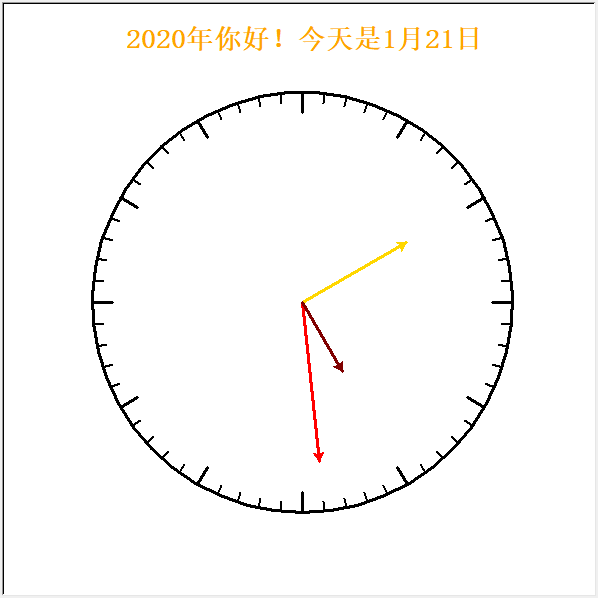
时钟
import turtle as t

import datetime as dt

#画出背景

game = t.Screen()

game.bgcolor("white")

game.setup(600,600)

game.tracer(0)

#定义画笔属性

pen = t.Turtle()

pen.speed(10)

pen.ht()

pen.up()

def draw_clock(h,m,s):

    #画圈

    pen.clear()

    pen.up()

    pen.color("black")

    pen.pensize(3)

    pen.seth(0)

    pen.goto(0,-210)

    pen.down()

    pen.circle(210)

    #画刻度

    pen.up()

    pen.goto(0,0)

    pen.seth(90)

    #大刻度

    for _ in range(12):

        pen.fd(190)

        pen.down()

        pen.fd(20)

        pen.up()

        pen.goto(0,0)

        pen.rt(30)

    #小刻度

    for _ in range(60):

        pen.up()

        pen.goto(0,0)

        pen.rt(6)

        pen.fd(200)

        pen.down()

        pen.color('black')

        pen.pensize(2)

        pen.fd(10)

    #画秒针

    pen.up()

    pen.home()

    pen.down()

    pen.color("red")

    pen.pensize(3)

    pen.seth(90)

    pen.rt(s/60*360)

    pen.fd(160)

    pen.stamp()

    #画分针

    pen.up()

    pen.home()

    pen.down()

    pen.color("Gold")

    pen.pensize(3)

    pen.seth(90)

    pen.rt(m/60*360)

    pen.fd(120)

    pen.stamp()

    #画时针

    pen.up()

    pen.home()

    pen.down()

    pen.color("Maroon")

    pen.pensize(3)

    pen.seth(90)

    pen.rt(h/12*360)

    pen.fd(80)

    pen.stamp()

    #问候字体

    pen.up()

    pen.goto(-175,250)

    pen.color('orange')

    font1 = ('宋体',20,'bold')

    hello = "{}年你好!今天是{}月{}日".format(now.year,now.month,now.day)

    pen.write(hello,"center",font=font1)

while True:

    game.update()

    now = dt.datetime.now()

    draw_clock(now.hour,now.minute,now.second)

game.mainloop()
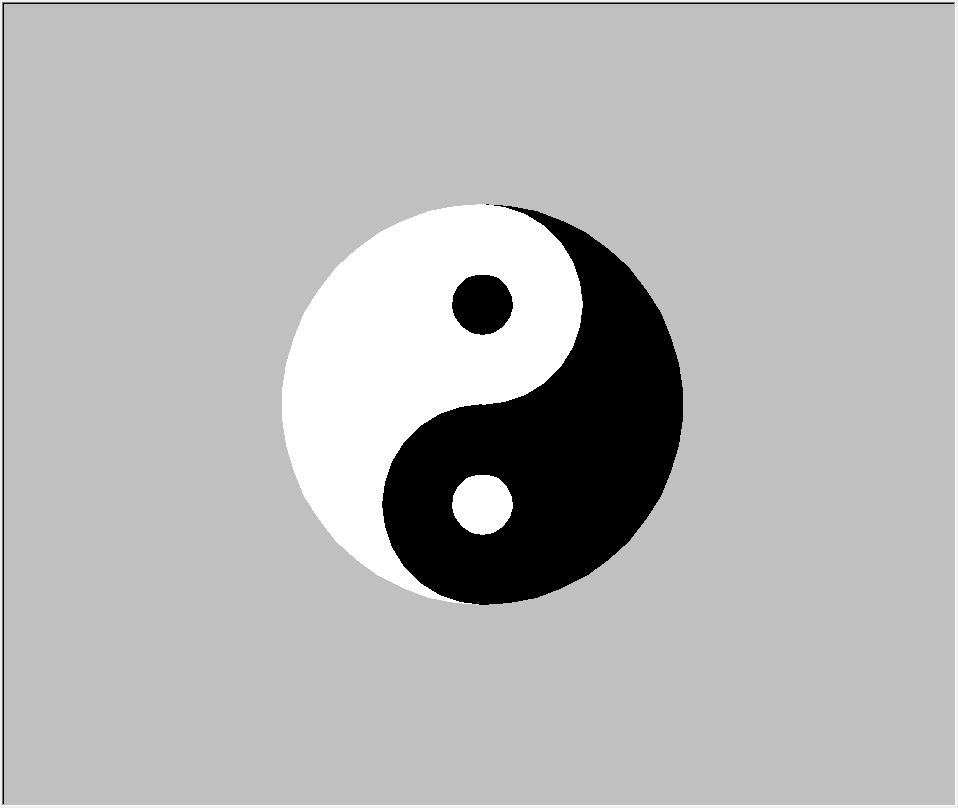
太极图
import turtle

def Taichi(R,r):

    '''

    R:整个大圆半径;

    r:两个最小圆半径

    '''

    #大圆左白右黑

    p.up()

    p.goto(0,-R)

    p.down()

    p.pencolor('black')

    p.fillcolor('black')

    p.begin_fill()

    p.circle(R,180)

    p.end_fill()

    p.pencolor('white')

    p.fillcolor('white')

    p.begin_fill()

    p.circle(R,180)

    p.end_fill()

    #半圆下黑上白

    p.pencolor('black')

    p.fillcolor('black')

    p.begin_fill()

    p.circle(R/2,-180)

    p.end_fill()

    p.right(180)

    p.pencolor('white')

    p.fillcolor('white')

    p.begin_fill()

    p.circle(R/2,180)

    p.end_fill()

    #小圆上黑下白

    p.up()

    p.home()

    p.goto(0,R/2-r)

    p.down()

    p.pencolor('black')

    p.fillcolor('black')

    p.begin_fill()

    p.circle(r)

    p.end_fill()

    p.up()

    p.goto(0,-(R/2+r))

    p.down()

    p.pencolor('white')

    p.fillcolor('white')

    p.begin_fill()

    p.circle(r)

    p.end_fill()

if __name__ == '__main__':

    s = turtle.Screen()

    s.bgcolor('Silver')

    s.screensize(800,800)

    p = turtle.Turtle()

    p.shape('turtle')

    p.ht()

    s.tracer(10,0)

    Taichi(200,30)

    s.mainloop()
玫瑰
大部分都是通过调整圆半径、弧度和方向绘制的,过程需一步步尝试,比较繁琐,仅供参考
import turtle

#渐大

def increases(a,z,f):

    #a:画笔起始大小;z:画笔终止大小;f:渐变拉伸距离

    for i in range(a,z):

        p.pensize(i)

        p.forward(f)

#渐小

def smaller(a,z,f):

    for i in range(a,z,-1):

        p.pensize(i)

        p.forward(f)

#花蕊

def flower():

    #右下

    p.up()

    p.home()

    p.goto(0,0)

    p.pencolor('red')

    p.left(15)

    p.down()

    increases(1,7,5)

    p.circle(50,70)

    p.forward(60)

    p.circle(-100,15)

    smaller(7,1,5)

    #左下

    p.up()

    p.home()

    p.goto(-20,0)

    p.left(180)

    p.down()

    increases(1,7,5)

    p.circle(-60,85)

    p.forward(60)

    p.circle(100,15)

    smaller(7,1,5)

    #右边

    p.up()

    p.home()

    p.goto(80,250)

    p.left(10)

    p.down()

    increases(1,5,5)

    p.circle(-20,120)

    p.circle(-130,20)

    p.forward(50)

    p.circle(100,15)

    smaller(5,1,6)

    #左边

    p.up()

    p.home()

    p.goto(-110,240)

    p.left(180)

    p.down()

    increases(1,5,5)

    p.circle(30,130)

    p.circle(130,15)

    p.forward(20)

    p.circle(-100,35)

    smaller(5,1,7)

    #左上

    p.up()

    p.home()

    p.goto(0,270)

    p.left(150)

    p.down()

    increases(1,5,5)

    p.circle(60,120)

    p.circle(60,30)

    p.circle(-50,25)

    smaller(5,1,5)

    #右上

    p.up()

    p.home()

    p.goto(8,271)

    p.left(10)

    p.down()

    increases(1,5,5)

    p.circle(-40,80)

    p.circle(-30,90)

    p.forward(5)

    p.circle(250,25)

    smaller(4,1,6)

    #右中

    p.up()

    p.home()

    p.goto(65,215)

    p.left(-95)

    p.down()

    increases(1,5,5)

    p.circle(200,6)

    smaller(5,1,7)

    #顶右1

    p.up()

    p.home()

    p.goto(-10,260)

    p.left(10)

    p.down()

    increases(1,5,5)

    p.circle(-25,120)

    p.circle(-20,40)

    p.forward(15)

    smaller(4,1,6)

    #顶右2

    p.up()

    p.home()

    p.goto(-20,240)

    p.left(10)

    p.down()

    increases(1,5,5)

    p.circle(-10,200)

    smaller(4,1,6)

    #顶左1

    p.up()

    p.home()

    p.goto(-20,255)

    p.left(165)

    p.down()

    increases(1,5,5)

    p.forward(10)

    p.circle(35,190)

    p.circle(90,25)

    smaller(4,1,5)

    #顶左2

    p.up()

    p.home()

    p.goto(-25,240)

    p.left(170)

    p.down()

    increases(1,5,5)

    p.circle(15,230)

    smaller(4,1,6)

def leaf():

    #叶子

    #左1

    p.pencolor('Green')

    p.up()

    p.home()

    p.goto(-80,0)

    p.left(220)

    p.down()

    increases(1,5,5)

    p.circle(80,50)

    p.circle(-80,60)

    smaller(4,1,5)

    #左2

    p.right(210)

    increases(1,5,5)

    p.circle(70,80)

    p.circle(-100,40)

    smaller(4,1,5)

    #左3

    p.right(100)

    increases(1,5,5)

    p.circle(-200,40)

    smaller(4,1,5)

    #左4

    p.left(155)

    increases(1,5,5)

    p.circle(200,45)

    smaller(4,1,5)

    #右1

    p.up()

    p.home()

    p.goto(45,8)

    p.right(45)

    p.down()

    increases(1,5,5)

    p.circle(-300,20)

    p.circle(100,40)

    smaller(4,1,5)

    #右2

    p.left(200)

    increases(1,5,5)

    p.circle(-100,60)

    p.circle(70,20)

    smaller(5,1,7)

    #小叶

    p.up()

    p.home()

    p.goto(70,30)

    p.left(20)

    p.down()

    increases(1,5,5)

    p.circle(50,30)

    smaller(4,1,5)

    p.right(150)

    increases(1,5,5)

    p.circle(-50,70)

    smaller(4,1,5)

    #花柄

    p.up()

    p.home()

    p.goto(-30,-60)

    p.down()

    p.right(80)

    increases(1,5,5)

    p.circle(-700,20)

    p.fd(60)

    smaller(4,1,5)

    p.up()

    p.home()

    p.goto(10,-170)

    p.down()

    p.right(90)

    increases(1,5,5)

    p.circle(-700,10)

    p.fd(55)

    smaller(4,1,5)

    #刺

    p.up()

    p.home()

    p.goto(-25,-250)

    p.down()

    p.left(125)

    increases(1,5,5)

    p.fd(10)

    smaller(5,1,5)

    p.left(165)

    increases(1,5,5)

    p.fd(40)

    smaller(5,1,5)

#画布设置

s = turtle.Screen()

s.bgcolor('LightYellow')

s.setup(1400,800)

s.title('送你花花')

s.tracer(1,10)

#画笔设置

p = turtle.Turtle()

p.shape('turtle')

p.speed('fastest')

p.ht()


#画花和叶

flower()

leaf()

s.mainloop()

Python Turtle模块的简单应用的更多相关文章
- Python turtle模块小黄人程序
讲解Python初级课程的turtle模块,简单粗暴的编写了小黄人的程序.程序还需要进一步优化.难点就是要搞清楚turtle在绘制图形过程中的方向变化. import turtle t = turtl ...
- Python turtle 模块可以编写游戏,是真的吗?
1. 前言 turtle (小海龟) 是 Python 内置的一个绘图模块,其实它不仅可以用来绘图,还可以制作简单的小游戏,甚至可以当成简易的 GUI 模块,编写简单的 GUI 程序. 本文使用 tu ...
- Python Logging模块的简单使用
前言 日志是非常重要的,最近有接触到这个,所以系统的看一下Python这个模块的用法.本文即为Logging模块的用法简介,主要参考文章为Python官方文档,链接见参考列表. 另外,Python的H ...
- Python turtle库绘制简单图形
一.简介 Python中的turtle库是一个直观有趣的图形绘制函数库.turtle库绘制图形有一个基本框架:一个小海龟在坐标系中爬行,其爬行轨迹形成了绘制图形. 二.简单的图形列举 1.绘制4个不同 ...
- Python第三方模块--requests简单使用
1.requests简介 requests是什么?python语言编写的,基于urllib的第三方模块 与urllib有什么关系?urllib是python的内置模块,比urllib更加简洁和方便使用 ...
- 用python socket模块实现简单的文件下载
server端: # ftp server端 import socket, os, time server = socket.socket() server.bind(("localhost ...
- python optparse模块的简单用法
# coding = utf-8 from optparse import OptionParser from optparse import OptionGroup usage = 'Usage: ...
- 浅谈Python时间模块
浅谈Python时间模块 今天简单总结了一下Python处理时间和日期方面的模块,主要就是datetime.time.calendar三个模块的使用.希望这篇文章对于学习Python的朋友们有所帮助 ...
- python绘制图形(Turtle模块)
用python的Turtle模块可以绘制很多精美的图形,下面简单介绍一下使用方法. 需要用到的工具有python,python 的安装这里就不再细说.自行搜索. from turtle import ...
随机推荐
- vue-cli中配置vuex流程和注意事项
本文目录 vue-cli下新建站 配置路由更改HelloWorld.vue组件到新建Home.vue组件 安装vuex 测试是否安装成功vuex一:vue-cli下新建站 a)新建文件夹vuexStu ...
- Angular4.0环境搭建
1.安装nodejs 先装nodejs,如果你的电脑已经装过了,最好确认是比较新的版本,否则可能会出问题 下载地址:https://nodejs.org/en/download/ 安装过程很简单,一直 ...
- LeetCode 面试题 02.07. 链表相交
题目链接:https://leetcode-cn.com/problems/intersection-of-two-linked-lists-lcci/ 给定两个(单向)链表,判定它们是否相交并返回交 ...
- string_random
1.随机数 import random 0-1间的随机浮点数,random.random() 指定区间随机浮点数,random.uniform(a,b) 指定区间随机整数(闭区间),random.ra ...
- Java设计模式之Iterator
public interface Aggregate { //调用iterator方法生成实现Iterator接口的类的实例 public abstract Iterator iterator(); ...
- 洛谷P1464 Function HDU P1579 Function Run Fun
洛谷P1464 Function HDU P1579 Function Run Fun 题目描述 对于一个递归函数w(a,b,c) 如果a≤0 or b≤0 or c≤0就返回值11. 如果a> ...
- kali2020更换中科大的更新源
kali2020更换中科大的更新源 中科大的源地址 deb http://mirrors.ustc.edu.cn/kali kali-rolling main non-free contrib deb ...
- MVC的App_Data中看不到数据库mdf文件
点击运行后的页面去注册个账号,然后点击解决方案的‘显示所有文件就能看到了
- 如何在IDEA中使用GitHub
第一步:在GitHub网站中注册自己的账号 地址:https://github.com/ 第二步:下载Git客户端 地址:https://git-scm.com/ 第三步:在GitBash中配置用户名 ...
- TCP与UDP的一些心得
1:CC攻击是正常的业务逻辑,大并发让你处理不过来,处理XP SP2,以上的系统都封了RAW格式协议封包自定义,除了基于应用层改协议,之外都是模拟或请求来测试传输层2:UDP不会粘包,不会少包,除非缓 ...