
Ansible Playbooks常用模块
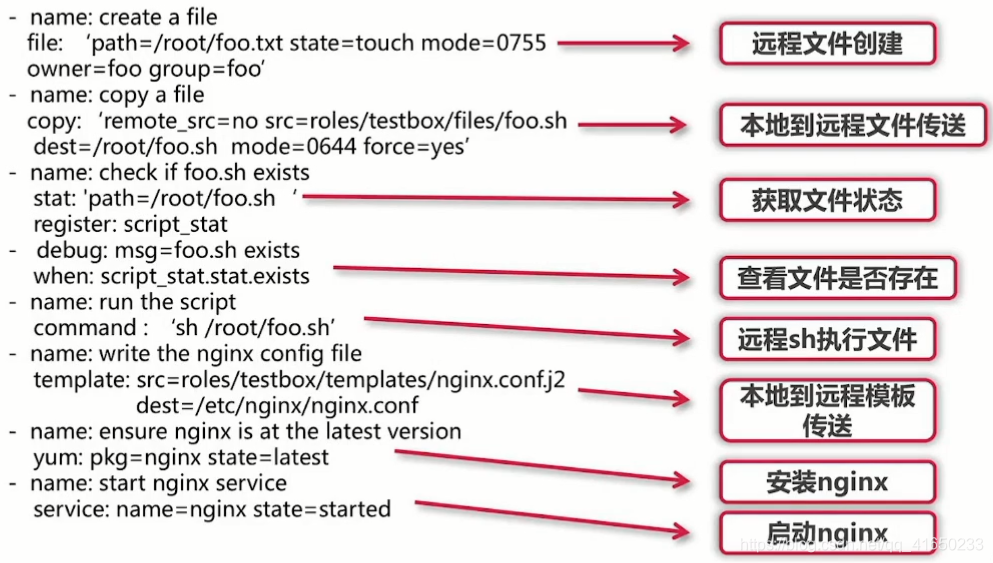
File模块
在目标主机创建文件或目录,并赋予其系统权限
- name: create a file

  file:'path=/oot/foo.txt state=touch mode=0755

  owner=foo group=foo'
Copy模块
实现Ansible服务端到目标主机的文件传送
- name: copy a file

  copy:'remote src=no src=roles/testbox/files/foo.sh

  dest=/root/foo.sh mode=0644 force=yes'
Stat模块
获取远程文件状态信息
- name: check if foo.sh exists

  stat: 'path=/root/foo.sh'

  register: script_ stat
Debug模块
打印语句到Ansible执行输出
- debug: msg =foo.sh exists

  when: script_ stat.stat.exists
Command/Shell模块
用来执行Linux目标主机命令行
- name: run the script

  command:"sh /root/foo.sh"

- name: run the script

  command:"echo 'test' > /root/test.txt"
Template模块
实现Ansible服务端到目标主机的jinja2模块传送
- name: write the nginx config file

  template: src= roles/testbox/templates/nginx.confj2

  dest=/etc/nginx/nginx.conf
Packaging模块
调用目标主机系统包管理工具(yum,apt)进行安装
- name: ensure nginx is at the latest version

  yum: pkg= nginx state = latest

- name: ensure nginx is at the latest version

  apt: pkg= nginx state = latest
Service模块
管理目标主机系统服务
- name: start nginx service

  service: name = nginx state= started
Ansible Playbooks常用模块的更多相关文章
- Ansible Playbooks 常用模块
官网链接:https://docs.ansible.com/ansible/latest/modules/list_of_all_modules.html ansible python module ...
- Ansible playbooks常用模块案例操作
打开git bash 连接ansible服务器,然后进入deploy用户 #ssh root@192.168.96.188 进入python3.6虚拟环境 #su - deploy #source . ...
- ansible api常用模块与参数
###ansibleAPI 常用模块 用于读取yaml,json格式的文件 from ansible.parsing.dataloader import DataLoader #用于管理变量的类,包括 ...
- ansible中常用模块详解
ansible中常用的模块详解: file模块 ansible内置的可以查看模块用法的命令如下: [root@docker5 ~]# ansible-doc -s file - name: Sets ...
- Ansible之常用模块(一)
ansible之所以功能强大,不是ansible本身,是因为它有众多的模块,前文我们介绍了ansible的基础介绍,系列命令的用法以及选项的说明,通过前文的学习我们知道了ansible是基于pytho ...
- ansible API 常用模块
常用模块 用于读取yaml,json格式的文件 from ansible.parsing.dataloader import DataLoader #用于管理变量的类,包括主机,组,扩展等变量 fro ...
- ansible 四常用模块
常用模块 Ansible默认提供了很多模块来供我们使用.在Linux中,我们可以通过 ansible-doc -l 命令查看到当前Ansible支持哪些模块,通过 ansible-doc -s [模块 ...
- ansible 003 常用模块
常用模块 file 模块 管理被控端文件 回显为绿色则,未变更,符合要求 黄色则改变 红色则报错 因为默认值为file,那么文件不存在,报错 改为touch则创建 将state改为directory变 ...
- ansible小结常用模块
根据官方的分类,将模块按功能分类为:云模块.命令模块.数据库模块.文件模块.资产模块.消息模块.监控模块.网络模块.通知模块.包管理模块.源码控制模块.系统模块.单元模块.web设施模块.window ...
随机推荐
- springSecurity安全框架的学习和原理解读
最近在公司的项目中使用了spring security框架,所以有机会来学习一下,公司的项目是使用springboot搭建 springBoot版本1.59 spring security 版本4.2 ...
- codemirror 行高 字体 行间距 设置
用的是 react-codemirror2 样式文件: ... .code-mirror{ font-size : 13px; line-height : 150%; } ... 引入样式文件: .. ...
- 51nod 1287加农炮
1287 加农炮 题目来源: Codility 基准时间限制:1 秒 空间限制:131072 KB 分值: 40 难度:4级算法题 一个长度为M的正整数数组A,表示从左向右的地形高度.测试一种加农炮 ...
- H3C配置设备的FTP服务
- C# 使用汇编
本文告诉大家如何在 C# 里面使用汇编代码 请看 C#嵌入x86汇编--一个GPIO接口的实现 - 云+社区 - 腾讯云 C# inline-asm / 嵌入x86汇编 - 苏璃 - CSDN博客 通 ...
- js 处理json
json 分为两种结构 数组 对象 对象 { } 对象里的键值对 1.键值对之间用冒号链接 2.键必须用“”包裹 3.值如果是字符串 就用“”包裹 如果是数字 则不需要 4.键值对 ...
- Laravel -- Excel 导入(import) (v2.1.0)
原博客地址 https://www.jianshu.com/p/7287ebdc77bb Install (安装) //> composer.json 中 require中添加如下: " ...
- OpenCV与MFC实战之图像处理 样本采集小工具制作 c++MFC课程设计
原文作者:aircraft 原文链接:https://www.cnblogs.com/DOMLX/p/12111102.html 入门不久的人可以通过opencv实战来锻炼一下学习opencv的成果, ...
- Linux网络文件共享服务之FTP
一.FTP介绍 ftp(File Transfer Protocol)是早期的三个应用级协议之一,基于C/S结构,双通道协议,数据和命令连接,数据传输格式默认是二进制,当然也支持文件方式传输.默认情况 ...
- 【Linux】一个定时任务小脚本
需要一个定时任务,每隔固定时间停止,等待几分钟,然后在启动,每5分钟一个循环. 简要写了一下,如下,未来在优化: 3,8,13,18,23,28,33,38,43,48,53,58 * * * * s ...